How to Size Disk Capacity When Cluster Has Data Reduction Enabled
When sizing a storage solution for OneFS, two major aspects need to be considered – capacity and performance. In this blog, we will talk about how to calculate the raw capacity in each node in the AWS cloud environment.
Consider a customer who wants to have 30TB of data capacity on APEX File Storage on AWS. The data reduction ratio is 1.6, and the cluster contains 6 nodes. How much capacity is needed for each node of the cluster?
1. The usable capacity is calculated by dividing the application data size by the data reduction ratio: 30TB/1.6 = 18.75TB
2. OneFS in the AWS environment uses +2n as the default protection level. The +2n protection level striping pattern of 6 nodes is 4+2. The raw capacity necessary can be calculated by dividing the usable capacity by the striping pattern for the number of nodes involved: 18.75TB/66% = 28.41TB
3. Single disk capacity is then calculated by dividing the total raw capacity by the number of nodes involved: 28.41TB/6 nodes = 4.735TB
4. When each node contains 10 disks, each disk’s raw capacity should be 474GB.
OK, let's take a look at the formula of this calculation:
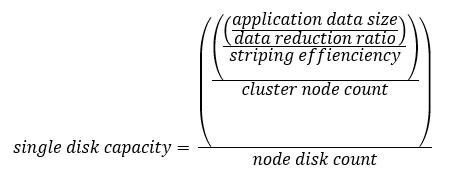
For reference, the striping patterns of 4, 5, and 6 nodes are listed as follows:
* 4 nodes: 2+2 (50%)
* 5 nodes: 3+2 (60%)
* 6 nodes: 4+2 (66%)
Now, knowing the logical data capacity, you can calculate the appropriate amount of capacity of each single EBS volume in the cluster.
Author: Yunlong Zhang