Multi-Cloud Data Services for Dell PowerScale in AWS: Amazon EMR for Data Analytics Solutions
Executive summary
Overview
This document describes a unified data analytics platform for massive-scale data engineering and collaborative data analytics workloads. This solution is built on Multi-Cloud Data Services for Dell PowerScale for Amazon Web Services (AWS) powered by Faction, a multi-cloud data services provider.
Amazon EMR on Multi-Cloud Data Services for PowerScale enables customers to easily deploy an EMR Hadoop cluster on fully managed PowerScale scale-out file storage-as-a-service. This end-to-end solution delivers a data platform for customers to realize their business objectives with agility, flexibility, and at higher cost efficiencies.
Hadoop tiered storage enables customer to easily expand storage of existing Amazon EMR Hadoop clusters with PowerScale. This capability enables you to supply immediate capacity, provide better storage efficiency, and reduce the total cost of ownership.
There are two components to this unified, integrated, data-analytics solution. The first component is Multi-Cloud Data Services for AWS services, which is built on a scale-out NAS platform powered by PowerScale OneFS. The second component is AWS EMR, the industry-leading cloud big data platform for processing vast amounts of data using open-source-tools as a compute platform for operational flexibility. This solution offers a high-bandwidth (up to 80 Gbps) and low-latency connection (as low as 1.2 milliseconds) from PowerScale storage to the AWS cloud using AWS Direct Connect Local. Faction powers this integrated solution, which provides a fully managed cloud-data-services platform. This platform also includes its patented low-latency, high-throughput network connectivity that can deliver ultra-high performance from PowerScale systems that are hosted next to the AWS cloud.
Revisions
|
Date |
Description |
|
June 2021 |
Initial release |
|
February 2022 |
Template and content update |
Note: This document may contain language from third-party content that is not under Dell Technologies’ control and is not consistent with current guidelines for Dell Technologies’ own content. When such third-party content is updated by the relevant third parties, this document will be revised accordingly.
We value your feedback
Dell Technologies and the authors of this document welcome your feedback on this document. Contact the Dell Technologies team by email.
Author: Kirankumar Bhusanurmath, Analytics Solutions Architect, Dell Technologies
Contributor: Anjan Dave, Cloud Strategy and Architecture, Dell Technologies
Note: For links to other documentation for this topic, see the PowerScale Info Hub.
Solution overview
Introduction
Multi-Cloud Data Services for PowerScale for AWS enables connecting its file storage, consumed as a service, directly to the AWS EMR cluster. The solution achieves this ability through native replication from on-premises PowerScale storage to a managed-service-provider location.
Dell Technologies has partnered with Faction Inc. to deliver a fully managed, cloud-based service for Dell storage to address various cloud use cases. Faction, Inc. is a Dell Technologies Gold cloud service provider (CSP) and Tech Connect Select partner. Faction is a multi-cloud platform-as-a-service provider and VMware partner that offers multicloud-attached storage from various co-location sites. The service is available in several locations in the United States and in Europe. In this hybrid-cloud AI solution, Faction PowerScale Cloud Control Volumes (CCVs) storage offerings are the storage layer or data lake for the AWS cloud services.
Native cloud integration
The PowerScale storage solution directly uses Amazon EMR, showing interoperability beyond regular NFS or SMB protocol mounts to virtual machine (VM) instances. In this solution, Amazon EMR Service uses the HDFS protocol to read and write data at high speed to the PowerScale file storage.
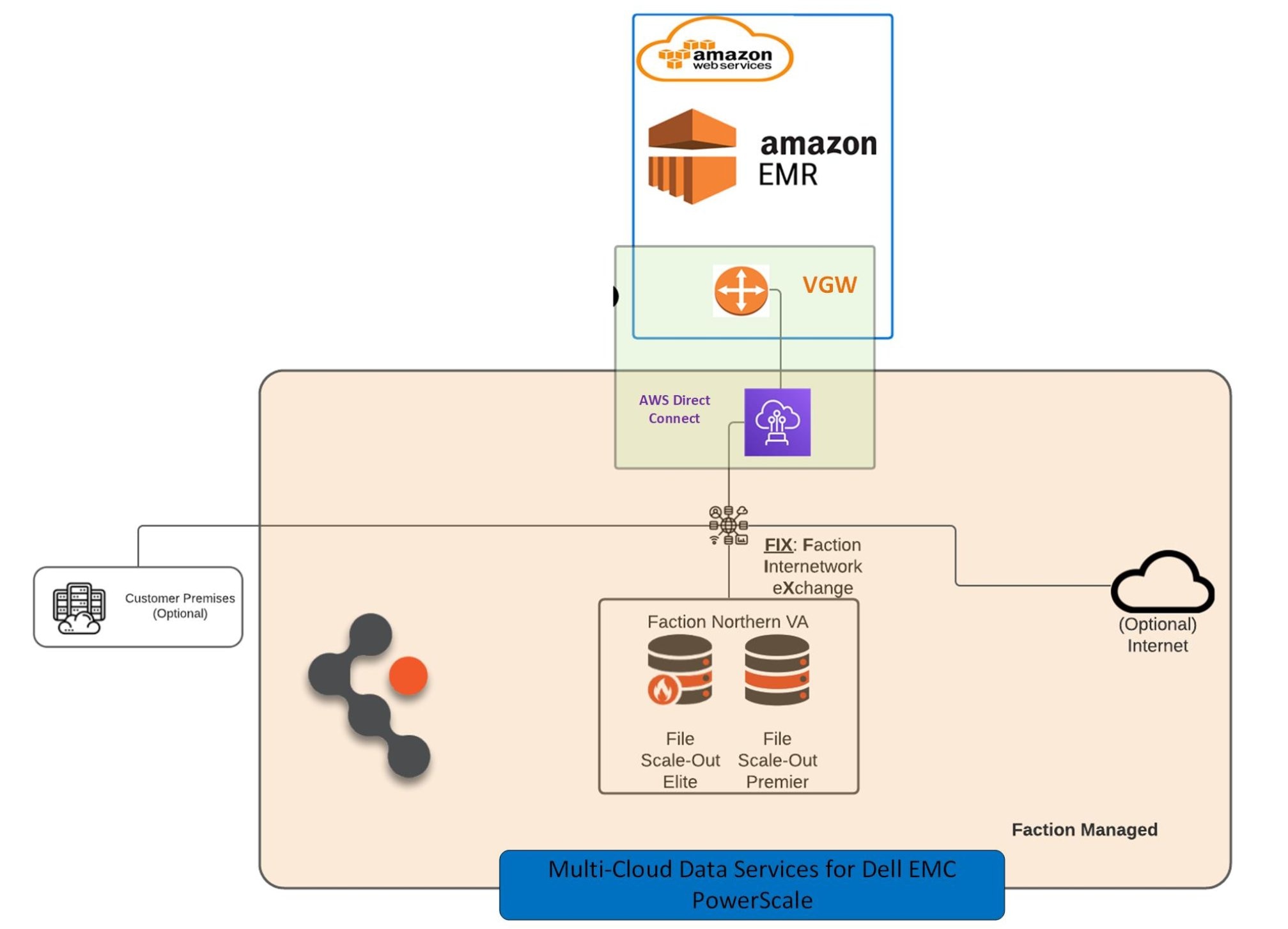
Figure 1. Amazon EMR and PowerScale unified data analytics platform solution diagram
Faction Cloud Control Volumes
Cloud Control Volumes (CCVs) provide durable, persistent, cloud-attached, and cloud-adjacent storage that is directly connected to the AWS cloud.
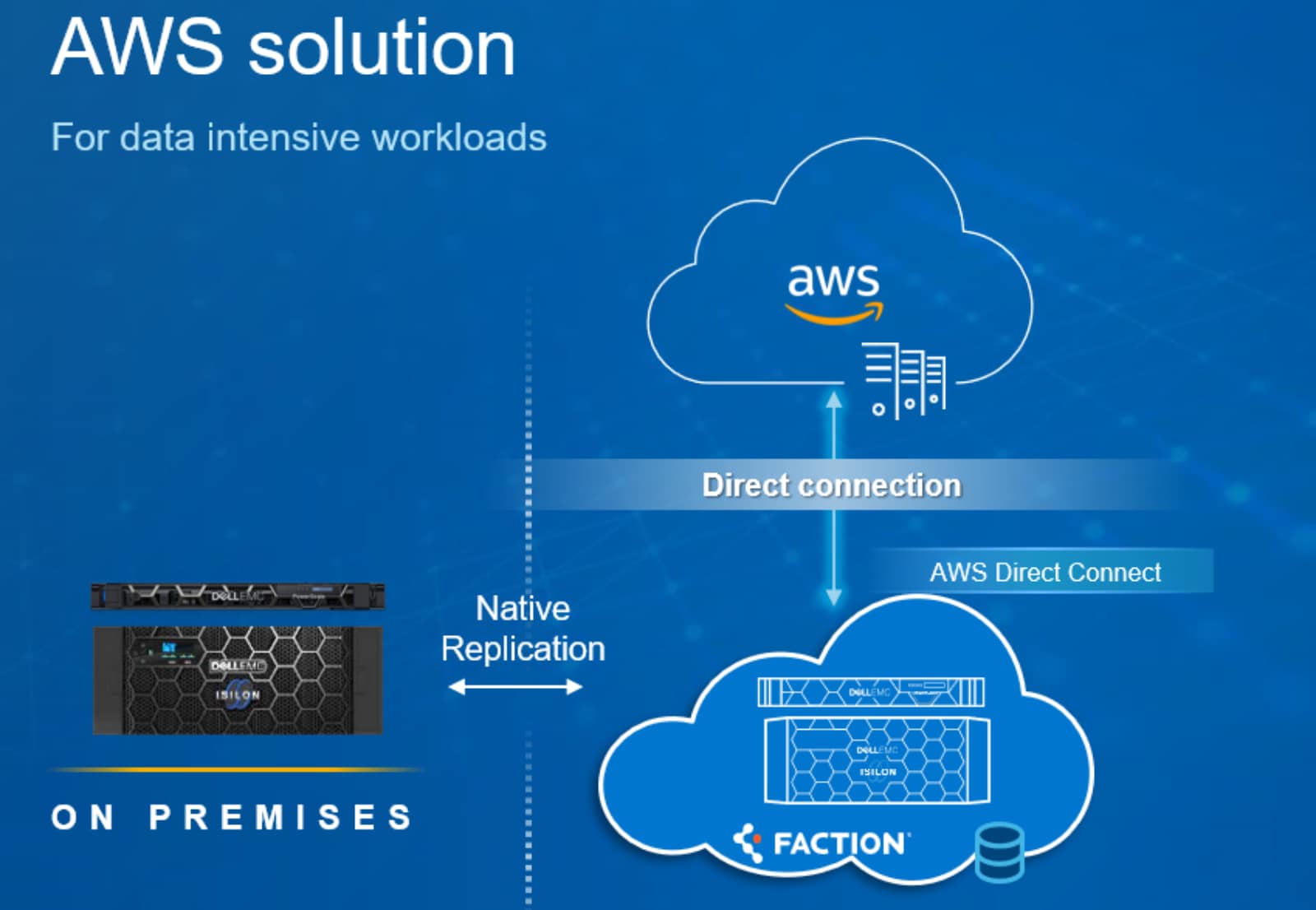
Figure 2. Array-based replication of volumes to Faction directly attached as CCVs across one or more clouds through NFS
Use cases for CCVs could be transient in nature and could include performing data analytics on a large or complex data footprint. Various tiers of CCV storage are available for customers as subscriptions.
The following table shows the PowerScale subscriptions including starting capacity, cloud network bandwidth, and use cases for each tier.
Table 1. File scale-out CCV details
|
Archive (small) |
Archive |
Standard |
Premier |
Elite (small) |
Elite |
|
Base network connectivity |
|||||
|
10 Gb/s |
10 Gb/s |
20 Gb/s |
40 Gb/s |
20 Gb/s |
80 Gb/s |
|
Model |
|||||
|
A200 |
A2000 |
H5600 |
H500 |
F600 |
F800 |
|
Storage scaling |
|||||
|
Base includes 162 TB |
Base includes 648 TB |
Base includes 540 TB |
Base includes 162 TB |
Base includes 28 TB |
Base includes 130 TB |
|
Scale in 90 TB increments |
Scale in 360 TB increments |
Scale in 300 TB increments |
Scale in 90 TB increments |
Scale in 12 TB increments |
Scale in 77 TB increments |
|
Workloads |
|||||
|
Write-once-read-never/retention data |
Video Streaming |
Real-time inference (machine learning) |
|
Long-term healthcare records retention |
Media processing |
Critical streaming analytics |
|
Long-term legal records retention |
Rendering |
Rendering |
Rendering |
|
Web content management |
Replace on-premises file servers |
Time-sensitive data warehouse workloads |
|
Video retention |
Video retention |
Video retention |
Test/dev |
Small footprint flash workloads |
|
|
Tiering from standard/ |
Big data uses (for example, genomics, machine learning, and so on) |
|
|
|
|
|
|
Cloud user-level Windows file sharing |
|
|
For big data analytics, organizations often move data from an on-premises data center to a Faction data center. Customers can use Dell SyncIQ to configure native replication between on-premises PowerScale storage and the PowerScale storage array that Faction owns and manages in the Faction data center.
It is the customer’s responsibility to manage the network between their on-premises data center and the Faction data center. For optimal performance, use a dedicated circuit as a dedicated connection for replication traffic between the customer facility and Faction. Customers may also use a VPN as redundancy to a dedicated link.
CCVs are close in proximity to the AWS public cloud and use redundant connectivity with multiple 10 Gbps Ethernet connections and redundant switches to provide highly available connections. The solution uses Link Aggregation Groups (LAGs) to scale to higher levels of bandwidth into the AWS cloud.
Amazon EMR and PowerScale solution architectures
This section demonstrates two different solutions, each with its own advantages.
Amazon EMR on PowerScale through HDFS protocol
This solution deploys an Amazon EMR cluster on PowerScale. PowerScale is the default HDFS file system for the Hadoop components running on Amazon EMR cluster. All the EMR Hadoop cluster data is stored and accessed from PowerScale though HDFS protocol.
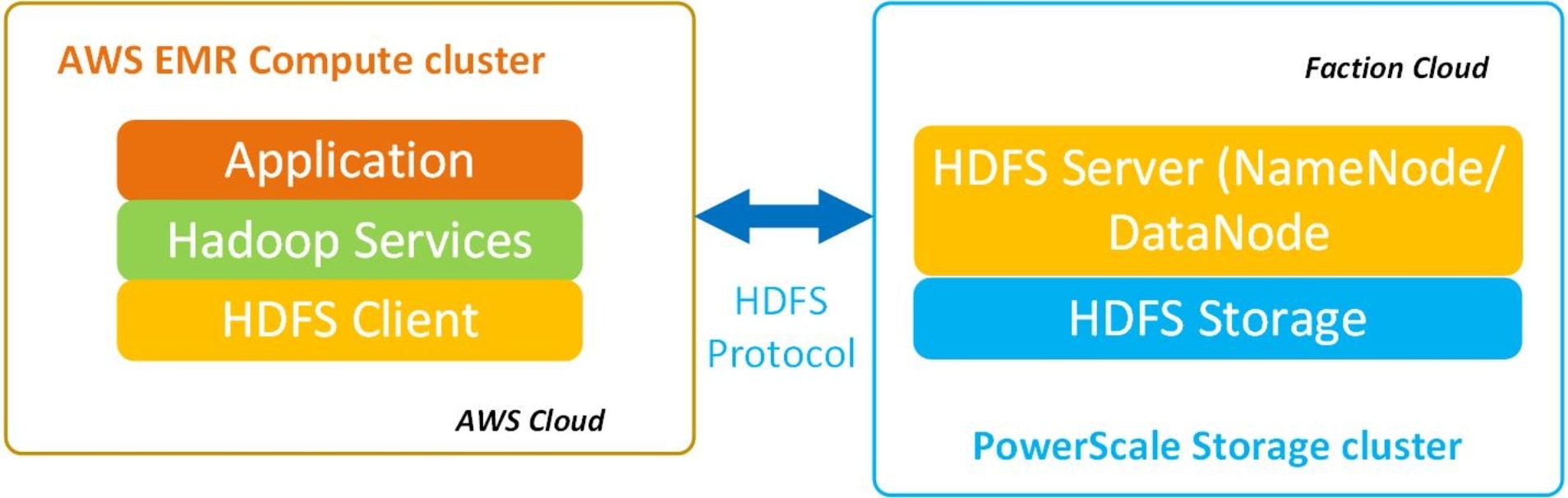
Figure 3. AWS EMR on PowerScale solution diagram
PowerScale as the Hadoop tiered storage for Amazon EMR
This Hadoop tiered storage solution provides an architecture that can support cross-namespace analytics. With this solution, you can use both AWS EMR direct-attached storage (DAS) and an alternate storage media, such as PowerScale storage. Also, you can run analytics jobs and toolsets across data that spans these storage tiers.
The Hadoop tiered-storage solution from Dell Technologies enables the following:
- Cold data storage in a shared storage cluster that is based on the PowerScale system, providing outstanding capacity density and low cost per TB.
- Hot data storage in a DAS cluster, that is based on the Amazon EMR HDFS or EMRFS. These storage systems are the two main high-performance-file systems used with Amazon EMR.
- Processing of data by YARN based Hadoop applications across both clusters, which are subject to data governance, risk management, and compliance management. The DAS and PowerScale clusters represent separate namespaces, so Hadoop applications and governance run on the federated namespace.
Deployment options are as follows:
- Customers who plan to use AWS services for data analytics for the data stored on remote on-premises PowerScale cluster without data migration.
- Customers who have existing AWS EMR Hadoop clusters running DAS and who need to expand their Hadoop clusters to hundreds of TBs or PBs. You can add a PowerScale cluster to their existing Hadoop cluster to handle the high volume of data growth.
- Customers who plan to deploy a large Hadoop data lake can build the Hadoop tiered storage solution with DAS and PowerScale clusters.
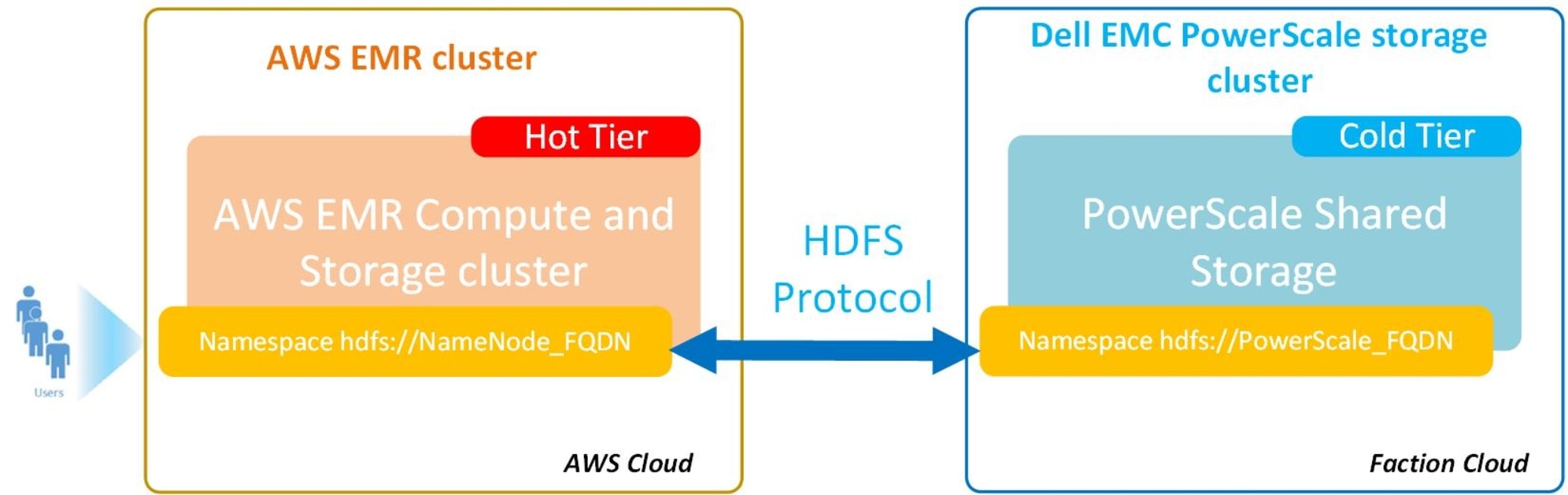
Figure 4. Amazon EMR and PowerScale Hadoop tiered storage solution
Solution components
Amazon EMR
Amazon EMR is the industry-leading cloud big data platform for processing vast amounts of data using open-source tools such as Apache Spark, Apache Hive, Apache HBase, Apache Flink, Apache Hudi, and Presto. Amazon EMR makes it easy to set up, operate, and scale your big data environments by automating time-consuming tasks like provisioning capacity and tuning clusters. With EMR, you can run petabyte-scale analysis at less than half of the cost of traditional on-premises solutions and over 3x faster than standard Apache Spark. You can run workloads on Amazon EC2 instances, on Amazon Elastic Kubernetes Service (EKS) clusters, or on-premises using EMR on AWS Outposts.
See Amazon EMR for more information.
PowerScale
PowerScale is the next evolution of OneFS, the operating system powering the scale-out NAS platform. The PowerScale family includes PowerScale and Dell Isilon nodes running the OneFS operating system. OneFS provides the intelligence behind the highly scalable, high-performance modular-storage solution that can grow with your business. A OneFS-powered cluster is composed of a flexible choice of storage platforms including all-flash, hybrid, and archive nodes. These solutions provide the efficiency, flexibility, scalability, security, and protection for you to store massive amounts of unstructured data within a cluster. The new PowerScale all-flash platforms co-exist seamlessly in the same cluster with your existing PowerScale nodes to drive your traditional and modern applications.
See the page PowerScale family for more information about PowerScale platforms.
Solution implementation
Introduction
Note: The solution that is described in this document is validated for functionally, but performance-related testing was not conducted or presented in this document.
Preparing OneFS
Complete the following steps to configure your PowerScale OneFS cluster for use with Amazon EMR big data cluster. Preparing OneFS requires you to configure DNS, SmartConnect, and access zones to enable the Amazon EMR big data cluster to connect to the PowerScale OneFS cluster. If these preparation steps are not configured, the subsequent configuration steps might fail.
Note: For validation purposes, this section skips DNS and SmartConnect configuration. The section details setting up an access zone (optional) and using the IP address of the PowerScale end point from Faction Cloud.
As a prerequisite step, complete the procedures in the section “Preparing OneFS” in the document PowerScale Powered by Azure Databricks and Faction to accelerate data-driven innovations.
Creating HDFS users and groups
We recommend that you maintain consistent names and numeric IDs for all users and groups on the OneFS cluster and your Hadoop clients. This consistency is important in multiprotocol environments because the HDFS protocol refers to users and groups by name. In contrast, NFS refers to users and groups by their numeric IDs (UIDs and GIDs). Maintaining this parity is critical in the behavior of OneFS multiprotocol file access.
During installation of Hadoop with Amazon EMR, the installer creates all required system accounts on all clients. For example, a Hadoop system account YARN is created with the UID of 502 and the GID of 502 on the Hadoop cluster nodes. EMR creates these accounts if they do not exist. You can ensure parity by pre-creating them on all nodes that will be installed in the Hadoop cluster. You can enforce parity by manually managing when and how these local system accounts are created. Since the Hadoop installer cannot create the local accounts directly on OneFS, you must create them manually. Create the OneFS YARN local account user in the OneFS access zone in which YARN accesses data. Create a local user YARN with the UID of 502 and the GID of 502 to ensure consistency of access and permissions.
For guidance and more information about maintaining parity between OneFS and Hadoop local users and UIDs, see the article Isilon and Hadoop Local User UID Parity.
There are many methods of achieving UID and GID parity. You can use Tools for Using Hadoop with OneFS, perform manual matching, or create scripts that parse users and create the equivalent users. However you choose to achieve this result, the sequence depends on your deployment methodology and management practices. We recommend that you maintain consistency between the Hadoop cluster and OneFS—for example, hdfs=hdfs, yarn=yarn, hbase=hbase, and so on—from a UID and GID consistency perspective.
Create users and groups on the OneFS cluster using Tools for Using Hadoop with OneFS
Manually create following users on the OneFS cluster before deploying the Amazon EMR.
Table 1 Users on OneFS cluster
|
Item# |
User |
uid |
groups |
gid |
other groups |
Proxy user |
|
1 |
hadoop |
996 |
hadoop |
1000 |
|
|
|
2 |
zookeeper |
995 |
zookeeper |
993 |
|
|
|
3 |
ganglia |
994 |
ganglia |
992 |
|
|
|
4 |
nginx |
993 |
nginx |
991 |
|
|
|
5 |
hue |
992 |
hue |
990 |
hadoop, hive |
hadoop |
|
6 |
yarn |
991 |
yarn |
989 |
hadoop |
hadoop |
|
7 |
hdfs |
990 |
hdfs |
988 |
hadoop |
hadoop |
|
8 |
mapred |
989 |
mapred |
987 |
hadoop |
|
|
9 |
hbase |
988 |
hbase |
986 |
hadoop |
|
|
10 |
spark |
987 |
spark |
985 |
|
|
|
11 |
hive |
986 |
hive |
984 |
hadoop |
hue, spark, presto |
|
12 |
kms |
983 |
kms |
983 |
|
|
|
13 |
oozie |
984 |
oozie |
982 |
|
|
|
14 |
httpfs |
983 |
httpfs |
981 |
hadoop |
|
|
15 |
presto |
982 |
presto |
980 |
|
|
|
16 |
livy |
981 |
livy |
979 |
hadoop |
|
For any Hadoop cluster, hdfs is the superuser. In the PowerScale HDFS cluster, the hdfs user must be a superuser for the hdfs access zone. Create a role with backup and restore privileges, and the setup should appear similar to the below example. For detailed information about this process, see the section “Configuring HDFS user for OneFS 8.2 and later versions” in the document PowerScale and Cloudera Data Platform Private Cloud Base document.
For example:
isi auth roles view HdfsAccess --zone=zone1-cdh
Name: HdfsAccess
Description: Bypass FS permissions
Members: - hdfs
Privileges
ID: ISI_PRIV_IFS_BACKUP
Read Only: True
ID: ISI_PRIV_IFS_RESTORE
Read Only: True
Amazon EMR on PowerScale installation
The main objective of this solution is to install Amazon EMR big data cluster on PowerScale. PowerScale supplies the HDFS storage for the EMR compute cluster.
Prerequisites
Set up Amazon EMR
Before you launch an Amazon EMR cluster, ensure you complete the tasks in Setting Up Amazon EMR.
Set up PowerScale for HDFS storage
- Create a Faction subscription.
- Enable the HDFS service on the PowerScale.
- Set up the HDFS access zone. See the Cloudera CDP on PowerScale install guide.
- Set up users and groups described in Create users and groups on the OneFS cluster using Tools for Using Hadoop with OneFS.
Amazon EMR tasks
Step 1: Plan and configure
In this step, plan for and launch a simple Amazon EMR cluster with selected service like Apache Spark, hive, hbase, and other services installed. The setup process includes creating a PowerScale HDFS storage area to store a sample script like pySpark and others, an input dataset, and cluster output.
- Prepare storage for cluster input and output:
The PowerScale setup with HDFS access zone is used here to store scripts jobs like PySpark script, input data, and output data.
- Develop and prepare an application for Amazon EMR:
This step uploads a sample script or jobs like PySpark script to the PowerScale HDFS location. This is the most common way to prepare an application for Amazon EMR. EMR lets you specify the PowerScale HDFS location of the script when you submit work to your cluster. You can also upload sample input data to PowerScale HDFS for the script to process.
- Launch an Amazon EMR cluster:
Now that you have completed the prework, you can launch a sample cluster with services like Apache Spark installed using the latest Amazon EMR release.
Launch a cluster with Spark installed using Quick Options:
- Sign in to the AWS Management Console and open the Amazon EMR console at https://console.aws.amazon.com/elasticmapreduce/.
- Choose Create cluster to open the Quick Options wizard.
- On the Create Cluster > Quick Options page, note the default values for Release, Instance type, Number of instances, and Permissions. These fields automatically populate with values chosen for general-purpose clusters. For more information about the Quick Options configuration settings, see Summary of Quick Options.
- Enter a Cluster name to help you identify the cluster. For example, My First EMR Cluster.
- Leave Logging enabled, but replace the S3 folder value with the Amazon S3 bucket you created, followed by /logs. For example, s3://DOC-EXAMPLE-BUCKET/logs. This will create a folder called logs in your bucket, where EMR will copy the log files of your cluster. PowerScale hdfs path can also be used here to place the logs.
- Under Applications, choose the services you want example Spark option to install Spark on your cluster. Quick Options lets you select from the most common application combinations.
Note: Choose the applications that you want to run on your Amazon EMR cluster before you launch the cluster. You cannot add or remove applications from a cluster after it has been launched.
- Under Security and access, choose the EC2 key pair that you designated or created in Create an Amazon EC2 Key Pair for SSH.
Note: The following step is important to make this solution functional. Here we change the default file system of Amazon EMR to PowerScale HDFS file system and use the same for different services like yarn, spark, hive, and others.
- Override the default configurations.
This is important because it replaces the default HDFS file system to PowerScale HDFS. To make this change, you can supply a configuration object. You can either use a shorthand syntax to provide the configuration, or reference the configuration object in a JSON file. Configuration objects consist of a classification, properties, and optional nested configurations. Properties correspond to the application settings you want to change. You can specify multiple classifications for multiple applications in a single JSON object.
The following is an example JSON file for a list of configurations.
[
{
"Classification": "core-site",
"Properties": {
"fs.defaultFS": "hdfs://powerscale_fqdn:8020"
}
},
{
"Classification": "hive-site",
"Properties": {
"fs.defaultFS": "hdfs://powerscale_fqdn:8020"
}
}
]
- Choose Create cluster to launch the cluster and open the cluster status page.
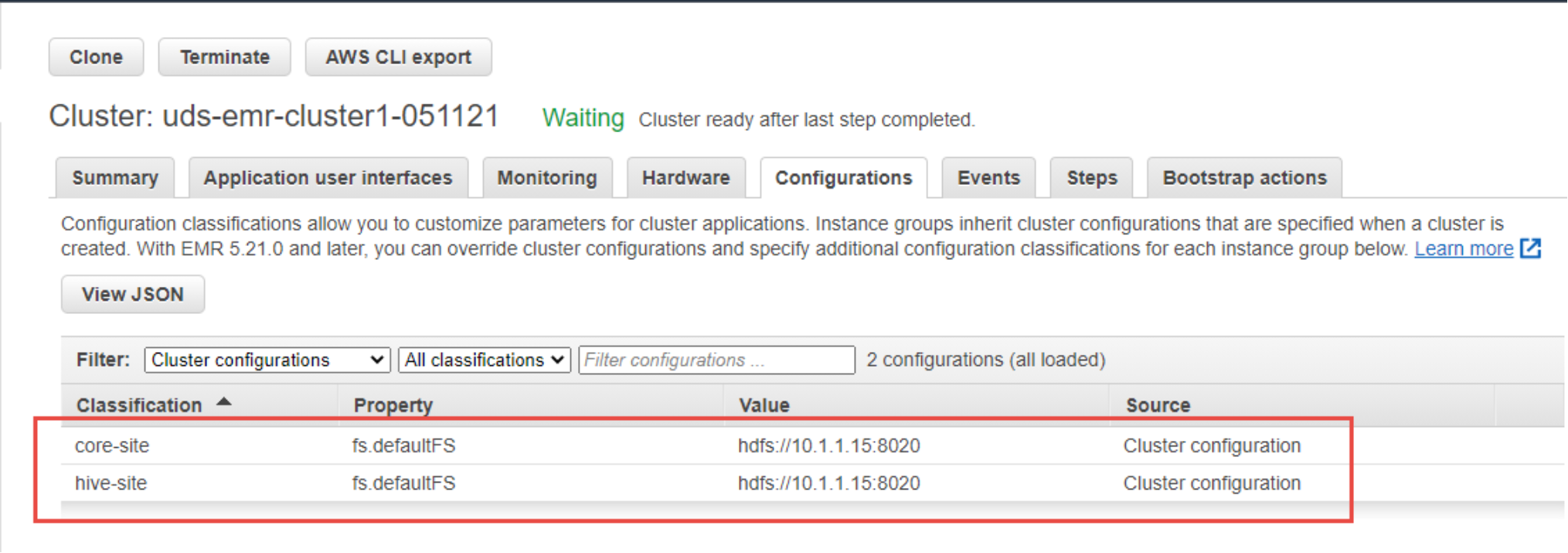
Figure 5. Amazon EMR updated configuration
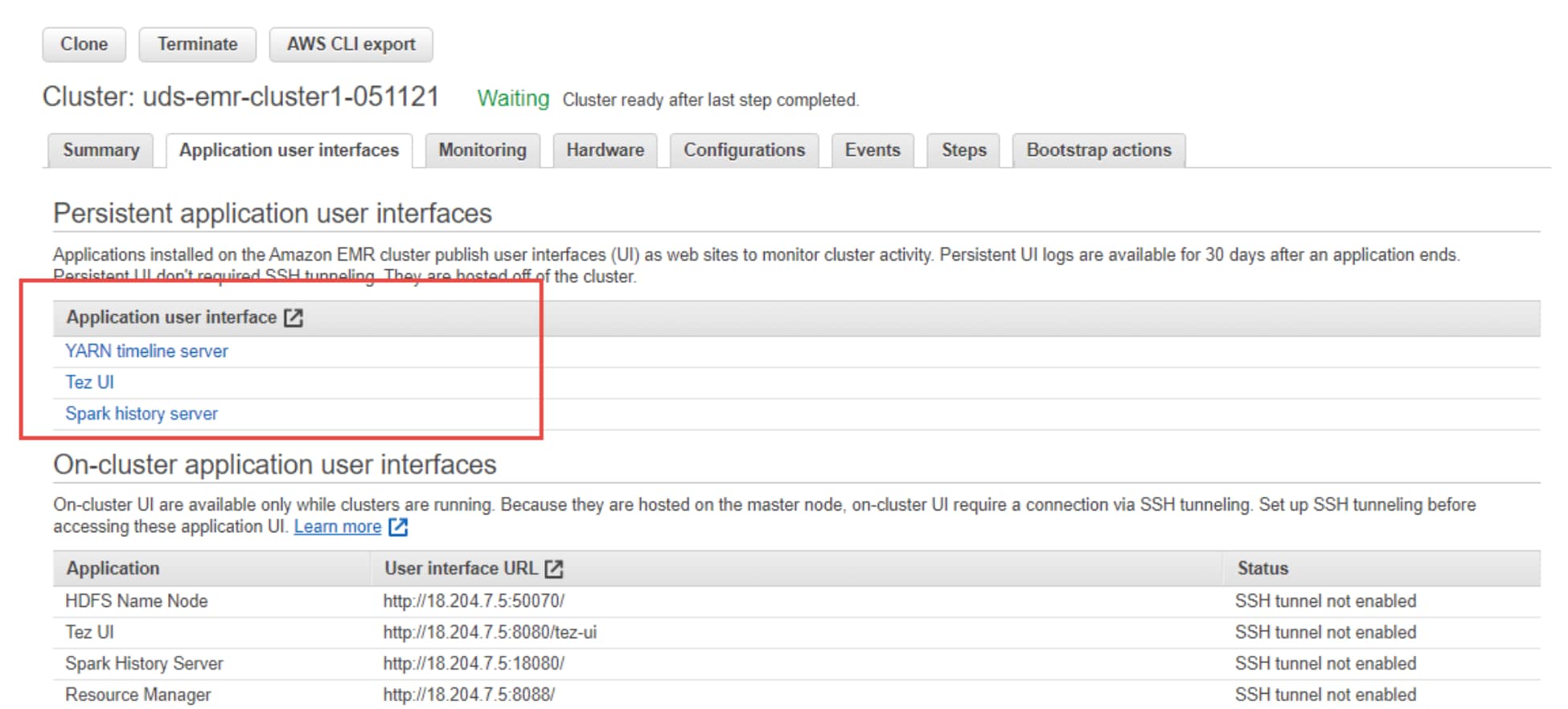
Figure 6. Amazon EMR Application user interface
- On the cluster status page, find the Status next to the cluster name. The status should change from Starting to Running to Waiting during the cluster creation process. You may need to choose the refresh icon on the right or refresh your browser to receive updates.
When the status progresses to Waiting, your cluster is running and ready to accept work.
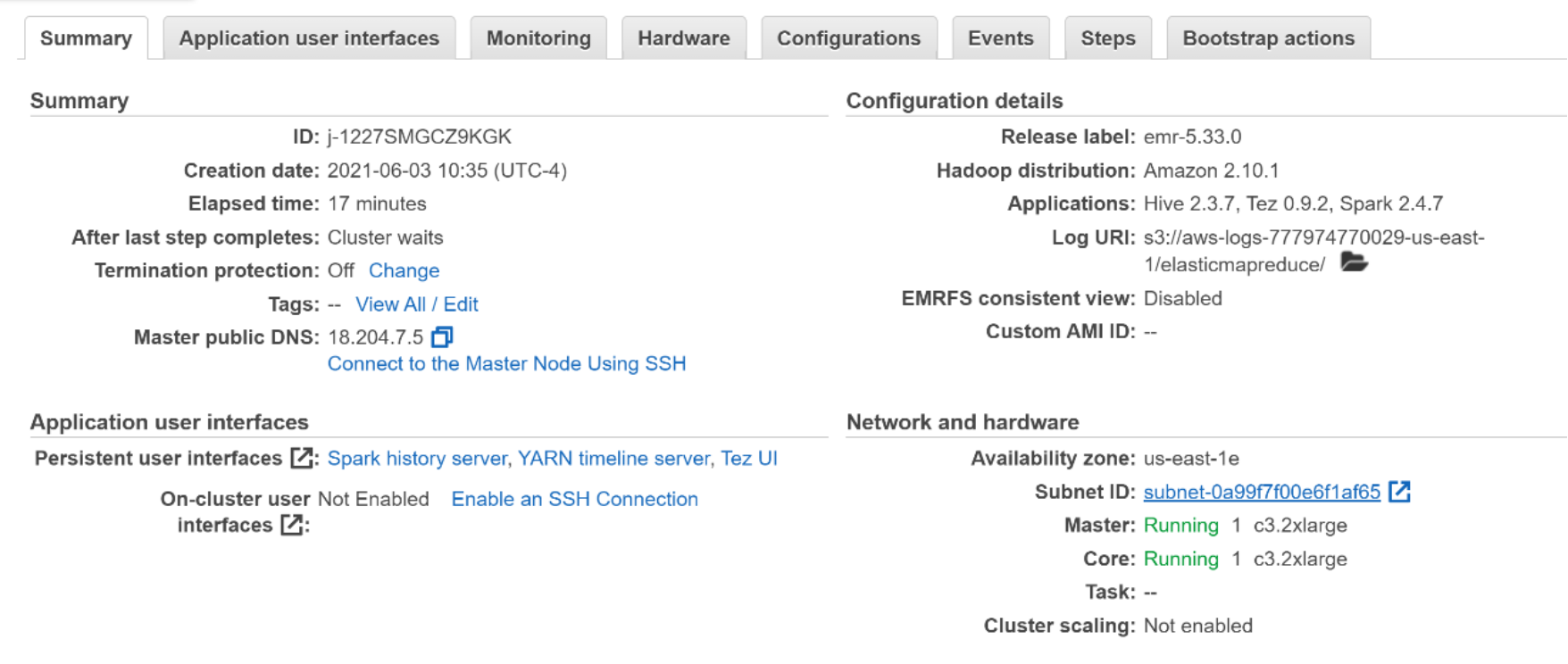
Figure 7. Amazon EMR cluster with PowerScale HDFS as default file system summary
Step 2: Manage
Now that your cluster is running, connect to it and manage it. You can also submit work to your running cluster to process and analyze data.
- Submit work to Amazon EMR:
With your cluster up and running, you can submit health_violations.py as a step. A step is a unit of cluster work made up of one or more jobs. For example, you might submit a step to compute values, or to transfer and process data.
You can submit multiple steps to accomplish a set of tasks on a cluster when you create the cluster, or after it is already running. For more information, see Submit Work to a Cluster.
- View results:
After a step runs successfully, you can view its output results in the PowerScale HDFS output folder you specified when you submitted the step.
- (Optional) set up cluster connections:
This step is not required, but you can connect to cluster nodes with Secure Shell (SSH) for tasks like issuing commands, running applications interactively, and reading log files.
Step 3: Clean up your Amazon EMR resources
Now that you have submitted work to your cluster and viewed the results of your sample application, you can shut the cluster down. You have option to retain or delete the data from the PowerScale HDFS cluster.
- Shut down your cluster:
Shutting down a cluster stops all its associated Amazon EMR charges and Amazon EC2 instances.
- Delete PowerScale HDFS resources:
This is optional since you can delete or retain the input dataset, cluster output, script, and log files.
PowerScale as the Hadoop tiered storage for Amazon EMR
The main objective of this solution is to install Amazon EMR big data cluster and connect the EMR cluster services to PowerScale HDFS cluster, which supports cross-namespace analytics. This solution can use both direct-attached storage (DAS) and remote PowerScale HDFS storage and run analytics jobs and toolsets across data that spans these storage tiers.
Prerequisites
Set up Amazon EMR
Before you launch an Amazon EMR cluster, ensure you complete the tasks in Setting Up Amazon EMR.
Set up PowerScale for HDFS storage
- Get a Faction subscription.
- Enable the HDFS service on the PowerScale.
- Set up the HDFS access zone. See the Cloudera CDP on PowerScale install guide.
- Set up users and groups described in Create users and groups on the OneFS cluster using Tools for Using Hadoop with OneFS.
Amazon EMR tasks
To set up the Amazon EMR cluster, see getting started with Amazon EMR. All the steps remain same, except “Prepare Storage for Cluster Input and Output.” Instead of using an Amazon S3 bucket, you can use PowerScale HDFS cluster to store scripts, input, and output datasets. All that we need to do is point to the PowerScale HDFS through hdfs protocol like hdfs://powerscale_fqdn:8020/.
Solution validation
Introduction
Note: For simplicity, this document uses the PowerScale (CCV) IP address provided by Faction as the data endpoint. The Amazon EMR cluster services can connect to this endpoint using the HDFS protocol and read or write data into PowerScale. If the PowerScale system is configured with a DNS and SmartConnect, you can set a Fully Qualified Domain Name (FQDN) to the HDFS access zone. You can also use the FQDN instead of the IP address to read and write data to and from the PowerScale system.
This section demonstrates using the unified data analytics platform for massive-scale data engineering and collaborative analytics solutions using Amazon EMR YARN, HIVE, and Spark services.
The raw data is fetched from the PowerScale system in the on-premises data center. This data is actively replicated into the PowerScale system in the Faction cloud data center. The same data is also made available to the Amazon EMR cluster on AWS public cloud for in-place data analytics.
Amazon EMR on PowerScale as default HDFS file system
In this solution, PowerScale is the default HDFS file system for EMR big data cluster, and all the data is placed on PowerScale. Only temporary and scratch space is retained on the master and core worker nodes of the EMR cluster.
HDFS, YARN, MapReduce, and Spark services
The following table outlines the procedures for validating HDFS, YARN, MapReduce, and Spark services of Amazon EMR on the PowerScale HDFS storage cluster.
Note: For a list of specific test steps and results, see Appendix A: Test steps and output.
Table 2. Validation of HDFS, YARN, MapReduce, and Spark
|
Test case name |
Step |
Description |
|
MapReduce |
1 |
Create a hdfs home directory on the Amazon EMR and PowerScale clusters. |
|
2 |
Put local file /etc/redhat-release on the PowerScale HDFS as input dataset. |
|
|
3 |
Run MapReduce WordCount job on input and out from PowerScale HDFS. |
|
|
Spark (line count and word count) |
1 |
Put local file /etc/passwd on the PowerScale HDFS as input dataset. |
|
2 |
Run a Spark LineCount job on input and out from PowerScale HDFS. |
|
|
3 |
Run a Spark WordCount job on input and out from PowerScale HDFS. |
For the detailed test cases and their results, see Validation results.
Hive and Hive on Tez
This section includes steps for validating the Hive service.
Note: For a list of specific test steps and output, see Appendix A: Test steps and output.
- Ensure that the PowerScale HDFS clusters have the necessary permission for user hive RWX access.
- Switch to hive, and run the beeline CLI to create a database location on the PowerScale HDFS cluster:
CREATE database remote_DB COMMENT 'Holds all the tables data in PowerScale hdfs cluster' LOCATION 'hdfs://powerscale_fqdn:8020/user/hive/remote_DB'
OK
Time taken: 0.045 seconds
- Create an internal nonpartitioned table, and load data using local in the path:
USE remote_DB
OK
Time taken: 0.036 seconds
CREATE TABLE passwd_int_nonpart (user_name STRING, password STRING, user_id STRING, group_id STRING, user_id_info STRING, home_dir STRING, shell STRING) ROW FORMAT DELIMITED FIELDS TERMINATED BY ':'
OK
Time taken: 0.211 seconds
LOAD data local inpath '/etc/passwd' into TABLE passwd_int_nonpart
Loading data to table remote_db.passwd_int_nonpart
Table remote_db.passwd_int_nonpart stats: [numFiles=1, numRows=0, totalSize=1808, rawDataSize=0]
OK
Time taken: 0.261 seconds
For the detailed test cases and their results, see Validation results.
Distcp between HDFS and PowerScale cluster
This section includes steps for validating Distcp PowerScale HDFS clusters.
Note: For a list of specific test steps and output, see Appendix A: Test steps and output.
Run DistCp to copy a sample file from the remote PowerScale HDFS to the local DAS HDFS.
sudo -u hdfs hadoop distcp -pc /tmp/redhat-release hdfs://powerscale_fqdn:8020/user/hdfs/
sudo -u hdfs hdfs dfs -ls -R hdfs://powerscale_fqdn:8020/user/hdfs/redhat-release
-rw-r--r-- 3 hdfs hdfs 27 2020-03-07 13:26 hdfs://powerscale_fqdn:8020/user/hdfs/redhat-release
For the detailed test cases and their results, see Validation results.
Validation results
This section describes detailed results of the validation procedures as PASS or FAIL.
|
Category |
Test case name |
Expected test results |
Status |
|
Amazon EMR setup |
PowerScale as default HDFS file system |
Deployment is completed successfully |
PASS |
|
Usability and functionality test of UI |
Service check runs successfully |
PASS |
|
|
MapReduce |
Word count |
Command runs successfully |
PASS |
|
Spark |
Line count and word count |
Command runs successfully |
PASS |
|
Hive and Hive on Tez |
DDL operations
|
Command runs successfully |
PASS |
|
DML operations
|
Command runs successfully |
PASS |
|
|
JOIN tables in db1 database |
Command runs successfully |
PASS |
|
|
JOIN tables in db2 database |
Command runs successfully |
PASS |
|
|
JOIN tables between db1 and db2 |
Command runs successfully |
PASS |
|
|
Local temporary table from db1 table |
Command runs successfully |
PASS |
|
|
IMPORT and EXPORT operations |
Command runs successfully |
PASS |
|
|
Table-level and column-level statistics |
Command runs successfully |
PASS |
|
|
DistCp |
DisctCp and backup script |
Command runs successfully |
PASS |
PowerScale as the Hadoop tiered storage for Amazon EMR cluster
In this solution, PowerScale is the parallel HDFS file system for Amazon EMR big data cluster. The data can be placed and accessed from the PowerScale. Amazon EMR local HDFS file system will be default hdfs file system and hosts hot data along with temporary and scratch space for big data cluster.
HDFS, YARN, MapReduce, and Spark services
The following table outlines the procedures for validating HDFS, YARN, MapReduce, and Spark services of Amazon EMR with EMRFS as default file system and PowerScale HDFS as Hadoop tiered storage.
Note: For a list of specific test steps and results, see Appendix A: Test steps and output.
Table 3. Validation of HDFS, YARN, MapReduce, and Spark
|
Test case name |
Step |
Description |
|
MapReduce |
1 |
Create a hdp-user1 home directory on the Amazon EMR (local HDFS) and PowerScale clusters |
|
3 |
Put local file /etc/redhat-release on the Amazon EMR (local HDFS) file system |
|
|
4 |
Put local file /etc/redhat-release on the PowerScale HDFS |
|
|
5 |
Run MapReduce WordCount job on input from Amazon EMR (local HDFS) with output to the PowerScale HDFS |
|
|
6 |
Run MapReduce WordCount job on input from PowerScale HDFS1, with output to Amazon EMR (local HDFS) |
|
|
Spark (line count and word count) |
1 |
Put local file /etc/passwd on the Amazon EMR (local HDFS) file system |
|
2 |
Put local file /etc/passwd on the PowerScale HDFS |
|
|
3 |
Run a Spark LineCount/WordCount job on input from the primary Amazon EMR (local HDFS), with output to the secondary PowerScale HDFS |
|
|
4 |
Run a Spark LineCount/WordCount job on input from the secondary PowerScale HDFS, with output to the primary Amazon EMR (local HDFS) |
For the detailed test cases and their results, see Validation results.
Hive and Hive on Tez
This section includes steps for validating the Hive service.
Note: For a list of specific test steps and output, see Appendix A: Test steps and output.
- Ensure that the local EMR DAS HDFS and remote PowerScale HDFS clusters are set up and the necessary permission for user hdp-user1 RWX access are provided.
- Switch to hdp-user1, and run the beeline CLI to create a remote database location on the remote PowerScale HDFS cluster:
CREATE database remote_DB COMMENT 'Holds all the tables data in remote location Hadoop cluster' LOCATION 'hdfs://powerscale_fqdn:8020/user/hive/remote_DB'
OK
Time taken: 0.045 seconds
- Create an internal nonpartitioned table and load data using local in path:
USE remote_DB
OK
Time taken: 0.036 seconds
CREATE TABLE passwd_int_nonpart (user_name STRING, password STRING, user_id STRING, group_id STRING, user_id_info STRING, home_dir STRING, shell STRING) ROW FORMAT DELIMITED FIELDS TERMINATED BY ':'
OK
Time taken: 0.211 seconds
LOAD data local inpath '/etc/passwd' into TABLE passwd_int_nonpart
Loading data to table remote_db.passwd_int_nonpart
Table remote_db.passwd_int_nonpart stats: [numFiles=1, numRows=0, totalSize=1808, rawDataSize=0]
OK
Time taken: 0.261 seconds
For the detailed test cases and their results, see Validation results.
Distcp between HDFS and PowerScale cluster
This section includes steps for validating Distcp within Amazon EMR HDFS and PowerScale clusters.
Note: For a list of specific test steps and output, see Appendix A: Test steps and output.
Run DistCp to copy a sample file from the remote PowerScale HDFS to the local DAS HDFS.
sudo -u hdfs hadoop distcp -pc hdfs://powerscale_fqdn:8020/tmp/redhat-release /tmp/
sudo -u hdfs hdfs dfs -ls -R /tmp/redhat-release
-rw-r--r-- 3 hdfs hdfs 27 2020-03-07 13:26 /tmp/redhat-release
For the detailed test cases and their results see Validation results.
Validation results
This section describes detailed results of the validation procedures as PASS or FAIL.
|
Category |
Test case name |
Expected test results |
Status |
|
Amazon EMR setup |
PowerScale as default HDFS file system |
Deployment is completed successfully |
PASS |
|
Usability and functionality test of UI |
Service check runs successfully |
PASS |
|
|
MapReduce |
Word count |
Command runs successfully |
PASS |
|
Spark |
Line count and word count |
Command runs successfully |
PASS |
|
Hive and Hive on Tez |
DDL operations
|
Command runs successfully |
PASS |
|
DML operations
|
Command runs successfully |
PASS |
|
|
JOIN tables in local database |
Command runs successfully |
PASS |
|
|
JOIN tables in remote database |
Command runs successfully |
PASS |
|
|
JOIN tables between local_db and remote_db |
Command runs successfully |
PASS |
|
|
Local temporary table from remote_db table |
Command runs successfully |
PASS |
|
|
IMPORT and EXPORT operations |
Command runs successfully |
PASS |
|
|
Table-level and column-level statistics |
Command runs successfully |
PASS |
|
|
DistCp |
DistCp and backup script |
Command runs successfully |
PASS |
Validation summary
Multi-Cloud Data Services for PowerScale with the Amazon EMR Service and powered by Faction enables a unified data analytics platform for massive-scale data engineering and collaborative analytics solutions. Benefits of this solution include the following:
- High-speed data movement to the AWS cloud
- Simplified connectivity between AWS and PowerScale
- In-place data analytics on the on-premises, large-scale data stored on PowerScale
- Unified and easy setup process to develop analytics solutions for on-premises data
- Decoupled storage and computation platform for analytics
- Validated and demonstrated ability to develop analytics solutions quickly for large-scale data without requiring migration and data lock-in
- Unified solution platform that lets users channel terabytes of data through Amazon EMR Bigdata cluster services like Apache Hadoop, Apache Hive, Apache Spark, and Distcp
- Easy process to create large-scale intelligent applications with remote datastores.
Conclusion
Conclusion
This document described a unified data-analytics platform for a massive-scale data engineering and collaborative-analytics solution. Enterprises must address the data-deployment challenges and costs associated with the storage and consumption of data for insights. The solution presented in this document combines the strengths of PowerScale powered by the Faction multi-cloud platform-as-a-service, and Amazon EMR big data cluster. This combination offers enterprises multi-cloud flexibility, which can lead to deployment freedom, superior performance, and industry-leading storage-cost reduction. Enterprises can share and use data across public clouds in both an agile and secure fashion, more efficiently use cloud compute, eliminate cloud lock-in, and reduce cloud-egress costs.
Besides deployment flexibility and exceptional price per performance, the unified data-analytics platform solution for enterprises must also meet several tactical demands. First, it must process data by using solutions like Amazon EMR for data discovery, in-place analytics, AI, and ML. Second, it must support real-time streaming with the ability to scale to high message rates and large datasets. Third, it must satisfy the concurrency requirements resulting from today’s business intelligence solutions.
Enterprise customers continue to demand more data with faster access to insights. However, traditional architectural approaches that rely on commodity solutions that are built on virtualized instances fall short of these stringent demands and come at a premium price. With optimized instances and purpose-built analytics solutions described in this document, customers have the flexibility and price per performance required for today’s multi-cloud challenges.
Appendix A: Test steps and output
HDFS, YARN, MapReduce, and Distcp
Script started on 2021-06-03 18:21:17+0000
EEEEEEEEEEEEEEEEEEEE MMMMMMMM MMMMMMMM RRRRRRRRRRRRRRR
E::::::::::::::::::E M:::::::M M:::::::M R::::::::::::::R
EE:::::EEEEEEEEE:::E M::::::::M M::::::::M R:::::RRRRRR:::::R
E::::E EEEEE M:::::::::M M:::::::::M RR::::R R::::R
E::::E M::::::M:::M M:::M::::::M R:::R R::::R
E:::::EEEEEEEEEE M:::::M M:::M M:::M M:::::M R:::RRRRRR:::::R
E::::::::::::::E M:::::M M:::M:::M M:::::M R:::::::::::RR
E:::::EEEEEEEEEE M:::::M M:::::M M:::::M R:::RRRRRR::::R
E::::E M:::::M M:::M M:::::M R:::R R::::R
E::::E EEEEE M:::::M MMM M:::::M R:::R R::::R
EE:::::EEEEEEEE::::E M:::::M M:::::M R:::R R::::R
E::::::::::::::::::E M:::::M M:::::M RR::::R R::::R
EEEEEEEEEEEEEEEEEEEE MMMMMMM MMMMMMM RRRRRRR RRRRRR
]0;hadoop@ip-10-15-1-140:~/scripts
[?1034h[hadoop@ip-10-15-1-140 scripts]$ ./hdfs_mr.sh
++ clear
[3J[H[2J++ POWERSCALE_HDFS=hdfs://10.1.1.15:8020
++ sudo -u hdfs hdfs dfs -rm -skipTrash -r hdfs://10.1.1.15:8020/user/hdfs/mr
Deleted hdfs://10.1.1.15:8020/user/hdfs/mr
++ sudo -u hdfs hdfs dfs -mkdir -p hdfs://10.1.1.15:8020/user/hdfs/mr
++ sudo -u hdfs hdfs dfs -put /etc/os-release hdfs://10.1.1.15:8020/user/hdfs/mr/
++ sudo -u hdfs hdfs dfs -ls hdfs://10.1.1.15:8020/user/hdfs/mr/
Found 1 items
-rw-r--r-- 3 root Administrators 212 2021-06-03 18:21 hdfs://10.1.1.15:8020/user/hdfs/mr/os-release
++ sudo -u hdfs yarn jar /usr/lib/hadoop-mapreduce/hadoop-mapreduce-examples.jar wordcount /user/hdfs/mr/os-release hdfs://10.1.1.15:8020/user/hdfs/mr/output
21/06/03 18:21:31 INFO client.RMProxy: Connecting to ResourceManager at ip-10-15-1-140.ec2.internal/10.15.1.140:8032
21/06/03 18:21:31 INFO client.AHSProxy: Connecting to Application History server at ip-10-15-1-140.ec2.internal/10.15.1.140:10200
21/06/03 18:21:32 INFO input.FileInputFormat: Total input files to process : 1
21/06/03 18:21:32 INFO lzo.GPLNativeCodeLoader: Loaded native gpl library
21/06/03 18:21:32 INFO lzo.LzoCodec: Successfully loaded & initialized native-lzo library [hadoop-lzo rev e24bb348396ead67774fc8eb51646b5aaeae53a1]
21/06/03 18:21:32 INFO mapreduce.JobSubmitter: number of splits:1
21/06/03 18:21:32 INFO mapreduce.JobSubmitter: Submitting tokens for job: job_1622731208564_0010
21/06/03 18:21:32 INFO conf.Configuration: resource-types.xml not found
21/06/03 18:21:32 INFO resource.ResourceUtils: Unable to find 'resource-types.xml'.
21/06/03 18:21:32 INFO resource.ResourceUtils: Adding resource type - name = memory-mb, units = Mi, type = COUNTABLE
21/06/03 18:21:32 INFO resource.ResourceUtils: Adding resource type - name = vcores, units = , type = COUNTABLE
21/06/03 18:21:32 INFO impl.YarnClientImpl: Submitted application application_1622731208564_0010
21/06/03 18:21:32 INFO mapreduce.Job: The url to track the job: http://ip-10-15-1-140.ec2.internal:20888/proxy/application_1622731208564_0010/
21/06/03 18:21:32 INFO mapreduce.Job: Running job: job_1622731208564_0010
21/06/03 18:21:38 INFO mapreduce.Job: Job job_1622731208564_0010 running in uber mode : false
21/06/03 18:21:38 INFO mapreduce.Job: map 0% reduce 0%
21/06/03 18:21:43 INFO mapreduce.Job: map 100% reduce 0%
21/06/03 18:21:49 INFO mapreduce.Job: map 100% reduce 67%
21/06/03 18:21:50 INFO mapreduce.Job: map 100% reduce 100%
21/06/03 18:21:50 INFO mapreduce.Job: Job job_1622731208564_0010 completed successfully
21/06/03 18:21:51 INFO mapreduce.Job: Counters: 49
File System Counters
FILE: Number of bytes read=328
FILE: Number of bytes written=878643
FILE: Number of read operations=0
FILE: Number of large read operations=0
FILE: Number of write operations=0
HDFS: Number of bytes read=322
HDFS: Number of bytes written=240
HDFS: Number of read operations=12
HDFS: Number of large read operations=0
HDFS: Number of write operations=6
Job Counters
Launched map tasks=1
Launched reduce tasks=3
Rack-local map tasks=1
Total time spent by all maps in occupied slots (ms)=123075
Total time spent by all reduces in occupied slots (ms)=1146150
Total time spent by all map tasks (ms)=2735
Total time spent by all reduce tasks (ms)=12735
Total vcore-milliseconds taken by all map tasks=2735
Total vcore-milliseconds taken by all reduce tasks=12735
Total megabyte-milliseconds taken by all map tasks=3938400
Total megabyte-milliseconds taken by all reduce tasks=36676800
Map-Reduce Framework
Map input records=9
Map output records=14
Map output bytes=268
Map output materialized bytes=316
Input split bytes=110
Combine input records=14
Combine output records=14
Reduce input groups=14
Reduce shuffle bytes=316
Reduce input records=14
Reduce output records=14
Spilled Records=28
Shuffled Maps =3
Failed Shuffles=0
Merged Map outputs=3
GC time elapsed (ms)=353
CPU time spent (ms)=3690
Physical memory (bytes) snapshot=1286746112
Virtual memory (bytes) snapshot=16800141312
Total committed heap usage (bytes)=1018691584
Shuffle Errors
BAD_ID=0
CONNECTION=0
IO_ERROR=0
WRONG_LENGTH=0
WRONG_MAP=0
WRONG_REDUCE=0
File Input Format Counters
Bytes Read=212
File Output Format Counters
Bytes Written=240
++ sudo -u hdfs hdfs dfs -ls -R hdfs://10.1.1.15:8020/user/hdfs/mr/
-rw-r--r-- 3 root Administrators 212 2021-06-03 18:21 hdfs://10.1.1.15:8020/user/hdfs/mr/os-release
drwxr-xr-x - root Administrators 0 2021-06-03 18:21 hdfs://10.1.1.15:8020/user/hdfs/mr/output
-rw-r--r-- 3 root Administrators 0 2021-06-03 18:21 hdfs://10.1.1.15:8020/user/hdfs/mr/output/_SUCCESS
-rw-r--r-- 3 root Administrators 100 2021-06-03 18:21 hdfs://10.1.1.15:8020/user/hdfs/mr/output/part-r-00000
-rw-r--r-- 3 root Administrators 85 2021-06-03 18:21 hdfs://10.1.1.15:8020/user/hdfs/mr/output/part-r-00001
-rw-r--r-- 3 root Administrators 55 2021-06-03 18:21 hdfs://10.1.1.15:8020/user/hdfs/mr/output/part-r-00002
++ sudo -u hdfs hdfs dfs -cat 'hdfs://10.1.1.15:8020/user/hdfs/mr/output/part*'
CPE_NAME="cpe:2.3:o:amazon:amazon_linux:2" 1
Linux" 1
NAME="Amazon 1
VERSION="2" 1
VERSION_ID="2" 1
2" 1
HOME_URL="https://amazonlinux.com/" 1
ID="amzn" 1
Linux 1
PRETTY_NAME="Amazon 1
ANSI_COLOR="0;33" 1
ID_LIKE="centos 1
fedora" 1
rhel 1
++ true
]0;hadoop@ip-10-15-1-140:~/scripts
[hadoop@ip-10-15-1-140 scripts]$ exit
exit
Script done on 2021-06-03 18:22:00+0000
Apache Spark
Script started on 2021-06-03 17:57:00+0000
EEEEEEEEEEEEEEEEEEEE MMMMMMMM MMMMMMMM RRRRRRRRRRRRRRR
E::::::::::::::::::E M:::::::M M:::::::M R::::::::::::::R
EE:::::EEEEEEEEE:::E M::::::::M M::::::::M R:::::RRRRRR:::::R
E::::E EEEEE M:::::::::M M:::::::::M RR::::R R::::R
E::::E M::::::M:::M M:::M::::::M R:::R R::::R
E:::::EEEEEEEEEE M:::::M M:::M M:::M M:::::M R:::RRRRRR:::::R
E::::::::::::::E M:::::M M:::M:::M M:::::M R:::::::::::RR
E:::::EEEEEEEEEE M:::::M M:::::M M:::::M R:::RRRRRR::::R
E::::E M:::::M M:::M M:::::M R:::R R::::R
E::::E EEEEE M:::::M MMM M:::::M R:::R R::::R
EE:::::EEEEEEEE::::E M:::::M M:::::M R:::R R::::R
E::::::::::::::::::E M:::::M M:::::M RR::::R R::::R
EEEEEEEEEEEEEEEEEEEE MMMMMMM MMMMMMM RRRRRRR RRRRRR
]0;hadoop@ip-10-15-1-140:~/scripts
[?1034h[hadoop@ip-10-15-1-140 scripts]$ exit[K./hive_dml.sh exit[K./hive_dml.sh exi[Kt[K
./spark_swc_lc.sh
++ clear
[3J[H[2J++ POWERSCALE_HDFS=hdfs://10.1.1.15:8020
++ klist
./spark_swc_lc.sh: line 6: klist: command not found
++ sudo -u hdfs hdfs dfs -rm -skipTrash -r hdfs://10.1.1.15:8020/user/hdfs/spark
Deleted hdfs://10.1.1.15:8020/user/hdfs/spark
++ sudo -u hdfs hdfs dfs -mkdir -p hdfs://10.1.1.15:8020/user/hdfs/spark
++ sudo -u hdfs hdfs dfs -put /etc/os-release hdfs://10.1.1.15:8020/user/hdfs/spark/
++ cat
++ sudo -u hdfs spark-shell -i /tmp/spark_line_word_count.scala --conf spark.yarn.access.hadoopFileSystems=hdfs://10.1.1.15:8020 –conf
'spark.driver.args=/user/hdfs/spark/os-release hdfs://10.1.1.15:8020/user/hdfs/spark/output'
Setting default log level to "WARN".
To adjust logging level use sc.setLogLevel(newLevel). For SparkR, use setLogLevel(newLevel).
21/06/03 17:57:27 WARN Client: Neither spark.yarn.jars nor spark.yarn.archive is set, falling back to uploading libraries under SPARK_HOME.
Spark context Web UI available at http://ip-10-15-1-140.ec2.internal:4040
Spark context available as 'sc' (master = yarn, app id = application_1622731208564_0008).
Spark session available as 'spark'.
[Stage 0:> (0 + 2) / 2]
++ sudo -u hdfs hdfs dfs -ls -R hdfs://10.1.1.15:8020/user/hdfs/spark/
-rw-r--r-- 3 root Administrators 212 2021-06-03 17:57 hdfs://10.1.1.15:8020/user/hdfs/spark/os-release
drwxr-xr-x - root Administrators 0 2021-06-03 17:57 hdfs://10.1.1.15:8020/user/hdfs/spark/output-lc
-rw-r--r-- 3 root Administrators 0 2021-06-03 17:57 hdfs://10.1.1.15:8020/user/hdfs/spark/output-lc/_SUCCESS
-rw-r--r-- 3 root Administrators 0 2021-06-03 17:57 hdfs://10.1.1.15:8020/user/hdfs/spark/output-lc/part-00000
-rw-r--r-- 3 root Administrators 0 2021-06-03 17:57 hdfs://10.1.1.15:8020/user/hdfs/spark/output-lc/part-00001
-rw-r--r-- 3 root Administrators 0 2021-06-03 17:57 hdfs://10.1.1.15:8020/user/hdfs/spark/output-lc/part-00002
-rw-r--r-- 3 root Administrators 2 2021-06-03 17:57 hdfs://10.1.1.15:8020/user/hdfs/spark/output-lc/part-00003
drwxr-xr-x - root Administrators 0 2021-06-03 17:57 hdfs://10.1.1.15:8020/user/hdfs/spark/output-wc
-rw-r--r-- 3 root Administrators 0 2021-06-03 17:57 hdfs://10.1.1.15:8020/user/hdfs/spark/output-wc/_SUCCESS
-rw-r--r-- 3 root Administrators 126 2021-06-03 17:57 hdfs://10.1.1.15:8020/user/hdfs/spark/output-wc/part-00000
-rw-r--r-- 3 root Administrators 142 2021-06-03 17:57 hdfs://10.1.1.15:8020/user/hdfs/spark/output-wc/part-00001
++ sudo -u hdfs hdfs dfs -cat 'hdfs://10.1.1.15:8020/user/hdfs/spark/output-wc/*'
(NAME="Amazon,1)
(Linux",1)
(ID_LIKE="centos,1)
(2",1)
(ID="amzn",1)
(Linux,1)
(CPE_NAME="cpe:2.3:o:amazon:amazon_linux:2",1)
(PRETTY_NAME="Amazon,1)
(fedora",1)
(VERSION="2",1)
(rhel,1)
(VERSION_ID="2",1)
(ANSI_COLOR="0;33",1)
(HOME_URL="https://amazonlinux.com/",1)
++ sudo -u hdfs hdfs dfs -cat 'hdfs://10.1.1.15:8020/user/hdfs/spark/output-lc/*'
9
++ true
]0;hadoop@ip-10-15-1-140:~/scripts
[hadoop@ip-10-15-1-140 scripts]$ exit
exit
Script done on 2021-06-03 17:58:40+0000
Apache Hive and Hive on TEZ
Script started on 2021-06-03 17:25:04+0000
EEEEEEEEEEEEEEEEEEEE MMMMMMMM MMMMMMMM RRRRRRRRRRRRRRR
E::::::::::::::::::E M:::::::M M:::::::M R::::::::::::::R
EE:::::EEEEEEEEE:::E M::::::::M M::::::::M R:::::RRRRRR:::::R
E::::E EEEEE M:::::::::M M:::::::::M RR::::R R::::R
E::::E M::::::M:::M M:::M::::::M R:::R R::::R
E:::::EEEEEEEEEE M:::::M M:::M M:::M M:::::M R:::RRRRRR:::::R
E::::::::::::::E M:::::M M:::M:::M M:::::M R:::::::::::RR
E:::::EEEEEEEEEE M:::::M M:::::M M:::::M R:::RRRRRR::::R
E::::E M:::::M M:::M M:::::M R:::R R::::R
E::::E EEEEE M:::::M MMM M:::::M R:::R R::::R
EE:::::EEEEEEEE::::E M:::::M M:::::M R:::R R::::R
E::::::::::::::::::E M:::::M M:::::M RR::::R R::::R
EEEEEEEEEEEEEEEEEEEE MMMMMMM MMMMMMM RRRRRRR RRRRRR
]0;hadoop@ip-10-15-1-140:~/scripts
[?1034h[hadoop@ip-10-15-1-140 scripts]$ ./hive_dll.sh
++ clear
[3J[H[2J++ cat
++ sudo -u hive beeline -u 'jdbc:hive2://localhost:10000/default;' -n hive -p hive -f /tmp/hive_ddl.sql
Connecting to jdbc:hive2://localhost:10000/default;
Connected to: Apache Hive (version 2.3.7-amzn-4)
Driver: Hive JDBC (version 2.3.7-amzn-4)
Transaction isolation: TRANSACTION_REPEATABLE_READ
0: jdbc:hive2://localhost:10000/default> -- Create remote DB DDL
0: jdbc:hive2://localhost:10000/default> SET hive.txn.manager=org.apache.hadoop.hive.ql.lockmgr.DbTxn
Manager;
No rows affected (0.062 seconds)
0: jdbc:hive2://localhost:10000/default> SET hive.support.concurrency=true;
No rows affected (0.004 seconds)
0: jdbc:hive2://localhost:10000/default> SET hive.enforce.bucketing=true;
No rows affected (0.003 seconds)
0: jdbc:hive2://localhost:10000/default> SET hive.exec.dynamic.partition.mode=nonstrict;
No rows affected (0.003 seconds)
0: jdbc:hive2://localhost:10000/default>
0: jdbc:hive2://localhost:10000/default> DROP DATABASE IF EXISTS remote_DB CASCADE;
No rows affected (0.747 seconds)
0: jdbc:hive2://localhost:10000/default>
0: jdbc:hive2://localhost:10000/default> CREATE database remote_DB COMMENT 'Holds all the tables data
in remote location Isilon Hadoop cluster' LOCATION 'hdfs://10.1.1.15:8020/user/hive/remote_DB' ;
No rows affected (0.051 seconds)
0: jdbc:hive2://localhost:10000/default> USE remote_DB;
No rows affected (0.024 seconds)
0: jdbc:hive2://localhost:10000/default>
0: jdbc:hive2://localhost:10000/default> CREATE TABLE passwd_int_nonpart
. . . . . . . . . . . . . . . . . . . .> (user_name STRING, password STRING, user_id STRING, group_id
STRING, user_id_info STRING, home_dir STRING, shell STRING)
. . . . . . . . . . . . . . . . . . . .> ROW FORMAT DELIMITED FIELDS TERMINATED BY ':'
. . . . . . . . . . . . . . . . . . . .> STORED AS TEXTFILE;
No rows affected (0.073 seconds)
0: jdbc:hive2://localhost:10000/default> LOAD data local inpath '/etc/passwd' into TABLE passwd_int_
nonpart;
No rows affected (0.232 seconds)
0: jdbc:hive2://localhost:10000/default>
0: jdbc:hive2://localhost:10000/default> CREATE EXTERNAL TABLE passwd_ext_nonpart_remote
. . . . . . . . . . . . . . . . . . . .> (user_name STRING, password STRING, user_id STRING, group_id
STRING, user_id_info STRING, home_dir STRING, shell STRING)
. . . . . . . . . . . . . . . . . . . .> ROW FORMAT DELIMITED FIELDS TERMINATED BY ':'
. . . . . . . . . . . . . . . . . . . .> STORED AS TEXTFILE
. . . . . . . . . . . . . . . . . . . .> LOCATION 'hdfs://10.1.1.15:8020/user/hive/remote_DB/passwd_e
xt_nonpart_remote';
No rows affected (0.102 seconds)
0: jdbc:hive2://localhost:10000/default> LOAD data local inpath '/etc/passwd' into TABLE passwd_ext_
nonpart_remote;
No rows affected (0.222 seconds)
0: jdbc:hive2://localhost:10000/default>
0: jdbc:hive2://localhost:10000/default> CREATE TABLE passwd_int_trans
. . . . . . . . . . . . . . . . . . . .> (user_name STRING, password STRING, user_id STRING, group_id
STRING, user_id_info STRING, home_dir STRING, shell STRING) CLUSTERED by(user_name) into 3 buckets s
tored as orc tblproperties ("transactional"="true");
No rows affected (0.104 seconds)
0: jdbc:hive2://localhost:10000/default> INSERT INTO TABLE passwd_int_trans SELECT user_name, passwor
d, user_id, group_id, user_id_info, home_dir, shell from passwd_int_nonpart;
No rows affected (10.795 seconds)
0: jdbc:hive2://localhost:10000/default>
0: jdbc:hive2://localhost:10000/default> CREATE TABLE passwd_int_part (user_name STRING, password STR
ING, user_id STRING, user_id_info STRING, home_dir STRING, shell STRING) PARTITIONED BY (group_id STR
ING) ROW FORMAT DELIMITED FIELDS TERMINATED BY ':';
No rows affected (0.108 seconds)
0: jdbc:hive2://localhost:10000/default> INSERT OVERWRITE TABLE passwd_int_part PARTITION (group_id)
SELECT user_name, password, user_id, user_id_info, home_dir, shell, group_id from passwd_int_nonpart;
No rows affected (4.14 seconds)
0: jdbc:hive2://localhost:10000/default> --show partitions passwd_int_part;
0: jdbc:hive2://localhost:10000/default>
0: jdbc:hive2://localhost:10000/default> CREATE EXTERNAL TABLE passwd_ext_nonpart (user_name STRING,
password STRING, user_id STRING, group_id STRING, user_id_info STRING, home_dir STRING, shell STRING)
. . . . . . . . . . . . . . . . . . . .> ROW FORMAT DELIMITED FIELDS TERMINATED BY ':' LOCATION 'hdfs
://10.1.1.15:8020/user/hive/remote_DB/passwd_ext_nonpart_remote';
No rows affected (0.085 seconds)
0: jdbc:hive2://localhost:10000/default>
0: jdbc:hive2://localhost:10000/default> -- Create local DB DDL
0: jdbc:hive2://localhost:10000/default> DROP DATABASE IF EXISTS local_DB CASCADE;
No rows affected (0.482 seconds)
0: jdbc:hive2://localhost:10000/default>
0: jdbc:hive2://localhost:10000/default> CREATE database local_DB COMMENT 'Holds all the tables data
in local Hadoop cluster' LOCATION '/user/hive/local_DB';
No rows affected (0.046 seconds)
0: jdbc:hive2://localhost:10000/default> USE local_DB;
No rows affected (0.022 seconds)
0: jdbc:hive2://localhost:10000/default>
0: jdbc:hive2://localhost:10000/default> CREATE TABLE passwd_int_nonpart
. . . . . . . . . . . . . . . . . . . .> (user_name STRING, password STRING, user_id STRING, group_id
STRING, user_id_info STRING, home_dir STRING, shell STRING)
. . . . . . . . . . . . . . . . . . . .> ROW FORMAT DELIMITED FIELDS TERMINATED BY ':'
. . . . . . . . . . . . . . . . . . . .> STORED AS TEXTFILE;
No rows affected (0.068 seconds)
0: jdbc:hive2://localhost:10000/default> LOAD data local inpath '/etc/passwd' into TABLE passwd_int_
nonpart;
No rows affected (0.201 seconds)
0: jdbc:hive2://localhost:10000/default>
0: jdbc:hive2://localhost:10000/default> CREATE EXTERNAL TABLE passwd_ext_nonpart_local
. . . . . . . . . . . . . . . . . . . .> (user_name STRING, password STRING, user_id STRING, group_id
STRING, user_id_info STRING, home_dir STRING, shell STRING)
. . . . . . . . . . . . . . . . . . . .> ROW FORMAT DELIMITED FIELDS TERMINATED BY ':'
. . . . . . . . . . . . . . . . . . . .> STORED AS TEXTFILE
. . . . . . . . . . . . . . . . . . . .> LOCATION 'hdfs://10.1.1.15:8020/user/hive/local_DB/passwd_ex
t_nonpart_local';
No rows affected (0.095 seconds)
0: jdbc:hive2://localhost:10000/default> LOAD data local inpath '/etc/passwd' into TABLE passwd_ext_
nonpart_local;
No rows affected (0.208 seconds)
0: jdbc:hive2://localhost:10000/default>
0: jdbc:hive2://localhost:10000/default> CREATE TABLE passwd_int_trans (user_name STRING, password ST
RING, user_id STRING, group_id STRING, user_id_info STRING, home_dir STRING, shell STRING) CLUSTERED
by(user_name) into 3 buckets stored as orc tblproperties ("transactional"="true");
No rows affected (0.102 seconds)
0: jdbc:hive2://localhost:10000/default> INSERT INTO TABLE passwd_int_trans SELECT user_name, passwor
d, user_id, group_id, user_id_info, home_dir, shell from passwd_int_nonpart;
No rows affected (1.943 seconds)
0: jdbc:hive2://localhost:10000/default>
0: jdbc:hive2://localhost:10000/default> CREATE TABLE passwd_int_part (user_name STRING, password STR
ING, user_id STRING, user_id_info STRING, home_dir STRING, shell STRING) PARTITIONED BY (group_id STR
ING) ROW FORMAT DELIMITED FIELDS TERMINATED BY ':';
No rows affected (0.1 seconds)
0: jdbc:hive2://localhost:10000/default> INSERT OVERWRITE TABLE passwd_int_part PARTITION (group_id)
SELECT user_name, password, user_id, user_id_info, home_dir, shell, group_id from passwd_int_nonpart;
No rows affected (4.018 seconds)
0: jdbc:hive2://localhost:10000/default> --show partitions passwd_int_part;
0: jdbc:hive2://localhost:10000/default>
0: jdbc:hive2://localhost:10000/default> CREATE EXTERNAL TABLE passwd_ext_nonpart (user_name STRING,
password STRING, user_id STRING, group_id STRING, user_id_info STRING, home_dir STRING, shell STRING)
ROW FORMAT DELIMITED FIELDS TERMINATED BY ':' LOCATION 'hdfs://10.1.1.15:8020/user/hive/local_DB/pas
swd_ext_nonpart_local';
No rows affected (0.082 seconds)
0: jdbc:hive2://localhost:10000/default>
0: jdbc:hive2://localhost:10000/default> --Check the database
0: jdbc:hive2://localhost:10000/default> SHOW databases;
+----------------+
| database_name |
+----------------+
| default |
| local_db |
| remote_db |
+----------------+
3 rows selected (0.057 seconds)
0: jdbc:hive2://localhost:10000/default> USE remote_DB;
No rows affected (0.022 seconds)
0: jdbc:hive2://localhost:10000/default> show tables;
+----------------------------+
| tab_name |
+----------------------------+
| passwd_ext_nonpart |
| passwd_ext_nonpart_remote |
| passwd_int_nonpart |
| passwd_int_part |
| passwd_int_trans |
+----------------------------+
5 rows selected (0.041 seconds)
0: jdbc:hive2://localhost:10000/default> USE local_DB;
No rows affected (0.022 seconds)
0: jdbc:hive2://localhost:10000/default> show tables;
+---------------------------+
| tab_name |
+---------------------------+
| passwd_ext_nonpart |
| passwd_ext_nonpart_local |
| passwd_int_nonpart |
| passwd_int_part |
| passwd_int_trans |
+---------------------------+
5 rows selected (0.036 seconds)
0: jdbc:hive2://localhost:10000/default>
0: jdbc:hive2://localhost:10000/default> !q
Closing: 0: jdbc:hive2://localhost:10000/default;
++ sudo -u hdfs hdfs dfs -ls /user/hive/
Found 4 items
drwxr-xr-x - hive Administrators 0 2021-06-03 17:11 /user/hive/.hiveJars
drwxrwxrwx - hive Administrators 0 2021-06-03 17:25 /user/hive/local_DB
drwxrwxrwx - hive Administrators 0 2021-06-03 17:25 /user/hive/remote_DB
drwxrwxrwt - root Administrators 0 2021-06-03 17:10 /user/hive/warehouse
++ sudo -u hdfs hdfs dfs -ls /user/hive/local_DB
Found 4 items
drwxrwxrwx - hive Administrators 0 2021-06-03 17:25 /user/hive/local_DB/passwd_ext_nonpart_local
drwxrwxrwx - hive Administrators 0 2021-06-03 17:25 /user/hive/local_DB/passwd_int_nonpart
drwxrwxrwx - hive Administrators 0 2021-06-03 17:25 /user/hive/local_DB/passwd_int_part
drwxrwxrwx - hive Administrators 0 2021-06-03 17:25 /user/hive/local_DB/passwd_int_trans
++ sudo -u hdfs hdfs dfs -ls -R /user/hive/local_DB/passwd_ext_nonpart_local
-rwxrwxrwx 3 hive Administrators 2224 2021-06-03 17:25 /user/hive/local_DB/passwd_ext_nonpart_local/passwd
++ sudo -u hdfs hdfs dfs -ls hdfs://10.1.1.15:8020/user/hive/
Found 4 items
drwxr-xr-x - hive Administrators 0 2021-06-03 17:11 hdfs://10.1.1.15:8020/user/hive/.hiveJars
drwxrwxrwx - hive Administrators 0 2021-06-03 17:25 hdfs://10.1.1.15:8020/user/hive/local_DB
drwxrwxrwx - hive Administrators 0 2021-06-03 17:25 hdfs://10.1.1.15:8020/user/hive/remote_DB
drwxrwxrwt - root Administrators 0 2021-06-03 17:10 hdfs://10.1.1.15:8020/user/hive/warehouse
++ sudo -u hdfs hdfs dfs -ls hdfs://10.1.1.15:8020/user/hive/remote_DB
Found 4 items
drwxrwxrwx - hive Administrators 0 2021-06-03 17:25 hdfs://10.1.1.15:8020/user/hive/remote_DB/passwd_ext_nonpart_remote
drwxrwxrwx - hive Administrators 0 2021-06-03 17:25 hdfs://10.1.1.15:8020/user/hive/remote_DB/passwd_int_nonpart
drwxrwxrwx - hive Administrators 0 2021-06-03 17:25 hdfs://10.1.1.15:8020/user/hive/remote_DB/passwd_int_part
drwxrwxrwx - hive Administrators 0 2021-06-03 17:25 hdfs://10.1.1.15:8020/user/hive/remote_DB/passwd_int_trans
++ sudo -u hdfs hdfs dfs -ls -R hdfs://10.1.1.15:8020/user/hive/remote_DB/passwd_ext_nonpart_remote
-rwxrwxrwx 3 hive Administrators 2224 2021-06-03 17:25 hdfs://10.1.1.15:8020/user/hive/remote_DB/passwd_ext_nonpart_remote/passwd
++ true
]0;hadoop@ip-10-15-1-140:~/scripts
[hadoop@ip-10-15-1-140 scripts]$ exit
exit
Script done on 2021-06-03 17:27:51+0000
Appendix B: Technical support and resources
Technical support
The Dell Technologies Info Hub provides expertise that helps to ensure customer success with Dell storage and data protection products.
Dell.com/support is focused on meeting customer needs with proven services and support.
Related resources
See the following resources for more information:
PowerScale, Yellowbrick and Faction to Modernize Data Warehouse
PowerScale, Databricks and Faction to accelerate data-driven innovations
PowerScale, Azure cognitive service and Faction for AI solutions
Multi-Cloud Data Services Enabled by Faction
Dell Technologies Cloud Storage Solution for Unstructured Data