Multitenancy using VRF with Dell SmartFabric OS10 Implementation Guide
Introduction
Solution introduction
Overview
Virtual routing and forwarding (VRF) technology is well suited for multitenancy because it segments and protects traffic by partitioning the switch into multiple virtual routers (VR). With VRF, the control and data plane are isolated in each VR as traffic does not flow across VRs. VRF does so by provisioning multiple different routing tables within the same layer-3 (L3) switch. VRF segments traffic between VRs at Layer 3, like VLANs at Layer 2.
A L3 switch has a single global routing table by default. You can view the default routing table with the show ip route command in the Dell SmartFabric OS10 operating system (OS10). When you configure a VRF instance, the switch creates a VR with a unique routing table. The default routing table still exists, and a new routing table for that VRF is created. You can view the routing table for each VRF with the show ip route vrf vrf-name command. Layer 3 traffic cannot pass between VRs unless permitted with route leaking. With route leaking, you configure the source VRF and destination VRF, and specify either a static or dynamic route.
There are two types of VRF: full VRF, and VRF-lite. Full VRF was designed for service providers to provide end-to-end traffic segmentation across a network using multiprotocol BGP (MP-BGP) and MPLS. VRF-lite is a subset of VRF that does not use MP-BGP and MPLS, to enable traffic separation on a single L3 switch or router. Dell OS10 supports VRF-lite, which is the topic of this guide and is called VRF.
Implementation Guide introduction
This guide demonstrates how to configure multitenancy in Dell PowerSwitch switches using the virtual routing and forwarding (VRF) feature of OS10. Multitenancy is useful in data center networks. It allows multiple tenants or user groups to securely share the switching infrastructure without having to provision separate switches for each. This feature allows the physical infrastructure to be more fully used resulting in reduced total cost of ownership.
Document purpose
This guide shows how to configure and validate VRF on Dell S5248F-ON switches running Dell SmartFabric OS10 software. This guide is not meant to supply a comprehensive overview of all options and features available for VRF.
For more information about additional features and options for VRF on Dell SmartFabric OS10 software, see the Dell SmartFabric OS10 User Guide Release 10.5.4.
The steps in this guide were validated using the specified Dell Technologies PowerSwitch model and OS10 version. You can use these steps for other PowerSwitch models with similar port types that support the OS10 version or later used here.
Goals
This guide shows you how to:
- Configure VRF instances on Dell S5248F-ON switches using VRF CLI commands.
- Demonstrate multitenancy and route leaking.
- Validate configuration and verify connectivity.
Resources
The resources that are used include:
- Two Dell S5248F-ON PowerSwitch networking switches
- Dell SmartFabric OS10 version 10.5.4.6
Revision history
|
Date |
Description |
Authors |
|
04-21-2023 |
Version 3.0 |
Michael Wenstrom, Technical Marketing Engineer, Dell Networking |
|
10-23-2014 |
Version 2.0 |
Humair Ahmed, Sr. Technical Marketing Engineer, Dell Networking |
|
04-14-2014 |
Initial release |
Humair Ahmed, Sr. Technical Marketing Engineer, Dell Networking |
Multitenancy Use Cases
Overview
VRF can be used to enable multitenancy for several use cases. It enables data center operators to provide separate isolated networks for customers using existing switch infrastructure. VRF enables a top-of-rack or leaf switch to support more than one customer securely. Overlapping IP address space can exist in a L3 switch, where VRFs isolate them. Layer 3 path isolation with VRF is better than Layer 3 VLAN alone. The VRF enables route table isolation, and the VLAN provides data path isolation.
Public cloud repatriation use case
Consider how VRF can be used in a public cloud repatriation use case. The customer migrates servers, storage, and applications back into their data center from the public cloud. They have determined this move reduces total cost of ownership, improves performance, and gives them more control over their resources and data. They use Dell Technologies products to do so.
IT resources for the sales and marketing user groups are repatriated. They stand up a new server for each. There is an existing switch and server for the general corporate user group. A challenge is that cloud-based sales and marketing resources have IP addresses that overlap with each other and an existing corporate server. They prefer to not reassign the sales and marketing IP address ranges.
Consider two high-level designs that they can use for repatriation. With the first design, the company could purchase additional switches and add them to the data center along with the existing corporate server. The new sales and marketing servers would each be connected to their own switch. See Figure 1.
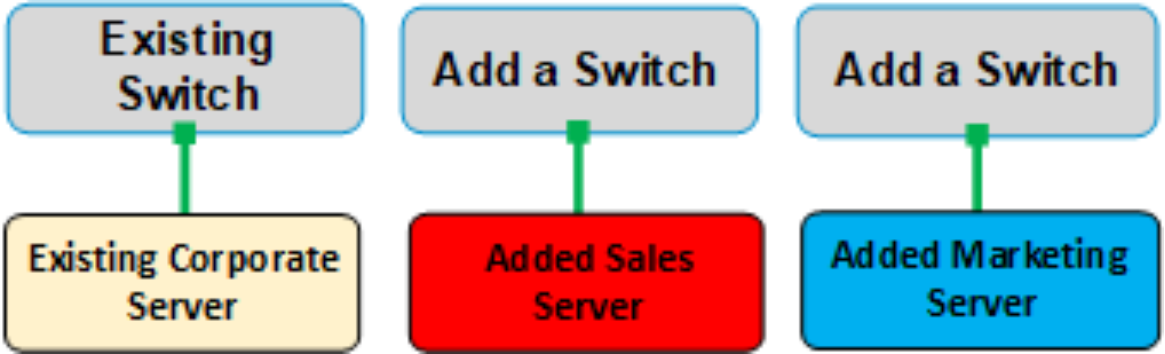
Figure 1. Data center multitenancy by adding switches
Alternately the company could use their existing switch and rack (which has capacity) to host the new sales and marketing servers alongside the existing corporate server. They could use VRFs to segment the new servers. See Figure 2.
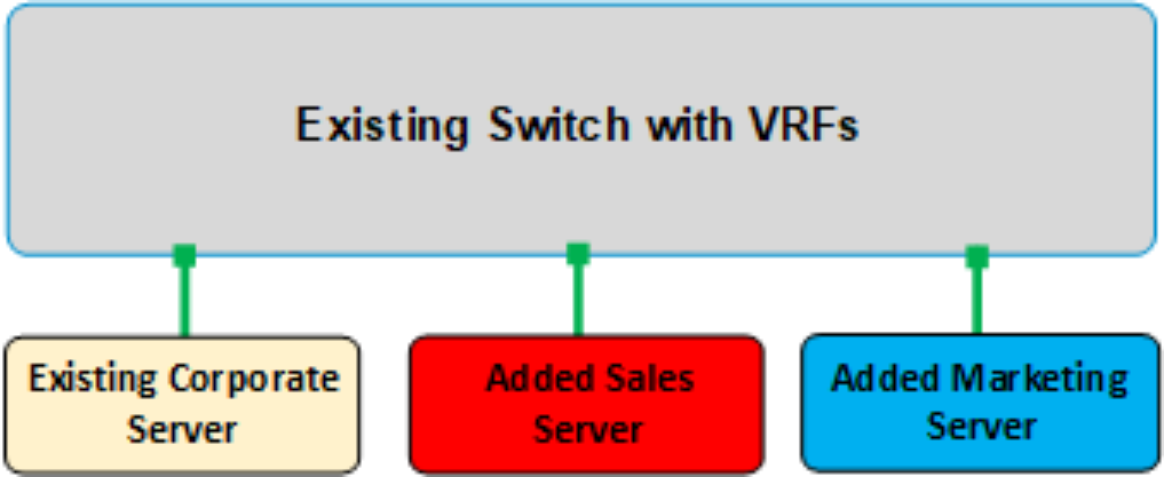
Figure 2. Data center multitenancy with VRF
The customer has chosen the second option, to add the new servers to the existing switch and use VRFs to segment traffic. VRFs are configured in the switch for each server, creating separate routing tables to segment traffic between the existing and new servers. The corporate server already resides in the default VRF, colored in yellow in Figure 2. Two new VRFs are created for sales and marketing, which are colored in red and blue. The VRFs isolate the control and data planes for each set of resources using different routing tables for each. VLANs are also configured for each server to further isolate the data plane.
The example configurations in this guide are built around a single-switch VRF use case. The example use case shows a simple network and compute environment to communicate key VRF information. A more complex environment with a leaf-spine network and multiple ports that are used on each server is supported with VRF.
Another use case where VRF can be helpful is in virtualized environments leveraging Network Virtualization Overlay (NVO). Dell PowerSwitch switches can be used with VMware NSX-T. VRF is configured in the PowerSwitch switches to enable network multitenancy, and NSX-T enables network and compute multitenancy. See the related reference in the Technical Resources chapter.
VRF in Dell SmartFabric OS10
Some key facts to be aware of with VRF in OS10 include:
- VRF is a feature that enables multitenancy in a Dell PowerSwitch.
- VRF is a feature that separates data in a network by creating multiple logical routers (a routing table per VRF) within a physical L3 switch.
- VRF allows network paths to be segmented (per domain or customer) without using multiple devices. It does so by configuring multiple different routing tables that co-exist within the same L3 switch simultaneously.
- VRF increases network security and can eliminate specific needs for encryption and authentication by automatically separating traffic in each VRF.
- Each VRF must be assigned an ingress and egress interface. Interfaces can be physical or virtual.
- IP address space can be overlapped among different VRF instances as the control plane (routing tables) are isolated.
- Within a VRF instance, routing can be statically provisioned, or exchanged using dynamic routing protocols. All forwarding components are VRF-aware and provisioned within the context of a VRF instance.
- Route leaking is supported across VRF Instances using static routes, dynamic routing protocols, or both. Route leaking enables traffic to flow across VRFs in a controlled manner when wanted.
- VRF can also work smoothly in virtualized environments, such as with VMware NSX.
- The VRF feature is supported with the Dell Virtual Link Trunking (VLT) multipathing technology.
- VRFs are local to a physical switch. Note the following:
- The VRF IDs of VRs running on a physical switch are not exchanged with VRF VRs running on other physical switches.
- Yet VRFs can extend to other switches by assigning VLANs to VRFs and trunking the VLANs.
- This configuration requires specific VRF-to-VLAN mapping at each involved switch.
- VXLAN can also be used to stretch the VLANs.
- VRRP or Proxy ARP used with VLT can be configured on interfaces that belong to a VRF instance.
- There is no restriction on the number of VLANs that can be assigned to a VRF instance.
- The size of the IPv4 CAM limits the total number of routes that are supported in VRF.
Table 1 summarizes VRF support in OS10 software,
Table 1. VRF support in OS10 software
|
Item |
Support |
Notes |
|
Supported Platforms |
Dell PowerSwitch family |
See Reference section. |
|
Supported OS10 software releases |
Dell SmartFabric OS10 10.4.1.0 or later |
Some features require a later release. |
|
VRFs Supported |
One management VRF One default VRF 512 nondefault VRFs with static routing 128 nondefault VRFs with dynamic routing |
Use the default and nondefault VRFs for routing. |
|
Routing supported |
Static routing Dynamic routing: OSPFv2, OSPFv3, BGP |
N/A |
|
Dynamic routing: OSPFv2, OSPFv3, BGP |
Physical and virtual |
N/A |
|
Services supported |
Many, such as DHCP, DNS, HTTP, SSH server |
In both management and nondefault VRFs |
|
Route leaking |
Static and dynamic |
N/A |
VRF example lab setup
Figure 3 shows the example lab setup that is used in this guide. The lab setup illustrates the repatriation use case where the customer is bringing back storage and servers from the cloud. Two Dell S5248F-ON switches are configured as leaf switches in two different racks. They are each connected to the Data Center Cloud with a 100 GbE port that is configured as a trunk port with allowed VLANs.
Three tenants are enabled with VRFs in each switch. The default VRF (in yellow) has interfaces for existing corporate resources that are assigned to it. Logical and physical interfaces are assigned by default to the default VFR. The sales VRF is created with loopback 1 and VLAN 20 and VLAN 200 interfaces that are assigned to it. The marketing VRF is created and loopback 2 and VLAN 30 and VLAN 300 are created and assigned to it.
The loopback interfaces assigned to each VRF simulates end hosts. Each tenant has unique VLAN interfaces but use overlapping IP addresses that are inherited from the cloud on their respective VLANs. A trunk is configured in each switch to connect the switch to the Data Center Cloud and to each other.
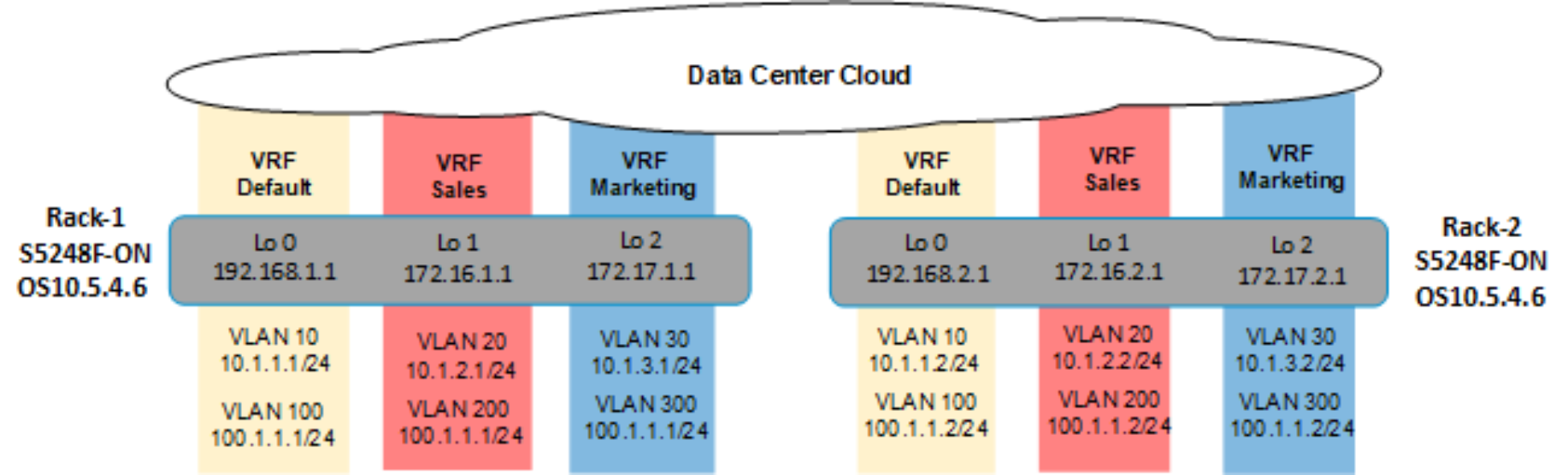
Figure 3. Example lab setup using two S5248F-ON leaf switches with VRF and overlapping IP address scheme
Validated Components
Dell PowerSwitch S5248F-ON
The validated example lab uses the Dell PowerSwitch S5248F-ON for each rack switch. It is a single rack-unit (1U), multilayer switch with 48 25 GbE SFP28 ports, four 100GbE QSFP28 ports, and two 200 GbE QFSP28-DD ports.
The S5248F-ON uses the Broadcom Trident3 (BCM56873) network processing unit. The S5248F-ON switches are installed with OS10 version 5.4.6.

Figure 4. Dell PowerSwitch S5248F-ON switch front view
Switch Configurations
Rack-1 leaf VRF and OSPF configuration
Enter the configuration commands as shown for the Rack-1 leaf switch. It has a 100 GbE port that is connected to the Data Center Cloud. See the notes to the right of the commands.
The Tab key can be used for autocomplete when entering configuration commands.
Configure the VRFs and OSPF settings
Configure the following VRF and OSPF settings.
|
Rack-1 switch |
Notes |
|
ip vrf sales ! ip vrf marketing |
Configure the VRFs. The default VRF is configured by default in OS10. |
|
router ospf 1 log-adjacency-changes router-id 192.168.1.1 ! router ospf 2 vrf sales log-adjacency-changes router-id 172.16.1.1 ! router ospf 3 vrf marketing log-adjacency-changes router-id 172.17.1.1 |
Configure OSPF for each VRF. The router-id is the loopback interface IP address for each VRF, to ease identification. |
Configure the VLAN interfaces
Give the interfaces IP addresses and assign them to VRFs and OSPF processes.
|
Rack-1 switch |
Notes |
|
interface vlan10 mode L3 no shutdown ip address 10.1.1.1/24 ip ospf 1 area 0.0.0.0 ! interface vlan20 mode L3 no shutdown ip vrf forwarding sales ip address 10.1.2.1/24 ip ospf 2 area 0.0.0.0 ! interface vlan30 mode L3 no shutdown ip vrf forwarding marketing ip address 10.1.3.1/24 ip ospf 3 area 0.0.0.0 ! interface vlan100 mode L3 shutdown ip address 100.1.1.1/24 ip ospf 1 area 0.0.0.0 ! interface vlan200 mode L3 no shutdown ip vrf forwarding sales ip address 100.1.1.1/24 ip ospf 2 area 0.0.0.0 ! interface vlan300 mode L3 no shutdown ip vrf forwarding marketing ip address 100.1.1.1/24 ip ospf 3 area 0.0.0.0 |
The VRF for the VLAN 10 and 100 interfaces is not specified as they remain in the default VRF. |
Configure the loopback interfaces
Configure the IP address, VRF, and OSPF of each loopback interface.
|
Rack-1 switch |
Notes |
|
interface loopback0 no shutdown ip address 192.168.1.1/24 ip ospf 1 area 0.0.0.0 ! interface loopback1 no shutdown ip vrf forwarding sales ip address 172.16.1.1/24 ip ospf 2 area 0.0.0.0 ! interface loopback2 no shutdown ip vrf forwarding marketing ip address 172.17.1.1/24 ip ospf 3 area 0.0.0.0 |
The VRF for the loopback 0 interface is not specified as it remains in the default VRF. |
|
interface ethernet1/1/49 no shutdown switchport mode trunk switchport access vlan 1 switchport trunk allowed vlan 10,20,30,100,200,300 mtu 1532 flowcontrol receive off |
Configure the 100 GbE Ethernet interface and specify the allowed VLANs. |
|
write memory |
Save the running configuration. |
Rack-2 leaf VRF and OSPF configuration
Enter the configuration commands as shown for the Rack-2 leaf switch. It has a 100 GbE port that is connected to the Data Center Cloud. See the notes to the right of the commands.
The Tab key can be used for autocomplete when entering configuration commands.
Configure the VRFs and OSPF settings
Configure the following VRF and OSPF settings.
|
Rack 2 switch |
Notes |
|
ip vrf sales ! ip vrf marketing |
Configure the VRFs. The default VRF is configured by default in OS10. |
|
router ospf 1 log-adjacency-changes router-id 192.168.2.1 ! router ospf 2 vrf sales log-adjacency-changes router-id 172.16.2.1 ! router ospf 3 vrf marketing log-adjacency-changes router-id 172.17.2.1 |
Configure OSPF for each VRF. The router-id is the loopback interface IP address for each VRF to ease identification. |
Configure the VLAN interfaces
Give the interfaces IP addresses and assign them to VRFs and OSPF processes.
|
Rack 2 switch |
Notes |
|
interface vlan10 mode L3 no shutdown ip address 10.1.1.2/24 ip ospf 1 area 0.0.0.0 ! interface vlan20 mode L3 no shutdown ip vrf forwarding sales ip address 10.1.2.2/24 ip ospf 2 area 0.0.0.0 ! interface vlan30 mode L3 no shutdown ip vrf forwarding marketing ip address 10.1.3.2/24 ip ospf 3 area 0.0.0.0 ! interface vlan100 mode L3 no shutdown ip address 100.1.1.2/24 ip ospf 1 area 0.0.0.0 ! interface vlan200 mode L3 no shutdown ip vrf forwarding sales ip address 100.1.1.2/24 ip ospf 2 area 0.0.0.0 ! interface vlan300 mode L3 no shutdown ip vrf forwarding marketing ip address 100.1.1.2/24 ip ospf 3 area 0.0.0.0 |
Although there are overlapping subnets with the VLAN interfaces, the interfaces are slightly different that in the Rack-1 switch.
The VRF for the VLAN 10 and 100 interfaces is not specified as they remain in the default VRF. |
Configure the loopback interfaces
Configure the IP address, VRF, and OSPF of each loopback interface.
|
Rack-2 switch |
Notes |
|
interface loopback0 no shutdown ip address 192.168.2.1/24 ip ospf 1 area 0.0.0.0 ! interface loopback1 no shutdown ip vrf forwarding sales ip address 172.16.2.1/24 ip ospf 2 area 0.0.0.0 ! interface loopback2 no shutdown ip vrf forwarding marketing ip address 172.17.2.1/24 ip ospf 3 area 0.0.0.0 |
No VRF is specified for the loopback 0 interface as it remains in the default VRF. |
|
interface ethernet1/1/49 no shutdown switchport mode trunk switchport access vlan 1 switchport trunk allowed vlan 10,20,30,100,200,300 mtu 1532 flowcontrol receive off |
Configure the Ethernet interface and specify the allowed VLANs. |
|
write memory |
Save the running configuration. |
Validate Configurations
Overview
This chapter covers validation of the VRF and OSPF configuration and verifying that OSPF routing is working.
Verify the OSPF configuration
View the OSPF configuration with the show running-configuration ospf command to ensure that it is properly configured.
|
Rack-1 switch |
Notes |
|
Rack-1# show running-configuration ospf ! interface vlan10 ip ospf 1 area 0.0.0.1 ! interface vlan20 ip ospf 2 area 0.0.0.1 ! interface vlan30 ip ospf 3 area 0.0.0.1 ! interface vlan100 ip ospf 1 area 0.0.0.1 ! interface vlan200 ip ospf 2 area 0.0.0.1 ! interface vlan300 ip ospf 3 area 0.0.0.1 ! interface loopback0 ip ospf 1 area 0.0.0.1 ! interface loopback1 ip ospf 2 area 0.0.0.1 ! interface loopback2 ip ospf 3 area 0.0.0.1 ! router ospf 1 log-adjacency-changes router-id 192.168.1.1 ! router ospf 2 vrf sales log-adjacency-changes router-id 172.16.1.1 ! router ospf 3 vrf marketing log-adjacency-changes router-id 172.17.1.1 |
Validate the OSPF configuration. |
Verify the VRFs and VLAN interfaces configurations
Verify the configuration of the VRFs and VLAN interfaces using the following commands. Not all VLANs are shown here.
- show running-configuration vrf
- show running-configuration interface vlan 10
- show running-configuration interface vlan 20
- show running-configuration interface loopback 0
- show running-configuration interface loopback 1
- show running-configuration interface loopback 2
|
Rack-1 switch |
Notes |
|
Rack-1# show running-configuration vrf ip vrf default ! ip vrf sales ! ip vrf marketing |
Show the running configuration for the VRFs. Note the default, sales, and marketing VRFs. |
|
Rack-1# show running-configuration interface vlan 10 ! interface vlan10 mode L3 no shutdown ip address 10.1.1.1/24 ip ospf 1 area 0.0.0.0
Rack-1# show running-configuration interface vlan 20 ! interface vlan20 mode L3 no shutdown ip vrf forwarding sales ip address 10.1.2.1/24 ip ospf 2 area 0.0.0.0 |
View the configuration for interfaces VLAN 10, 100, 20, 200, 30, 300. Two are shown as examples. VLAN 10 is in the default VRF. VLAN 20 is in the sales VRF. |
|
Rack-1# show running-configuration interface loopback 0 ! interface loopback0 no shutdown ip address 192.168.1.1/24 ip ospf 1 area 0.0.0.0
Rack-1# show running-configuration interface loopback 1 ! interface loopback1 no shutdown ip vrf forwarding sales ip address 172.16.1.1/24 ip ospf 2 area 0.0.0.0
Rack-1# show running-configuration interface loopback 2 ! interface loopback2 no shutdown ip vrf forwarding marketing ip address 172.17.1.1/24 ip ospf 3 area 0.0.0.0 |
View the configuration of the loopback interfaces. Interface loopback 0 resides in the default VRF. The IP address of each interface is advertised in OSPF. |
Verify the VLAN interfaces statuses
View the status of each VLAN interface. They are trunked over Ethernet interface 1/1/49. Use the following commands:
- show vlan 10
- show vlan 20
- show vlan 30
- show vlan 100
- show vlan 200
- show vlan 300
|
Rack 1 switch |
|
Rack-1# show vlan 200
Codes: * - Default VLAN, M - Management VLAN, R - Remote Port Mirroring VLANs, @ - Attached to Virtual Network, P - Primary, C - Community, I - Isolated, S - VLAN-Stack VLAN Q: A - Access (Untagged), T - Tagged NUM Status Description Q Ports 200 Active T Eth1/1/49
Rack-1# show vlan 300
Codes: * - Default VLAN, M - Management VLAN, R - Remote Port Mirroring VLANs, @ - Attached to Virtual Network, P - Primary, C - Community, I - Isolated, S - VLAN-Stack VLAN Q: A - Access (Untagged), T - Tagged NUM Status Description Q Ports 300 Active T Eth1/1/49 |
Verify the VLAN and loopback interfaces statuses
Use the show ip interface brief command to view the state of the VLAN and loopback interfaces. Observe the overlapping IPs on different VLANs on the same switch. Each VLAN is assigned to a VRF, ensuring separation. Only relevant interfaces are shown.
|
Rack 1 switch |
|
Rack-1# show ip interface brief
Interface Name IP-Address OK Method Status Protocol ========================================================================= Ethernet 1/1/49 unassigned YES unset up up Vlan 1 unassigned YES unset up up Vlan 10 10.1.1.1/24 YES manual up up Vlan 20 10.1.2.1/24 YES manual up up Vlan 30 10.1.3.1/24 YES manual up up Vlan 100 100.1.1.1/24 YES manual up up Vlan 200 100.1.1.1/24 YES manual up up Vlan 300 100.1.1.1/24 YES manual up up Loopback 0 192.168.1.1/24 YES manual up up Loopback 1 172.16.1.1/24 YES manual up up Loopback 2 172.17.1.1/24 YES manual up up |
Confirm OSPF neighbors connectivity
Confirm connectivity to OSPF neighbors. The Neighbor ID is the IP address of the loopback interface for each neighboring VRF. Use the following commands:
- show ip ospf neighbor
- show ip ospf vrf sales neighbor
- show ip ospf vrf marketing neighbor
|
Rack 1 switch |
|
Rack-1# show ip ospf neighbor Neighbor ID Pri State Dead Time Address Interface Area -------------------------------------------------------------------------- 192.168.2.1 1 FULL/DR 00:00:30 10.1.1.2 vlan10 0.0.0.0 192.168.2.1 1 FULL/DR 00:00:30 100.1.1.2 vlan100 0.0.0.0
Rack-1# show ip ospf vrf sales neighbor Neighbor ID Pri State Dead Time Address Interface Area ------------------------------------------------------------------------- 172.16.2.1 1 FULL/DR 00:00:31 10.1.1.2 vlan20 0.0.0.0 172.16.2.1 1 FULL/DR 00:00:31 100.1.1.2 vlan200 0.0.0.0
Rack-1# show ip ospf vrf marketing neighbor Neighbor ID Pri State Dead Time Address Interface Area ------------------------------------------------------------------------- 172.17.2.1 1 FULL/DR 00:00:30 10.1.1.2 vlan30 0.0.0.0 172.17.2.1 1 FULL/DR 00:00:30 100.1.1.2 vlan300 0.0.0.0 |
View the routing tables
View the routing tables for the default, sales, and marketing VRF instances. Some VRF routing tables have overlapping subnets. Use the following commands:
- show ip route
- show ip route vrf sales
- show ip route vrf marketing
|
Rack 1 switch |
|
Rack-1# show ip route Codes: C - connected S - static B - BGP, IN - internal BGP, EX - external BGP, EV - EVPN BGP O - OSPF, IA - OSPF inter area, N1 - OSPF NSSA external type 1, N2 - OSPF NSSA external type 2, E1 - OSPF external type 1, E2 - OSPF external type 2, * - candidate default, + - summary route, > - non-active route Gateway of last resort is not set Destination Gateway Dist/Metric Last Change ---------------------------------------------------------------------------------------- C 10.1.1.0/24 via 10.1.1.1 vlan10 0/0 03:50:39 C 100.1.1.0/24 via 100.1.1.1 vlan100 0/0 03:50:39 C 192.168.1.0/24 via 192.168.1.1 loopback0 0/0 17:22:43 O 192.168.2.0/24 via 10.1.1.2 vlan10 110/11 03:44:56 via 100.1.1.2 vlan100 Rack-1# show ip route vrf sales Codes: C - connected S - static B - BGP, IN - internal BGP, EX - external BGP, EV - EVPN BGP O - OSPF, IA - OSPF inter area, N1 - OSPF NSSA external type 1, N2 - OSPF NSSA external type 2, E1 - OSPF external type 1, E2 - OSPF external type 2, * - candidate default, + - summary route, > - non-active route Gateway of last resort is not set Destination Gateway Dist/Metric Last Change ---------------------------------------------------------------------------------------- C 10.1.2.0/24 via 10.1.2.1 vlan20 0/0 03:50:47 C 100.1.1.0/24 via 100.1.1.1 vlan200 0/0 03:50:47 C 172.16.1.0/24 via 172.16.1.1 loopback1 0/0 17:22:50 O 172.16.2.0/24 via 10.1.2.2 vlan20 110/11 03:44:57 via 100.1.1.2 vlan200 Rack-1# show ip route vrf marketing Codes: C - connected S - static B - BGP, IN - internal BGP, EX - external BGP, EV - EVPN BGP O - OSPF, IA - OSPF inter area, N1 - OSPF NSSA external type 1, N2 - OSPF NSSA external type 2, E1 - OSPF external type 1, E2 - OSPF external type 2, * - candidate default, + - summary route, > - non-active route Gateway of last resort is not set Destination Gateway Dist/Metric Last Change ---------------------------------------------------------------------------------------- C 10.1.3.0/24 via 10.1.3.1 vlan30 0/0 03:50:55 C 100.1.1.0/24 via 100.1.1.1 vlan300 0/0 03:50:55 C 172.17.1.0/24 via 172.17.1.1 loopback2 0/0 17:22:57 O 172.17.2.0/24 via 10.1.3.2 vlan30 110/11 03:45:03 via 100.1.1.2 vlan300 |
Validate Connectivity
Overview
This chapter covers validation of connectivity within VRFs and verifying no connectivity across VRFs at the Rack-1 S5248F-ON console.
Verify connectivity to the default VRF instance
Use the ping command to verify connectivity to interfaces in the default VRF instance for the Rack-1 and Rack-2 switches.
|
Rack 1 switch |
|
Rack-1# ping 192.168.1.1 PING 192.168.1.1 (192.168.1.1) 56(84) bytes of data. 64 bytes from 192.168.1.1: icmp_seq=1 ttl=64 time=0.061 ms 64 bytes from 192.168.1.1: icmp_seq=2 ttl=64 time=0.038 ms 64 bytes from 192.168.1.1: icmp_seq=3 ttl=64 time=0.032 ms ^C --- 192.168.1.1 ping statistics --- 3 packets transmitted, 3 received, 0% packet loss, time 77ms rtt min/avg/max/mdev = 0.290/0.307/0.322/0.024 ms
Rack-1# ping 192.168.2.1 PING 192.168.2.1 (192.168.2.1) 56(84) bytes of data. 64 bytes from 192.168.2.1: icmp_seq=1 ttl=64 time=0.311 ms 64 bytes from 192.168.2.1: icmp_seq=2 ttl=64 time=0.290 ms 64 bytes from 192.168.2.1: icmp_seq=3 ttl=64 time=0.322 ms ^C --- 192.168.2.1 ping statistics --- 3 packets transmitted, 3 received, 0% packet loss, time 55ms rtt min/avg/max/mdev = 0.290/0.307/0.322/0.024 ms
Rack-1# ping 10.1.1.1 PING 10.1.1.1 (10.1.1.1) 56(84) bytes of data. 64 bytes from 10.1.1.1: icmp_seq=1 ttl=64 time=0.057 ms 64 bytes from 10.1.1.1: icmp_seq=2 ttl=64 time=0.038 ms 64 bytes from 10.1.1.1: icmp_seq=3 ttl=64 time=0.042 ms ^C --- 10.1.1.1 ping statistics --- 3 packets transmitted, 3 received, 0% packet loss, time 68ms rtt min/avg/max/mdev = 0.030/0.041/0.057/0.012 ms
Rack-1# ping 100.1.1.1 PING 100.1.1.1 (100.1.1.1) 56(84) bytes of data. 64 bytes from 100.1.1.1: icmp_seq=1 ttl=64 time=0.057 ms 64 bytes from 100.1.1.1: icmp_seq=2 ttl=64 time=0.043 ms 64 bytes from 100.1.1.1: icmp_seq=4 ttl=64 time=0.047 ms ^C --- 100.1.1.1 ping statistics --- 3 packets transmitted, 3 received, 0% packet loss, time 53ms rtt min/avg/max/mdev = 0.043/0.048/0.057/0.008 ms |
Verify connectivity to the sales VRF instance
Use the ping command to verify connectivity to interfaces in the sales VRF instance for the Rack-1 and Rack-2 switches.
|
Rack 1 switch |
|
Rack-1# ping vrf sales 172.16.1.1 PING 172.16.1.1 (172.16.1.1) 56(84) bytes of data. 64 bytes from 172.16.1.1: icmp_seq=1 ttl=64 time=0.086 ms 64 bytes from 172.16.1.1: icmp_seq=2 ttl=64 time=0.064 ms 64 bytes from 172.16.1.1: icmp_seq=3 ttl=64 time=0.043 ms ^C --- 172.16.1.1 ping statistics --- 3 packets transmitted, 3 received, 0% packet loss, time 94ms rtt min/avg/max/mdev = 0.043/0.059/0.086/0.017 ms
Rack-1# ping vrf sales 172.16.2.1 !! Loopback 1 interface Rack-2 PING 172.16.2.1 (172.16.2.1) 56(84) bytes of data. 64 bytes from 172.16.2.1: icmp_seq=1 ttl=64 time=0.343 ms 64 bytes from 172.16.2.1: icmp_seq=2 ttl=64 time=0.304 ms 64 bytes from 172.16.2.1: icmp_seq=3 ttl=64 time=0.322 ms ^C --- 172.16.2.1 ping statistics --- 3 packets transmitted, 3 received, 0% packet loss, time 57ms rtt min/avg/max/mdev = 0.304/0.333/0.364/0.025 ms
Rack-1# ping vrf sales 10.1.2.1 PING 10.1.2.1 (10.1.2.1) 56(84) bytes of data. 64 bytes from 10.1.2.1: icmp_seq=1 ttl=64 time=0.084 ms 64 bytes from 10.1.2.1: icmp_seq=2 ttl=64 time=0.048 ms 64 bytes from 10.1.2.1: icmp_seq=3 ttl=64 time=0.052 ms ^C --- 10.1.2.1 ping statistics --- 3 packets transmitted, 3 received, 0% packet loss, time 28ms rtt min/avg/max/mdev = 0.048/0.061/0.084/0.017 ms
Rack-1# ping vrf sales 10.1.2.2 PING 10.1.2.2 (10.1.2.2) 56(84) bytes of data. 64 bytes from 10.1.2.2: icmp_seq=1 ttl=64 time=0.340 ms 64 bytes from 10.1.2.2: icmp_seq=2 ttl=64 time=0.261 ms 64 bytes from 10.1.2.2: icmp_seq=3 ttl=64 time=0.280 ms ^C --- 10.1.2.2 ping statistics --- 3 packets transmitted, 3 received, 0% packet loss, time 44ms rtt min/avg/max/mdev = 0.261/0.293/0.340/0.039 ms Rack-1# ping vrf sales 100.1.1.2 PING 100.1.1.2 (100.1.1.2) 56(84) bytes of data. 64 bytes from 100.1.1.2: icmp_seq=1 ttl=64 time=0.367 ms 64 bytes from 100.1.1.2: icmp_seq=2 ttl=64 time=0.307 ms 64 bytes from 100.1.1.2: icmp_seq=3 ttl=64 time=0.352 ms ^V^C --- 100.1.1.2 ping statistics --- 3 packets transmitted, 3 received, 0% packet loss, time 52ms rtt min/avg/max/mdev = 0.307/0.342/0.367/0.025 ms |
Verify connectivity to the marketing VRF instance
Use the ping command to verify connectivity to interfaces in the marketing VRF instance for the Rack-1 and Rack-2 switches.
|
Rack 1 switch |
|
Rack-1# ping vrf marketing 172.17.1.1 PING 172.17.1.1 (172.17.1.1) 56(84) bytes of data. 64 bytes from 172.17.1.1: icmp_seq=1 ttl=64 time=0.084 ms 64 bytes from 172.17.1.1: icmp_seq=2 ttl=64 time=0.044 ms 64 bytes from 172.17.1.1: icmp_seq=3 ttl=64 time=0.047 ms ^C --- 172.17.1.1 ping statistics --- 3 packets transmitted, 3 received, 0% packet loss, time 73ms rtt min/avg/max/mdev = 0.044/0.056/0.084/0.018 ms
Rack-1# ping vrf marketing 172.17.2.1 PING 172.17.2.1 (172.17.2.1) 56(84) bytes of data. 64 bytes from 172.17.2.1: icmp_seq=1 ttl=64 time=0.415 ms 64 bytes from 172.17.2.1: icmp_seq=2 ttl=64 time=0.331 ms 64 bytes from 172.17.2.1: icmp_seq=3 ttl=64 time=0.334 ms ^C --- 172.17.2.1 ping statistics --- 3 packets transmitted, 3 received, 0% packet loss, time 36ms rtt min/avg/max/mdev = 0.331/0.360/0.415/0.038 ms
Rack-1# ping vrf marketing 10.1.3.1 PING 10.1.3.1 (10.1.3.1) 56(84) bytes of data. 64 bytes from 10.1.3.1: icmp_seq=1 ttl=64 time=0.086 ms 64 bytes from 10.1.3.1: icmp_seq=2 ttl=64 time=0.056 ms 64 bytes from 10.1.3.1: icmp_seq=3 ttl=64 time=0.054 ms ^C --- 10.1.3.1 ping statistics --- 3 packets transmitted, 3 received, 0% packet loss, time 48ms rtt min/avg/max/mdev = 0.054/0.065/0.086/0.016 ms
Rack-1# ping vrf marketing 10.1.3.2 PING 10.1.3.2 (10.1.3.2) 56(84) bytes of data. 64 bytes from 10.1.3.2: icmp_seq=1 ttl=64 time=0.319 ms 64 bytes from 10.1.3.2: icmp_seq=2 ttl=64 time=0.269 ms 64 bytes from 10.1.3.2: icmp_seq=3 ttl=64 time=0.274 ms ^C --- 10.1.3.2 ping statistics --- 3 packets transmitted, 3 received, 0% packet loss, time 36ms rtt min/avg/max/mdev = 0.269/0.287/0.319/0.026 ms
Rack-1# ping vrf marketing 100.1.1.2 PING 100.1.1.2 (100.1.1.2) 56(84) bytes of data. 64 bytes from 100.1.1.2: icmp_seq=1 ttl=64 time=0.428 ms 64 bytes from 100.1.1.2: icmp_seq=2 ttl=64 time=0.327 ms 64 bytes from 100.1.1.2: icmp_seq=3 ttl=64 time=0.310 ms ^C --- 100.1.1.2 ping statistics --- 3 packets transmitted, 3 received, 0% packet loss, time 48ms rtt min/avg/max/mdev = 0.310/0.355/0.428/0.052 ms |
Verify no connectivity to endpoints
Use the ping command to verify there is no connectivity to endpoints across VRFs.
|
Rack 1 switch |
|
Rack-1# ping 172.16.1.1 !! Loopback 1 VRF sales Rack-1 connect: Network is unreachable
Rack-1# ping 172.16.2.1 !! Loopback 1 VRF sales Rack-2 connect: Network is unreachable
Rack-1# ping 172.17.1.1 !! Loopback 2 VRF marketing Rack-1 connect: Network is unreachable
Rack-1# ping 172.17.2.1 !! Loopback 2 VRF marketing Rack-2 connect: Network is unreachable |
The validation checks for the Rack-1 switch are complete.
Route Leaking
Overview
VRFs enable L3 control and data plane isolation within a switch. But sometimes traffic must flow between VRFs. In the multitenancy use case, hosts in the VLAN 20 subnet need a path to hosts in the VLAN 30 subnet, and conversely. This flow can be accomplished with the route leaking feature.
Route leaking enables routes in either a default or nondefault VRF to be presented to another VRF and be placed in its routing table. Static and dynamic routes can be leaked. Route leaking must be configured symmetrically in both the source and destination VRFs. With dynamic route leaking, you can obtain more granular control with route maps.
Dynamic route leaking is shown in the following example because OSPF is used. Routes are leaked between the sales and marketing tenants for the VLAN 20 interfaces in both Rack-1 and Rack-2 S5248S switches. See the following table.
|
Rack Switch |
Source VRF, VLAN, IP Address |
Destination VRF, VLAN, IP Address |
|
Rack 1 |
VRF Sales VRF 20 10.1.2.0/24 |
VRF Marketing VRF 30 10.1.3.0/24 |
|
Rack 2 |
VRF Marketing VRF 30 10.1.3.0/24 |
VRF Sales VRF 20 10.1.2.0/24 |
Dynamic route leaking is configured using the route-export and route-import commands under each VRF in each switch. These commands export and import all routes between VRFs local to the switch.
Route leaking configuration commands
Enter the configuration commands as shown for the Rack-1 and Rack-2 switches. Once configuration is complete, the route leaking can be validated by looking at the routing table of each tenant and using the ping command.
Rack 1 configuration
Enter the configuration commands as shown for the Rack-1 switch.
|
Rack-1 switch |
Notes |
|
ip vrf sales ip route-export 1:1 ip route-import 2:2 |
The ip route-export community value in the source VRF must match the ip route-import community value in the destination VRF. |
|
ip vrf marketing ip route-export 2:2 ip route-import 1:1 |
The ip route-export community value in the source VRF must match the ip route-import community value in the destination VRF. |
Rack 2 configuration
Enter the configuration commands as shown for the Rack-2 switch.
|
Rack-2 switch |
Notes |
|
ip vrf sales ip route-export 1:1 ip route-import 2:2 |
Like for the Rack-1 switch, the ip route-export community value in the source VRF must match the ip route-import community value in the destination VRF. |
|
ip vrf marketing ip route-export 2:2 ip route-import 1:1 |
Like for the Rack-1 switch, the ip route-export community value in the source VRF must match the ip route-import community value in the destination VRF. |
Verify configurations
Validate the route leaking configuration by looking at the routing tables with show ip route commands. The routing tables with route leaking can be compared to the original routing tables to confirm the changes. The 10.1.3.0/24 marketing tenant network is now reachable by the sales tenant, and the 10.1.2.0/24 sales tenant network is now reachable by the marketing tenant. Use the following commands:
- show ip route vrf sales
- show ip route vrf marketing
Rack 1 validation
The following table shows the IP routing tables for the Rack-1 switch. The 10.1.2.0/24 sales tenant network is now reachable by the marketing tenant, and the 10.1.3.0/24 marketing tenant network is now reachable by the sales tenant.
Enter the validation commands as shown for the Rack-1 switch.
|
Rack 1 switch |
|
Rack-1# show ip route vrf sales Codes: C - connected S - static B - BGP, IN - internal BGP, EX - external BGP, EV - EVPN BGP O - OSPF, IA - OSPF inter area, N1 - OSPF NSSA external type 1, N2 - OSPF NSSA external type 2, E1 - OSPF external type 1, E2 - OSPF external type 2, * - candidate default, + - summary route, > - non-active route Gateway of last resort is not set Destination Gateway Dist/Metric Last Change ------------------------------------------------------------------------------------------ C 10.1.2.0/24 via 10.1.2.1 vlan20 0/0 14:22:50 C 10.1.3.0/24 via 10.1.3.1,marketing vlan30 0/0 00:28:46 C 100.1.1.0/24 via 100.1.1.1 vlan200 0/0 13:50:18 C 172.16.1.0/24 via 172.16.1.1 loopback1 0/0 1 week 12:44:43 O 172.16.2.0/24 via 10.1.2.2 vlan20 110/11 13:50:15 via 100.1.1.2 vlan200 C 172.17.1.0/24 via 172.17.1.1,marketing loopback2 0/0 00:28:46 O 172.17.2.0/24 via 10.1.3.2,marketing vlan30 110/11 00:28:35 via 100.1.1.2,marketing vlan300 |
|
Rack-1# show ip route vrf marketing Codes: C - connected S - static B - BGP, IN - internal BGP, EX - external BGP, EV - EVPN BGP O - OSPF, IA - OSPF inter area, N1 - OSPF NSSA external type 1, N2 - OSPF NSSA external type 2, E1 - OSPF external type 1, E2 - OSPF external type 2, * - candidate default, + - summary route, > - non-active route Gateway of last resort is not set Destination Gateway Dist/Metric Last Change ------------------------------------------------------------------------------------------ C 10.1.2.0/24 via 10.1.2.1,sales vlan20 0/0 00:28:43 C 10.1.3.0/24 via 10.1.3.1 vlan30 0/0 14:22:27 C 100.1.1.0/24 via 100.1.1.1 vlan300 0/0 13:52:19 C 172.16.1.0/24 via 172.16.1.1,sales loopback1 0/0 00:28:43 O 172.16.2.0/24 via 10.1.2.2,sales vlan20 110/11 00:28:43 via 100.1.1.2,sales vlan200 C 172.17.1.0/24 via 172.17.1.1 loopback2 0/0 1 week 12:44:50 O 172.17.2.0/24 via 10.1.3.2 vlan30 110/11 13:52:13 via 100.1.1.2 vlan300 |
Rack 2 validation
The following table shows the IP routing tables for the Rack-2 switch. The 10.1.2.0/24 sales tenant network is now reachable by the marketing tenant, and the 10.1.3.0/24 marketing tenant network is now reachable by the sales tenant.
Enter the validation commands as shown for the Rack-2 switch.
|
Rack 2 switch |
|
Rack-2# show ip route vrf sales Codes: C - connected S - static B - BGP, IN - internal BGP, EX - external BGP, EV - EVPN BGP O - OSPF, IA - OSPF inter area, N1 - OSPF NSSA external type 1, N2 - OSPF NSSA external type 2, E1 - OSPF external type 1, E2 - OSPF external type 2, * - candidate default, + - summary route, > - non-active route Gateway of last resort is not set Destination Gateway Dist/Metric Last Change ------------------------------------------------------------------------------------------- C 10.1.2.0/24 via 10.1.2.2 vlan20 0/0 14:23:24 C 10.1.3.0/24 via 10.1.3.2,marketing vlan30 0/0 00:28:50 C 100.1.1.0/24 via 100.1.1.2 vlan200 0/0 6 days 23:15:22 O 172.16.1.0/24 via 10.1.2.1 vlan20 110/11 13:52:51 via 100.1.1.1 vlan200 C 172.16.2.0/24 via 172.16.2.1 loopback1 0/0 1 week 12:24:18 O 172.17.1.0/24 via 10.1.3.1,marketing vlan30 110/11 00:28:41 via 100.1.1.1,marketing vlan300 C 172.17.2.0/24 via 172.17.2.1,marketing loopback2 0/0 00:28:50 |
|
Codes: C - connected S - static B - BGP, IN - internal BGP, EX - external BGP, EV - EVPN BGP O - OSPF, IA - OSPF inter area, N1 - OSPF NSSA external type 1, N2 - OSPF NSSA external type 2, E1 - OSPF external type 1, E2 - OSPF external type 2, * - candidate default, + - summary route, > - non-active route Gateway of last resort is not set Destination Gateway Dist/Metric Last Change -------------------------------------------------------------------------------------------- C 10.1.2.0/24 via 10.1.2.2,sales vlan20 0/0 00:29:03 C 10.1.3.0/24 via 10.1.3.2 vlan30 0/0 14:09:39 C 100.1.1.0/24 via 100.1.1.2 vlan300 0/0 6 days 23:15:44 O 172.16.1.0/24 via 10.1.2.1,sales vlan20 110/11 00:29:03 via 100.1.1.1,sales vlan200 C 172.16.2.0/24 via 172.16.2.1,sales loopback1 0/0 00:29:03 O 172.17.1.0/24 via 10.1.3.1 vlan30 110/11 13:55:08 via 100.1.1.1 vlan300 C 172.17.2.0/24 via 172.17.2.1 loopback2 0/0 1 week 12:24:39 |
Verify route leaking
Use the ping command to verify route leaking connectivity to the VLAN 20 and 30 interfaces between the sales and marketing VRF instances for the Rack-1 and Rack-2 switches.
Rack 1 validation
Rack-1 ping commands and results are shown in the following table,
|
Rack 1 switch |
Notes |
|
Rack-1# ping vrf sales 10.1.3.1 PING 10.1.3.1 (10.1.3.1) 56(84) bytes of data. 64 bytes from 10.1.3.1: icmp_seq=1 ttl=65 time=0.120 ms 64 bytes from 10.1.3.1: icmp_seq=2 ttl=65 time=0.064 ms 64 bytes from 10.1.3.1: icmp_seq=3 ttl=65 time=0.053 ms ^C --- 10.1.3.1 ping statistics --- 3 packets transmitted, 3 received, 0% packet loss, time 36ms rtt min/avg/max/mdev = 0.053/0.079/0.120/0.029 ms |
The extended ping command is used to ping to the VLAN 30 interface in VRF marketing from VRF sales in the Rack-1 switch. |
|
Rack-1# ping vrf sales 10.1.3.2 PING 10.1.3.2 (10.1.3.2) 56(84) bytes of data. 64 bytes from 10.1.3.2: icmp_seq=1 ttl=63 time=0.511 ms 64 bytes from 10.1.3.2: icmp_seq=2 ttl=63 time=0.388 ms 64 bytes from 10.1.3.2: icmp_seq=3 ttl=63 time=0.422 ms 64 bytes from 10.1.3.2: icmp_seq=4 ttl=63 time=0.449 ms ^C --- 10.1.3.2 ping statistics --- 4 packets transmitted, 4 received, 0% packet loss, time 73ms rtt min/avg/max/mdev = 0.388/0.442/0.511/0.049 ms |
The extended ping command is used to ping to the VLAN 30 interface in VRF marketing from VRF sales in the Rack-2 switch. |
|
Rack-1# ping vrf sales 172.17.1.1 PING 172.17.1.1 (172.17.1.1) 56(84) bytes of data. 64 bytes from 172.17.1.1: icmp_seq=1 ttl=65 time=0.115 ms 64 bytes from 172.17.1.1: icmp_seq=2 ttl=65 time=0.068 ms 64 bytes from 172.17.1.1: icmp_seq=3 ttl=65 time=0.059 ms 64 bytes from 172.17.1.1: icmp_seq=4 ttl=65 time=0.063 ms ^C --- 172.17.1.1 ping statistics --- 4 packets transmitted, 4 received, 0% packet loss, time 77ms rtt min/avg/max/mdev = 0.059/0.076/0.115/0.023 ms |
The extended ping command is used to ping to the loopback 2 interface in VRF marketing from VRF sales in the Rack-1 switch. |
|
Rack-1# ping vrf marketing 10.1.2.2 PING 10.1.2.2 (10.1.2.2) 56(84) bytes of data. 64 bytes from 10.1.2.2: icmp_seq=1 ttl=64 time=0.460 ms 64 bytes from 10.1.2.2: icmp_seq=2 ttl=64 time=0.337 ms 64 bytes from 10.1.2.2: icmp_seq=3 ttl=64 time=0.387 ms 64 bytes from 10.1.2.2: icmp_seq=4 ttl=64 time=0.393 ms ^C --- 10.1.2.2 ping statistics --- 4 packets transmitted, 4 received, 0% packet loss, time 69ms rtt min/avg/max/mdev = 0.337/0.394/0.460/0.045 ms |
The extended ping command is used to ping from VRF marketing in the Rack-1 switch to the VLAN 20 interface in VRF sales in the Rack-2 switch. |
|
Rack-1# ping vrf sales 192.168.1.1 connect: Network is unreachable |
The loopback0 interface is still unreachable from the sales VRF because route leaking was not configured between the sales and default VRFs. |
Rack 2 validation
Route leaking in Rack-2 is validated by using the ping command to confirm reachability across tenants in the following table.
|
Rack 2 switch |
Notes |
|
Rack-2# ping vrf sales 10.1.3.1 PING 10.1.3.1 (10.1.3.1) 56(84) bytes of data. 64 bytes from 10.1.3.1: icmp_seq=1 ttl=64 time=0.409 ms 64 bytes from 10.1.3.1: icmp_seq=2 ttl=64 time=0.388 ms 64 bytes from 10.1.3.1: icmp_seq=3 ttl=64 time=0.315 ms 64 bytes from 10.1.3.1: icmp_seq=4 ttl=64 time=0.327 ms ^C --- 10.1.3.1 ping statistics --- 4 packets transmitted, 4 received, 0% packet loss, time 81ms rtt min/avg/max/mdev = 0.315/0.359/0.409/0.045 ms |
The extended ping command is used to ping to the VLAN 30 interface in VRF marketing from VRF sales in the Rack-1 switch. |
|
Rack-2# ping vrf sales 10.1.3.2 PING 10.1.3.2 (10.1.3.2) 56(84) bytes of data. 64 bytes from 10.1.3.2: icmp_seq=1 ttl=64 time=0.101 ms 64 bytes from 10.1.3.2: icmp_seq=2 ttl=64 time=0.078 ms 64 bytes from 10.1.3.2: icmp_seq=3 ttl=64 time=0.049 ms ^C --- 10.1.3.2 ping statistics --- 3 packets transmitted, 3 received, 0% packet loss, time 44ms rtt min/avg/max/mdev = 0.049/0.076/0.101/0.021 ms |
The extended ping command is used to ping to the VLAN 30 interface in VRF marketing from VRF sales in the Rack-2 switch. |
|
Rack-2# ping vrf sales 172.17.1.1 PING 172.17.1.1 (172.17.1.1) 56(84) bytes of data. 64 bytes from 172.17.1.1: icmp_seq=1 ttl=64 time=0.401 ms 64 bytes from 172.17.1.1: icmp_seq=2 ttl=64 time=0.319 ms 64 bytes from 172.17.1.1: icmp_seq=3 ttl=64 time=0.330 ms ^C --- 172.17.1.1 ping statistics --- 3 packets transmitted, 3 received, 0% packet loss, time 28ms rtt min/avg/max/mdev = 0.319/0.350/0.401/0.036 ms |
The extended ping command is used to ping to the loopback 2 interface in VRF marketing in the Rack-1 switch. |
|
Rack-1# ping vrf marketing 10.1.2.1 PING 10.1.2.1 (10.1.2.1) 56(84) bytes of data. 64 bytes from 10.1.2.1: icmp_seq=1 ttl=65 time=0.106 ms 64 bytes from 10.1.2.1: icmp_seq=2 ttl=65 time=0.064 ms 64 bytes from 10.1.2.1: icmp_seq=3 ttl=65 time=0.057 ms 64 bytes from 10.1.2.1: icmp_seq=4 ttl=65 time=0.058 ms ^C --- 10.1.2.1 ping statistics --- 4 packets transmitted, 4 received, 0% packet loss, time 57ms rtt min/avg/max/mdev = 0.057/0.071/0.106/0.021 ms |
The extended ping command is used to ping to the VLAN 30 interface in VRF sales in the Rack-1 switch. |
|
Rack-2# ping vrf marketing 10.1.2.1 PING 10.1.2.1 (10.1.2.1) 56(84) bytes of data. 64 bytes from 10.1.2.1: icmp_seq=1 ttl=64 time=0.475 ms 64 bytes from 10.1.2.1: icmp_seq=2 ttl=64 time=0.432 ms 64 bytes from 10.1.2.1: icmp_seq=3 ttl=64 time=0.368 ms ^C --- 10.1.2.1 ping statistics --- 3 packets transmitted, 3 received, 0% packet loss, time 77ms rtt min/avg/max/mdev = 0.368/0.422/0.475/0.043 ms |
The extended ping command is used to ping to the VLAN 20 interface in VRF sales from VRF marketing in the Rack-2 switch. |
|
Rack-2# ping vrf marketing 192.168 |
The loopback0 interface in Rack-1 is still unreachable from the marketing VRF because route leaking was not configured between the marketing and default VRFs. |
Summary
Conclusion
This guide looked at the benefits of VRF and how it can be implemented on Dell S5248F-ON switches with OS10 to achieve multitenancy. For more general information about additional features and options for VRF on S5248F-ON and other supported switches, see the respective documentation in the Technical Resources chapter. For an example of using VRF in VMware NVO environments, see the document that is referenced in the Technical Resources chapter.
We value your feedback
Dell Technologies and the authors of this document welcome your feedback on the solution and the solution documentation. Contact the Dell Technologies Solutions team by email.
Note: For links to additional documentation for this solution, see the Dell Technologies Info Hub for Networking Solutions.
Technical Resources
Dell Technologies documentation
The following Dell Technologies documentation provides additional and relevant information. Access to these documents depends on your login credentials. If you do not have access to a document, contact your Dell Technologies representative.
Locate up-to-date models and specifications for Dell PowerSwitch switches.
Search for OS10 documentation for software releases
User guide for example configurations in this guide.
VMware documentation
The following VMware documentation provides additional and relevant information:
A reference for using VRF-Lite with NVO.