OneFS and HTTP Security
To enable granular HTTP security configuration, OneFS provides an option to disable nonessential HTTP components selectively. This can help reduce the overall attack surface of your infrastructure. Disabling a specific component’s service still allows other essential services on the cluster to continue to run unimpeded. In OneFS 9.4 and later, you can disable the following nonessential HTTP services:
|
Service |
Description |
|
PowerScaleUI |
The OneFS WebUI configuration interface. |
|
Platform-API-External |
External access to the OneFS platform API endpoints. |
|
Rest Access to Namespace (RAN) |
REST-ful access by HTTP to a cluster’s /ifs namespace. |
|
RemoteService |
Remote Support and In-Product Activation. |
|
SWIFT (deprecated) |
Deprecated object access to the cluster using the SWIFT protocol. This has been replaced by the S3 protocol in OneFS. |
You can enable or disable each of these services independently, using the CLI or platform API, if you have a user account with the ISI_PRIV_HTTP RBAC privilege.
You can use the isi http services CLI command set to view and modify the nonessential HTTP services:
# isi http services list
ID                     Enabled
------------------------------
Platform-API-External Yes
PowerScaleUI          Yes
RAN                   Yes
RemoteService         Yes
SWIFT                 No
------------------------------
Total: 5
For example, you can easily disable remote HTTP access to the OneFS /ifs namespace as follows:
# isi http services modify RAN --enabled=0
You are about to modify the service RAN. Are you sure? (yes/[no]): yes
Similarly, you can also use the WebUI to view and edit a subset of the HTTP configuration settings, by navigating to Protocols > HTTP settings:
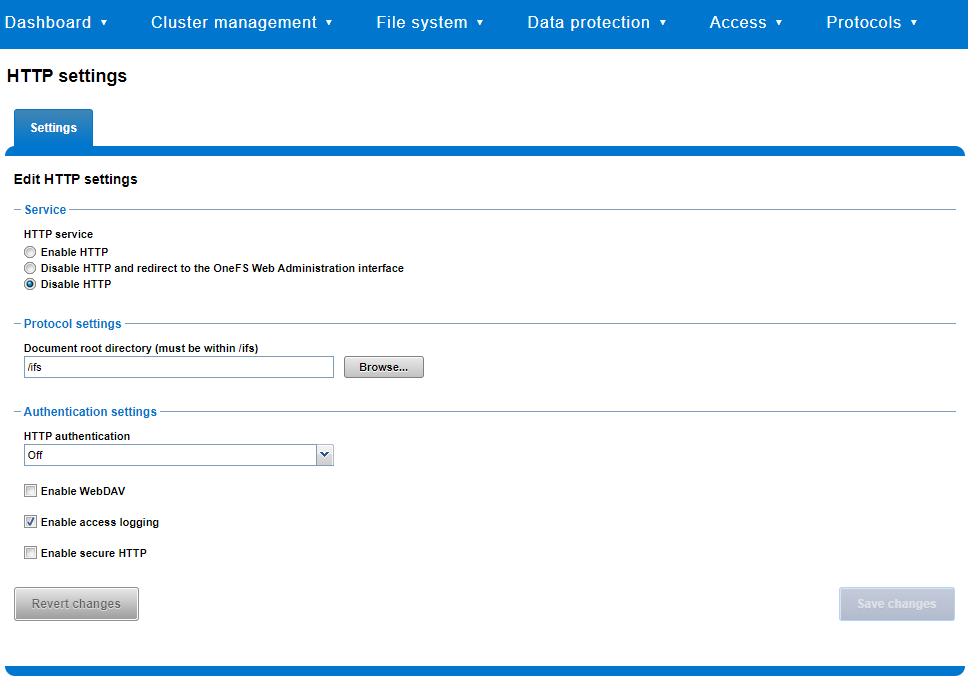
That said, the implications and impact of disabling each of the services is as follows:
|
Service |
Disabling impacts |
|
WebUI |
The WebUI is completely disabled, and access attempts (default TCP port 8080) are denied with the warning Service Unavailable. Please contact Administrator. If the WebUI is re-enabled, the external platform API service (Platform-API-External) is also started if it is not running. Note that disabling the WebUI does not affect the PlatformAPI service. |
|
Platform API |
External API requests to the cluster are denied, and the WebUI is disabled, because it uses the Platform-API-External service. Note that the Platform-API-Internal service is not impacted if/when the Platform-API-External is disabled, and internal pAPI services continue to function as expected. If the Platform-API-External service is re-enabled, the WebUI will remain inactive until the PowerScaleUI service is also enabled. |
|
RAN |
If RAN is disabled, the WebUI components for File System Explorer and File Browser are also automatically disabled. From the WebUI, attempts to access the OneFS file system explorer (File System > File System Explorer) fail with the warning message Browse is disabled as RAN service is not running. Contact your administrator to enable the service. This same warning also appears when attempting to access any other WebUI components that require directory selection. |
|
RemoteService |
If RemoteService is disabled, the WebUI components for Remote Support and In-Product Activation are disabled. In the WebUI, going to Cluster Management > General Settings and selecting the Remote Support tab displays the message The service required for the feature is disabled. Contact your administrator to enable the service. In the WebUI, going to Cluster Management > Licensing and scrolling to the License Activation section displays the message The service required for the feature is disabled. Contact your administrator to enable the service. |
|
SWIFT |
Deprecated object protocol and disabled by default. |
You can use the CLI command isi http settings view to display the OneFS HTTP configuration:
# isi http settings view
            Access Control: No
      Basic Authentication: No
    WebHDFS Ran HTTPS Port: 8443
                        Dav: No
         Enable Access Log: Yes
                      HTTPS: No
 Integrated Authentication: No
               Server Root: /ifs
                    Service: disabled
           Service Timeout: 8m20s
          Inactive Timeout: 15m
           Session Max Age: 4H
Httpd Controlpath Redirect: No
Similarly, you can manage and change the HTTP configuration using the isi http settings modify CLI command.
For example, to reduce the maximum session age from four to two hours:
# isi http settings view | grep -i age
           Session Max Age: 4H
# isi http settings modify --session-max-age=2H
# isi http settings view | grep -i age
           Session Max Age: 2H
The full set of configuration options for isi http settings includes:
|
Option |
Description |
|
--access-control <boolean> |
Enable Access Control Authentication for the HTTP service. Access Control Authentication requires at least one type of authentication to be enabled. |
|
--basic-authentication <boolean> |
Enable Basic Authentication for the HTTP service. |
|
--webhdfs-ran-https-port <integer> |
Configure Data Services Port for the HTTP service. |
|
--revert-webhdfs-ran-https-port |
Set value to system default for --webhdfs-ran-https-port. |
|
--dav <boolean> |
Comply with Class 1 and 2 of the DAV specification (RFC 2518) for the HTTP service. All DAV clients must go through a single node. DAV compliance is NOT met if you go through SmartConnect, or using 2 or more node IPs. |
|
--enable-access-log <boolean> |
Enable writing to a log when the HTTP server is accessed for the HTTP service. |
|
--https <boolean> |
Enable the HTTPS transport protocol for the HTTP service. |
|
--https <boolean> |
Enable the HTTPS transport protocol for the HTTP service. |
|
--integrated-authentication <boolean> |
Enable Integrated Authentication for the HTTP service. |
|
--server-root <path> |
Document root directory for the HTTP service. Must be within /ifs. |
|
--service (enabled | disabled | redirect | disabled_basicfile) |
Enable/disable the HTTP Service or redirect to WebUI or disabled BasicFileAccess. |
|
--service-timeout <duration> |
The amount of time (in seconds) that the server will wait for certain events before failing a request. A value of 0 indicates that the service timeout value is the Apache default. |
|
--revert-service-timeout |
Set value to system default for --service-timeout. |
|
--inactive-timeout <duration> |
Get the HTTP RequestReadTimeout directive from both the WebUI and the HTTP service. |
|
--revert-inactive-timeout |
Set value to system default for --inactive-timeout. |
|
--session-max-age <duration> |
Get the HTTP SessionMaxAge directive from both WebUI and HTTP service. |
|
--revert-session-max-age |
Set value to system default for --session-max-age. |
|
--httpd-controlpath-redirect <boolean> |
Enable or disable WebUI redirection to the HTTP service. |
Note that while the OneFS S3 service uses HTTP, it is considered a tier-1 protocol, and as such is managed using its own isi s3 CLI command set and corresponding WebUI area. For example, the following CLI command forces the cluster to only accept encrypted HTTPS/SSL traffic on TCP port 9999 (rather than the default TCP port 9021):
# isi s3 settings global modify --https-only 1 –https-port 9921
# isi s3 settings global view
         HTTP Port: 9020
        HTTPS Port: 9999
        HTTPS only: Yes
S3 Service Enabled: Yes
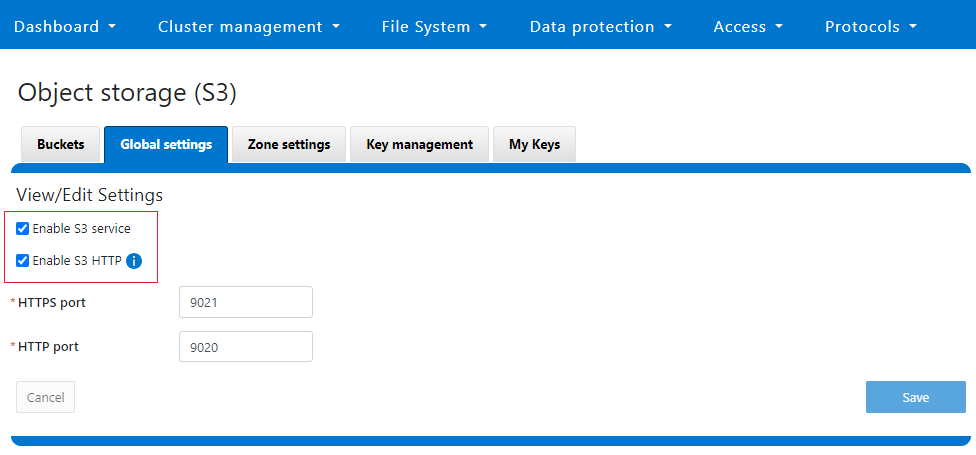
Additionally, you can entirely disable the S3 service with the following CLI command:
# isi services s3 disable
The service 's3' has been disabled.
Or from the WebUI, under Protocols > S3 > Global settings:
Author: Nick Trimbee