OneFS Security and USB Device Control
As we’ve seen over the course of the last several articles, OneFS 9.5 delivers a wealth of security focused features. These span the realms of core file system, protocols, data services, platform, and peripherals. Among these security enhancements is the ability to manually or automatically disable a cluster’s USB ports from either the CLI, platform API, or by activating a security hardening policy.
In support of this functionality, the basic USB port control architecture is as follows:
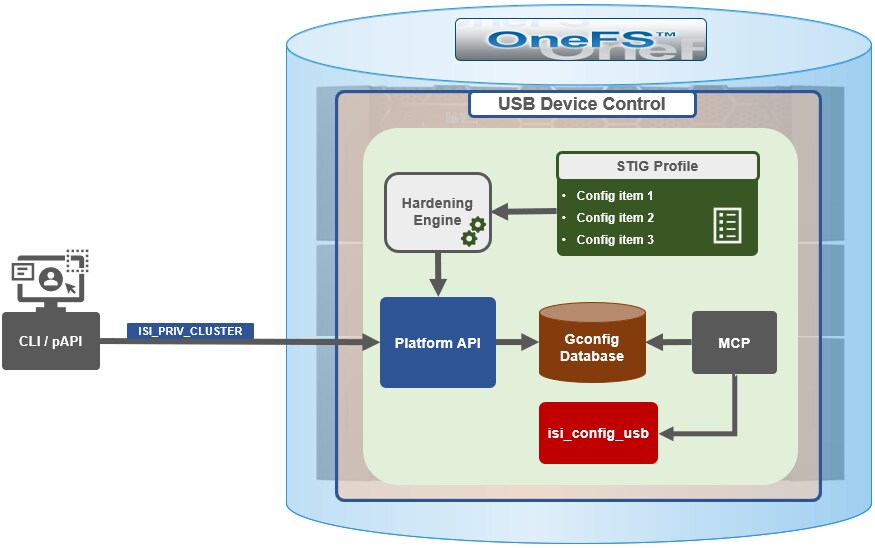
To facilitate this, OneFS 9.5 and subsequent releases see the addition of a new gconfig variable, ‘usb_ports_disabled’, in ‘security_config’, specifically to track the status of USB Ports on a cluster. On receiving an admin request either from the CLI or the platform API handler to disable the USB port, OneFS modifies the security config parameter in gconfig. For example:
# isi_gconfig -t security_config | grep -i usb
usb_ports_disabled (bool) = true
Under the hood, the MCP (master control process) daemon watches for any changes to the ‘isi_security.gcfg’ security config file on the cluster. If the value for the ‘usb_ports_disabled’ variable in the ‘isi_security.gcfg’ file is updated, then MCP executes the ‘isi_config_usb’ utility to enact the desired change. Note that because ‘isi_config_usb’ operates per-node but the MCP actions are global (executed cluster wide), isi_config_usb is invoked across each node by a Python script to enable or disable the cluster’s USB Ports.
The USB Ports enable/disable feature is only supported on PowerScale F900, F600, F200, H700/7000, and A300/3000 clusters running OneFS 9.5 and later, and PowerScale F710 and F210 running OneFS 9.7 or later.
In OneFS 9.5 and later, USB port control can be manually configured from either the CLI or platform API.
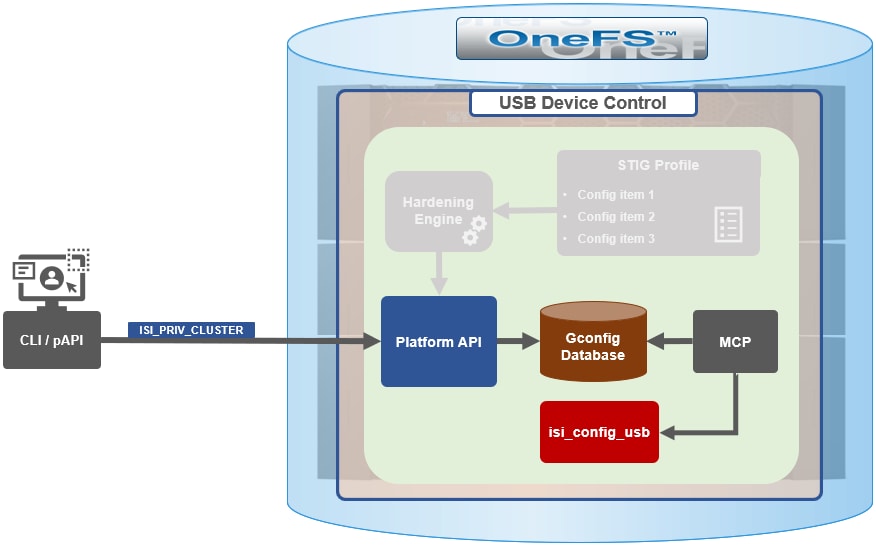
Note that there is no WebUI option at this time.
The following table lists the CLI and platform API configuration options for USB port control in OneFS 9.5 and later:
|
Action |
CLI Syntax |
Description |
|
View |
isi security settings view |
Report the state of a cluster’s USB ports. |
|
Enable |
isi security settings modify --usb-ports-disabled=False |
Activate a cluster’s USB ports. |
|
Disable |
isi security settings modify --usb-ports-disabled=True |
Disable a cluster’s USB ports. |
For example:
# isi security settings view | grep -i usb
      USB Ports Disabled: No
# isi security settings modify --usb-ports-disabled=True
# isi security settings view | grep -i usb
      USB Ports Disabled: Yes
Similarly, to re-enable a cluster’s USB ports:
# isi security settings modify --usb-ports-disabled=False
# isi security settings view | grep -i usb
      USB Ports Disabled: No
Note that a user account with the OneFS ISI_PRIV_CLUSTER RBAC privilege is required to configure USB port changes on a cluster.
In addition to the ‘isi security settings’ CLI command, there is also a node-local CLI utility:
# whereis isi_config_usb
isi_config_usb: /usr/bin/isi_hwtools/isi_config_usb
As mentioned previously, ‘isi security settings’ acts globally on a cluster, using ‘isi_config_usb’ to effect its changes on each node.
Alternatively, cluster USB ports can also be enabled and disabled using the OneFS platform API with the following endpoints:
|
API |
Method |
Argument |
Output |
|
/16/security/settings |
GET |
No argument required. |
JSON object for security settings with USB ports setting. |
|
/16/security/settings |
PUT |
JSON object with boolean value for USB ports setting. |
None or Error. |
For example:
# curl -k -u <username>:<passwd> https://localhost:8080/platform/security/settings”

 {
 "settings" :
 {
 "fips_mode_enabled" : false,
 "restricted_shell_enabled" : false,
 "usb_ports_disabled" : true
 }
 }
In addition to manual configuration, the USB ports are automatically disabled if the STIG security hardening profile is applied to a cluster.
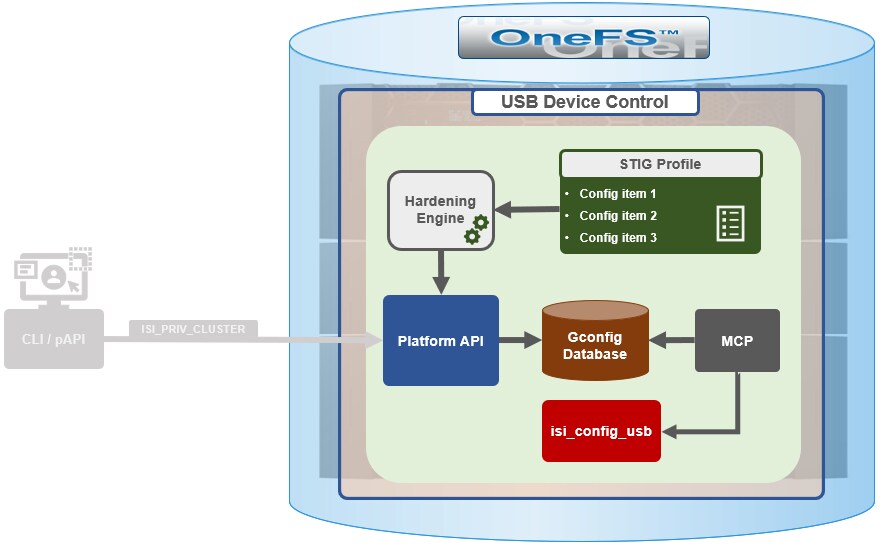
This is governed by the following section of XML code in the isi_hardening configuration file, which can be found at /etc/isi_hardening/profiles/isi_hardening.xml:
<CONFIG_ITEM id ="isi_usb_ports" version = "1">
              <PapiOperation>
                           <DO>
                                        <URI>/security/settings</URI>
                                        <BODY>{"usb_ports_disabled": true}</BODY>
                                        <KEY>settings</KEY>
                           </DO>
                           <UNDO>
                                        <URI>/security/settings</URI>
                                        <BODY>{"usb_ports_disabled": false}</BODY>
                                        <KEY>settings</KEY>
                           </UNDO>
                           <ACTION_SCOPE>CLUSTER</ACTION_SCOPE>
                           <IGNORE>FALSE</IGNORE>
              </PapiOperation>
 </CONFIG_ITEM>
The ‘isi_config_usb’ CLI utility can be used to display the USB port status on a subset of nodes. For example:
# isi_config_usb --nodes 1-10 --mode display
    Node   |   Current  |  Pending
-----------------------------------
    TME-9  |   UNSUP    | INFO: This platform is not supported to run this script.
    TME-8  |   UNSUP    | INFO: This platform is not supported to run this script.
    TME-1  |     On     |
    TME-3  |     On     |
    TME-2  |     On     |
   TME-10  |     On     |
    TME-7  |   AllOn    |
    TME-5  |   AllOn    |
    TME-6  |   AllOn    |
Unable to connect: TME-4
Note: In addition to port status, the output identifies any nodes that do not support USB port control (nodes 8 and 9 above) or that are unreachable (node 4 above).
When investigating or troubleshooting issues with USB port control, the following log files are the first places to check:
|
Log file |
Description |
|
/var/log/isi_papi_d.log |
Will log any requests to enable or disable USB ports. |
|
/var/log/isi_config_usb.log |
Logs activity from the isi_config_usb script execution. |
|
/var/log/isi_mcp |
Logs activity related to MCP actions on invoking the API. |
Author: Nick Trimbee