OneFS Snapshot Security
In this era of elevated cyber-crime and data security threats, there is increasing demand for immutable, tamper-proof snapshots. Often this need arises as part of a broader security mandate, ideally proactively, but oftentimes as a response to a security incident. OneFS addresses this requirement in the following ways:
|
On-cluster |
Off-cluster |
|
|
Read-only snapshots
At its core, OneFS SnapshotIQ generates read-only, point-in-time, space efficient copies of a defined subset of a cluster’s data.
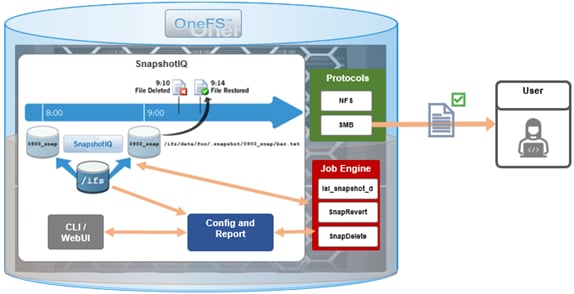
Only the changed blocks of a file are stored when updating OneFS snapshots, ensuring efficient storage utilization. They are also highly scalable and typically take less than a second to create, while generating little performance overhead. As such, the RPO (recovery point objective) and RTO (recovery time objective) of a OneFS snapshot can be very small and highly flexible, with the use of rich policies and schedules.
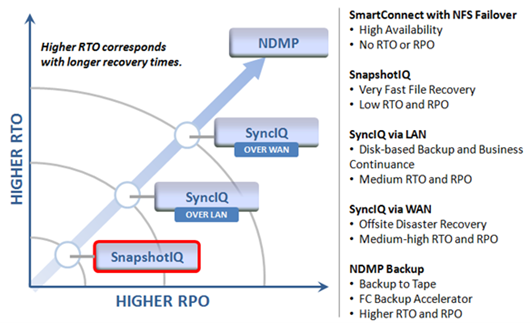
OneFS Snapshots are created manually, on a schedule, or automatically generated by OneFS to facilitate system operations. But whatever the generation method, when a snapshot has been taken, its contents cannot be manually altered.
Snapshot Locks
In addition to snapshot contents immutability, for an enhanced level of tamper-proofing, SnapshotIQ also provides the ability to lock snapshots with the ‘isi snapshot locks’ CLI syntax. This prevents snapshots from being accidentally or unintentionally deleted.
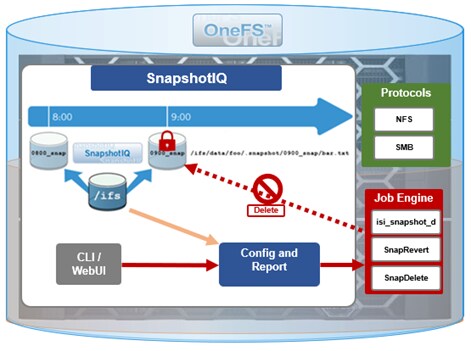
For example, a manual snapshot, ‘snaploc1’ is taken of /ifs/test:
# isi snapshot snapshots create /ifs/test --name snaploc1
# isi snapshot snapshots list | grep snaploc1
79188 snaploc1                                     /ifs/test
A lock is then placed on it (in this case lock ID=1):
# isi snapshot locks create snaplock1
# isi snapshot locks list snaploc1
ID
----
1
----
Total: 1
Attempts to delete the snapshot fail because the lock prevents its removal:
# isi snapshot snapshots delete snaploc1
Are you sure? (yes/[no]): yes
Snapshot "snaploc1" can't be deleted because it is locked
The CLI command ‘isi snapshot locks delete <lock_ID>’ can be used to clear existing snapshot locks, if desired. For example, to remove the only lock (ID=1) from snapshot ‘snaploc1’:
# isi snapshot locks list snaploc1
ID
----
1
----
Total: 1
# isi snapshot locks delete snaploc1 1
Are you sure you want to delete snapshot lock 1 from snaploc1? (yes/[no]): yes
# isi snap locks view snaploc1 1
No such lock
When the lock is removed, the snapshot can then be deleted:
# isi snapshot snapshots delete snaploc1
Are you sure? (yes/[no]): yes
# isi snapshot snapshots list| grep -i snaploc1 | wc -l
       0
Note that a snapshot can have up to a maximum of sixteen locks on it at any time. Also, lock numbers are continually incremented and not recycled upon deletion.
Like snapshot expiration, snapshot locks can also have an expiration time configured. For example, to set a lock on snapshot ‘snaploc1’ that expires at 1am on April 1st, 2024:
# isi snap lock create snaploc1 --expires '2024-04-01T01:00:00'
# isi snap lock list snaploc1
ID
----
36
----
Total: 1
# isi snap lock view snaploc1 33
     ID: 36
Comment:
Expires: 2024-04-01T01:00:00
  Count: 1
Note that if the duration period of a particular snapshot lock expires but others remain, OneFS will not delete that snapshot until all the locks on it have been deleted or expired.
The following table provides an example snapshot expiration schedule, with monthly locked snapshots to prevent deletion:
|
Snapshot Frequency |
Snapshot Time |
Snapshot Expiration |
Max Retained Snapshots |
|
Every other hour |
Start at 12:00AM End at 11:59AM |
1 day |
27 |
|
Every day |
At 12:00AM |
1 week |
|
|
Every week |
Saturday at 12:00AM |
1 month |
|
|
Every month |
First Saturday of month at 12:00AM |
Locked |
Roles-based Access Control
Read-only snapshots plus locks present physically secure snapshots on a cluster. However, if you can login to the cluster and have the required elevated administrator privileges to do so, you can still remove locks and/or delete snapshots.
Because data security threats come from inside an environment as well as out, such as from a disgruntled IT employee or other internal bad actor, another key to a robust security profile is to constrain the use of all-powerful ‘root’, ‘administrator’, and ‘sudo’ accounts as much as possible. Instead, of granting cluster admins full rights, a preferred security best practice is to leverage the comprehensive authentication, authorization, and accounting framework that OneFS natively provides.
OneFS role-based access control (RBAC) can be used to explicitly limit who has access to manage and delete snapshots. This granular control allows you to craft administrative roles that can create and manage snapshot schedules, but prevent their unlocking and/or deletion. Similarly, lock removal and snapshot deletion can be isolated to a specific security role (or to root only).
A cluster security administrator selects the desired access zone, creates a zone-aware role within it, assigns privileges, and then assigns members.

For example, from the WebUI under Access > Membership and roles > Roles:
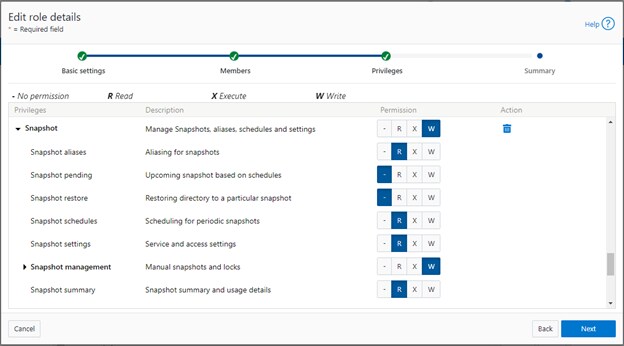
When these members access the cluster through the WebUI, PlatformAPI, or CLI, they inherit their assigned privileges.
The specific privileges that can be used to segment OneFS snapshot management include:
|
Privilege |
Description |
|
ISI_PRIV_SNAPSHOT_ALIAS |
Aliasing for snapshots |
|
ISI_PRIV_SNAPSHOT_LOCKS |
Locking of snapshots from deletion |
|
ISI_PRIV_SNAPSHOT_PENDING |
Upcoming snapshot based on schedules |
|
ISI_PRIV_SNAPSHOT_RESTORE |
Restoring directory to a particular snapshot |
|
ISI_PRIV_SNAPSHOT_SCHEDULES |
Scheduling for periodic snapshots |
|
ISI_PRIV_SNAPSHOT_SETTING |
Service and access settings |
|
ISI_PRIV_SNAPSHOT_SNAPSHOTMANAGEMENT |
Manual snapshots and locks |
|
ISI_PRIV_SNAPSHOT_SNAPSHOT_SUMMARY |
Snapshot summary and usage details |
Each privilege can be assigned one of four permission levels for a role, including:
|
Permission Indicator |
Description |
|
– |
No permission |
|
R |
Read-only permission |
|
X |
Execute permission |
|
W |
Write permission |
The ability for a user to delete a snapshot is governed by the ‘ISI_PRIV_SNAPSHOT_SNAPSHOTMANAGEMENT’ privilege. Similarly, the ‘ISI_PRIV_SNAPSHOT_LOCKS’ privilege governs lock creation and removal.
In the following example, the ‘snap’ role has ‘read’ rights for the ‘ISI_PRIV_SNAPSHOT_LOCKS’ privilege, allowing a user associated with this role to view snapshot locks:
# isi auth roles view snap | grep -I -A 1 locks
             ID: ISI_PRIV_SNAPSHOT_LOCKS
     Permission: r
--
# isi snapshot locks list snaploc1
ID
----
1
----
Total: 1
However, attempts to remove the lock ‘ID 1’ from the ‘snaploc1’ snapshot fail without write privileges:
# isi snapshot locks delete snaploc1 1
Privilege check failed. The following write privilege is required: Snapshot locks (ISI_PRIV_SNAPSHOT_LOCKS)
Write privileges are added to ‘ISI_PRIV_SNAPSHOT_LOCKS’ in the ‘’snaploc1’ role:
# isi auth roles modify snap –-add-priv-write ISI_PRIV_SNAPSHOT_LOCKS
# isi auth roles view snap | grep -I -A 1 locks
             ID: ISI_PRIV_SNAPSHOT_LOCKS
     Permission: w
--
This allows the lock ‘ID 1’ to be successfully deleted from the ‘snaploc1’ snapshot:
# isi snapshot locks delete snaploc1 1
Are you sure you want to delete snapshot lock 1 from snaploc1? (yes/[no]): yes
# isi snap locks view snaploc1 1
No such lock
Using OneFS RBAC, an enhanced security approach for a site could be to create three OneFS roles on a cluster, each with an increasing realm of trust:
1. First, an IT ops/helpdesk role with ‘read’ access to the snapshot attributes would permit monitoring and troubleshooting, but no changes:
|
Snapshot Privilege |
Description |
|
ISI_PRIV_SNAPSHOT_ALIAS |
Read |
|
ISI_PRIV_SNAPSHOT_LOCKS |
Read |
|
ISI_PRIV_SNAPSHOT_PENDING |
Read |
|
ISI_PRIV_SNAPSHOT_RESTORE |
Read |
|
ISI_PRIV_SNAPSHOT_SCHEDULES |
Read |
|
ISI_PRIV_SNAPSHOT_SETTING |
Read |
|
ISI_PRIV_SNAPSHOT_SNAPSHOTMANAGEMENT |
Read |
|
ISI_PRIV_SNAPSHOT_SNAPSHOT_SUMMARY |
Read |
2. Next, a cluster admin role, with ‘read’ privileges for ‘ISI_PRIV_SNAPSHOT_LOCKS’ and ‘ISI_PRIV_SNAPSHOT_SNAPSHOTMANAGEMENT’ would prevent snapshot and lock deletion, but provide ‘write’ access for schedule configuration, restores, and so on.
|
Snapshot Privilege |
Description |
|
ISI_PRIV_SNAPSHOT_ALIAS |
Write |
|
ISI_PRIV_SNAPSHOT_LOCKS |
Read |
|
ISI_PRIV_SNAPSHOT_PENDING |
Write |
|
ISI_PRIV_SNAPSHOT_RESTORE |
Write |
|
ISI_PRIV_SNAPSHOT_SCHEDULES |
Write |
|
ISI_PRIV_SNAPSHOT_SETTING |
Write |
|
ISI_PRIV_SNAPSHOT_SNAPSHOTMANAGEMENT |
Read |
|
ISI_PRIV_SNAPSHOT_SNAPSHOT_SUMMARY |
Write |
3. Finally, a cluster security admin role (root equivalence) would provide full snapshot configuration and management, lock control, and deletion rights:
|
Snapshot Privilege |
Description |
|
ISI_PRIV_SNAPSHOT_ALIAS |
Write |
|
ISI_PRIV_SNAPSHOT_LOCKS |
Write |
|
ISI_PRIV_SNAPSHOT_PENDING |
Write |
|
ISI_PRIV_SNAPSHOT_RESTORE |
Write |
|
ISI_PRIV_SNAPSHOT_SCHEDULES |
Write |
|
ISI_PRIV_SNAPSHOT_SETTING |
Write |
|
ISI_PRIV_SNAPSHOT_SNAPSHOTMANAGEMENT |
Write |
|
ISI_PRIV_SNAPSHOT_SNAPSHOT_SUMMARY |
Write |
Note that when configuring OneFS RBAC, remember to remove the ‘ISI_PRIV_AUTH’ and ‘ISI_PRIV_ROLE’ privilege from all but the most trusted administrators.
Additionally, enterprise security management tools such as CyberArk can also be incorporated to manage authentication and access control holistically across an environment. These can be configured to frequently change passwords on trusted accounts (that is, every hour or so), require multi-Level approvals prior to retrieving passwords, and track and audit password requests and trends.
While this article focuses exclusively on OneFS snapshots, the expanded use of RBAC granular privileges for enhanced security is germane to most key areas of cluster management and data protection, such as SyncIQ replication, and so on.
Snapshot replication
In addition to using snapshots for its own checkpointing system, SyncIQ, the OneFS data replication engine, supports snapshot replication to a target cluster.
OneFS SyncIQ replication policies contain an option for triggering a replication policy when a snapshot of the source directory is completed. Additionally, at the onset of a new policy configuration, when the “Whenever a Snapshot of the Source Directory is Taken” option is selected, a checkbox appears to enable any existing snapshots in the source directory to be replicated. More information is available in this SyncIQ paper.
Cyber-vaulting
File data is arguably the most difficult to protect, because:
- It is the only type of data where potentially all employees have a direct connection to the storage (with the other type of storage it’s through an application)
- File data is linked (or mounted) to the operating system of the client. This means that it’s sufficient to gain file access to the OS to get access to potentially critical data.
- Users are the largest breach points.
The Cyber Security Framework (CSF) from the National Institute of Standards and Technology (NIST) categorizes the threat through recovery process:

Within the ‘Protect’ phase, there are two core aspects:
- Applying all the core protection features available on the OneFS platform, namely:
|
Feature |
Description |
|
Access control |
Where the core data protection functions are being executed. Assess who actually needs write access. |
|
Immutability |
Having immutable snapshots, replica versions, and so on. Augmenting backup strategy with an archiving strategy with SmartLock WORM. |
|
Encryption |
Encrypting both data in-flight and data at rest. |
|
Anti-virus |
Integrating with anti-virus/anti-malware protection that does content inspection. |
|
Security advisories |
Dell Security Advisories (DSA) inform customers about fixes to common vulnerabilities and exposures. |
- Data isolation provides a last resort copy of business critical data, and can be achieved by using an air gap to isolate the cyber vault copy of the data. The vault copy is logically separated from the production copy of the data. Data syncing happens only intermittently by closing the air gap after ensuring that there are no known issues.
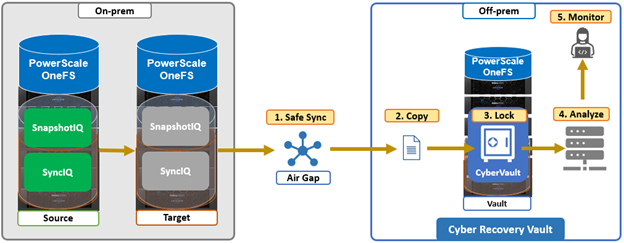
The combination of OneFS snapshots and SyncIQ replication allows for granular data recovery. This means that only the affected files are recovered, while the most recent changes are preserved for the unaffected data. While an on-prem air-gapped cyber vault can still provide secure network isolation, in the event of an attack, the ability to failover to a fully operational ‘clean slate’ remote site provides additional security and peace of mind.
We’ll explore PowerScale cyber protection and recovery in more depth in a future article.
Author: Nick Trimbee