Oracle RAC and PowerFlex Asynchronous Replication

Oct 20, 2026
Oracle RAC and PowerFlex Asynchronous Replication This whitepaper describes how best to implement Oracle Real Application Clusters with Dell EMC PowerFlex asynchronous replication feature for reliable high availability and business continuity.

Executive Summary

Executive Summary

Enterprise Organizations face many challenges today which includes ever-increasing SLAs, lower downtime, and the ability for application or business owners to quickly recover application to a disaster recovery site with minimal data loss for business continuity. Many customers running large enterprise databases have a compliance requirement for disaster recovery.

Dell EMC PowerFlex provides asynchronous storage-consistent remote replication that caters to the needs of disaster recovery, providing the ability to restart Oracle database instances with small data loss after unplanned outages of the local site.

In addition to disaster protection, PowerFlex replication also allows the creation of remote snapshots. These snapshots can be used to instantiate restartable Oracle database instances for purposes such as test, development, and reporting. They can also be used to offload backups from the local site to the remote site when archive logs are also replicated.

Many organizations require the ability to periodically test their disaster recovery strategy. PowerFlex replication Test Failover feature allows such testing to take place without interruption of the local site protection. A remote snapshot is automatically taken and mapped to the remote replication volumes. This allows the organization to test their strategy at the remote site, even while production database replication continues undisturbed. When the test is complete, the remote device mapping is automatically restored, and the snapshot is discarded.

By using PowerFlex consistent replication, not only the Oracle database, whether it is a single instance or cluster, can be protected, but also the replication can include any external data, message queues, and/or other databases with dependencies on each other. Such Enterprise consistency solution protects all these related applications from a disaster, allowing the business to resume operations much faster at the remote site, instead of trying to coordinate a point of consistency between applications if they were using native, independent replications, each failing at slightly different time.

This paper provides best practices and deployment examples of using Oracle RAC database with PowerFlex asynchronous replication.

Introduction

Revisions

Date

Description

May 2021

Initial Release

We value your feedback

Dell Technologies and the authors of this document welcome your feedback on the solution and the solution documentation. Contact the Dell Technologies Solutions team by email. 

Author: Harsha Yadappanavar

Contributors: Yaron Dar

Note: For links to additional documentation for this solution, see PowerFlex Introduction to replication.

Objective

The purpose of this white paper is to provide best practices for business continuity and disaster recovery of Oracle RAC database using Dell EMC PowerFlex asynchronous replication.

Audience

This white paper is intended for Oracle database administrators, system administrators, architects, and technical administrators of IT environments, and anyone else who is interested in understanding the disaster recovery capability of PowerFlex.

The readers of this document are expected to have basic knowledge of PowerFlex, VMware vSphere technologies, Oracle database technologies, and should be familiar with storage, compute, networking technologies and topologies.

Terminology

Table 1.              Terms and definitions

Term

Definition

RAC

Real Application Clusters

DR site

Disaster Recovery site

HCI

Hyperconverged Infrastructure

MDM

Meta Data Manager

SDS

Storage Data Server

SDR

Storage Data Replicator

SDC

Storage Data Client

OS

Operating System

Source domain

Primary cluster

Target domain

Secondary cluster

MG

Medium Granularity

FG

Fine Granularity

Product overview

PowerFlex family

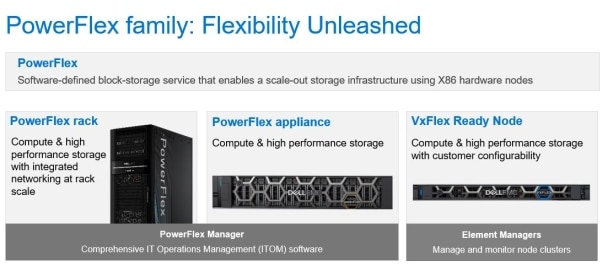
PowerFlex is a software-defined storage platform designed to significantly reduce operational and infrastructure complexity, empowering organizations to move faster by delivering flexibility, elasticity, and simplicity with predictable performance and resiliency at scale. The PowerFlex family provides a foundation that combines compute as well as high performance storage resources in a managed unified fabric. PowerFlex comes in flexible deployment options - rack, appliance, or ready nodes-that enables disaggregated (two-layer), HCI (single-layer), or mixed architectures. PowerFlex is ideal for high performance applications and databases, building an agile private cloud, or consolidating resources in heterogeneous environments.
A screenshot of a cell phone

Description automatically generated

Figure 1.              PowerFlex family

PowerFlex software components

Software is the key differentiation and the “secret sauce” in the PowerFlex offering. PowerFlex software components not only provide software-defined storage services, they also help simplify infrastructure management and orchestration with comprehensive ITOM and LCM capabilities that span compute as well as storage infrastructure, from BIOS and Firmware to nodes, software, and networking.

The core foundational component in the PowerFlex family that enables Software Defined Storage (SDS) services is called PowerFlex, to represent the core value it enables for the platform. Also, PowerFlex Manager is a comprehensive IT Operational Management (ITOM) and Life Cycle Management (LCM) tool that drastically simplifies management and ongoing operation.

PowerFlex

PowerFlex (previously VxFlex OS) is the software foundation of PowerFlex software-defined storage. It is a scale-out block storage service designed to deliver flexibility, elasticity, and simplicity with predictable high performance and resiliency at scale.

PowerFlex Manager

PowerFlex Manager is the software component in PowerFlex family that enables ITOM automation and life cycle management capabilities for PowerFlex systems.

PowerFlex consumption options

PowerFlex SDS platform is available in multiple consumption options to help customers meet their project and data center requirements. PowerFlex appliance and PowerFlex rack provide customers comprehensive IT Operations Management (ITOM) and life cycle management (LCM) of the entire infrastructure stack in addition to sophisticated high-performance, scalable, resilient storage services. PowerFlex appliance and PowerFlex rack are the two preferred and proactively marketed consumption options. PowerFlex is also available on VxFlex Ready Nodes without the ITOM and LCM capabilities.

Note: The brand for Ready Nodes continues to be VxFlex.

PowerFlex rack

PowerFlex rack is a software-defined storage platform designed to deliver flexibility, elasticity, and simplicity with predictable performance and resiliency at scale by combining compute as well as high performance storage resources in a managed unified network. This rack-scale engineered system, with integrated networking, enables customers to achieve the scalability and management requirements of a modern data center.

PowerFlex appliance

PowerFlex appliance is a software-defined storage platform designed to deliver flexibility, elasticity, and simplicity with predictable performance and resiliency at scale by combining compute as well as high performance storage resources in a managed unified network. This turnkey offer allows customers the flexibility and savings to bring their own compatible networking. With PowerFlex, customers deploy to match their initial needs and easily expand with massive scale potential, without having to compromise on performance and resiliency.

VxFlex Ready nodes

VxFlex Ready Nodes are validated server building blocks configured for use with PowerFlex. They are available with thousands of configuration options and are available for customers who prefer to build their own environments.

PowerFlex deployment architectures

PowerFlex software-defined storage offers flexibility of deployment architecture to help best meet the specific deployment and architectural requirements. PowerFlex can be deployed in a two-layer (Server SAN), single-layer (HCI), or in storage-only architectures.

Two-layer architecture

In a two-layer architecture, nodes that provide storage capacity and host datasets are separated from nodes that host applications and workloads. PowerFlex manager provides LCM and IOTM for the entire infrastructure, including nodes that provide storage and nodes that host the applications. Compute and storage resources can be scaled by adding respective node to the cluster. This segregation of compute and storage resources can be helpful to minimize software licensing costs in certain situations. This architecture could be most suitable for hosting high-performance high-value databases and application workloads.

Single-layer (HCI) architecture

In this architecture, each node in the cluster contributes storage resources as well as hosts applications and workloads. This architecture allows you to scale your infrastructure uniformly and with a pre-defined building block that adds both storage and compute resources. PowerFlex Manager provides ITOM and LCM capabilities for the entire infrastructure. This architecture is most suitable for data center and workload consolidation.

Mixed architecture

Using PowerFlex storage-only nodes, a software-defined block storage environment is created that can be accessed and consumed by a number of applications and workloads that are hosted outside of the PowerFlex cluster. PowerFlex Manager provides LCM and ITOM for the storage infrastructure. This is a suitable architecture where the customer has existing compute infrastructure but needs high-performance SDS. This can be a starting point with the customer and may expand to a two-layer Server SAN deployment in the future as the external compute is migrated to PowerFlex.

PowerFlex asynchronous replication architecture

Introduction to replication

Replication Consistency Groups

Replication Consistency Groups (RCG), establish the attributes and behavior of the replication of one or more volume pairs. The replication consistency, or write-order fidelity, is maintained for the remote volumes in an RCG.

Before creating RCGs, the replication volumes must exist on both the source and target systems, and they must be of the same size. However, they are not required to reside in a storage pool of the same type (MG or FG), and are not required to have the same properties (such as thick, thin, compressed, or non-compressed). If volumes must be resized, the target volume should be expanded first to prevent disruption in replication.

Since consistency is maintained across volumes of an RCG, it is important to create the RCGs in such a way that they contain either the whole application, or independent components of the application. Example: Complete Oracle ASM disk groups.

For more information about RCG, see Replication consistency group.

RPO versus lag

The Recovery Point Objective (RPO) is the maximum acceptable data (in terms of time units), that would be lost in a disaster. RPO is a parameter set by the user, with a value from 30 seconds to 60 minutes. PowerFlex measures the replication lag against the RPO for compliance. While the RPO is set by the user, the replication lag represents the real-time information on how long it took for complete interval-journals (checkpoints) to arrive to the remote SDR, tracked independently for each RCG. Since each interval-journal represents a point of data consistency for that RCG, the lag represents in real-time the potential data loss in case of a disaster, while the RPO is measured against it for compliance.

More details about replication and its configuration and setup can be found at PowerFlex Introduction to replication.

Replication process

PowerFlex replication can be used to quickly resume operations remotely after disaster at the local site, to test data at a remote site, to create remote crash-consistent snapshots or to offload backup. PowerFlex has designed replication to allow a sub-minute RPO, reducing the data-loss to be as minimal as possible in the case of a disaster. Replication occurs between two PowerFlex systems, designated as peer systems, which are connected by WAN. PowerFlex achieves replication using newly introduced storage component called the Storage Data Replicator (SDR).

The role of the SDR is to proxy the I/O of replicated volumes between the SDC and the SDSs where data is ultimately stored. It splits write I/O, sending one copy to the SDS nodes in local system and another to a replication journal volume. As it sits between the SDS and SDC, from the point-of view of the SDS, the SDR appears and behaves as an SDC, that is to say, the SDR is sending incoming writes to the SDS and then receiving write acknowledgements from the SDS. Conversely, to the SDC, the SDR appears as, and behaves as, an SDS, to which writes can be sent.

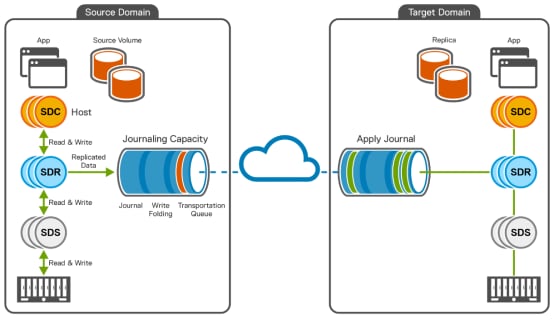
The following figure shows the architecture of PowerFlex asynchronous replication:
Diagram

Description automatically generated

Figure 2.              PowerFlex asynchronous replication between two PowerFlex systems

As shown in the figure, there are two PowerFlex clusters, namely the source domain and the target domain. Both systems are distributed using the network. Each cluster can act as a replication source and as a target. All application I/O of replicated volumes are processed by the source SDRs. The source SDC, sends the write I/O traffic to the SDR. The SDR then splits the I/O and forwards it to both the local SDS and the replication journal volume. The local multiple SDS process these write I/O normally, while the SDR assembles the journal data into checkpoints that each represent a point of consistency preserving the write order fidelity. Write I/O traffic of non-replicated volumes passes directly from SDC to SDS. The journal is a component of the SDR which stores data at source before it is sent to the target and at the target, journal stores the data before it is applied to target volumes.

On the source system, journals are accumulated in journal-intervals, or checkpoints. At the end of the collection interval, the checkpoint is closed, and a new journal-interval opens (a new checkpoint). As they near the head for the queue, the journal-intervals are scanned, and writes to the same blocks are consolidated (a process called write folding) to minimize the amount of data sent. These journal-intervals are then sent continuously to the remote system’s target journal buffer over dedicated networks assigned to replication.

On the target system, the journal-intervals are processed by the SDRs residing in the target system. Once all the data for a journal-interval (checkpoint) is received, the data is applied to the target volume by the relevant SDS. After all writes to target volume complete by remote SDS, the SDS will then send acknowledgment back to the SDR, which will then proceed to send the next complete journal-interval.

Basic concepts

Oracle restart versus recovery solutions

Oracle distinguishes between a restartable and a recoverable state of the database, that correlates to a restart and recovery solutions respectively.

A restartable state requires all redo logs, data, and control files to be consistent with each other. There is no use of archive logs in a restartable solution. When the Oracle database starts and the database files are consistent (in a restartable state), it automatically goes through crash/instance recovery without user intervention. During that process, the database engine re-applies committed transactions using the redo log files and removes uncommitted transactions using the undo log files. At the end of the process the database opens, ready for transactions. The data in the database after it opens from a restartable state represents the exact point in time when the restartable state was created, be it a power-failure, a storage consistent snapshot, or the point in time when consistent storage replication stopped replicating data.

A recoverable state of the database relies on a manual process called media recovery in which archive logs are applied to an older version of the datafiles. That older version is referred to as a database backup copy and is typically created using Oracle Recovery Manager (RMAN) or a storage snapshot taken while the database is quiesced (Oracle ‘hot-backup’ mode). That image only contains the Oracle datafiles.

Except for a cold backup, where the database is shutdown first, a recoverable state is created while the database is open, and therefore, the datafiles are in a ‘fuzzy’, or inconsistent state. During media recovery, the archive logs are applied to the datafiles from the last point of the datafiles consistency (the last complete database checkpoint), and until all the datafiles are consistent again. Additional archive logs can be applied to bring the database closer to the present time, where if the online redo logs are available, they can also be applied to provide a no-data-loss solution.

Note: Oracle restart solution does not require archive logs and recovery solution does. Oracle restart solution opens the database to the point in time when the restartable state was created and recovery solution applies available logs to bring the database forward in time, up to a possible no-loss of all committed transactions. However, Oracle restart solution requires the data, control, and redo logs files, while a recovery solution requires an older version of just the datafiles, together with more recent archive logs and optionally redo logs.

Oracle Storage Snapshot Optimization

Starting with Oracle 12c, Oracle does not require the database to be quiesced (placed in hot-backup mode) to create a recoverable state. This capability is called Storage Snapshot Optimization. To use it, Oracle requires that a snapshot of a live database is created using a consistent storage snapshot, and that the snapshot time is known. During media recovery, the snapshot creation time is provided, and the recovery process will ensure that the archive logs are applied from a database checkpoint prior to the snapshot and until the datafiles regained consistency (no longer ‘fuzzy’), with the ability to continue and apply additional archive or redo logs as available.

This feature is very important because it means that you can take consistent snapshots in short intervals and each such snapshot is a valid database backup that can be used to recover the database if needed. It also means that Oracle hot-backup mode is not necessary, allowing us to be more aggressive in our backup (or snapshot) strategy for more granular database protection.

Create a snapshot for restart and recovery solutions

Knowing the differences between restartable and recoverable states, you can now create a storage-consistent snapshot that can serve both purposes. This is done by creating a consistent snapshot containing all the data, redo, and control files, thus satisfying the requirements for a restart solution. If that snapshot is used, Oracle performs crash/instance recovery and open the database.

However, the snapshot can also be used for a recovery solution. This is done by only using the datafiles, thus satisfying the requirement for recovery solution. The datafiles can be restored alone back to the production database, then use the archive and redo logs to perform media recovery. Or, mount the datafiles to a different server and use RMAN from there to create a backup image to Data Domain or another backup target.

In other words, by creating a consistent snapshot containing the database data, control, and redo log files, and with the ability to restore just the datafiles or all the files, snapshot can be used for both purposes.

Note: To use such a hybrid solution it is required to separate the Oracle data, redo, and archive logs from each other, such as to different ASM disk groups, or file systems. See the requirements section below.

PowerFlex consistent replication

Natively, PowerFlex replication forms a restart solution as the remote volumes are consistent with each other. It is therefore critical to include all database redo logs, data, and control files in a single Replication Consistency Group (RCG). In that way, if the replication stops, the target can be made read-writable, and the database will perform automatic crash/instance recovery. As explained earlier, the database at the target will open with data as-of the time when the restartable state was created. For PowerFlex replication, this is typically a few seconds behind the replication source, based on the replication lag.

Note: Typically, a planned failover scenario is different than unplanned because in a planned failover the database is first shutdown on the replication source, the replication synchronizes the latest changes, and then either a fail-over is performed (making the target read-writable), or switch-over (swapping the roles of the replication source and target). In either case, there is no loss of data because the database was shutdown first.

PowerFlex can take advantage of Oracle Storage Optimization feature to allow for a replication that is capable of both restart and recovery solutions. Natively, the PowerFlex replication creates a restart solution. By also replicating the archive logs to the target system in their own RCG, PowerFlex snapshots can be taken at the remote site and can be used for either restart or recovery solutions. The requirements for each such use case are explained in the next section.

Requirements

PowerFlex replication disaster restart solution

PowerFlex provides native asynchronous consistent replication for disaster restart solution. The following are required to satisfy such a solution:

  • All the database storage volumes containing the Oracle data, redo logs, and control files are aggregated into a single Replication Consistency Group (RCG).
  • The replication is in a consistent state.

The following are additional considerations and recommended best practices:

  • It is recommended that if Oracle ASM (Grid Infrastructure, or GI) is used, it is pre-installed at the target site. The reason is that if the Oracle ASM stack is already running at the target site, if a fail-over, switch-over, or remote snapshots are taken, then remote ASM disk groups can simply be mounted into the already running GI at the target site in a matter of seconds. This is true whether the database is clustered or not.
  • For restart solution alone, there is no specific need to separate the datafiles from redo logs or archive logs. They just need to be replicated in a single RCG.
  • Since archive logs are not part of a restart solution, there is no need to replicate the archive logs. However, if, after a replication fail-over or switch-over, the expectation is for the database to continue generating archive logs, either a matching space for the archive logs should exist at the target site, or, if the bandwidth allows it, it might be simpler to replicate the archive logs as well, so their remote space is accounted for. In that case, it is recommended to place them in their own RCG.
  • If Oracle flashback database feature is used, then Oracle generates a large amount of flashback logs into the Flash Recovery Area (FRA) space. In that case, due to the high capacity demand of the flashback logs, it is recommended to separate the archive logs to their own space (rather than mixing them with the flashback logs). To make use of the flashback database feature at the replication target site, the FRA must be consistent with the database datafiles and therefore included in the same RCG as the data, redo, and control files.
  • During active replication, the remote volumes are not accessible to the remote servers. To ensure the remote servers are aware of them, or even more importantly, to test the disaster restart strategy, it is recommended to use the PowerFlex Test Failover feature. This feature does not stop the replication. Instead, it automatically creates a remote snapshot and it maps to the same target volumes of the replication, making them read-writable. Therefore, one or more remote servers can discover the remote volume and disaster restart testing can be performed. When the Test Failover is finished, the snapshot is discarded.

By following these requirements and best practices, PowerFlex replication provides for an easy to use, comprehensive restart solution including a single Oracle (clustered, or single instance), multiple Oracle or using other databases.

PowerFlex asynchronous replication feature allows other databases, message queues, and external data, keeping all of them consistent.

PowerFlex replication remote instance creation

PowerFlex replication can be extended to create remote database instances for purposes such as to run database reports, create test and development environments, performance testing, and other such uses. This is done without disturbing the PowerFlex replication by using remote PowerFlex snapshots. PowerFlex snapshots are coordinated with PowerFlex asynchronous replication to ensure that the remote snapshot data is consistent. The following are required to satisfy such a solution:

  • Since all the database storage volumes containing the Oracle data, redo, and control files are already replicated as part of a single Replication Consistency Group (RCG), the only requirement is that the remote snapshot contains these same remote volumes, therefore satisfying the requirements for a restart solution.
  • Once the snapshot target volumes are mapped to a server, if ASM is used then the ASM disk groups are mounted, and if file systems are used then the file system are mounted. At this point, the database instance is simply restarted. It is important that media recovery is not performed, as the purpose of this snapshot is a restart and not recovery solution.

The following are additional considerations and recommended best practices:

  • It is recommended that if Oracle ASM (Grid Infrastructure, or GI) is used, it is pre-installed at the target site. The reason is that if the Oracle GI stack is already running at the target site, once the remote snapshot target volumes are mapped to a server, then their ASM disk groups can be mounted into the already running GI at the target site in a matter of seconds. This is true whether the database is clustered or not.
  • Before refreshing a snapshot, remember to shut down the remote instance and dismount the ASM disk groups (or file system). This prevents any remaining locks by the database if it was still open.
  • It is possible to mount multiple snapshots to a single server (or set of servers in the case of Oracle RAC). This requires a few extra steps, including renaming the ASM disk groups (or file system mount points), renaming the Oracle datafiles to match the new ASM disk groups (or file system mount points), and renaming the Oracle database ID and instance ID. While it can be easily executed and automated, the exact steps are not in the scope of this paper.

By following these requirements and best practices, PowerFlex replication can be used to create remote database instances for many purposes, including the creation of test, development, and reporting instances.

PowerFlex replication remote backups

PowerFlex replication can be extended to create remote database backups. These backup images can be mounted to a remote server and used by RMAN to perform a backup to Data Domain or other backup targets, recover a database image at the remote site, or replicated back to the source side to recover the production database at the replication source site. The creation of such backup images is done without disturbing the PowerFlex replication by using remote PowerFlex snapshots of both the database files and the archive logs in a specific order. The following are required to satisfy such a solution:

  • To allow for remote snapshots that can satisfy the requirement for a recovery solution, the database data, redo log, and archive log files need to be in separate ASM disk groups or file system mount points. The reason is that if the production redo logs survived a disaster and the administrator must restore the older datafiles image from the snapshot, they can be restored without overwriting the redo logs that survived. In addition, the archive logs snapshot is taken later than the datafiles snapshot and therefore requires the archive logs separated. For example, if ASM is used, the Oracle files should be in disk groups such as +DATA, +REDO, and +FRA for the datafiles, redo logs, and archive logs respectively.
  • The archive logs must be part of the PowerFlex replication so a remote snapshot of the archive logs can be taken. It is recommended to include the archive logs in their own RCG so there is no dependency between synchronization and replication of the database files, and the archive logs.
  • If flashback database feature is used, it is recommended to separate the archive logs from the flashback logs. This is because the flashback logs must be consistent with the datafiles and therefore included in the same RCG as the datafiles. Another reason is so there is no dependency between synchronization and replication of the database files (and flashback logs), and the archive logs.

The process of creating a remote snapshot in a recoverable state is important and must include the following steps:

  1. For Oracle databases earlier to release 12c, place the production database in hot-backup mode, for example, by running the following SQL command: alter database begin backup. For Oracle database of release 12c or higher there is no need for hot-backup mode due to Oracle Snapshot Optimization feature.
  2. Only if the database was placed in hot-backup mode, to ensure the begin hot-backup mode marker from the replication source has reached the target, perform the following PowerFlex CLI commands on the database RCG: sync_now_replication_consistency_group. The output is a key that you provide to the second command: query_sync_now_replication_consistency_group, providing the sync key and waiting for a successful response, before going to the next step.
  3. Create a remote snapshot. If the purpose of the remote snapshot is recovery solution alone, it should contain just the remote volumes with the replicated Oracle datafiles. If the purpose of the remote snapshot is to provide a hybrid solution, making it capable of both restart and recovery solutions, it should contain all data, control, and redo logs files (the same volumes as the database RCG).
  4. Only if hot-backup mode was used in the production database, perform the command to end hot-backup mode, for example, by performing the following SQL command: alter database end backup.
  5. In the production database, switch and archive the current redo logs. This is done to generate archive logs from a time after the datafiles snapshot was created. This is the minimum set of archive logs required to recover the database. If additional archive logs are available during recovery, they can be used as well, but this step ensures minimum necessary archive logs to provide enough recovery to the database so it can be opened. This step is done by performing the following SQL command in the production database: alter system archive log current.
  6. To ensure the archive logs from the replication source have reached the target, execute the following PowerFlex CLI commands on the archive logs RCG: sync_now_replication_consistency_group. The output is a key that you provide to the second command: query_sync_now_replication_consistency_group, providing the sync key and waiting for successful response, before continuing to the next step.
  7. Create a remote snapshot of the archive logs remote volumes.

The following are additional considerations and recommended best practices:

  • Since Oracle recovery is allowed if the database ID remains the same, whether local or remote snapshots are used to create backup images, it does not matter. The snapshot image contains the same Oracle database ID and therefore can be used to recover the production database, be it locally or remotely.
  • If the remote snapshot is used to allow RMAN to create a backup image and store it in Data Domain (or similar targets), it is important that the database is only mounted, or opened in read-only mode, but not in read/write mode. If the database is opened in read/write mode prior to RMAN backup the database will perform reset-logs, which invalidates it as a backup image. Therefore, just mount it, or open it in read-only mode. Either of these options is sufficient for RMAN to perform a backup.

By following these requirements, PowerFlex replication can be used to create remote backup images of the Oracle database. The two snapshots - the one with the datafiles, and the one with the archive logs - can be used to perform media recovery either at the remote site, or at the source (if the snapshot is restored and the data replicated back).

Solution architecture

Solution architecture

The following section provides an architecture overview and best practices to be followed in setting up of disaster recovery for Oracle RAC using PowerFlex asynchronous replication on a two-layer setup.

Logical architecture

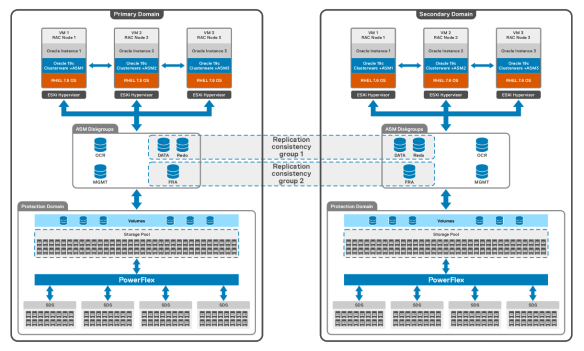
The following figure illustrates logical view of disaster recovery setup of two-layer using PowerFlex asynchronous replication feature.
A picture containing calendar

Description automatically generated

Figure 3.              Logical architecture

In the two-layer PowerFlex system, the SDC is installed on compute-only host, while the MDM, and SDS components are installed on back-end storage-only nodes. The SDS aggregates and serves raw local storage in each node and shares that storage as part of PowerFlex cluster. A single protection domain is carved out of drives on these SDS systems. A single storage pool is configured, and multiple volumes are carved out to meet the Oracle RAC ASM disk group database requirements including volumes for data, redo logging, voting disk, grid infrastructure management repository and flash recovery area. The volumes are mapped to compute-only nodes and later mapped to Oracle virtual machine.

Note: The solution was validated in engineering lab using two-layer PowerFlex system with VMware vSphere environment, but the reference architecture and the best practices demonstrated in this paper are applicable for both virtualized and bare metal configurations.

Network architecture

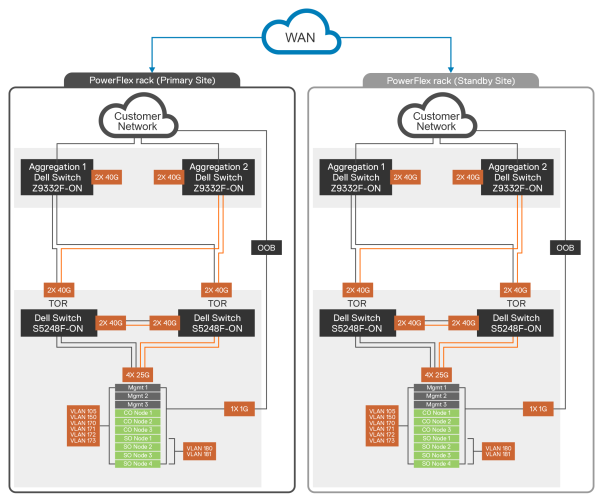
The following network diagram provides overview of PowerFlex rack for both source and target site using PowerFlex asynchronous replication.
A picture containing chart

Description automatically generated

Figure 4.              Network architecture

The following table contains the network details of PowerFlex rack:

Table 2.              PowerFlex networking details

Components

Description

Application Traffic

2 x 25 Gbps links

PowerFlex Storage Traffic

2 x 25 Gbps links

VLAN 105

Hypervisor Management

VLAN 150

PowerFlex Management

VLAN 170, 171, 172, 173

Data1 Network, Data2 Network, Data3 Network, Data4 Network

VLAN 180, 181

Replication Traffic Network

Oracle RAC configuration

Oracle RAC configuration

Oracle RAC configuration

General best practices

  • PowerFlex requires that the volumes should be of the same size in both source and target system, for volumes to participate in replication.
  • A Test Failover automatically creates a snapshot of the volumes which are part of the replication pairing on the target system and replaces the original target volumes mapping with mapping to the snapshot. The access mode of the volumes in the target system will be changed to read/write from read-only, thus enabling volumes to be mapped to an SDC connected to the target PowerFlex storage system.
  • Failover passes the ownership of volumes in an RCG from source to target system. Thus, whenever an RCG failover command is issued, the access mode of source volumes switches to read_only and the access mode of target volumes switches to read/write.
  • PowerFlex asynchronous replication also provides the snapshot feature which is essentially a snapshot of each volume which is part of an RCG in target system. This feature can be useful for remote testing of application or DR activity.
  • It is recommended to include DATA and REDO into a single RCG and make a separate RCG for archivelog.

Configuration overview

The steps below were followed in this configuration to setup Oracle RAC disaster recovery with PowerFlex asynchronous replication as described below:

  1. Create three VMs in both source and target PowerFlex clusters.
  1. Create the volumes that are required for ASM disk groups and map the volumes in both the source and target cluster.
  2. Create a replication consistency group (RCG), between the data, redolog, and flash recovery area volumes of both the source and target.
  3. Install Oracle 19c grid infrastructure and Oracle database 19c software in both source and target.
  4. Create Oracle database only on the source cluster. Since data and redolog are being replicated to target, the journals are replicated to the target cluster and a copy of the database can be brought up in target without any additional modifications.

Configuration procedure

Follow these steps to set up Oracle RAC disaster recovery with PowerFlex asynchronous replication:

  1. Create PowerFlex volumes to be used as ASM disk groups for Oracle RAC, in both the source and target PowerFlex systems.

Table 3.              Total number and size of PowerFlex volumes carved out of storage pool

ASM disk name

Source cluster

Target cluster

OCRVOTE

1 x 32 GB

1 x 32 GB

MGMT

1 x 40 GB

1 x 40 GB

DATA

6 x 200 GB

6 x 200 GB

REDO

4 x 152 GB

4 x 152 GB

FRA

4 x 600 GB

4 x 600 GB

  1. Creates two RCGs namely oracle_DATAREDO and oracle_FRA. Set the RPO for both RCGs to 30 s.

DOLL E MC PowerFIex 
CONFIGURATION 
protection Domai 
Fa Sets 
bdC•SOln 
Pools 
bdc-soln 
Replication: 
Showing 2 of 4 RCCs 
oracle_DATARED0 
oracle_FRA 
RCGS 
SYS 
adrnin 
v onr 
LAG 
Sec d_ 
second_ 
Volume 
Consiste_ 
Consiste_ 
protection in

Note: In this configuration, ocrvote and mgmt are not be part of replication. The grid infrastructure software will be running independently in both the source and target systems.

  1. Map the volumes created in both the source and target PowerFlex systems. Essentially, the volumes at the source system must be mapped to the SDCs connected to the source system, and all volumes at the target system to the target system SDCs.
  2. Create 3 VMs in both the source and target cluster and install RHEL 7.6 OS into each VM.
  3. Attach the volumes to each VM. The volume devices will then be visible to each VM.
  4. Configure PowerFlex volumes for ASM and Install Oracle 19c grid and Oracle 19c software in both source and target cluster.
  5. Create ASM disk groups for DATA, REDO, and FRA only on the source. Since the DATA, REDO, and FRA is configured for replication, the ASM header data is also replicated to target volumes.
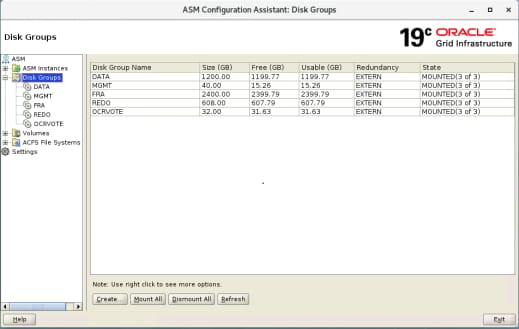
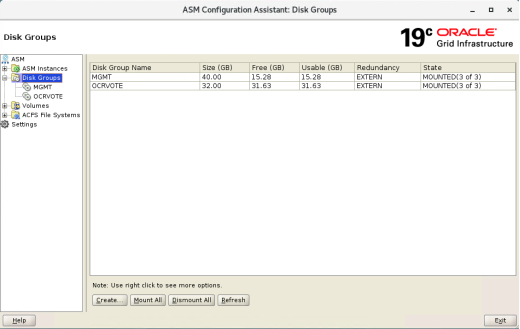
  1. Verify in target, the OCRVOTE, and MGMT disk group are active and up and running.
  1. Create RAC database on the source.

Test failover

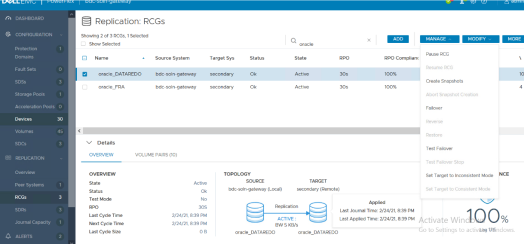
  1. Perform test failover to bring up database on the target.
DASHBOARD 
CONFIGURATION 
Domains 
Fault Sets 
Storage pools 
Acceleration Pools O 
Replication: RCGs 
Showing 2 Of 3 RCGs. I Selected 
LJ Show Selected 
ADD 
reg 
2/24/21.8 39 PM 
2/24/21, 839 
Target Sys 
secondary 
secondary 
TOPOLOGY 
t eway (Local) 
oracle 
secondary e) 
MANAGE 
Pause RCG 
MODIFY 
Sy Stem 
bdc-soln y 
b dc-soln•gateway 
v 
Name 
oracle_DATARED0 
oracle_FQA 
Details 
VOLUME PAIRS (10) 
RPO 
QCG 
Create Snapshots 
Abort Snapshot Creation 
Failcwer 
Aestore 
Test Failover 
Set Target to Inconsistent Mode 
Set Target to Consistent Mode 
MORE 
NCE 
REPLICATION 
Peer Systems 
Journal Capacity 
ALERTS 
Status 
Test Mode 
Last Cycle Time 
Next Cycle 
Last Cycle Size 
Replication 
BW S KB/s 
oracle 
_ DATAREDO 
oracle 
_ DATAREDO 
Last Journal Time: 2/24/21.8:39 PM 
100% 
LastApplied Time: 2/24/21.8:39PM Activate Wind 
Go to Settings to

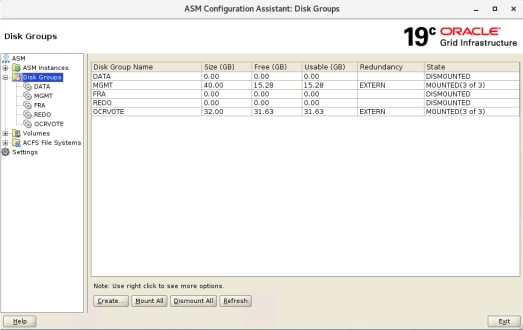
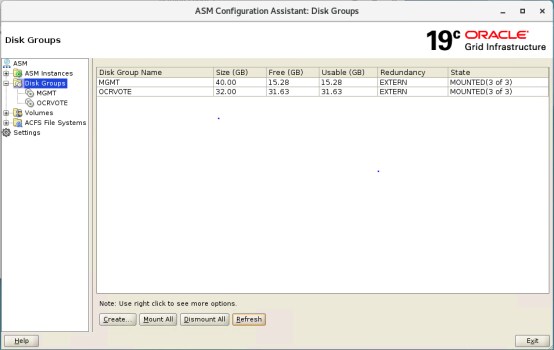
When a test failover is performed, the grid infrastructure on the target cluster can detect the ASM disks.

Note: The ASM disks is in dismounted state.
  1. Mount the devices, then register the database, before starting the database on the target.
  2. Target database is now ready to be used for other activities such as backup, reporting and so on.
  3. Go back to the initial state of replication from source to target:
    1. Stop database.
    2. Unmount DATA, REDO, and FRA ASM disk groups from the target.
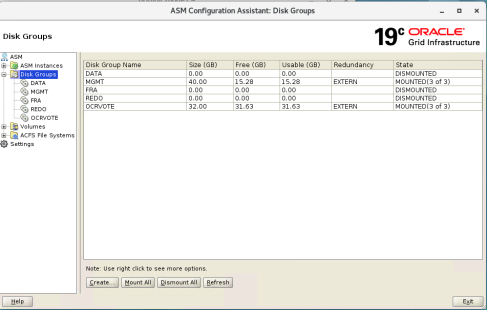
Machine generated alternative text:
ASM Configuration Assistant: Disk Groups 
Disk Groups 
ASM 
ASM Instances 
Disk Groups 
DATA 
MGMT 
REDO 
• OCRVOTE 
Volumes 
ACFS File Systems 
Settings 
Help 
Disk Group Name 
MGM 
REDO 
OCRVO 
Size (GB) 
0.00 
40.00 
0.00 
0.00 
32.00 
Free (GB) 
0.00 
15.28 
0.00 
0.00 
31.63 
Usable 
0.00 
15.28 
0.00 
0.00 
31.63 
Redundancy 
EXTERN 
EXTERN 
Grid Infrastructure 
State 
DISMOUNTED 
MOUNTED(3 of 3) 
DISMOUNTED 
DISMOUNTED 
MOUNTED(3 of 3) 
Note: Use right click to see more options 
Create 
Mount All 
Dismount All Refresh

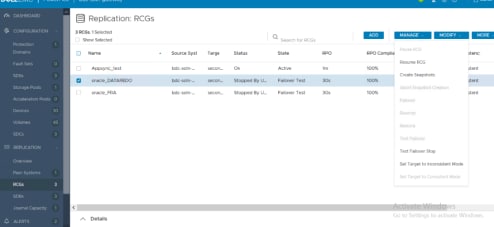
  1. Log in to PowerFlex presentation server UI and perform the ‘test failover stop’ from the selected RCG.
Machine generated alternative text:
DASHBOARD 
CONFIGURATION 
Protection 
Domains 
Fault Sets 
SDSs 
Storage Pools 
Acceleration Pools O 
Replication: 
3 RCGs, 1 Selected 
Cl Show Selected 
RCGs 
Source Syst 
bdc-soln 
bdc-soln 
bdc-soln 
Targe 
secon... 
secon... 
secon... 
Status 
Ok 
Stopped By U... 
Stopped By U... 
Search for RCGs 
State 
Active 
Failover Test 
Failover Test 
ADD 
RPO Complia 
100% 
100% 
100% 
MANAGE 
Pause RCG 
Resume RCG 
MODIFY 
El 
A 
Name 
Appsync_test 
RPO 
1m 
30s 
30s 
MORE 
;tenc 
stent 
stent 
stent 
oracle 
oracle 
Details 
DATAREDO 
Devices 
Volumes 
SDCs 
REPLICATION 
Overview 
Peer Systems 
RCGs 
SDRs 
Journal Capacity 
ALERTS 
30 
45 
Create Snapshots 
Abort Snapshot Creation 
Failover 
Restore 
Test Failover 
Test Failover Stop 
Set Target to Inconsistent Mode 
Set Target to Consistent Mode 
s 
Go to Settings to activate Windows.

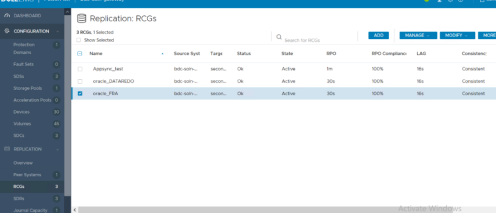
  1. Ensure that the RCG status displays as OK and state is ACTIVE after the test failover has stopped,
Machine generated alternative text:
DASHBOARD 
CONFIGURATION 
Protection 
Domains 
Fault Sets 
SDSs 
Storage Pools 
Replication: 
3 RCGs, 1 Selected 
Cl Show Selected 
RCGs 
ADD 
MANAGE 
MODIFY 
MORE 
El 
O 
Name 
Appsync_test 
oracle 
oracle 
DATAREDO 
Source Syst 
bdc-soln 
bdc-soln 
bdc-soln 
Targe 
secon... 
secon... 
secon... 
Status 
Ok 
Ok 
Ok 
Search for RCGs 
State 
Active 
Active 
Active 
RPO 
1m 
30s 
30s 
RPO Compliana 
100% 
100% 
100% 
LAG 
16s 
16s 
16s 
Acceleration Pools O 
Devices 
Volumes 
SDCs 
REPLICATION 
Overview 
Peer Systems 
RCGs 
SDRs 
Journal Capacity 
30 
45 
O 
Consistenc 
Consistent 
Consistent 
Consistent 
s

Result: The ASM disk groups DATA, REDO, and FRA on the target becomes read-only again and is not visible until the next failover/switchover from the source.
Failure scenarios

Failure scenarios

This section provides the use cases for disaster recovery.

Workload description

The in-house developed workload is essentially a consistency check workload between source and target. The workload is used to check for data consistency between source and target after a disaster and to check for lag between source and target. If this activity is a planned failover, the data on source can be noted down and can be verified on the target after failover.

Scenario 1: Planned test failover

This scenario is useful in situations such as to offload from source domain site for use cases such as RMAN backup, reporting, and test/dev setup.

  1. Start the workload.

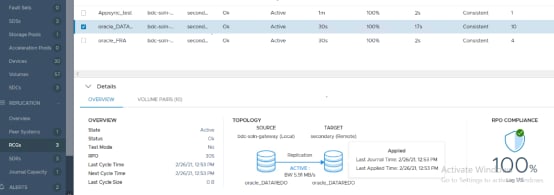
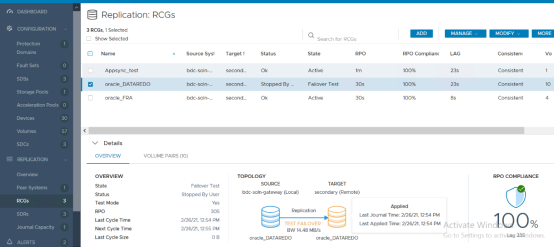
  1. Log in to the PowerFlex presentation server UI on the source system. From the RCG screen, select the Replication RCG that you want to test and choose the Test Failover menu option.
DASHBOARD 
CONFIGURATION 
Domains 
Fault Sets 
Storage Pools 
Replication: 
3 RCGs, 1 selected 
Show Selected 
Name 
Appsy•n c_test 
oracle_DATARED0 
oracle_FRA 
RCGs 
Source Sys" 
bdc•soln•— 
bdc-soln-_ 
Target 
Status 
Stopped By 
Search for QCGs 
Failcwer Test 
Active 
secondary (Remote) 
Aaa 
RPO Complian« 
100% 
100% 
Applied 
Last Journal Time 2/26/21.12:54 PM 
MANAGE 
LAG 
MODIFY 
Consistent 
Consistent 
Consistent 
Consistent 
MORE 
o 
A Pools O 
o 
QEPUCATION 
Peer Systems 
Journal Capacity 
v Details 
OVERVIEW 
Test 
Last Cycle 
Next Cycle Time 
Last Cycle Size 
VOLUME PAIRS (10) 
TOPOLOGY 
Failover Test 
bdc- soln-gateway (Local) 
Stopped By user 
2/26/21, 12:54 PM 
2/26/21.12 55 PM 
Replication 
TEST 
aw 14.48 MB,'s 
oracle_DATARED0 
oracle_DATARED0 
RPO COMPLIANCE 
TOO% 
Activate Wind 
Go to Settings to activLag 23Sndows

  1. The workload data is still being generated on the source system. The database running on the source cluster is not affected and continues to be up and running. Journals are still getting transferred from the source system to the target system.
  2. Start the database on the target.
  3. Verify that there is a lag of whatever time the RPO is set between source and target.

RMAN validate and dbverify

RMAN validate and dbverify was run and ensured that there was no block corruption in the tablespaces and datafiles in the target setup.

Scenario 2: Complete failover and reverse replication

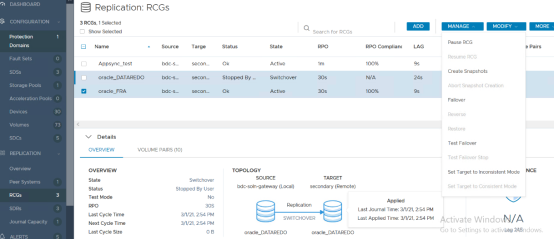
PowerFlex also provides users with the option of complete failover so that target cluster becomes the new source and the original source becomes the new target. PowerFlex also has the option to reverse replication from new source to new target.
Steps are as provided below:

  1. Start the workload.
  2. From PowerFlex presentation UI, select the RCG for the Oracle database and choose to 'Failover' the RCG from the menu.
Machine generated alternative text:
DASHBOARD 
CONFIGURATION 
Protection 
Domains 
Fault Sets 
SDSs 
Storage Pools 
Replication: 
3 RCGs, 1 Selected 
Cl Show Selected 
RCGs 
Source 
bdc s 
bdc-s 
bdc-s 
Targe 
secon... 
secon... 
secon... 
Status 
Ok 
Stopped By 
Ok 
TOPOLOGY 
State 
Active 
Switchover 
Active 
Search for RCGs 
PPO 
1m 
30s 
30s 
TARGET 
secondary (Remote) 
RPO Complianc 
100% 
N/A 
100% 
Applied 
ADD 
LAG 
24s 
MANAGE 
Pause RCG 
Resume RCG 
MODIFY 
El 
Name 
Appsync_test 
O 
O 
oracle 
oracle 
DATAREDO 
Acceleration Pools O 
Devices 
Volumes 
SDCs 
REPLICATION 
Overview 
Peer Systems 
RCGs 
SDRs 
Journal Capacity 
ALERTS 
30 
Create Snapshots 
Abort Snapshot Creation 
Failover 
Restore 
Test Failover 
Test Failover Stop 
Set Target to Inconsistent Mode 
Set Target to Consistent Mode 
MORE 
e Pairs 
NCE 
v Details 
OVERVIEW 
OVERVIEW 
State 
Status 
Test Mode 
PPO 
Last Cycle Time 
Next Cycle Time 
Last Cycle Size 
VOLUME PAIRS (10) 
Switchover 
Stopped By User 
No 
30s 
3/1/21, 2:54 PM 
3/1/21, 2:54 PM 
0B 
SOURCE 
bdc-soln-gateway (Local) 
Replication 
SWITCHOVER 
oracle 
DATAREDO 
oracle 
Last Journal Time: 3/1/21, 2 54 PM 
Last Applied Time: 3/1/21, 
2:54 PM 
DATAREDO 
Activa e WindovN/A 
Go to Se ings to activuag 24Sndows.

  1. On the target system, mount the ASM disks and start the database.
  2. From the PowerFlex presentation server UI select the RCG and then, perform reverse replication.
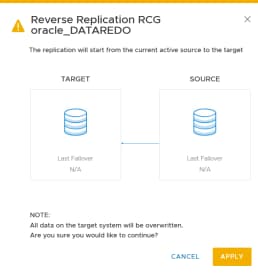
  1. As seen from the arrow in the above figure, the replication is now taking place in the reverse direction.

Machine generated alternative text:
Protection 
Domains 
Fault Sets 
SDSs 
Storage Pools 
Acceleration Pools 
DASHBOARD 
CONFIGURATION 
bdc-soln-gateway 
bdc-soln-gateway 
Replication: 
Showing 2 of 3 RCGs 
RCGs 
Source System 
secondary 
secondary 
Target System 
Status 
Ok 
Ok 
oracle 
State 
Active 
Active 
RPO 
30s 
30s 
ADD 
RPO Compliar 
100% 
100% 
MANAGE 
LAG 
26s 
14s 
MODIFY 
Consistency 
Consistent 
Consistent 
MORE 
Name 
oracle 
oracle 
DATAREDO 
O 
o

  1. The database in the new target can be brought up using the test failover method described in Scenario 1.

Scenario 3: Remote snapshot

PowerFlex remote snapshot feature enables users to take snapshots of an RCG, which would create a new set of volumes in target system. The new volumes can then be mounted to the RHEL VMs and database can be bought up on the target system. Highlights of the required steps are provided below:

  1. Start the workload.
  2. Log in to the PowerFlex presentation server UI of target system. Create a snapshot of both RCGs: oracle_DATAREDO and oracle_FRA.
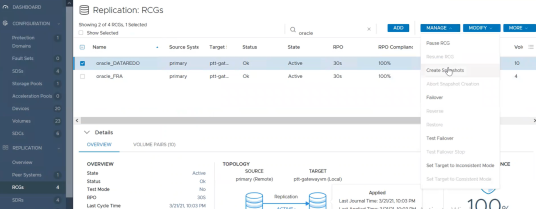
  1. The new snapshot volumes are displayed under volumes and acts as separate volumes which are not part of replication. The original replicated volumes are still present and participating in replication.
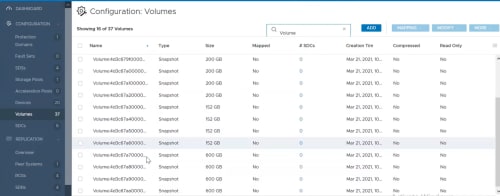
Note: No impact of performance during snapshot creation process for replication.

  1. Map the snapshot volumes to all SDCs that are part of the compute cluster; Add and mount the volumes across all VMs.
  2. Configure ASM disk groups with new volumes and start Oracle RAC cluster.
  3. Start the Oracle database.

Result: A separate instance of an Oracle RAC database is running on the target system

Scenario 4: Backup in target

Because the Oracle database backup is a resource-intensive operation, PowerFlex test failover can be used instead to perform backups using secondary storage without impacting production.

  1. Enable archive logging on the source to the FRA ASM disk group. In this configuration, FRA is also being replicated to the target.
  1. Start the Oracle database workload.
  2. Create remote snapshots, mount volumes on the target and start the database using the steps described in Scenario 3.

Result: A new database instance is running on the target system which can be used for database backup using the RMAN command causing no impact to the production database performance.

Conclusion

Conclusion

This white paper describes the Oracle RAC disaster recovery solutions that are available using PowerFlex asynchronous replication. The validation scenarios described in this white paper ensures that Oracle RAC data is consistent on replication target systems and remains within RPO. Thus, it has been shown that the asynchronous replication capabilities of Dell EMC PowerFlex ensure the high availability of Oracle databases in the case of both planned and unplanned outage, helping enterprises to meet their Service Level Agreements and thus ensuring business continuity.

Appendix

Configuration details

The following table describes the hardware and software components of the infrastructure used for the solution:

Components

Source domain

Target domain

Server Model

PowerFlex R640

PowerFlex R640

Number of Nodes used as Compute-Only

3

3

Number of Nodes used as Storage-Only

4

4

CPU

Intel® Xeon® Gold 6248 CPU @ 2.50 GHz

Intel® Xeon® Gold 5218 CPU @ 2.30 GHz

Sockets and Cores

2 socket 20 cores

2 socket 16 cores

Hyperthreading

Enabled

Enabled

Memory

256 GB @ 2933 MHz per host

224 GB @ 2666 MHz per host

Storage

10 x 1788.5 GB

5 x 223.57 GB

PCIe

Mellanox ConnectX-4 LX 25 GbE SFP Adapter (2 Ports)

Mellanox ConnectX-4 LX 25 GbE SFP Adapter (2 Ports)

BOSS S1

2 x 223.57 GB

Per Host

2 x 223.57 GB

Per Host

PowerFlex

R3_5.0.468

R3_5.0.468

PowerFlex Manager

Version 3.5.0 Build 5507

Version 3.5.0 Build 5507

ESXi Hypervisor

vSphere ESXi 6.7 U3

vSphere ESXi 6.7 U3

Oracle Database version

19.3.0.0.0

19.3.0.0.0

VM OS Linux

Red Hat Enterprise Linux Server release 7.6

Red Hat Enterprise Linux Server release 7.6

Number of VMs

3

3

VM configuration

16 vCPU, 128G Memory

16 vCPU, 128G Memory

Oracle database

19.3.0.0.0

19.3.0.0.0

VM Nodes

c1node1, c1node2, c1node3

c2node1, c2node2, c2node3

Database name

orcl

orcl

Instance names

orcl1, orcl2, orcl3

orcl1, orcl2, orcl3

ASM disk groups

OCRVOTE, MGMT, DATA, REDO, FRA

OCRVOTE, MGMT, DATA, REDO, FRA

References