PowerScale OneFS: Distributed Media Workflows
Executive summary – Hybrid Cloud Media Workflows
Object is the new core
Content creation workflows are increasingly distributed between multiple sites and cloud providers. Data orchestration has long been a key component in these workflows. With the extra complexity (and functionality) of multiple on-premises and cloud infrastructures, automated data orchestration is more crucial than ever.
There has been a subtle but significant shift in how media companies store and manage data. In the old way, file storage formed the “core” and data was eventually archived off to tape or object storage for long-term retention. The new way of managing data flips this paradigm. Object storage has become the new “core” with performant file storage at edge locations used for data processing and manipulation.
Various factors have influenced this shift. These factors include the ever-increasing volume of data involved in modern productions, the expanding role of public cloud providers (for whom object storage is the default), and media application support.
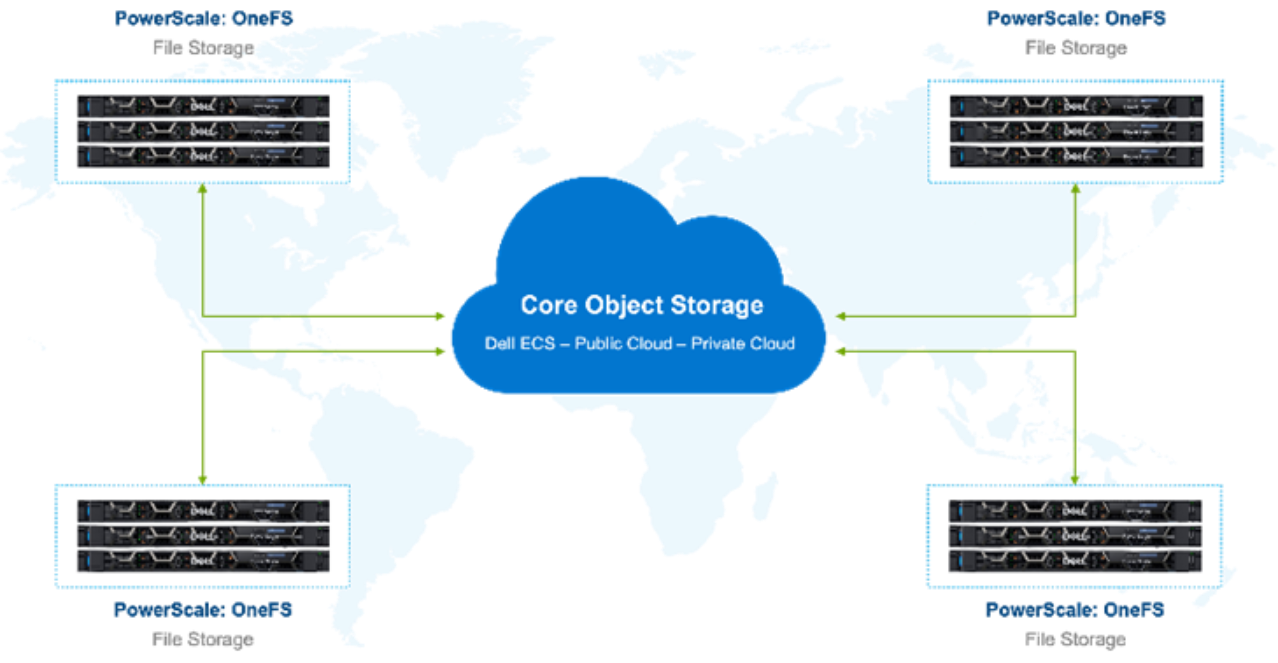
Figure 1. Global storage environment
With this shift in roles, new techniques for data orchestration become necessary. Data management vendors are reacting to these requirements for data movement and global file system solutions.
However, many of these solutions require data to be ingested and accessed through dedicated proprietary gateways. Often this gateway approach means that the data is now inaccessible using the native S3 API.
PowerScale OneFS and Superna Golden Copy provide a way of orchestrating data between file and object that retains the best qualities of both types of storage. Data is available to be accessed on both the performant edge (PowerScale) and the object core (ECS or public cloud) with no lock in at either end.
Further, Superna Golden Copy is directly integrated with the PowerScale OneFS API. The OneFS snapshot change list is used for immediate incremental data moves. Filesystem metadata is preserved in S3 tags.
Golden Copy and OneFS are a solution built for seamless movement of data between locations, file storage, and object storage. File structure and metadata are preserved.
Revisions
We value your feedback
Data Orchestration Challenges
Data orchestration challenge – Object storage is not file storage
Comparing object storage and file storage
There is still confusion about the differences between object and file storage. Cloud native architectures rely on object storage to store data, while most client systems and humans interact directly with file storage. There are some important differences that are worth noting.
PowerScale OneFS is a file storage platform. Files are accessed using protocols such as NFS or SMB. (There are others too, but we will stick with these protocols for now.) The storage is organized in a hierarchy of directories, subdirectories, and files.
Files stored in PowerScale OneFS (and other file storage) can be created, read, deleted, and modified. For instance, a 100GB file could have several bytes in the middle modified without having to rewrite the entire file.
PowerScale OneFS is optimized for high-performance data access. This performance is critical for workflows such as video edit, where multiple high throughput streams of video are accessed simultaneously. Performance is also crucial for render workflows where thousands of render processes may be accessing the PowerScale cluster simultaneously.
Object storage, such as Dell Elastic Cloud Storage (ECS) and Amazon S3, works differently. The data in an object store is accessed by object APIs. APIs are ideal for systems interacting with systems. APIs are less friendly for human to system interaction. There is no file hierarchy, data is stored in a flat bucket with unique identifiers, though many object stores use long object IDs to simulate the structure of file storage.
These objects can be created, read, or deleted, but objects cannot be modified. To revisit the example above, if a large 100 GB object needs a few bytes in the middle modified, the entire object needs to be rewritten to the storage.
While there are some performant object storage platforms (such as the all-flash ECS EFX900), in general object storage is not designed for high performance. Object storage is designed for massive scale. While it is possible to scale out file storage to hundreds of petabytes, that kind of massive capacity is the domain of object storage. ECS and some other object stores also have multitenancy capabilities. Multitenancy allows for data ingested in one location to be read natively in another location with the object storage platform handling replication and consistency in the background.
Object storage in media workflows
Object storage in media workflows has been rapidly evolving. Historically, object storage was an archive target, and archive is still a common use case. However, with the advent of cloud native workflows, object storage is fast becoming the first place where video data lands.
This shift in paradigm aligns with the Movie Labs 2030 Vision for content creation. One of the visions outlined in the paper is that production data should go the “cloud” as soon as possible. “Cloud” here is defined as a shared pool of storage and compute resources, be it private data center, co-location facility, or hyperscalar.
There are advantages for having video data land on object storage first. The low cost and massive scale of object storage easily accommodates the rapidly increasing volume of media production data. And depending on the multitenancy configuration of the object store, that data may now be accessible (or at least visible) in multiple locations quickly.
However, for humans to interact with that data directly and for most media applications, file storage is required.
File storage in media workflows
File storage is the working storage for most media applications. It has the file and folder hierarchy that humans are familiar with. OneFS PowerScale is file storage, and with its high throughput and low latency, PowerScale is suited to the many real-time operations in content creation.
File storage may be near the object store, such as when ECS and PowerScale are in the same data center. It may be cloud adjacent, such as a co-location facility with direct connects into public cloud providers. Or the object store may be in geographically diverse locations. The trick is to move data only when value is added.
Right tool for the job
Wherever the data lands initially, orchestration is crucial. Data that originates on object storage needs to be accessible natively by systems that can speak object APIs. Also, some subset of data needs to be moved to file storage for further processing. Production data that originates on file storage similarly needs native access. That file data will need to be moved to object storage for long-term retention and to make it accessible to globally distributed resources.
Content creation workflows are spread across multiple teams working in many locations. Multisite productions require distributed storage ecosystems that can span geographies. This architecture is well suited to a core of object storage as the “central source of truth”. Pools of highly performant file storage serve teams in their various global locations. Deciding when, where, and how to move data is crucial for success.
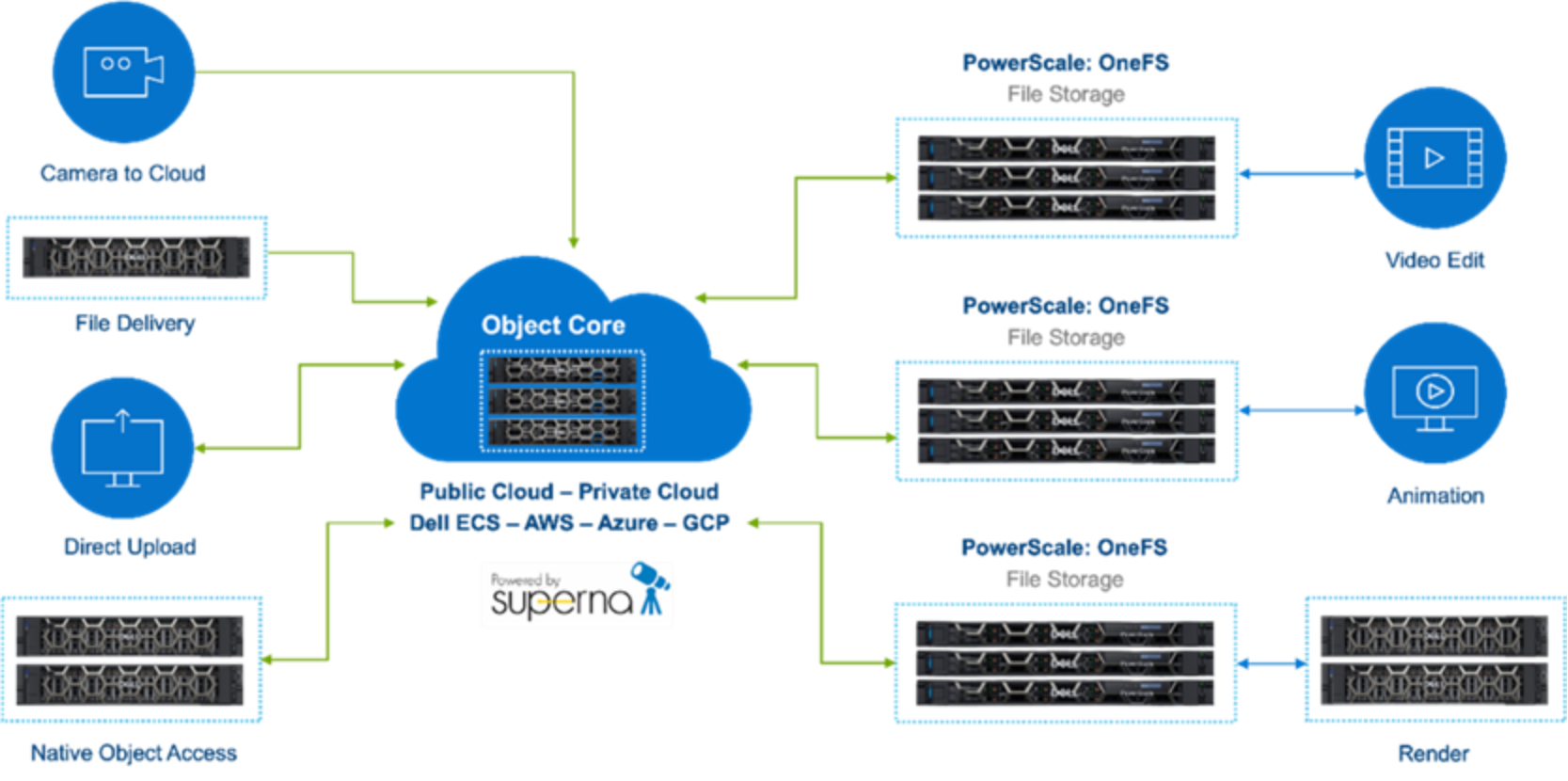
Figure 2. Object core with performant OneFS file edge
PowerScale OneFS and Golden Copy: Solution and Approach
Overview
Golden Copy architecture
Golden Copy is deployed as virtual or physical machines next to the on-premises PowerScale OneFS storage cluster. Depending on the data movement performance required, a Golden Copy cluster can consist of up to 99 datat movers at each site. These Golden Copy instances require access to the OneFS storage cluster and a local or remote object store.
In a scenario with multiple locations, say New York and Los Angeles, local instances of Golden Copy will be deployed at each location. Those Golden Copy instances use their own buckets on a common object store, the “central source of truth” in this scenario. Each location can then be configured to access and move data according to the needs of that particular locale.
Data movement policies are configured at the directory level. Golden Copy determines what changes have been made to the contents of a directory in PowerScale using the OneFS change list API. This efficient mechanism eliminates the need for file system crawling in most circumstances.
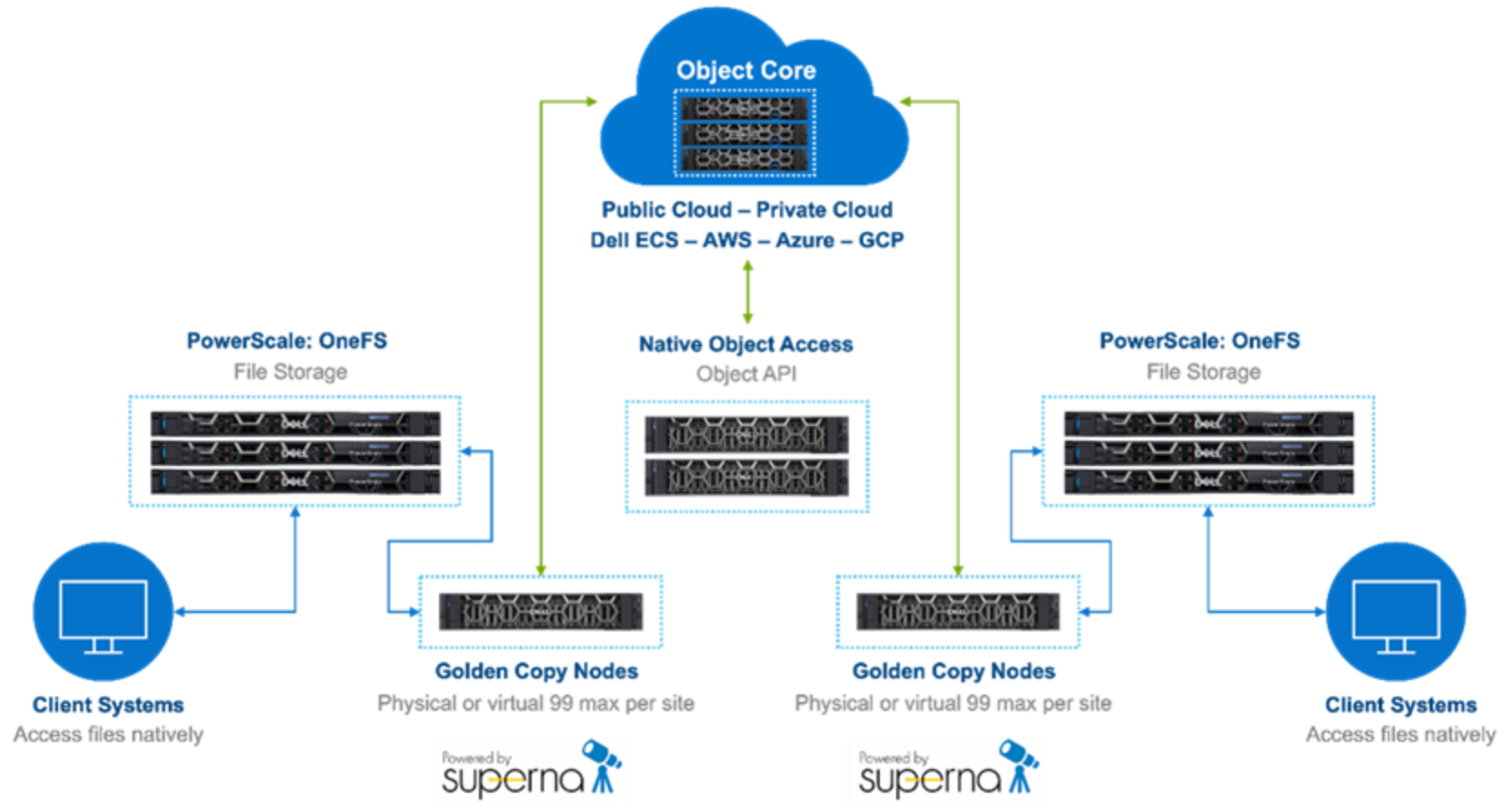
Figure 3. Object Core with PowerScale and GoldenCopy at the edge
File to object data movement
Object to file data movement
Golden Copy API
The Golden Copy GraphQL API allows external systems to control, configure, and monitor Golden Copy jobs. This type of API-based data orchestration is essential to the complex global pipelines of content creators. Manually moving large amounts of data is untenable. Schedule-based movement of data aligns well with some content creation workflows; other workflows require more ad hoc data movement.
A large ecosystem of production management tools, such as Autodesk Shotgrid, exist for managing global teams. These tools are excellent for managing projects, but do not typically include dedicated data movers. Data movement can be particularly challenging when large amounts of media need to be shifted between object and file.
Conceivably, a production asset management system could trigger data moves with Golden Copy, based on metadata changes to a production or scene. This kind of API and metadata driven data orchestration fits in the Movie Labs 2030 vision for software-defined workflows for content creation. This topic is covered in some detail for tiering within a OneFS file system in the paper PowerScale OneFS: A Metadata Driven Approach to On Demand Tiering.
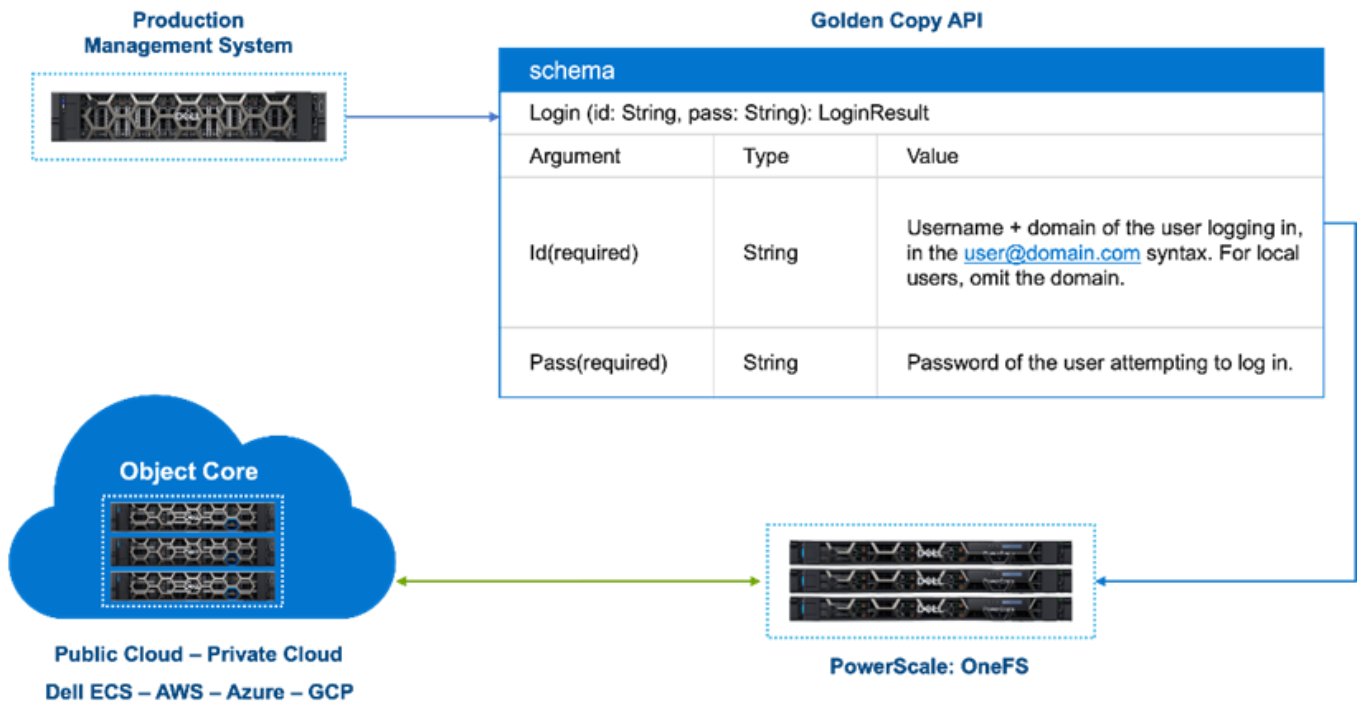
Figure 4. Data Orchestration with Golden Copy API
Workflow Examples
Scenarios
Remote production
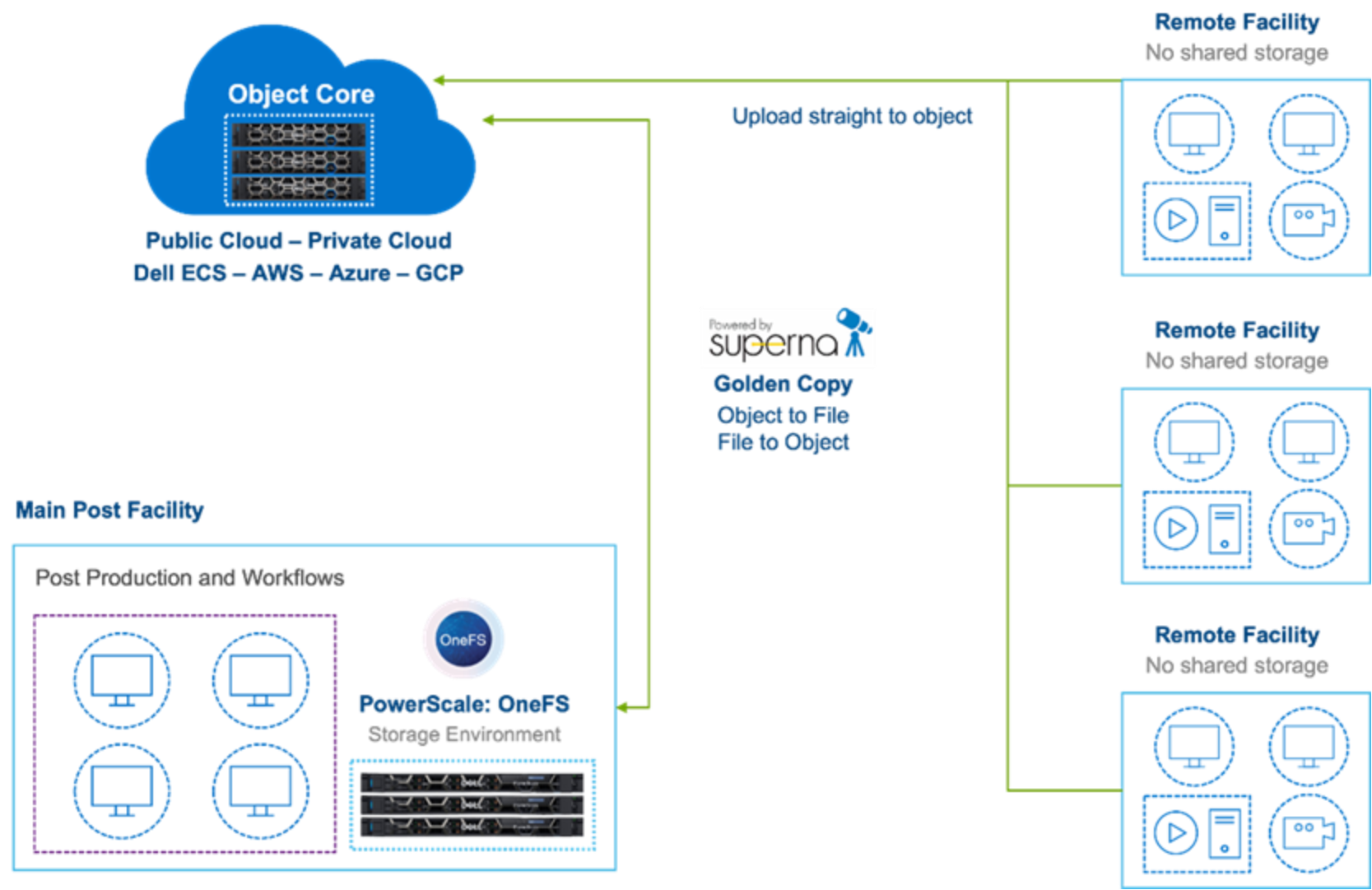
For this scenario, multiple independent production companies shoot video in remote locations with no shared storage. That data is uploaded to an object store from those remote locations. Cloud-based transcoding creates proxy videos which are pushed to the main production facility for edit and post.
Figure 5. Remote Production with Object core
Multisite VFX workflow
The following example illustrates a visual effects studio with multiple locations. Production assets need to be distributed and made available to artists working in each location. A production management system such as Autodesk Shotgrid drives the process using API communication to Golden Copy.
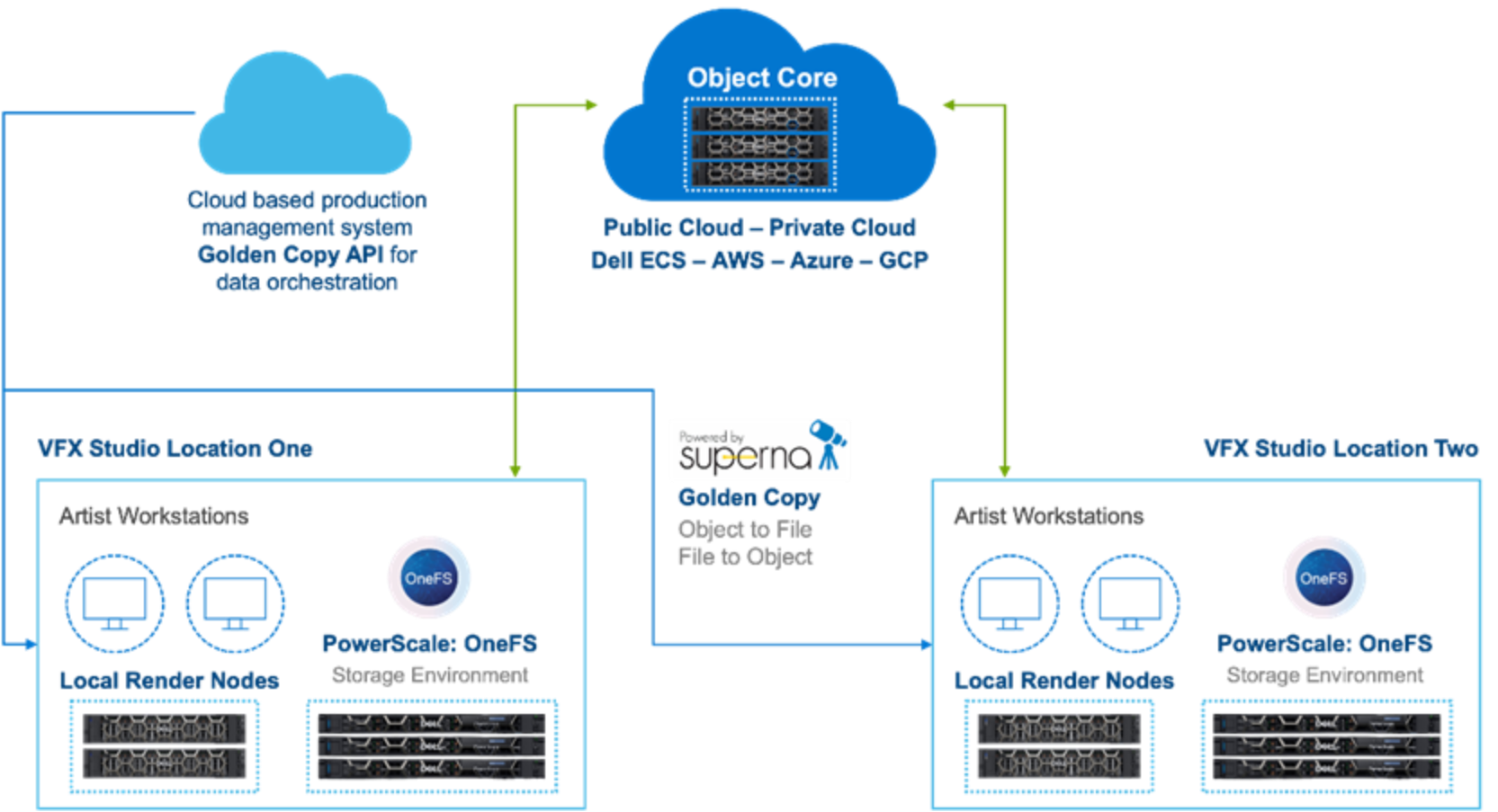
Figure 6. Multisite VFX studio
Distributed broadcast
In this example, a broadcaster has multiple studios and delivers content straight from a cloud-based object store. Golden Copy hands the file distribution, archive, and delivery to the object store.
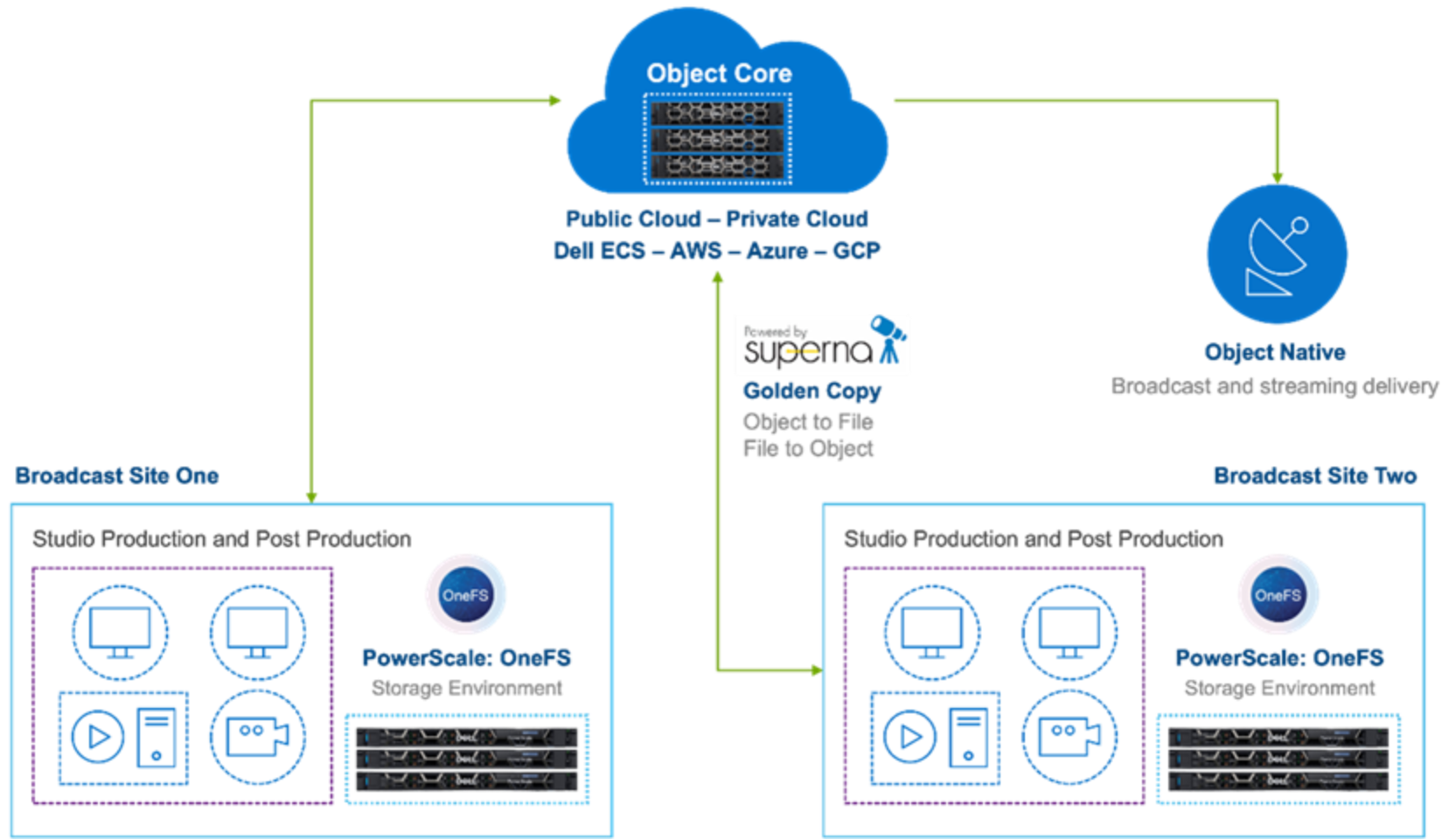
Figure 7. Multisite broadcast