PowerScale OneFS SmartFlash

Oct 19, 2026
PowerScale OneFS SmartFlash This white paper provides an introduction to Dell PowerScale SmartFlash, the foundation of the OneFS flash-based caching performance feature, including an overview of the OneFS caching architecture and the benefits of an SSD-based caching solution.

Executive summary

Overview

Enterprises across the globe are witnessing an explosion in the growth of big data today. These businesses continue to face the management challenges of this avalanche of large unstructured data. The ability to deliver greater performance from their storage systems while maintaining data consistency and availability for wide range of workflows also increases.

The caching of data and metadata is a common practice used to deliver high levels of performance and low latency in storage systems. Caching typically means to keep the most frequently accessed data in memory. Doing so provides faster access by intelligently predicting how content will be accessed and the parts of a dataset that will be required.

In traditional scale-up NAS architectures, the cache on a filer head processor is available only to the volumes stored on that device. Large deployments of these systems can consist of hundreds of volumes. As such, the total of cache on these systems might be huge, but its effectiveness is limited due to its partitioned nature. In contrast, the OneFS caching architecture ensures that all storage nodes in a PowerScale cluster share each other’s cache. It also ensures efficient use of the large aggregate amount of memory (RAM) in a cluster, which can contain a file system larger than 68 PB. Because each node contains RAM, OneFS read and write caches scale linearly as the cluster grows in size.

Audience and scope

The target audience for this white paper is anyone configuring and managing a clustered storage environment. It is assumed that the reader has an understanding and working knowledge of the OneFS components, architecture, commands, and features.

This paper presents information for deploying and managing a Dell PowerScale cluster. This paper does not intend to provide a comprehensive background to the OneFS architecture.

For more information about the OneFS architecture, see the OneFS Technical Overview white paper.

For more information about OneFS commands and feature configuration, see the OneFS Administration Guide.

Revisions

Date

Part number/
revision

Description

November 2013


Initial release for OneFS 7.1

June 2014


Updated for OneFS 7.1.1

November 2014


Updated for OneFS 7.2

June 2015


Updated for OneFS 7.2.1

November 2015


Updated for OneFS 8.0

September 2016


Updated for OneFS 8.0.1

April 2017


Updated for OneFS 8.1

November 2017


Updated for OneFS 8.1.1

February 2019


Updated for OneFS 8.1.3

April 2019


Updated for OneFS 8.2

August 2019


Updated for OneFS 8.2.1

December 2019


Updated for OneFS 8.2.2

June 2020


Updated for OneFS 9.0

September 2020


Updated for OneFS 9.1

April 2021


Updated for OneFS 9.2

September 2021


Updated for OneFS 9.3

April 2022


Updated for OneFS 9.4

January 2023


Updated for OneFS 9.5

January 2024


Updated for OneFS 9.7

April 2024

H13249.17

Updated for OneFS 9.8

August 2024

H13249.18

Updated for OneFS 9.9

December 2024

H13249.19

Updated for OneFS 9.10

April 2025

H13249.20

Updated for OneFS 9.11

August 2025

H13249.21

Updated for OneFS 9.12

December 2025

H13249.22

Updated for OneFS 9.13

April 2026

H13249.23

Updated for OneFS 9.14

August 2026

H13249.24

Updated for OneFS 9.15

OneFS caching

OneFS caching

The caching infrastructure enables OneFS to deliver extreme levels of performance, while maintaining globally coherent read and write access across the Dell PowerScale cluster. OneFS goes beyond traditional storage caching architectures in that it was designed to take advantage of the system’s distributed and highly parallel nature. Traditional scale-up storage systems typically have a fixed amount of cache per “head” unit (filer or server). The OneFS powered clustered architecture ensures that as storage grows, so does the amount of cache available to the system. Furthermore, unlike traditional NAS and SAN systems, OneFS caching is globally coherent across the cluster. Cached data is available to any node in the cluster, regardless of which node it physically resides on. Cache sharing across a consolidated storage environment is critical for today’s large-scale storage deployments, in terms of performance, scalability, efficiency, and overall cost of ownership.

Cache is typically used in storage systems to reduce the latency associated with retrieving data from disk, improving performance for clients making read requests. It is also used to improve the performance of writes, by acknowledging the write to the client when it has been written to cache. It later writes the data in the cache to disk.

The OneFS caching infrastructure leverages the system memory (RAM) and nonvolatile memory (NVRAM) in each node. It uses solid state drives (SSDs) and the increased capacity, affordability, and storage persistence that they offer.

Caching occurs in OneFS at multiple levels and for various types of data. For this discussion, we focus on caching of file system structures in main memory and on SSD.

OneFS cache architecture

OneFS cache architecture

The OneFS operating system caching infrastructure design is based on aggregating the cache present on each node in a cluster into one globally accessible pool of memory. OneFS uses an efficient messaging system, similar to non-uniform memory access (NUMA). This design allows all the nodes’ memory cache to be available to every node in the cluster. Remote memory is accessed over an internal interconnect and has lower latency than accessing hard disk drives.

For remote memory access, OneFS uses either an IP over Ethernet or Sockets Direct Protocol (SDP) over an InfiniBand (IB) back-end interconnect on the cluster; essentially a distributed system bus. SDP provides an efficient, socket-like interface between nodes which, by using a switched star topology, ensures that remote memory addresses are only ever one hop away. While not as fast as local memory, remote memory access is still quick due to the low latency of IB and 40 Gb Ethernet. The relative access latencies of the OneFS caching tiers are covered later in this paper.

Storage nodes can use up to 384 GB of RAM each. A OneFS powered cluster can therefore contain up to 94.5 TB of system memory (252 nodes), plus various SSD configurations for additional read caching.

OneFS caching hierarchy

OneFS caching hierarchy

OneFS uses up to three levels of read cache, plus an NVRAM-backed write cache, or coalescer. These cache levels and their high-level interaction are illustrated in the following diagram.
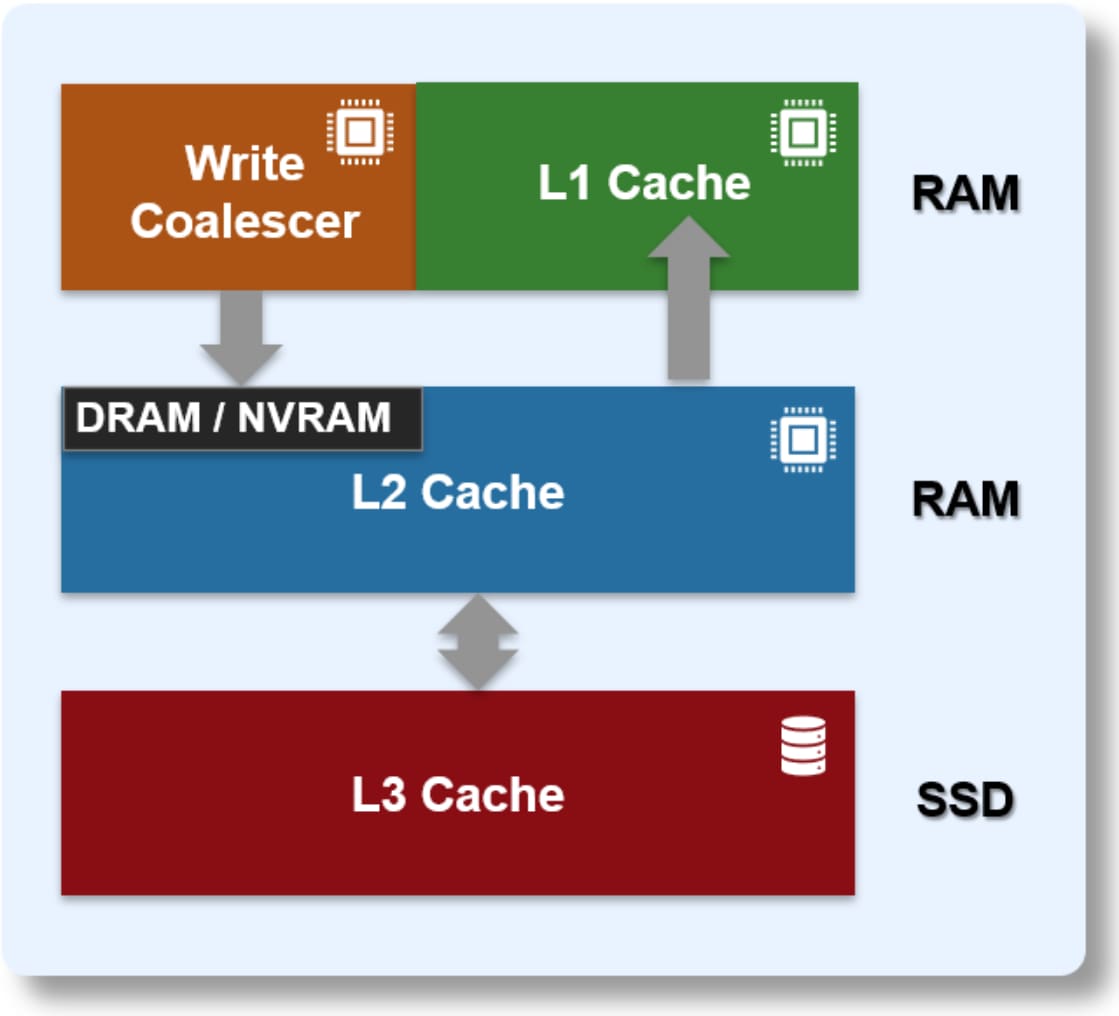
Graphic depicting the three levels of the OneFS caching hierarchy - RAM based L1 and L2 cache, and SSD-based L3 cache.

Figure 1.   OneFS caching hierarchy

The first two types of read cache - level 1 (L1) and level 2 (L2) - are memory (RAM)-based, and analogous to the cache used in processors (CPUs). These two cache layers are in all Dell PowerScale and Isilon storage nodes.

An optional third tier of read cache, called SmartFlash or level 3 (L3) cache, is also configurable on nodes that contain solid state drives (SSDs). L3 cache is an eviction cache that the L2 cache blocks populate as they are aged out from memory.

Each cache level is optimized for a specific purpose and operations, as summarized in the following table. These cache levels are described in more detail in the next few sections.

Table 1.      OneFS Cache Layers and Storage Characteristics

Name

Type

Persistence

Description

L1 Cache

RAM

Volatile

Also called front-end cache. It holds clean, cluster-coherent copies of file system data, and metadata blocks, requested from clients through the front-end network.

L2 Cache

RAM

Volatile

Back-end cache containing clean copies of file system data and metadata on a local node.

SmartCache/Write Coalescer

DRAM/ NVRAM

Nonvolatile

Persistent journal cache that buffers any pending writes to front-end files that have not been committed to disk.

SmartFlash/L3 Cache

SSD

Nonvolatile

Cache that contains file data and metadata blocks evicted from L2 cache, increasing L2 cache capacity.

OneFS cache coherency

Introduction to OneFS cache coherency

The OneFS caching subsystem is coherent across the cluster. If the same content exists in the private caches of multiple nodes, this cached data is consistent across all instances. For example, consider the following initial state and sequence of events:

  1. Node 1 and Node 5 each have a copy of data located at an address in shared cache.
  2. Node 5, in response to a write request, invalidates node 1’s copy.
  3. Node 5 updates the value.
  4. Node 1 must re-read the data from shared cache to get the updated value.

OneFS uses the MESI protocol to maintain cache coherency. This protocol implements an “invalidate-on-write” policy to ensure that all data is consistent across the entire shared cache. The following diagram illustrates the various states that in-cache data can take, and the transitions between them. The various states in the figure are:

  • M – Modified: The data exists only in local cache and has been changed from the value in shared cache. Modified data is typically referred to as dirty.
  • E – Exclusive: The data exists only in local cache but matches what is in shared cache. This data is often referred to as clean.
  • S – Shared: The data in local cache may also be in other local caches in the cluster.
  • I – Invalid: A lock (exclusive or shared) has been lost on the data.
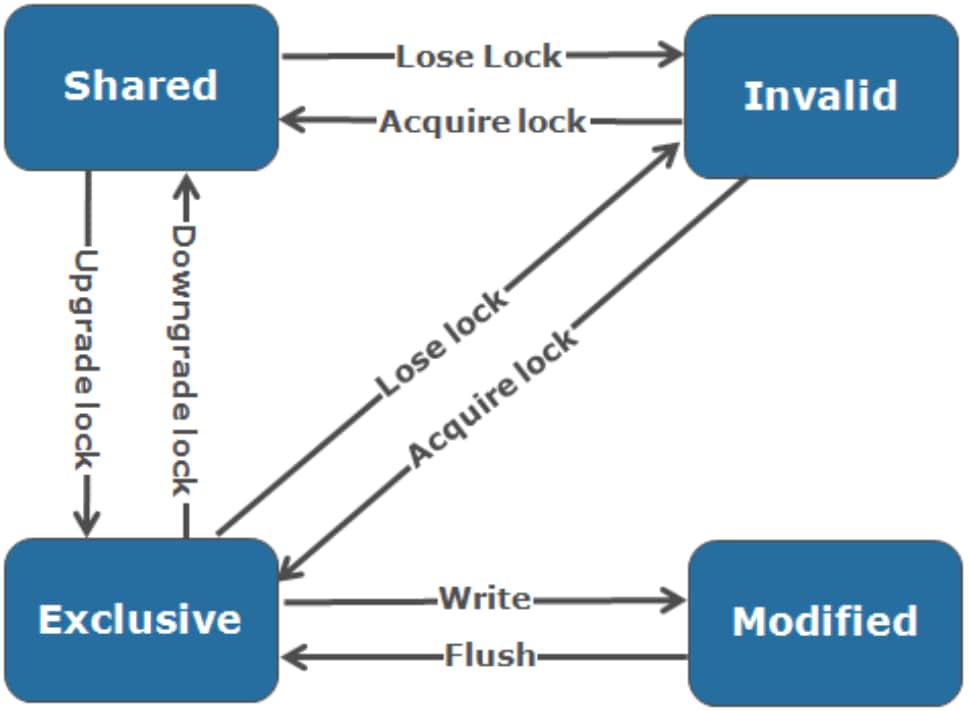
MESI cache coherence states in OneFS (Modified, Exclusive, Shared, Invalid) and the transitions between them.

Figure 2.   OneFS cache coherency state diagram

Level 1 cache

The level 1 (L1) cache, or front-end cache, is memory that is nearest to the protocol layers (NFS, SMB, HDFS, S3, and so on) used by clients, or initiators, connected to that node. The primary purpose of L1 cache is to prefetch data from remote nodes. Data is prefetched per file, and is optimized in order to reduce the latency associated with the nodes’ InfiniBand (IB) back-end network. Because the back-end interconnect latency is relatively small, the size of L1 cache, and the typical amount of data stored per request, is less than L2 cache.

L1 cache is also known as remote cache because it contains data retrieved from other nodes in the cluster. It is coherent across the cluster but only the node on which it resides uses it. It is not accessible by other nodes. Data in L1 cache on storage nodes is aggressively discarded after it is used. L1 cache uses file-based addressing, in which data is accessed through an offset into a file object.

The L1 cache refers to memory on the same node as the initiator. It is only accessible to the local node, and typically the cache is not the primary copy of the data. It is analogous to the L1 cache on a CPU core, which might be invalidated as other cores write to main memory.

L1 cache coherency is managed through a MESI-like protocol using distributed locks, as described in Introduction to OneFS cache coherency.

OneFS also uses a dedicated inode cache in which recently requested inodes are kept. The inode cache frequently has a large impact on performance. Clients often cache data, and many network I/O activities are primarily requests for file attributes and metadata, which can be quickly returned from the cached inode.

Note: L1 cache is used differently in accelerator nodes, such as the PowerScale P100, which do not contain any disk drives. Instead, the entire read cache is L1 cache because all the data is fetched from other storage nodes. Also, cache aging is based on a Least Recently Used (LRU) eviction policy, as opposed to the drop-behind algorithm typically used in a storage node’s L1 cache. An accelerator’s L1 cache is large, and the data in it is highly likely to be requested again. Data blocks are not immediately removed from cache upon use. However, metadata and update-heavy workloads do not benefit as much, and an accelerator’s cache is only beneficial to clients directly connected to the node.

To support OneFS inline compression, a node’s L1, or client-side, read cache is divided into separate address spaces. The result is that both the on-disk compressed data and the logical uncompressed data can be cached. The address space for the L1 cache is already split for data and FEC blocks, so a similar technique is used to divide it again. Data in the uncompressed L1 cache is fed from data in the compressed L1 cache which, in turn, is fed from disk.

OneFS prefetch caching has also been enhanced to accommodate compressed data. Because reading part of a compressed chunk results in the entire compression chunk being cached, prefetch requests, in effect, are rounded to compression chunk boundaries. Because a prefetch request is not complete until the uncompressed data is available in cache, the callback used for prefetch requests performs the decompression.

Level 2 cache

The level 2 (L2) cache, or back-end cache, refers to local memory on the node on which a particular block of data is stored. L2 cache is globally accessible from any node in the cluster. It is used to reduce the latency of a read operation by not requiring a seek directly from the disk drives. As such, the amount of data prefetched into L2 cache for use by remote nodes is greater than the data in L1 cache.

L2 cache is also known as local cache because it contains data retrieved from disk drives on that node and then is made available for requests from remote nodes. Data in L2 cache is evicted according to a Least Recently Used (LRU) algorithm.

The local node addresses data in L2 cache using an offset into a disk drive that is local to that node. Because the node knows the disk location of the data requested by the remote nodes, this process is a fast way of retrieving data destined for remote nodes. A remote node accesses L2 cache by doing a lookup of the block address for a particular file object. As previously described, MESI invalidation is unnecessary, and the cache is updated automatically during writes and kept coherent by the transaction system and NVRAM.

Level 3 cache

Also known as SmartFlash, level 3 (L3) cache is a subsystem which caches evicted L2 cache blocks on one or more SSDs on the node owning the L2 cache blocks. L3 cache is optional and requires one or more SSDs to function. Unlike with L1 and L2 cache, not all nodes or clusters have an L3 cache because SSDs must be present and exclusively reserved and configured for caching use. Conversely, all-flash nodes do not need an L3 cache because all data and metadata blocks already reside on SSDs.

OneFS L3 cache serves as a large, cost-effective method of extending of main memory per node from gigabytes to terabytes. This method allows clients to retain a larger working set of data in cache before being forced to retrieve data from spinning disk through a higher-latency hard drive operation.

At a high level, L3 cache serves as a cost-effective extension of main memory per node, from gigabytes to terabytes. This extension allows clients to manipulate a larger working set of data before forcing a cache miss to higher-latency spinning disks. The L3 cache is populated with “interesting” L2 cache blocks that are being dropped from memory as a result of L2 cache’s Least Recently Used (LRU) eviction algorithm.

Blocks evicted from L2 cache are candidates for inclusion in L3 cache, and a filter is employed to reduce the quantity and increase the value of incoming blocks. Because L3 cache is a first in, first out (FIFO) cache, filtering is performed ahead of time. By selecting blocks that are more likely to be read again, L3 cache can both limit SSD churn and enhance the quality of the L3 cache contents.
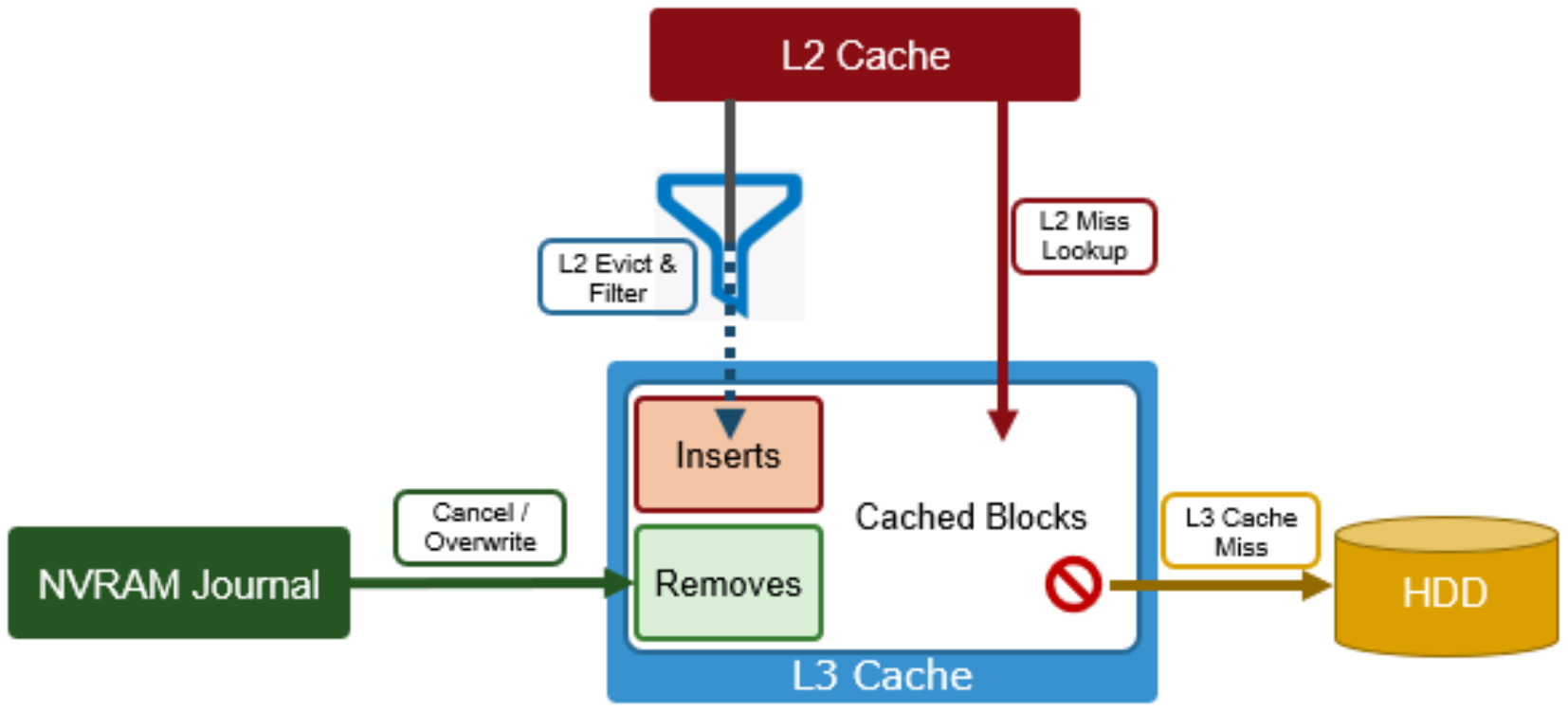
Architectural graphic depicting OneFS l3 cache operation.

Figure 3.   OneFS L3 cache operation

The L3 cache filter uses a few heuristics to decide which candidate blocks will go to L3 cache. These heuristics include:

  • L3 cache prefers metadata/inode to data blocks.
  • If a block is a random read (that is, there are no neighboring blocks on this disk in L2 cache), it is always in L3 cache.
  • If the block is part of a cluster of blocks (contiguous on disk) smaller than 16 blocks and has been accessed twice or more, it may be in L3 cache.
  • If the block is part of a sequential cluster of 16 or more blocks (128 KB), it is not evicted to L3 cache.
  • Prefetched blocks are not considered to be user read blocks unless they are sent to the client.

The principle here is that the per-block cost of re-reading a sequential cluster of blocks from disk is lower than performing random reads from disk. As such, the L3 cache can be most effective, per capacity, by addressing random reads.

Also, any uncached Job Engine metadata requests always come from disk, and bypass L3 cache. That way they do not displace user-cached blocks from L3 cache.

  • As new versions are written, the journal notifies L3 cache, which invalidates and removes the dirty blocks.
  • If its SSDs become full, L3 cache will prefer to evict user I/O data before metadata blocks.

Unlike RAM-based caches, because L3 cache is based on persistent flash storage, once the cache is populated, or warmed, it is highly durable and persists across node reboots.

To be beneficial, L3 cache must provide performance gains in addition to the memory cost it imposes on L2. To achieve this benefit, L3 cache uses a custom log-based file system with an index of cached blocks. The SSDs provide excellent random read access characteristics, such that a hit in L3 cache is only slightly slower than a hit in L2 cache.

Testing has proven that a streaming write pattern is optimal for both reliable drive-write performance, and to extend drive longevity. Both data and metadata blocks are written in a log pattern across the entire disk, wrapping around when the drive is full. These streaming writes assist the drive’s wear-leveling controller resulting in increased drive longevity.

To use multiple SSDs for cache effectively and automatically, L3 cache uses a consistent hashing approach to associate an L2 cache block address with one L3 cache SSD. If an L3 drive fails, a portion of the cache will obviously disappear, but the remaining cache entries on other drives will still be valid. Before a new L3 drive may be added to the hash, some cache entries must be invalidated.

The following diagram illustrates how clients interact with the full OneFS read cache infrastructure and the write coalescer. L1 cache still interacts with the L2 cache on any node it requires, and the L2 cache interacts with both the storage subsystem and L3 cache. L3 cache is stored on an SSD within the node and each node in the same node pool has L3 cache enabled. The diagram also illustrates a separate node pool where L3 cache is not enabled. This node pool either does not contain the required SSDs, or has L3 cache disabled, with the SSDs being used for a filesystem-based SmartPools SSD data or metadata strategy.
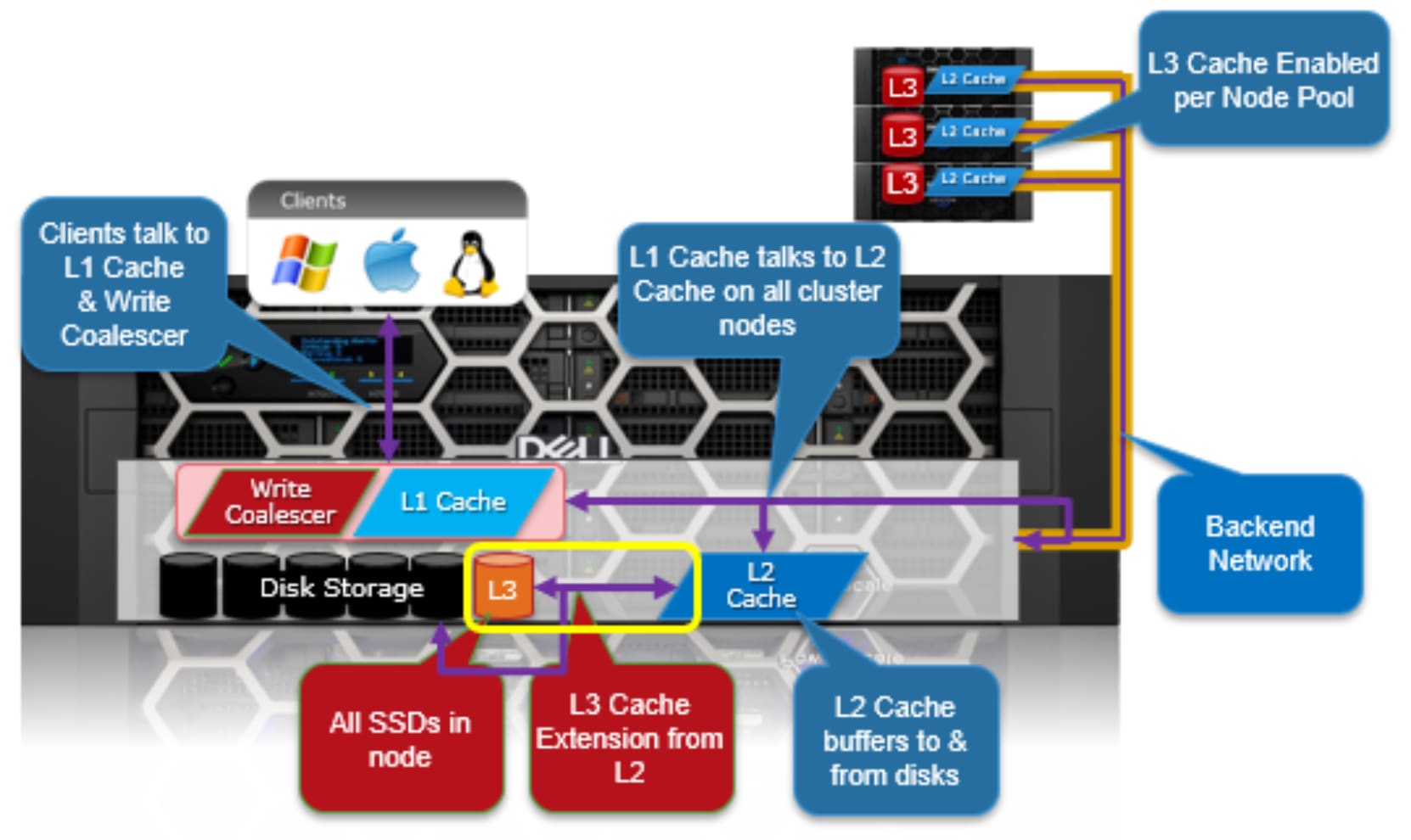
 Graphic illustrating the operation of the OneFS L1, L2, and L3 caching architecture.

Figure 4.   OneFS L1, L2, and L3 caching architecture

Cache level comparison

L2 cache is typically more valuable than L1 cache because a hit avoids a higher latency operation. An L1 cache hit avoids a back-end round trip to fetch the data, whereas an L2 cache hit avoids a SATA disk seek in the worst case. This difference is dramatic in both relative and absolute terms. For SATA drives, an L2 cache miss is two orders of magnitude above a hit compared to one for L1 cache. A single back-end round trip is typically a small portion of a full front-end operation.

Table 2.      Relative latency of OneFS cache hits and misses

Cache

Hit

Miss

L1

10 µs

L2

L2

100 µs

L3 (or Hard Disk)

L3

200 µs

Hard Disk

Hard Disk

1 ms–10 ms

x

L2 cache is also preferable because it is accessible to all nodes. Assuming a workflow with any overlap among nodes, it is preferable to have the cluster’s DRAM holding L2 cache data rather than L1 cache data. In L2 cache, a given data block is only cached once and invalidated much less frequently. This efficiency is why storage nodes are configured with a drop-behind policy on file data. Nodes without disks will not drop behind because there is no L2 cache data to be cached.

Metadata in L1 cache is not dropped behind because it is accessed so frequently. For example, when streaming a file, the inode is accessed for every new protection group (PG) read, while each data block is only accessed once. Metadata is also multiple steps in the latency path.

Read caching

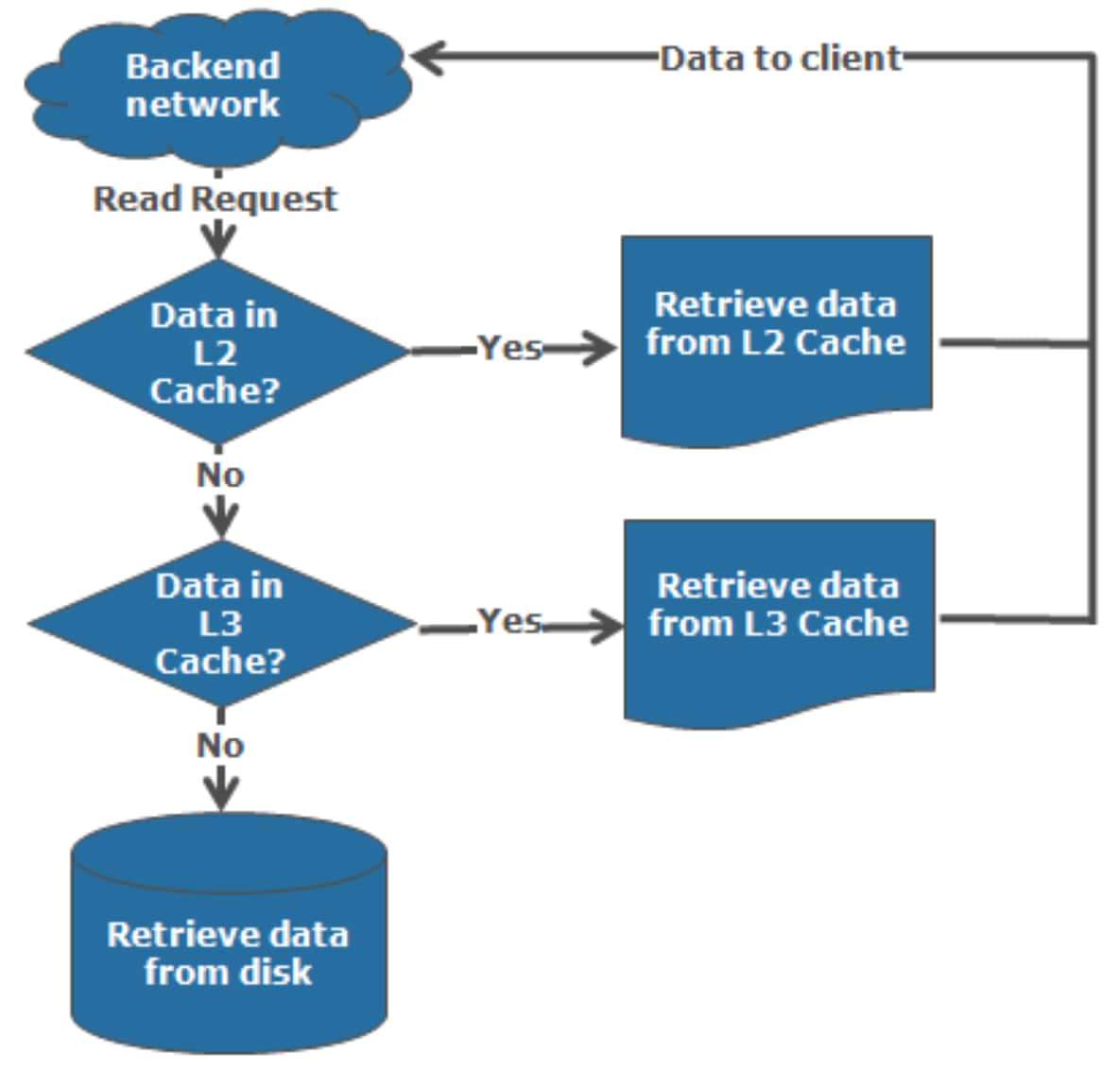
The OneFS operating system architecture dictates that a file is written across multiple nodes in the cluster, and possibly multiple drives within a node. All read requests involve reading remote (and possibly local) data. When a read request arrives from a client, OneFS determines whether the requested data is in local cache. Any data resident in local cache is read immediately. If data requested is not in local cache, it is read from disk. For data not on the local node, a request is made from the remote nodes on which it resides. On each of the other nodes, another cache lookup is performed. Any data in the cache is returned immediately, and any data not in the cache is retrieved from disk.

When the data has been retrieved from local and remote cache (and possibly disk), it is returned back to the client.

The high-level steps for fulfilling a read request on both a local and remote node are:

On local node (the node receiving the request):

  1. Determine whether part of the requested data is in the local L1 cache. If so, return to client.
  1. If not in the local cache, request data from the remote node or nodes.

On remote nodes:

  1. Determine whether requested data is in the local L2 or L3 cache. If so, return to the requesting node.
  1. If not in the local cache, read from disk and return to the requesting node.

The following figures illustrate the steps of a read request on the local and remote nodes:
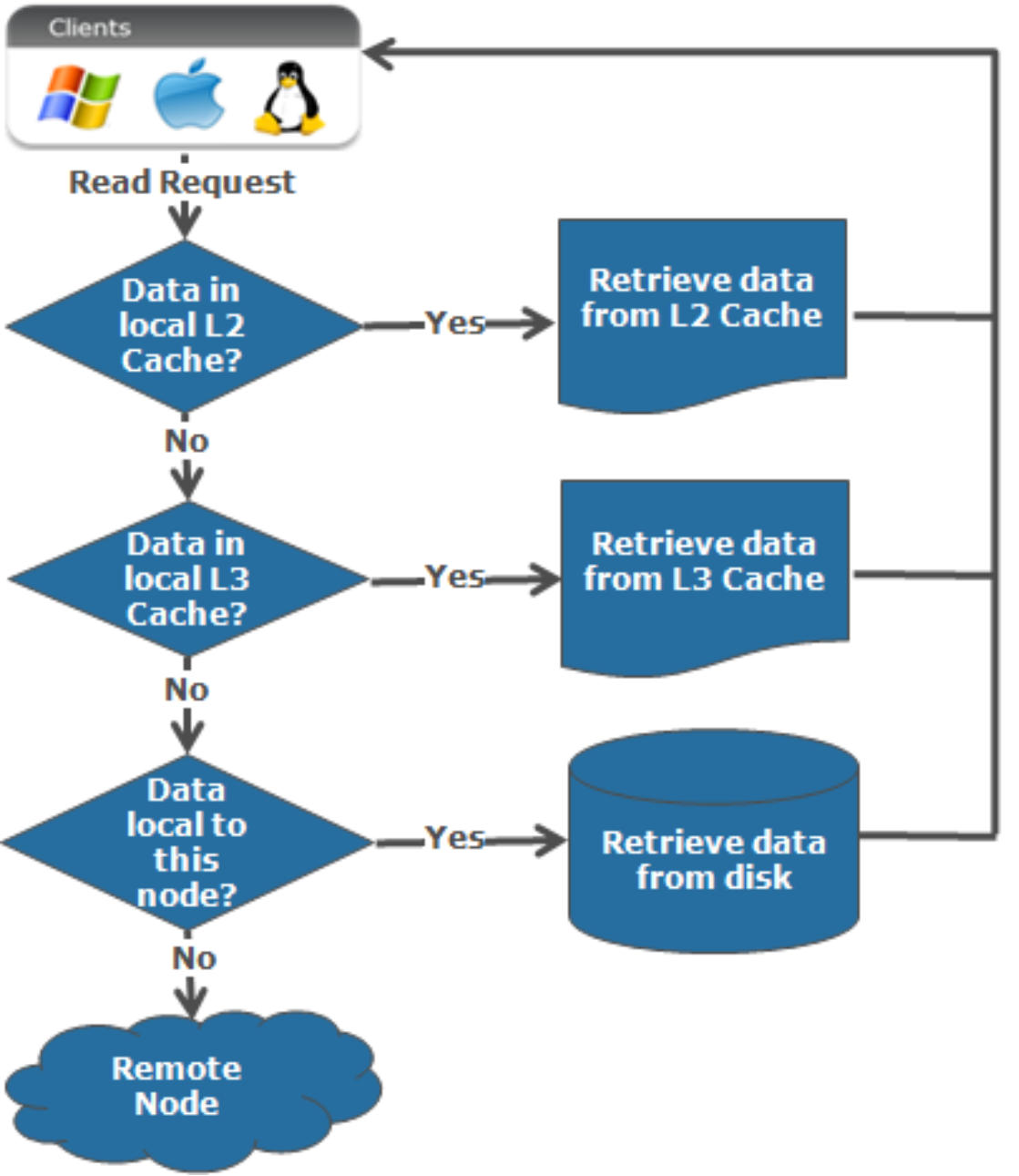
Flow chart graphic showing the read process on a local node.

Figure 5.   Read process on local node

Flow chart graphic showing the read process on a remote node.

Figure 6.   Read process on remote node

Write caching – SmartCache and the coalescer

Writes to a cluster are placed into a protected write cache, or SmartCache, and immediately acknowledged to the client. When several small writes to the same disk are received, SmartCache coalesces them before flushing these writes to disk. This coalescing reduces the number of I/Os required to write the data to physical media.

Being a distributed file system, OneFS can make informed, strategic decisions about where to place written data. That is, on which nodes and their specific drives within the cluster to place data. OneFS decides upon placement using a process known as safe write. Safe write develops a write plan, writes the data to the local and remote cache, and then commits it to the journal. Writes are kept in the journal until the data is written to disk.

With Dell chassis-based hardware, each 4RU enclosure houses four nodes. Each compute node blade contains its own CPU, memory, PCIe slots, storage, and so on.

A node’s file system journal is protected against sudden power loss or hardware failure by the Power-fail Memory Persistence (PMP) feature. PMP automatically stores both the local journal and journal mirror across both nodes in a node pair, as illustrated in the following figure:
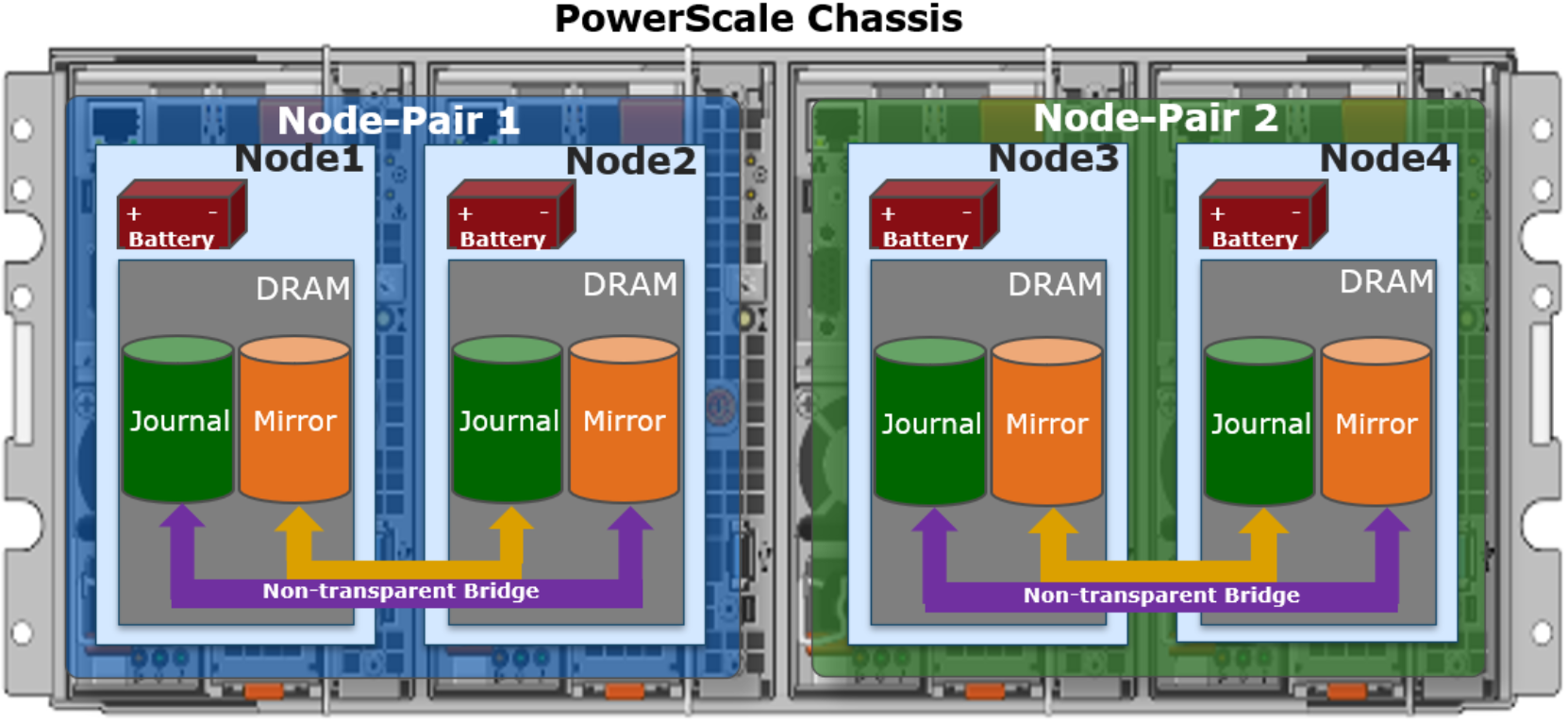
Graphic showing a 4RU chassis-based node with its constituent node pairs and mirrored journal architecture.

Figure 7.   PowerScale chassis-based node pairs and mirrored journal architecture

This journal de-staging process is known as “vaulting.” During vaulting, a dedicated battery in each node protects the journal until it has been safely written on both nodes in a node-pair. Gen6 hardware uses a 32 GB journal, providing ample space to coalesce and optimize writes.

With PMP, constant power is not required to protect the journal in a degraded state because the journal is saved to SSD and mirrored on the partner node. In contrast, the self-contained PowerScale F-series all-flash nodes protect the journal with a 16 GB DDR4 battery-backed NVDIMM-N instead of using PMP.

Software journal mirroring

OneFS 9.11 sees the addition of a new software journal mirroring capability (SJM). SJM currently supports the PowerScale all-flash F710 and F910 platforms with 61 TB or larger QLC SSDs. For these dense drive platforms, software journal mirroring negates the need for higher FEC protection levels and their associated overhead.

With SJM enabled, file system updates (writes) are sent to a node’s local, or Primary, journal as usual. Additionally, they are also synchronously replicated, or mirrored, to another node’s journal, referred to as the Buddy node.
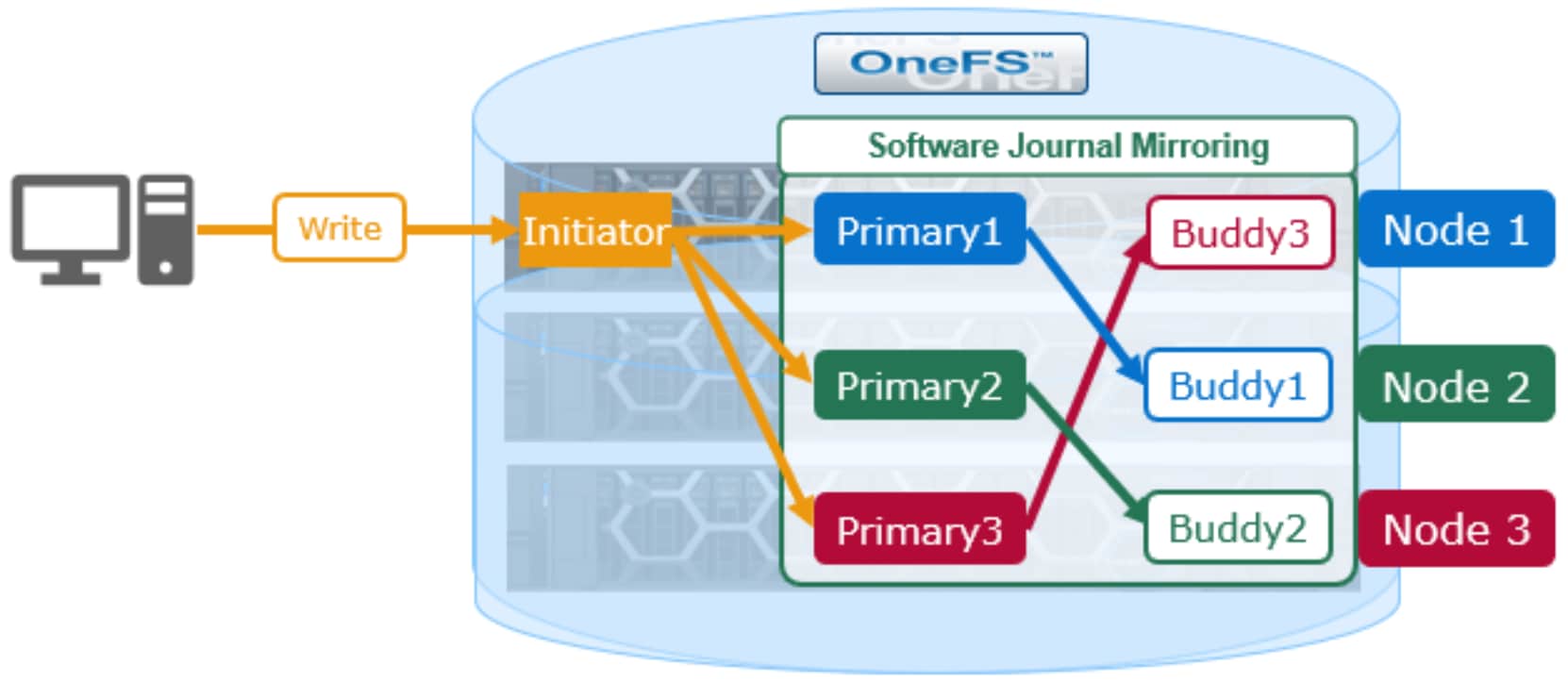
Graphic illustrating a three node F910 cluster with 61Tb QLC SSDs, with software journal mirroring enabled and the primary and buddy journal pairings.

Figure 8.   PowerScale software journal mirroring

Every node in an SJM-enabled node pool is dynamically assigned a unique Buddy, and the backend network connection between nodes is optimized for low latency bulk data flow. SJM’s automatic recovery scheme can use a Buddy journal’s mirrored contents to re-form the Primary node’s journal in the event of a failure, avoiding the costly process of SmartFailing the node. This recovery scheme, known as SyncBack, can also be applied manually if a failing journal device must be physically replaced.

The journal mirroring activity is continuous, and the SyncForward mechanism enables an out of date Buddy journal to catch up with any Primary journal content additions & deletions that it may have missed. However, if the Primary loses contact with its designated Buddy for an extended period, it will urgently seek out another Buddy and repeat the mirroring for each active transaction to restore a fully mirrored configuration. If the reverse happens, and the Primary experiences an adverse event like a local power loss, the Primary can reattach to its designated Buddy and ensure that its own journal is consistent with the transactions that the Buddy has kept safely mirrored. As such, the buddy must be on a different node than the primary.

Cache eviction

Employing an efficient cache eviction or replacement policy is critical for cache performance. This efficiency is evident in OneFS, where each level of the cache hierarchy uses a different methodology for eviction, to suit the attributes of that cache type. For L1 cache in storage nodes, cache aging is based on a drop-behind algorithm. The L2 cache uses a Least Recently Used (LRU) algorithm because it is relatively simple to implement, uses little overhead, and performs well in general. By contrast, the L3 cache employs a first-in, first-out (FIFO) eviction policy because it is writing to what is effectively a specialized linear file system on SSD.

For OneFS, a drawback of LRU is that it is not scan-resistant. For example, a OneFS Job Engine job or backup process that scans a large amount of data can cause the L2 cache to be flushed. As we will see, this problem can be mitigated to a large degree by the L3 cache. Other eviction policies can promote frequently accessed entries such that they are not evicted by scanning entries, which are accessed only once.

Cache prefetching

For read caching to be beneficial for reads, the cache must already contain data before it is requested. The storage system must accurately determine file access patterns and prepopulate the cache with data, and metadata blocks, before they are requested. OneFS uses two primary sources of information for predicting a file’s access pattern:

  • OneFS attributes that can be set on files and directories to provide hints to the file system
  • The read activity occurring on the file

This technique is known as prefetching, whereby predictively copying data into a cache before it has been requested mitigates the latency of an operation. Data prefetching is employed frequently and is a significant benefactor of the OneFS flexible file allocation strategy.

Flexible allocation means to determine the best layout for a file based on several factors, including:

  • Cluster size (number of nodes)
  • File size
  • Protection level (for example, +2 or +3)

The performance effect of flexible allocation is placement of a file on the largest number of drives possible.

The most straightforward application of prefetch is file data, where linear access is common for unstructured data, such as media files. Reading and writing of such files generally starts at the beginning and continues unimpeded to the end of the file. After a few requests, it becomes highly likely that a file is being streamed to the end.

However, for streaming reads from low-latency SSD media, the cache benefit of prefetching is typically less than the overhead. To address this benefit, OneFS 9.5 and later releases automatically disable L2 cache prefetching for concurrent and streaming reads from SSD media, in a process known as Direct Read. However, L2 caching is still used when prefetching data blocks from spinning disk (HDD).

Similarly, OneFS 9.7 introduces Direct Write, also known as NCIO or non-cached I/O, which is a feature that targets the NVMe-based F series platforms, and operates by bypassing cache to increase write throughput.

Writes to newly allocated blocks are identified and queued directly to the drives, by skipping the L2 cache and journal. This allows OneFS to better utilize the NVMe drives, reducing I/O access latency, and freeing up L2 cache and journal bandwidth for writes. And this will help in any streaming write or heavy sequential write workload.

Direct Write is analogous to the L2-bypass Direct Read functionality described above. Enabled by default in 9.7, it requires no license, is not user configurable, and, as such, has no CLI or WebUI interface.

OneFS data prefetch strategies can be configured either from the command line or using SmartPools. File data prefetch behavior can be controlled down to a per-file granularity using the isi set command’s access pattern setting. The available selectable file access patterns include concurrency (the default), streaming, and random.

Metadata prefetch occurs for the same reason as file data, particularly benefiting scanning operations, such as finds and tree walks. To ensure that metadata keeps up with data block prefetching, OneFS 9.5 and later releases include both a metadata prefetcher and lock prefetcher. They are automatically enabled for concurrent and streaming data access patterns, but remain inactive for random access where there is typically little benefit.

OneFS also provides a mechanism for prefetching files based on their nomenclature. In film and TV production, “streaming” often takes a different form as opposed to streaming an audio file. Each frame in a movie is often contained in an individual file. As such, streaming reads a set of image files, and prefetching across files is important. The files are often a subset of a directory, so directory entry prefetch does not apply. Ideally, a client application could control this issue, but in practice, it rarely occurs.

To address this issue, OneFS has a file name prefetch facility. While file name prefetch is disabled by default, as with file data prefetch, it can be enabled with file access settings. When enabled, file name prefetch guesses the next sequence of files to be read by matching against several generic naming patterns.

Flexible file handle affinity (FHA) is a read-side algorithm designed to better use the internal threads that read files. Using system configuration options and read access profiling, the number of operations per thread can be tuned to improve the efficiency of reads. FHA maps file handles to worker threads according to a combination of:

  • System settings
  • Locality of the read requests (in terms of how close the requested addresses are)
  • Latency of the thread or threads serving requests to a particular client

Note: Prefetch does not directly apply to the L3 cache because blocks that are evicted from L2 cache exclusively populate L3 cache. However, prefetch can affect L3 cache indirectly if and when prefetched blocks are evicted from L2 cache and are considered for inclusion in L3 cache.

L3 cache persistence

Caching is predicated on keeping hot data hot. The most frequently accessed data and metadata on a node should remain in L2 cache and not get evicted to L3 cache. The next tier of cached data is accessed frequently enough to live in L3 cache, but not frequently enough to always live in RAM. A mechanism is in place to keep these semi-frequently accessed blocks in L3 cache.

To maintain this L3 cache persistence, when the kernel goes to read a metadata or data block, the following steps are performed:

  1. First, L1 cache is checked. Then, if no hit, L2 cache is consulted.
  1. If a hit is found in memory, it is done.
  2. If not in memory, L3 cache is checked.
  3. If there is an L3 cache hit and that item is near the end of the L3 cache FIFO (last 10 percent), a flag is set on the block. The flag causes the block to be evicted again into L3 cache when it is evicted out of L2 cache.

This marking process helps guard against the chronological eviction of blocks that are accessed while they are in the last 10% of the cache. It also serves to keep most of the useful data in cache.

Benefits of using SSDs for L3 cache

There are several benefits to using SSDs for caching rather than as traditional file system storage devices. For example, when reserved for caching, the entire SSD is used, and writes occur in a linear and predictable way. This approach provides far better utilization and also results in considerably reduced wear and increased durability over regular file system usage, particularly with random write workloads. Using SSD for cache also makes sizing SSD capacity a more straightforward and less error-prone prospect. It requires considerably less management overhead as compared with configuring certain portions of a dataset to use SSDs as a storage tier within the file system.

OneFS SSD strategy comparison

Figure 9 provides a comparison of L3 cache with the other OneFS SmartPools SSD usage strategies. The principal benefits of L3 cache are around metadata read activity, user data read activity, and assistance with Job Engine performance. While L3 cache does not directly improve write performance, offloading random reads to SSD does have the additional benefit of freeing up the hard drives for write I/O. L3 cache is implemented at the node pool level and designed to be simple to use.

In contrast to L3 cache, with SmartPools Data on SSD strategy, only the files specifically targeted to SSD benefit from the increased read and write performance. The remainder of the data on the node pool lives exclusively on hard disk and does not benefit from SSD. SmartPools Data on SSD strategy is licensed functionality and is typically configured using file pool policies, or, occasionally, manually through the isi set command.

Compared to L3 cache, SmartPools SSD strategies in general typically require more complex configuration and must be monitored closely so as not to exceed the available SSD capacity.
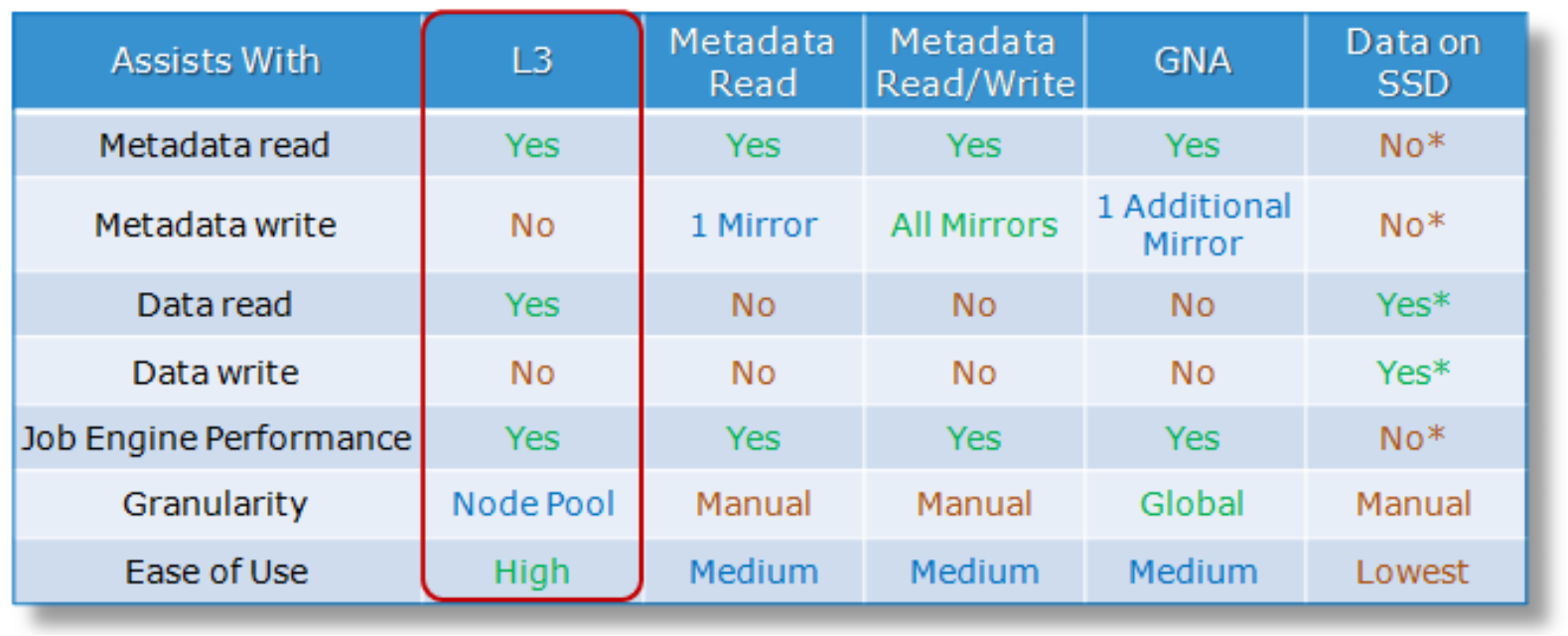
Table showing a comparison between the various SSD strategies including L3 cache, metadata read, metadata write, GNA, and data on SSD.

* Data located on SSD benefits. Other data on node pool does not benefit.

Figure 9.   SSD strategy comparison

SSD compatibility

OneFS also contains an SSD compatibility option, which allows nodes with dissimilar SSD capacity and count to be provisioned to a single node pool. The SSD compatibility is created and described in the OneFS WebUI SmartPools Compatibilities list and is also displayed in the Tiers & Node Pools list.

Note: When this SSD compatibility is created, OneFS automatically checks that the two pools to be merged have the same number of SSDs tier, requested protection, and L3 cache settings. If these settings are different, the OneFS WebUI prompts for consolidation and alignment of these settings.

Enabling L3 cache

L3 cache is enabled per node pool through a simple on or off configuration setting. Otherwise, there are no additional visible configuration settings to change. When enabled, L3 cache consumes all the SSD in node pool. Also, L3 cache cannot co-exist with other SSD strategies except for Global Namespace Acceleration (GNA). However, because they are exclusively reserved, L3 cache node pool SSDs cannot participate in GNA.

Note: L3 cache is enabled by default on any new node pool containing SSDs.
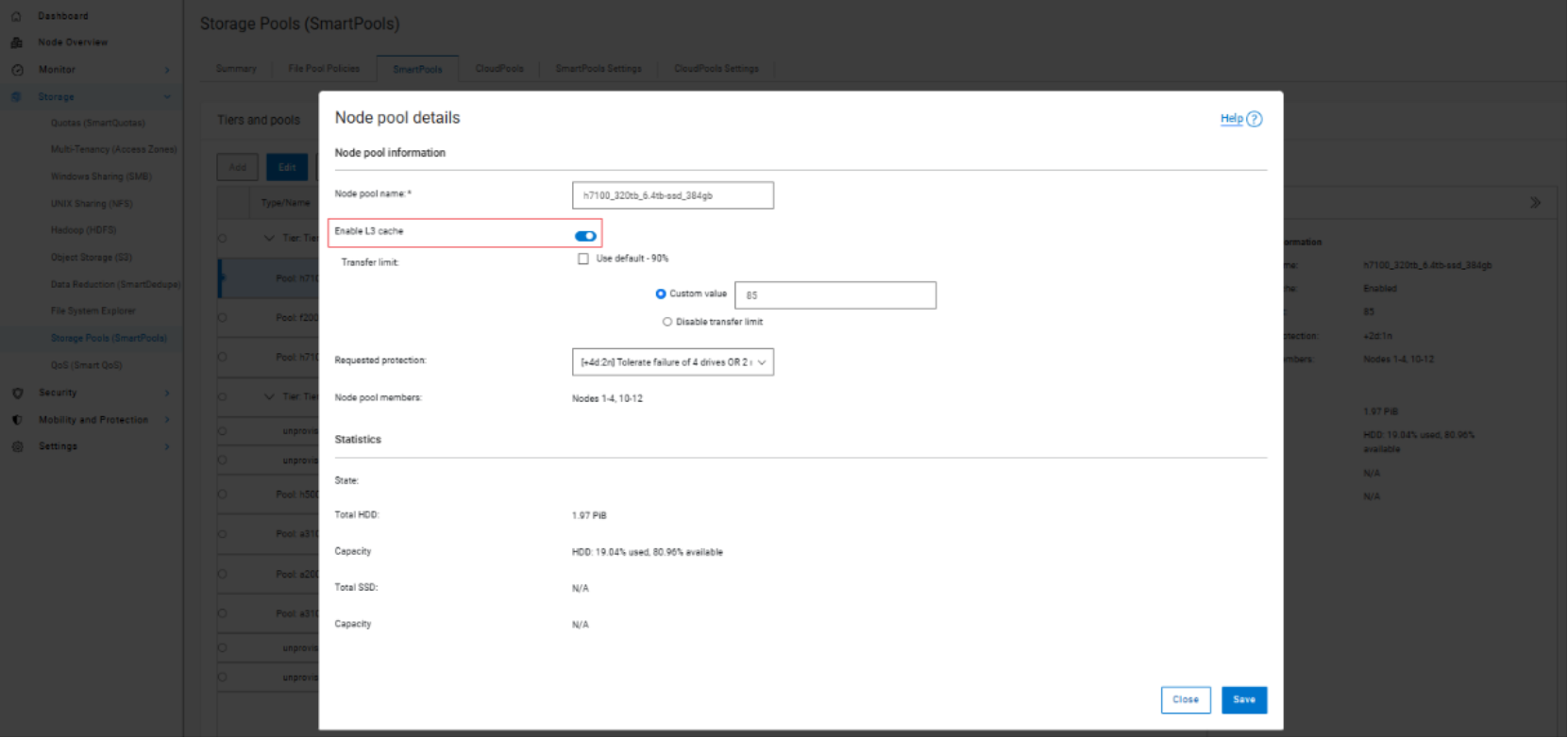
 The figure shows node pool details and transfer limit settings in the Storage Pools management interface.

Figure 10.    Node Pool Details Configuration

There is also a global setting to enable L3 cache by default for new node pools.
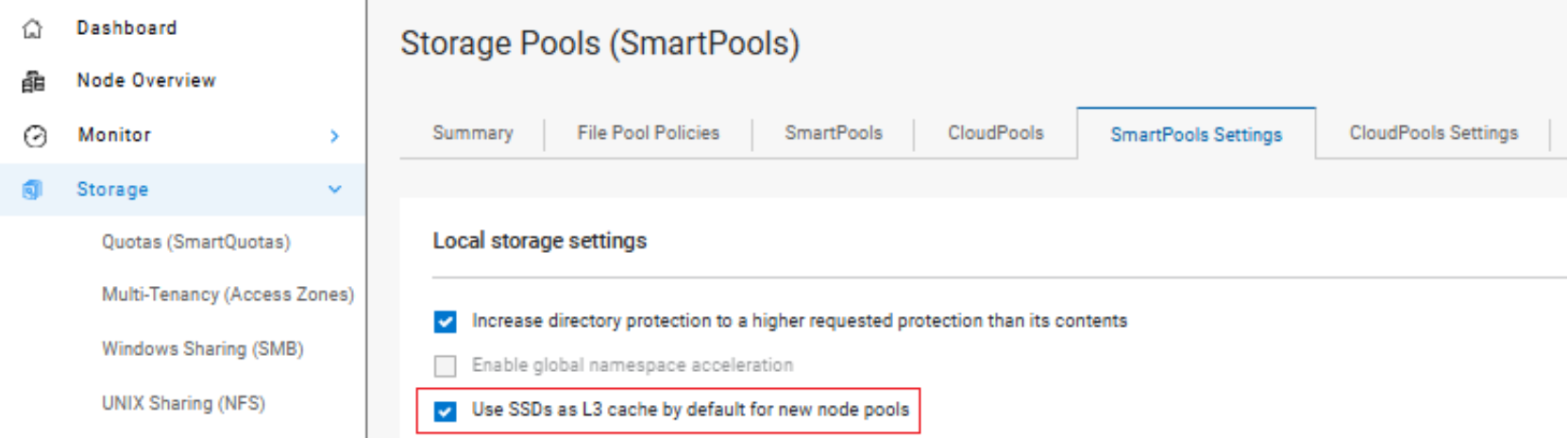
L3 cache WebUI configuration showing Storage Pools (SmartPools) local storage settings, with options enabled to increase directory protection and use SSDs as L3 cache by default for new node pools.

Figure 11.    L3 cache WebUI configuration

When converting the SSDs in a particular node pool to use L3 cache rather than SmartPools, you can estimate progress by periodically tracking SSD space usage (used capacity) during the conversion process. Also, you can change the job impact policy of the Flexprotect_Plus or SmartPools job responsible for the L3 cache conversion so that the job runs faster or slower. This change increases or decreases the impact of the conversion process on cluster resources.

Note: Node pools with L3 cache enabled are invisible for GNA purposes. All GNA ratio calculations are done exclusively for node pools without L3 cache enabled. For example, if you have six node pools on your cluster, and three of them have L3 cache enabled, GNA is applied only to the three remaining node pools without L3 cache enabled. On node pools with L3 cache enabled, metadata does not need an additional GNA mirror because L3 cache already accelerates metadata read access.

Cache monitoring and reporting

OneFS provides tools to accurately assess the performance of the various levels of cache at a point in time. These cache statistics can be viewed from the OneFS CLI using the isi_cache_stats command. The command results show statistics for L1, L2, and L3 cache for both data and metadata.

 Example output from the 'isi_cache_stats' CLI command.

Figure 12.    isi_cache_stats output

A verbose option of the command, isi_cache_stats -v, provides output that is more detailed and formatted:
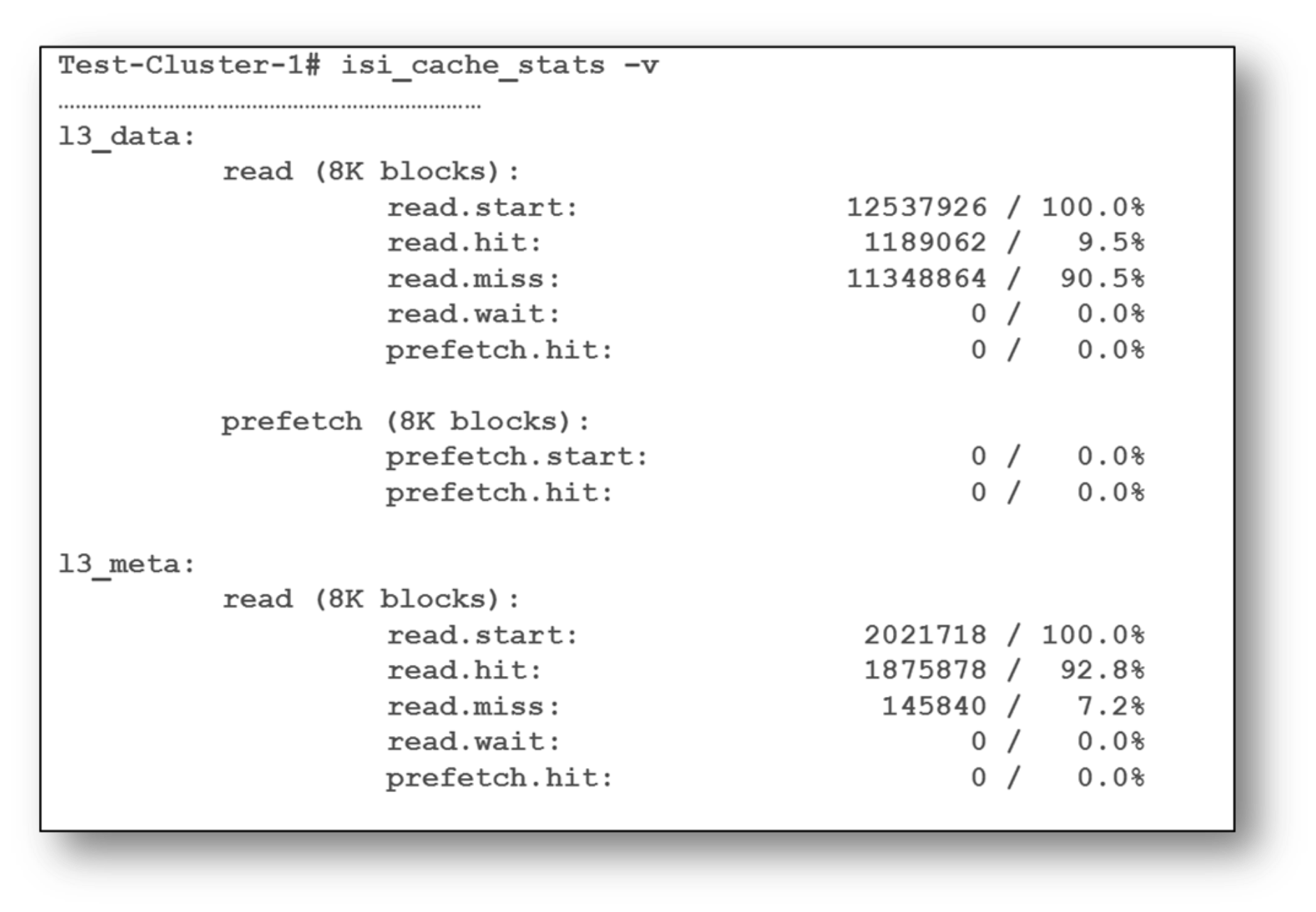
Example output from the 'isi_cache_stats' CLI command with the verbose option invoked.

Figure 13.    isi_cache_stats example output

Note: For L3 cache, the prefetch statistics will always read zero because L3 cache is a pure eviction cache and does not use data prefetch or metadata prefetch.

Performance resource management

OneFS performance resource management provides statistics for the resources used by jobs—both clusterwide and per-node. The isi statistics workload CLI command provides this information. Available in a “top” format, this command displays the top jobs and processes, and periodically updates the information.

For example, the following syntax shows and indefinitely refreshes the top five processes on a cluster:
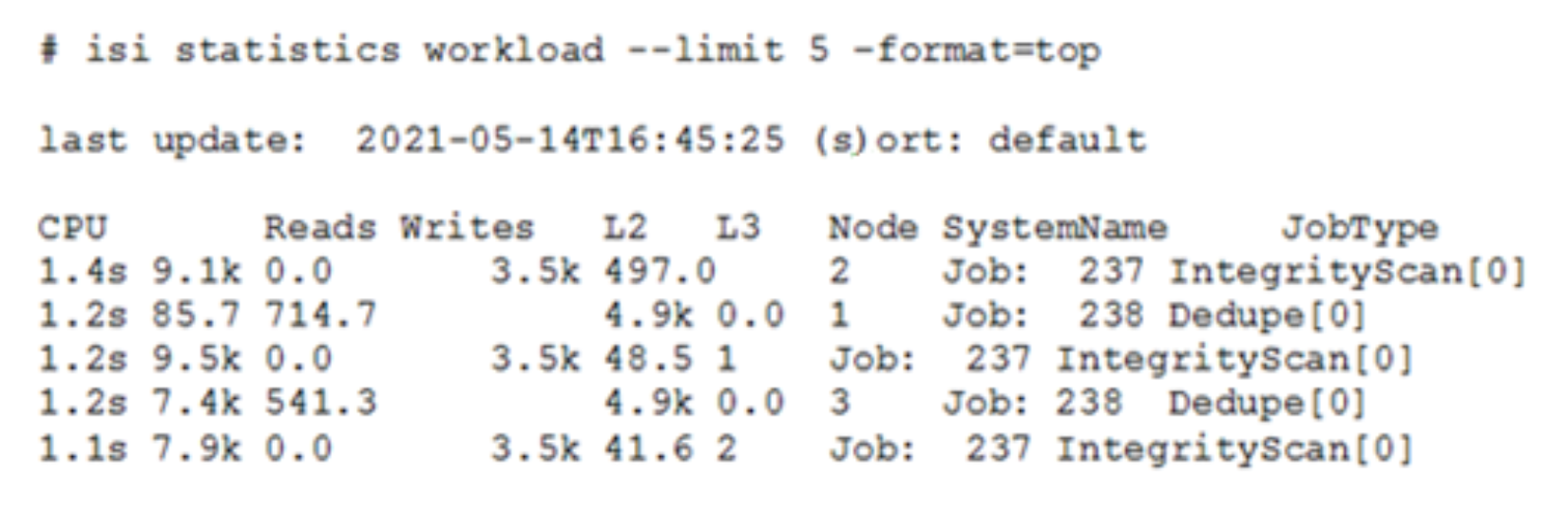
The figure shows ISI statistics workload output with five workload entries, including CPU usage, reads, writes, L2/L3 cache activity, node IDs, system names, and job types such as IntegrityScan and Dedupe.

Figure 14.    ISI statistics workload output

The resource statistics tracked per process, per job, and per node include CPU, reads, writes, and L2 and L3 cache data.

L3 cache and performance

A scale-out storage system must deliver the performance required for various workflows, whether they are sequential, concurrent, or random. Different workloads typically exist across applications and, often, within individual applications. With OneFS and L3 cache, throughput and IOPS scale linearly with the number of nodes present in a single system. Due to balanced data distribution, automatic rebalancing, and distributed processing, OneFS can use additional CPUs, network ports, and memory as the system grows. This capability also allows the caching subsystem to scale in relation to cluster size.

One of the goals of L3 cache is to immediately provide solid benefits for a wide variety of workloads, including:

  • EDA
  • Software design and build workflows
  • Virtualization
  • Rendering
  • Computer aided engineering (CAx) workloads

This goal is in line with the OneFS ethos of simplicity and ease of management. Although the benefit of L3 caching is highly workflow-dependent, the following general rules can be assumed:

  • L3 cache typically provides more benefit for random and aggregated workloads than for sequential and optimized workflows
  • L3 cache delivers good performance, with no configuration required, for a wide variety of workloads
  • L3 cache typically delivers similar IOPS as SmartPools metadata-read strategy, for user data retrieval (reads).
  • During data prefetch operations, streaming requests are intentionally sent directly to the spinning disks (HDDs), while using the L3 cache SSDs for random I/O.
  • SmartPools metadata-write strategy might be the better choice for metadata-write and overwrite heavy workloads, for example EDA and certain HPC workloads.
  • L3 cache can deliver considerable latency improvements for repeated random read workflows over both non-L3 cache node pools and SmartPools metadata-read configured node pools.
  • L3 cache can also provide improvements for parallel workflows, by reducing the impact to streaming throughput from random reads (streaming metadata).
  • L3 cache can also increase the performance of OneFS Job Engine jobs.

Note: In archive-class nodes, L3 cache is enabled by default and cannot be disabled. In these platforms, L3 cache runs in a metadata-only mode. By only storing metadata blocks, L3 cache optimizes the performance of operations such as system protection and maintenance jobs, in addition to metadata-intensive workloads.

L3 cache sizing

A large-scale storage system must provide the performance required for various workflows and datasets. Figuring out the size of the active data, or working set, for your environment is the first step in an L3 cache SSD sizing exercise.

L3 cache uses all available SSD space over time. As a rule, L3 cache benefits more with more available SSD space. However, sometimes losing spindle count hurts more than adding cache helps a workflow. If possible, add a larger capacity SSD rather than multiple smaller SSDs.

An L3 cache sizing exercise involves calculating the correct amount of SSD space to fit the working dataset. This calculation can be done by using the isi_cache_stats command to periodically capture L2 cache statistics on an existing cluster.

Run the following commands based on the workload activity cycle, at job start and job end. Initially run isi_cache_stats –c to reset, or zero out, the counters. Then run isi_cache_stats –v at workload activity completion and save the output. Observing the L2 cache miss rates for both data and metadata on a single node will help determine the working dataset size and the correct amount of SSD space.

Note: These cache miss counters are displayed as 8 KB blocks. As such, an L2_data_read.miss value of 1024 blocks represents 8 MB of missed data.

The formula for calculating the working set size is:

(L2_data_read.miss + L2_meta_read.miss) = working_set size

Once the working set size has been calculated, a good guideline is to size L3 cache SSD capacity per node according to the following formula:

L2 capacity + L3 capacity >= 150% of working set size.

There are diminishing returns for L3 cache after a certain point. When an SSD-to-working-set size ratio becomes too high, the cache hits decrease and fail to add greater benefit. Conversely, when compared to SmartPools SSD strategies, another benefit of using SSDs for L3 cache is that performance degrades more gracefully if metadata happens to exceed the available SSD capacity.

Note: L3 cache is not applicable for nodes containing 16 or more SSDs.

L3 cache and Global Namespace Acceleration

Global Name Space Acceleration, or GNA, is a configurable component of the OneFS SmartPools data tiering product. GNA’s goal is to help accelerate metadata read operations (filename lookup, access, and so forth). It does so by keeping a copy of the metadata for the entire cluster on high-performance, low-latency SSD media. This increase the performance of certain workflows across the whole file system for legacy Isilon clusters where not every node contains SSD. To achieve this benefit, a mirror of all the metadata from storage pools that do not contain SSDs is stored on any SSDs available. As such, metadata read operations are accelerated even for data on node pools that have no SSDs.

To implement L3 cache and GNA in the same cluster, you must create path-based file pool policies that target an L3 cache enabled node pool. Set the data SSD strategy and snapshot SSD strategy for this L3 cache-enabled node pool to avoid SSD storage. This setting allows the L3 cache node-pool-to-reference metadata blocks in its L3 cache. It does not default to using the GNA metadata mirror on another pool, which would incur a latency penalty. To configure file pool policies, OneFS SmartPools must be licensed. The policies can be added by running the following command:

# isi filepool policies create <policy-name> --begin-filter --path <path> --end-filter --data-storage-target <L3-cache-node-pool-ID> --data-ssd-strategy avoid --snapshot-ssd-strategy avoid --apply-order 1

Note: The apply-order flag value 1, as shown in the preceding command example, puts this file pool policy at the top of the policy order.

To prevent capacity or performance oversubscription of a cluster’s SSD resources, several requirements must be satisfied in order to activate GNA on a mixed node cluster running L3 cache:

  • At least 20 percent of the non-L3 cache nodes in the cluster must contain SSDs.
  • A minimum of 2 percent of the cluster usable capacity that is not residing on L3 cache enabled nodes must be on SSD in order to enable GNA.
  • General SmartPools configuration requirements apply including:
  • A minimum of three nodes per node pool
  • All nodes within a node pool must have the same configuration
  • All-SSD nodes (nodes with only SSD drives) must follow the same rules—three nodes to form a node pool.

Assuming these requirements are met, you can enable GNA across the entire cluster through the OneFS WebUI by going to ‘Storage > Storage Pools > Settings’, or ‘File System Management > SmartPools > Settings’ in OneFS 9.14 and earlier releases.

For workloads with a primary performance tier, and an archive element without SSD, you can run L3 cache and GNA in concert within the same cluster.

For example, in a cluster that has four PowerScale H700 nodes, four Isilon H400 nodes, and three Isilon NL400 nodes, you could:

  • Enable the SSDs in the H700 tier to run L3 cache. Doing so reformats these SSDs, and they will not be available for regular file system activity.
  • Use the H400 nodes to run GNA (assuming they meet the previously described 2 and 20 percent rules). Hold a read-only mirror of both their metadata and the NL400 nodes’ metadata. Thus, even the NL400 nodes that have no SSD can benefit from fast metadata lookups for a single mirror.

Note: In the instances where all the nodes in the cluster contain SSD, L3 caching is intended as a replacement for GNA.

In-line compression and caching

To support OneFS inline compression, a node’s L1, or client-side, read cache is divided into separate address spaces. That way, both the on-disk compressed data and the logical uncompressed data can be cached. The address space for the L1 cache is already split for data and FEC blocks, so a similar technique is used to divide it again. Data in the uncompressed L1 cache is fed from data in the compressed L1 cache which, in turn, is fed from disk.
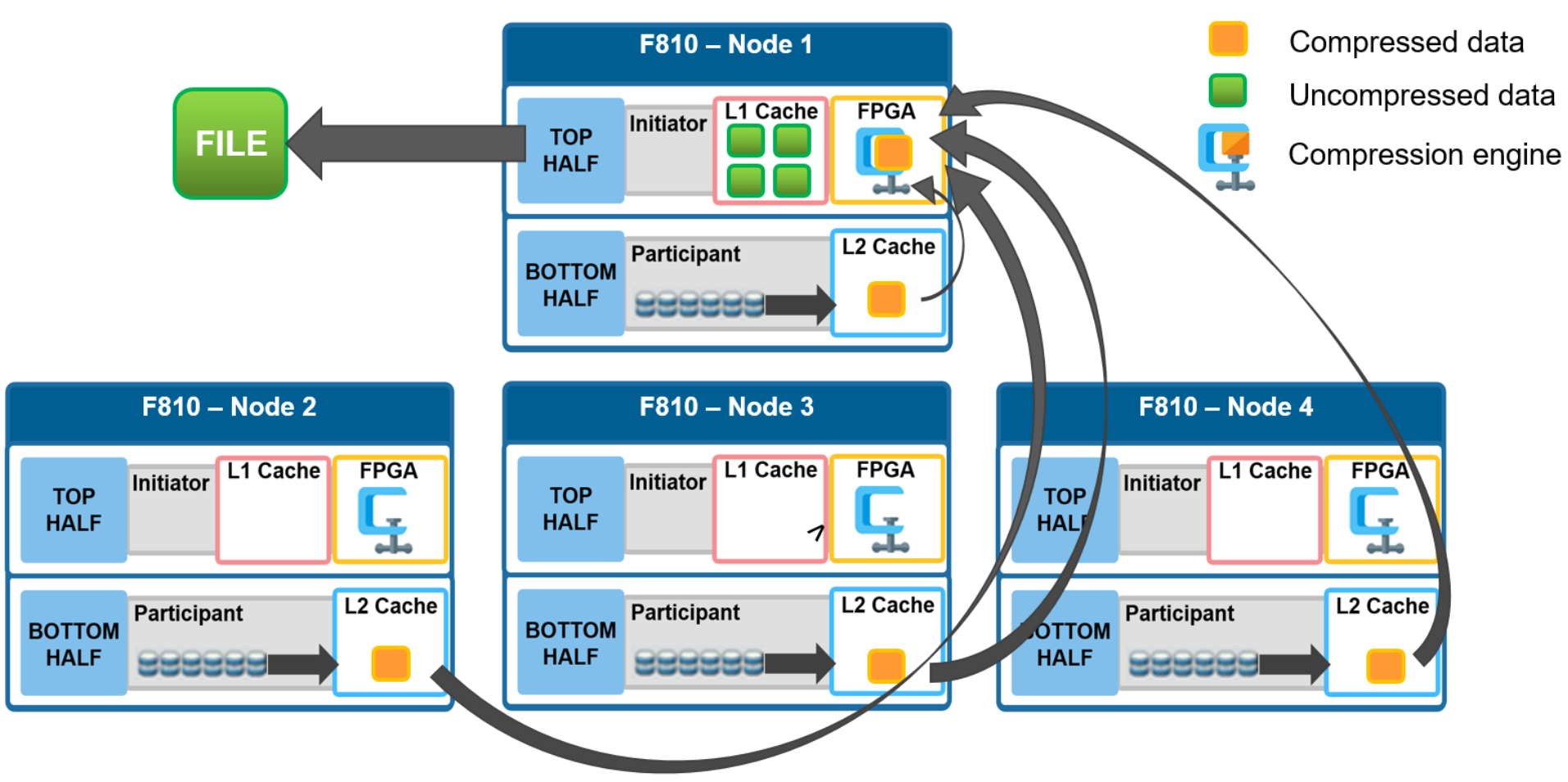
Graphic illustrating OneFS file reads with in-line compression enabled.

Figure 15.    File reads with compression

OneFS prefetch caching has also been enhanced to accommodate compressed data. Because reading part of a compressed chunk results in the entire compression chunk being cached, it means that prefetch requests are rounded to compression chunk boundaries. Because a prefetch request is not complete until the uncompressed data is available in cache, the callback used for prefetch requests performs the decompression.

L3 cache best practices and considerations

L3 cache best practices

Dell Technologies recommends the following L3 cache best practices:

  • Use a small number (ideally no more than two) of large capacity SSDs rather than multiple small SSDs.
  • Use the appropriate SSD capacity that will fit your working dataset. The isi_cache_stats utility can help to determine the appropriate capacity on existing clusters. A good guideline is to size L3 cache SSD capacity per node according to the following formula:

L2 capacity + L3 capacity >= 150% of working set size

  • While L3 cache can potentially use up to a 2:1 ratio of hard drives to SSDs per node, use at most two to three SSDs per node for L3 cache.
  • Repeated random read workloads typically benefit most from L3 cache through latency improvements.
  • Although not recommended, both L3 cache and Global Namespace Acceleration (GNA) are supported within the same cluster.
  • The same procedure is used for replacing failed L3 cache SSDs as for other storage drives. However, L3 cache SSDs do not require FlexProtect or AutoBalance to run post replacement, so it is typically a faster process.
  • For a legacy node pool using a SmartPools metadata-write strategy, do not convert to L3 cache unless:
  • The SSDs are seriously underutilized.
  • The SSDs in the pool are oversubscribed and spilling over to hard disk.
  • Your primary concern is SSD longevity.

L3 cache considerations

When deploying L3 cache, the following considerations should be kept in mind:

  • All the SSDs within a node pool can either be used for L3 cache, or for SmartPools data strategies (metadata-ro, metadata-rw, data) – but not mixed L3 cache/SmartPools usage.
  • L3 cache is not applicable for nodes containing 16 or more SSDs, and all SSD node pools are not eligible for L3 cache enablement.
  • Enabling L3 cache on an existing node pool with SSDs takes some time. Data and metadata on the SSDs must be evacuated to other drives before the SSDs can be formatted for caching. Conversely, disabling L3 cache is a fast operation because no data needs to be moved and drive reformatting can begin immediately.
  • If you are concerned about metadata being evicted from L3 cache, you can either:
  • Deploy more SSDs per node to accommodate a large working set.
  • Disable L3 cache and stay with traditional SmartPools metadata acceleration (either metadata read-only or read/write) for the particular node pool.
  • You can have GNA and L3 cache in the same cluster (different node pools). It requires some manual setup, including a SmartPools policy to avoid SSD storage on L3 cache node pool, is required.

Note: L3 cache node pool hard drive space does count towards GNA limits.

  • All the SSDs in an L3 cache node pool must be the same size.
  • If an L3 cache SSD fails, OneFS does not have to run FlexProtect or AutoBalance jobs, like with a regular file system SSD. However, after the failed SSD is replaced, some time is required before the cache is repopulated.
  • New clusters with SSD have L3 cache enabled by default, and L3 cache is enabled by default on any new node pool containing SSD. Existing node pools with SSD will not be modified to use L3 cache on upgrade.
  • SSDs displace hard drives. More SSDs and fewer hard drive spindles can impact streaming and concurrency performance towards total capacity.
  • The L3 cache is intentionally avoided for streaming reads during data prefetch operation. This approach keeps the streaming requests to the spinning disks (hard drives), while using the SSDs for the random I/O.
  • L3 cache node pool hard drive space does not count in GNA SSD percentage calculations.
  • In L3 cache, metadata is preferentially cached over data blocks.
  • When a node reboots, there is no automatic flushing of L2 cache blocks to L3 cache.
  • Unlike hard drives and SSDs that are used for storage, when an SSD used for L3 cache fails, the drive state immediately changes to REPLACE without a FlexProtect job running. An SSD drive used for L3 cache contains only cache data that does not require protection by FlexProtect. After the drive state changes to REPLACE, you can pull and replace the failed SSD.
  • Although there is no percentage completion reporting shown when converting node pools to use L3 cache, you can estimate percentage completion by tracking SSD space usage throughout the job run. You can also change the job impact policy of the Flexprotect_Plus or SmartPools job responsible for the L3 cache conversion so that the job runs faster or slower.
  • InsightIQ reports current and historical L3 cache statistics.
  • For L3 cache, the isi_cache_stats prefetch statistics will always read zero because L3 cache is purely an eviction cache and does not use data or metadata prefetch.
  • L3 cache has a metadata only mode (as opposed to data and metadata) to support archive-series storage nodes.

Conclusion

Conclusion

Caching of data and metadata is widely used to increase the performance of storage systems by keeping the most frequently accessed content in memory. The PowerScale OneFS caching architecture goes beyond the common approach. It provides a scale-out caching infrastructure, using both the speed of system memory and the persistence and affordability of SSDs and NVRAM. OneFS caching provides faster access to content by intelligently predicting how content will be accessed and retrieving only the required parts of files. This technology enables OneFS to deliver unparalleled storage performance, while maintaining globally coherent read and write access across the entire cluster.

The OneFS operating system features a fully distributed file system and a multi-tier, globally coherent cache. It gives businesses facing a deluge of unstructured data extreme levels of total aggregate throughput. It accelerates access to critical data while dramatically reduces the cost and complexity of storing and managing it.

A storage system that meets user needs and the ongoing challenges of the data center, especially in today’s world of big data in the enterprise, requires several critical features. These features include scalability, performance, ease of management, data protection, security, and interoperability.

With OneFS, clusters are simple to install, manage, and scale, at virtually any size. Organizations and administrators can scale from as little as 18 TB to greater than 68 PB within a single file system, single volume, with a single point of administration. OneFS delivers high levels of performance, throughput, and capacity, without adding management complexity.

Contact your Dell sales representative or authorized reseller to learn more about how Dell PowerScale NAS solutions can benefit your organization.

Visit Dell PowerScale to compare features and get more information.