RAG Chatbot
A full-stack Retrieval-Augmented Generation (RAG) application that enables intelligent, document-based question answering. The system integrates a FastAPI backend powered by LangChain, FAISS, and AI models, alongside a modern React + Vite + Tailwind CSS frontend for an intuitive chat experience.
The RAG Chatbot Blueprint document outlines a complete, production-ready architecture for building a Retrieval-Augmented Generation (RAG) chatbot capable of answering user questions based on uploaded documents. The system combines a FastAPI backend, LangChain-based document processing, FAISS vector search, and a modern React/Vite/Tailwind CSS frontend to deliver an intuitive, document-grounded conversational experience.
The document demonstrates how RAG systems integrate document ingestion, embedding, retrieval, and generative AI to produce accurate, context-aware answers. Users upload PDFs through a drag-and-drop interface; the backend then splits text, converts it into embeddings, and stores it in a FAISS vector database. During chat interactions, user queries trigger similarity search, supplying relevant context to a large language model, which generates a synthesized response.
The architecture consists of two major components:
React Web UI (Port 3000) – Provides PDF upload, real-time chat, responsive design, and live status updates.
FastAPI Backend (Port 5001) – Handles preprocessing, embeddings, vector storage, retrieval, LLM orchestration, authentication, and health checks.
The blueprint offers detailed instructions for installation, configuration, and deployment. It requires Docker, Docker Compose, and access to enterprise inference endpoints such as GenAI Gateway or APISIX Gateway, with token-based authentication. Configuration involves setting two environment files, one for Docker Compose and one for backend API parameters. These define model names, endpoint URLs, tokens, SSL settings, and optional local domain mappings.
Deployment is simplified through docker compose up, which launches both UI and backend services. Diagnostic commands and health checks help verify proper operation. The document also highlights validated models, including Llama3.18BInstruct and bgebaseenv1.5, with support for various hardware backends.
The blueprint serves as a step-by-step guide for deploying a scalable, modular RAG chatbot suitable for enterprise, research, and educational environments.
Link to download the code: https://github.com/opea-project/Enterprise-Inference/tree/main/sample_solutions/RAGChatbot
Project Overview
The RAG Chatbot demonstrates how retrieval-augmented generation can be used to build intelligent, document-grounded conversational systems. It retrieves relevant information from a knowledge base, passes it to a large language model, and generates a concise and reliable answer to the user’s query. This project integrates seamlessly with cloud-hosted APIs or local model endpoints, offering flexibility for research, enterprise, or educational use.
Features
Backend
- Clean PDF upload with validation
- LangChain-powered document processing
- FAISS-CPU vector store for efficient similarity search
- Enterprise inference endpoints for embeddings and LLM
- Token-based authentication for inference API
- Comprehensive error handling and logging
- File validation and size limits
- CORS enabled for web integration
- Health check endpoints
- Modular architecture (routes + services)
Frontend
- PDF file upload with drag-and-drop support
- Real-time chat interface
- Modern, responsive design with Tailwind CSS
- Built with Vite for fast development
- Live status updates
- Mobile-friendly
Architecture
Below is the architecture as it consists of a server that waits for documents to embed and index into a vector database. Once documents have been uploaded, the server will wait for user queries which initiates a similarity search in the vector database before calling the LLM service to summarize the findings.
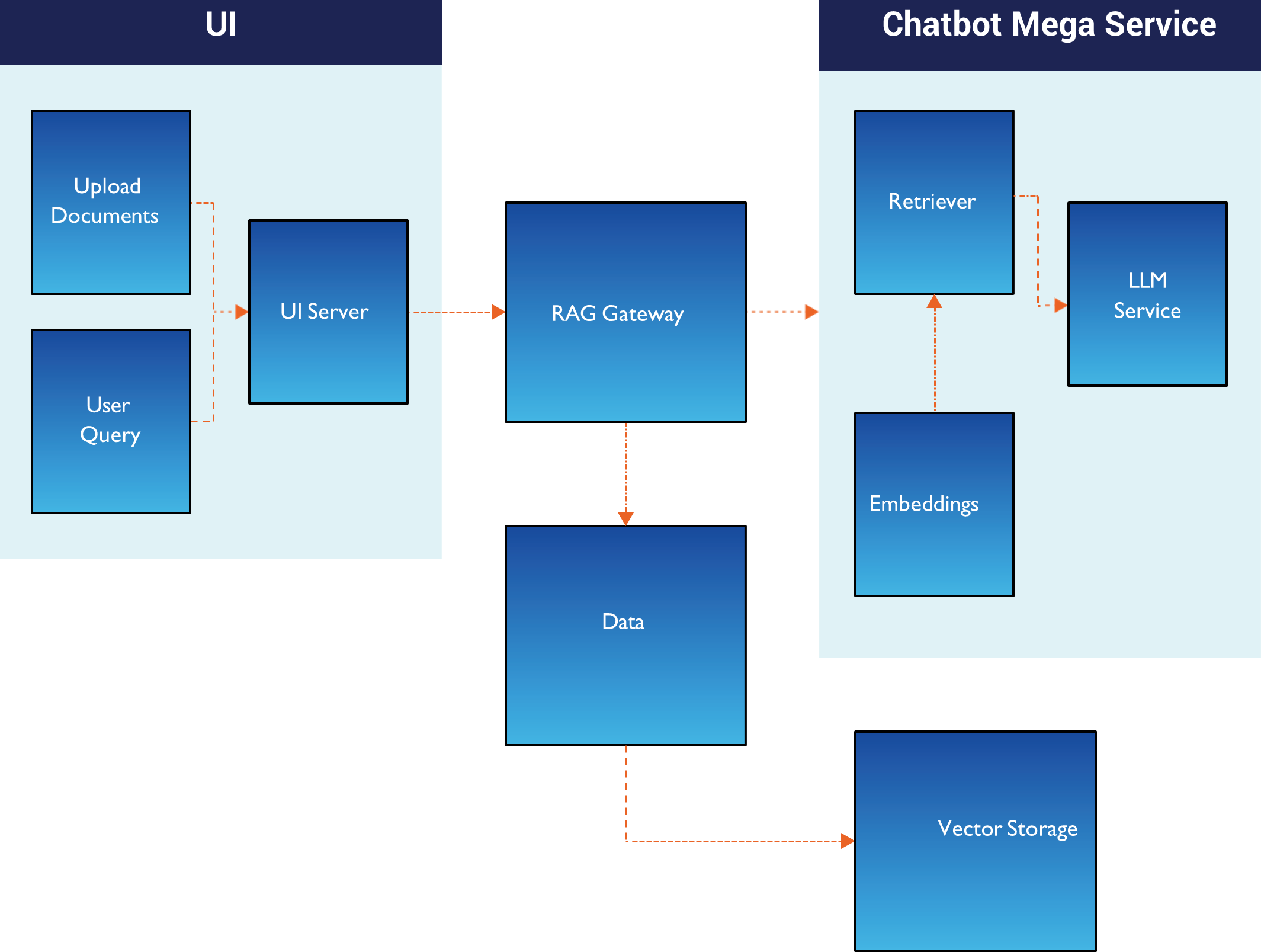
Service Components
- React Web UI (Port 3000)
Provides intuitive chat interface with drag-and-drop PDF upload, real-time messaging, and document-grounded Q&A interaction - FastAPI Backend (Port 5001)
Handles document processing, FAISS vector storage, LangChain integration, and orchestrates retrieval-augmented generation for accurate responses
Typical Flow:
- User uploads a document through the web UI.
- The backend processes the document by splitting it and transforming it into embeddings before storing it in the vector database.
- User sends a question through the web UI.
- The backend retrieves relevant content from stored documents.
- The model generates a response based on retrieved context.
- The answer is displayed to the user via the UI.
Prerequisites
System Requirements
Before you begin, ensure you have the following installed:
- Docker and Docker Compose
- Enterprise inference endpoint access (token-based authentication)
Required API Configuration
For Inference Service (RAG Chatbot):
This application supports multiple inference deployment patterns:
GenAI Gateway:
Provide your GenAI Gateway URL and API key
- To generate the GenAI Gateway API key, use the generate-vault-secrets.sh script
- The API key is the litellm_master_key value from the generated vault.yml file
APISIX Gateway:
Provide your APISIX Gateway URL and authentication token
- To generate the APISIX authentication token, use the generate-token.sh script
- The token is generated using Keycloak client credentials
Local Development Configuration
For Local Testing Only (Optional)
If you're testing with a local inference endpoint using a custom domain (e.g., api.example.com mapped to localhost in your hosts file):
- Edit api/.env and set:
LOCAL_URL_ENDPOINT=api.example.com
(Use the domain name from your INFERENCE_API_ENDPOINT without https://) - This allows Docker containers to resolve your local domain correctly.
Note: For public domains or cloud-hosted endpoints, leave the default value not-needed.
Verify Docker Installation
# Check Docker version
docker --version

# Check Docker Compose version
docker compose version

# Verify Docker is running
docker ps
Quick Start Deployment
Clone the Repository
git clone https://github.com/opea-project/Enterprise-Inference.git
cd Enterprise-Inference/sample_solutions/RAGChatbot
Set up the Environment
This application requires two .env files for proper configuration:
- Root .env file (for Docker Compose variables)
- api/.env file (for backend application configuration)
Step 1: Create Root .env File
# From the RAGChatbot directory cat > .env << EOF
# Docker Compose Configuration LOCAL_URL_ENDPOINT=not-needed EOF
Note: If using a local domain (e.g., api.example.com mapped to localhost), replace not-needed with your domain name (without https://).
Step 2: Create api/.env File
Copy from the example file and edit with your actual credentials:
cp api/.env.example api/.env
Then edit api/.env to set your INFERENCE_API_ENDPOINT and INFERENCE_API_TOKEN. Or manually create api/.env with:
# Inference API Configuration
# INFERENCE_API_ENDPOINT: URL to your inference service (without /v1 suffix)
#
# **GenAI Gateway**: Provide your GenAI Gateway URL and API key #    - URL format: https://genai-gateway.example.com
#    - To generate the GenAI Gateway API key, use the [generate-vault-secrets.sh] script
#    - The API key is the litellm_master_key value from the generated vault.yml file
#
# **APISIX Gateway**: Provide your APISIX Gateway URL and authentication token
#    - For APISIX, include the model name in the INFERENCE_API_ENDPOINT path #    - Example: https://apisix-gateway.example.com/Llama-3.1-8B-Instruct
#    - Set EMBEDDING_API_ENDPOINT separately for the embedding model #    - Example: https://apisix-gateway.example.com/bge-base-en-v1.5 #    - To generate the APISIX authentication token, use the [generate-token.sh] script
#    - The token is generated using Keycloak client credentials #
# INFERENCE_API_TOKEN: Authentication token/API key for the inference service
INFERENCE_API_ENDPOINT=https://api.example.com INFERENCE_API_TOKEN=your-pre-generated-token-here

# Model Configuration EMBEDDING_MODEL_NAME=BAAI/bge-base-en-v1.5
INFERENCE_MODEL_NAME=meta-llama/Llama-3.1-8B-Instruct

# APISIX Gateway Endpoints
# Uncomment and set these when using APISIX Gateway: # IMPORTANT: Use exact APISIX route paths:
# Example routes: /bge-base-en-v1.5/* and /Llama-3.1-8B-Instruct/*
# INFERENCE_API_ENDPOINT=https://api.example.com/Llama-3.1-8B-Instruct # EMBEDDING_API_ENDPOINT=https://api.example.com/bge-base-en-v1.5

# Local URL Endpoint (only needed for non-public domains)
# If using a local domain like api.example.com mapped to localhost: #    Set this to: api.example.com (domain without https://)
# If using a public domain, set any placeholder value like: not-needed LOCAL_URL_ENDPOINT=not-needed

# SSL Verification Settings
# Set to false only for dev with self-signed certs VERIFY_SSL=true
Important Configuration Notes:
INFERENCE_API_ENDPOINT: Your actual inference service URL (replace https://your-actual-api-endpoint.com)
- For APISIX/Keycloak deployments, the model name must be included in the endpoint URL (e.g., https://apisix-gateway.example.com/Llama-3.1-8B-Instruct)
INFERENCE_API_TOKEN: Your actual pre-generated authentication token
EMBEDDING_MODEL_NAME and INFERENCE_MODEL_NAME: Use the exact model names from your inference service
- To check available models: curl https://your-api-endpoint.com/v1/models -H "Authorization: Bearer your-token"
- Important for APISIX/Keycloak: You need a separate endpoint for the embedding model. Configure EMBEDDING_ENDPOINT with the embedding model in the URL path (e.g., https://apisix-gateway.example.com/bge-base-en-v1.5)
LOCAL_URL_ENDPOINT: Only needed if using local domain mapping (see Local Development Configuration)
Note: The docker-compose.yml file automatically loads environment variables from both .env (root) and ./api/.env (backend) files.
Running the Application
Start both API and UI services together with Docker Compose:
# From the RAGChatbot directory
docker compose up --build

# Or run in detached mode (background)
docker compose up -d --build
The API will be available at: http://localhost:5001
The UI will be available at: http://localhost:3000
View logs:
# All services
docker compose logs -f

# Backend only
docker compose logs -f backend

# Frontend only
docker compose logs -f frontend
Verify the services are running:
# Check API health
curl http://localhost:5001/health

# Check if containers are running
docker compose ps
User Interface
Using the Application
Make sure you are at the localhost:3000 url.
You will be directed to the main page which has each feature.
Upload a PDF:
- • Drag and drop a PDF file, or
- • Click "Browse Files" to select a file
- • Wait for processing to complete
Start chatting:
- • Type your question in the input field
- • Press Enter or click Send
- • Get Al-powered answers based on your document
UI Configuration
When running with Docker Compose, the UI automatically connects to the backend API. The frontend is available at http://localhost:3000 and the API at http://localhost:5001.
For production deployments, you may want to configure a reverse proxy or update the API URL in the frontend configuration.
Stopping the Application
docker compose down
Troubleshooting
For comprehensive troubleshooting guidance, common issues, and solutions, refer to: Troubleshooting Guide - TROUBLESHOOTING.md
Additional Info
The following models have been validated with RAGChatbot:
| Model | Hardware |
|---|---|
| meta-llama/Llama-3.1-8B-Instruct | Gaudi |
| BAAI/bge-base-en-v1.5 (embeddings) | Gaudi |
| Qwen/Qwen3-4B-Instruct | Xeon |