Reference Architecture—Splunk Reference Architecture on VxRail
Executive Summary
Introduction
Machine data is one of the fastest growing and complex areas of big data. It is also one of the most valuable, containing a definitive record of events that can reveal information about user transactions, customer behavior, machine behavior, security threats, fraudulent activity, and more. Extracting information from this data, however, presents real challenges. Many traditional data analysis, management, and monitoring solutions are not engineered to handle such high-volume, high-velocity, and highly diverse data.
This reference architecture addresses these key areas:
- Explains the core concepts and architecture of Splunk Enterprise
- Summarizes the key Dell Technologies components of the solution
- Details recommendations for reference architecture configurations for several realistic Splunk deployments of different business sizes and types
Splunk Enterprise gives you real-time visibility, insight, and understanding across your IT infrastructure and the applications and services that run on top of it. The Splunk platform also:
- Seamlessly blends metrics and events from both structured and unstructured data sources
- Collects and correlates multiple data sources to rapidly pinpoint service degradations and reduce mean-time-to-resolution (MTTR)
- Monitors end-to-end infrastructure to detect anomalies and prevent problems in near real-time
- Delivers powerful visualizations to understand relationships, track trends, and accelerate investigations
Dell Technologies and Splunk have partnered to provide a menu of standardized reference architectures for nondisruptive scalability and performance to aid an organization's digital transformation. When paired together, Dell Technologies and Splunk combine the Splunk ecosystem's analytics with the cost-effective, scalable, and flexible of Dell EMC infrastructure to deliver operational intelligence.
Reference overview
Note: This reference architecture provides validation guidelines for running Splunk Enterprise on VxRail. While it is showcased in this paper running on Dell EMC VxRail. The reference architecture can apply to any Dell EMC PowerEdge vSAN Ready Nodes.
This reference architecture is based on Splunk Enterprise 8.1.2. It describes key points that provide a validated Splunk Enterprise solution using Dell EMC VxRail, Dell EMC storage, and VMware virtualization software. These components can easily, efficiently, and cost-effectively scale to support enterprise-level machine data analytics and real-time operational intelligence. VxRail is the only fully integrated, preconfigured, and pretested VMware hyperconverged infrastructure (HCI) family on the market. Based on VMware vSphere plus VMware vSAN and Dell EMC software, VxRail delivers an all-in-one IT infrastructure transformation by using a known and proven building blocks for the Software-Defined Data Center (SDDC).
In addition to covering these use cases, the solution includes background material describing all the technologies that make the solution compelling, including VxRail architecture, Isilon storage, VMware vSphere, and Splunk Enterprise.
Key results
This solution provides detailed information for evaluating the applicability of VxRail offerings for a Splunk implementation. Splunk has validated multiple use case configurations for VxRail that meet or exceed Splunk’s documented reference hardware performance. You can match almost any current needs with an approved configuration. You can also be confident that the VxRail product line, together with the flexibility of Splunk Enterprise configuration options, can be scaled out to handle future needs without the need for extensive upgrades or expensive re-platforming.
Audience
This reference architecture is intended for IT professionals wanting to understand the architecture and implementation of Splunk enterprise on a VxRail.
We value your feedback
Dell Technologies and the authors of this document welcome your feedback on the solution and the solution documentation. Contact the Dell Technologies Solutions team by email or provide your comments by completing our documentation survey.
Author: Vic Dery, Sr. Principal Engineer of VxRail Technical Marketing
Contributors:
David Glynn, Sr. Principal Engineer of VxRail Technical Marketing
Al Bledsoe, Consulting Architect, Splunk & Big Data Analytics
Alex Rodriguez, Sr. Manager, Globals, SI, SPs, and Vertical Industries
George O’Toole, Sr. Advisor Solutions Marketing
Note: For links to additional documentation for this solution, see Dell Technologies Solutions Info Hub for VxRail.
Executive Overview
Introduction
The following reference architecture describes a Dell EMC HCI VxRail coupled with a Dell EMC storage solution hosting a Splunk Enterprise environment. Dell Technologies and Splunk jointly tested and validated this architecture to meet or exceed the performance of Splunk Enterprise. This architecture is in accordance with the Splunk Validated Architectures white paper.
VxRail is a fully integrated, preconfigured, and pretested HCI. Powered by industry-leading vSAN and vSphere software, VxRail is the easiest and fastest way to streamline and extend a VMware environment while dramatically simplifying IT operations.
We deployed two reference architectures representing Splunk instances as virtual machines on a VMware vSphere 7.0 cluster following Splunk’s documented virtualization best practices. VxRail uses VMware vSAN technology as the storage layer to build vSAN on groups of locally attached disks. This configuration provides a low latency read and writes disk I/O by using an all-flash array.
The following figure shows the four layers in this solution:
- Application layer
- Virtualization layer
- Infrastructure layer
- vSAN layer
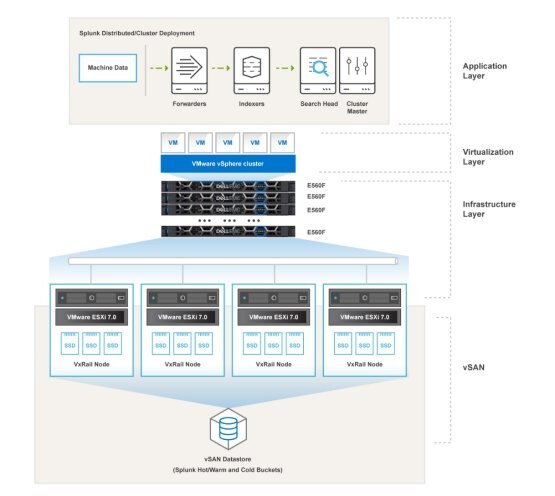
Figure 1. Splunk Enterprise on VxRail reference architecture
In the application layer, there are four Splunk components: forwarder, indexer, search head, and management node. The VxRail cluster forms a vSAN as shared storage on all-flash disks that is used to hold all virtual machines and indexed data in directories referred to as "buckets" as it moves through its life cycle in Splunk.
The following figure shows a reference architecture that is similar to Figure 1, except with differences in the number of VxRail nodes and Splunk bucket placements:

Figure 2. Splunk Enterprise on VxRail with Isilon reference architecture
In this example, vSAN is used to store all virtual machines and Splunk hot/warm buckets, while PowerScale storage is used to store the Splunk cold bucket for long-term data retention.
Note: For information about the hot/warm and cold bucket concept, see Splunk's Managing Indexers and Clusters of Indexers document.
Dell EMC VxRail
VxRail is an HCI platform jointly developed by Dell Technologies and VMware. It is the only fully integrated, preconfigured, and tested HCI system optimized for VMware vSAN software-defined storage and the VMware vSphere ESXi hypervisor. VxRail is managed through the vCenter Server interface, providing the familiar vSphere experience. VxRail seamlessly integrates with and can fully use the existing VMware ecosystem and cloud management solutions.
VxRail HCI System Software
VxRail HCI System Software is integrated software that delivers a seamless and automated operational experience, offering 100 percent native integration between VxRail Manager and vCenter. Intelligent life cycle management automates nondisruptive upgrades, updates, and node addition or retirement while keeping VxRail infrastructure in a continuously validated state to ensure that workloads are always available. The HCI System Software includes Software-as-a-Service (SaaS) multicluster management and orchestration for centralized data collection and analytics that uses machine learning and AI to help customers keep their HCI stack operating at peak performance and ready for future workloads. IT teams can benefit from the actionable insights to optimize infrastructure performance, improve serviceability, and foster operational freedom.
Dell EMC PowerScale
You can use Dell EMC PowerScale scale-out Network Attached Storage (NAS) platforms for additional cold and frozen bucket storage. The Isilon H- and A-series are particularly suited to host this data as they offer both hybrid and deep storage. The Isilon H-series hybrid models offer a flash tier for increased performance, while the Isilon A-series models offer dense archival storage for large-scale data retention at a lower cost.
PowerScale storage systems run the intelligent OneFS operating system to scale data across many hardware nodes, enabling explosive growth in performance and capacity. Orchestrated by OneFS, all components in a cluster work to create a unified pool of highly efficient storage—with a storage utilization rate of up to 80 percent. SmartDedupe data deduplication provides additional reductions in data storage physical requirements such as power and footprint. The OneFS AutoBalance function enables you to add or remove cluster nodes quickly and easily without downtime, manual data migration, or application logic reconfiguration. This function provides multiple redundancy levels, eliminates hardware refreshes, and saves precious IT resources.
With up to 252 nodes in a cluster, you can scale both capacity and performance in a few minutes to meet your specific business needs—all without any additional IT burden.
Splunk Enterprise
Splunk Enterprise is a software product that enables enterprises to collect, search, organize, analyze, and visualize data that is gathered from various system components. Splunk Enterprise ingests log and streaming data from a wide variety of sources, including websites, applications, sensors, and devices. From each data source, Splunk Enterprise indexes the data stream and parses it into a series of individual events that you can view and search. The Splunk web interface can be used to analyze the data further. The Splunk search language, lookups, macros, and sub searches reduce hours of tedium to seconds of simplicity and tags, saved searches, and dashboards offer both operational insights and collaborative vehicles.
The following figure provides an overview of the Splunk system architecture. A Splunk Enterprise instance can perform the role of a search head, an indexer, or both in small deployments. When the daily ingest rate or search load exceed the sizing recommendations for a combined instance environment, Splunk Enterprise scales out horizontally by adding additional indexers and search heads. For more information, see the Splunk Capacity Planning Manual.
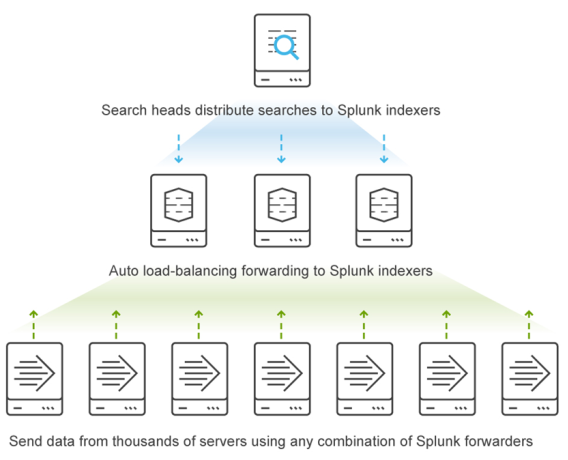
Figure 3. Splunk architecture overview
When a Splunk Enterprise indexer receives data, the indexer parses the raw data into specific events based on the event's timestamp and writes them to the appropriate internal index. Splunk implements a form of storage tiering involving hot/warm and cold buckets of index data to optimize performance for newly indexed data and provide an option to keep older data for more extended periods on higher capacity storage.
Newly indexed data lands in a hot bucket, where it is actively read and written by Splunk. When the number of hot buckets is reached, or when the size of the data in the hot buckets exceeds the specified threshold, the hot bucket is rolled to a warm bucket. Warm buckets reside on the same tier of storage as hot buckets. The only difference is that warm buckets are read-only. The storage that is identified for hot/warm data must be your fastest storage tier because it has the most significant impact on the performance of your Splunk Enterprise deployment.
When the number of warm buckets or volume size is exceeded, data is rolled into a cold bucket, which can optionally reside on another tier of storage. Cold data can reside on an NFS mount if the latency is less than 5 ms (ideally) and not more than 100 ms for indexers or 200 ms for search heads. PowerScale storage, in particular the Isilon Archive nodes, offers an acceptable blend of performance and lower cost per TB, making it a good choice for longer-term retention of cold data.
Data can also be archived or frozen, but the data is no longer searchable by Splunk search heads. Manual user action is required to bring the data back into Splunk Enterprise buckets to be searchable. While you might choose to use frozen buckets to meet compliance retention requirements, this guide shows how the Isilon H500 massive scalability and competitive cost of ownership can empower you to retain more data in the cold bucket, where it remains searchable. The following figure provides more details about Splunk bucket concepts:
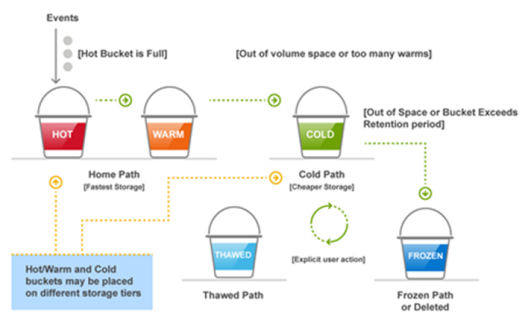
Figure 4. Splunk index buckets
Using this efficient and tunable index placement strategy, Splunk turns silos of data into operational insights and provides end-to-end visibility across your IT infrastructure to enable faster problem solving and informed data-driven decisions.
Solution Architecture
Introduction
This guide is not intended to replace the Splunk Validated Architectures white paper or any other architectures that enhance the overall knowledge or documentation. For an inclusive list of documentation, see References.
Splunk software running on Dell EMC converged infrastructure delivers the Operational Intelligence needed to drive an organization’s digital transformation. Together, Splunk and Dell Technologies provide:
- Splunk-validated configuration that meets or exceeds the performance of Splunk’s documented reference hardware
- Optimal storage platforms to achieve the wanted retention and performance profile for indexing and searching data in Splunk Enterprise
- Cost-effective and flexible scale-out in a single converged platform package
- Powerful data services including encryption, compression, and efficient backup and restore capabilities
- Source: https://www.splunk.com/en_us/partners/solutions/dellemc.html
Overview
This chapter provides details about Splunk Enterprise's deployment, design, and configuration on the Dell EMC HCI VxRail, from a single instance starter kit to a scalable, distributed, cluster environment. This solution covers five types of deployments that address different user scenarios:
- Single Instance 50 GB/day with 90-day Retention—A single instance that combines indexing and search management functions
- Multi-instance 500 GB/day with 90-day Retention—One search head with two indexers
- Multi-instance 1000 GB/day with 90-day Retention—One search head for every five indexers
- Multi-instance 3000 GB/day with > 90-day Retention—One search head for every five indexers, using Isilon to provide configurable retention for Splunk cold buckets
- Multi-instance 5000 GB/day with > 90-day Retention and Indexer High Availability—One search head for every five indexers, including a replication factor of 2 and a search factor of 2, using Isilon to provide configurable retention for Splunk cold buckets
Software components
The following table shows the software and versions that are recommended for Splunk Enterprise on Dell EMC Infrastructure:
Table 1.
|
Software |
Version |
|
Splunk Enterprise |
8.1.2 |
|
Splunk Enterprise |
8.1.2 |
|
RedHat Linux 64-bit |
8.3 |
|
VxRail Manager |
7.0.132 |
|
VMware vSphere |
7.0U1-EP3 |
|
VMware vCenter Server |
7.0U1-EP3 |
|
VMware vSAN |
7.0U1-EP3 |
|
VMware vRealize Log Insight |
8.2.0.0 |
|
OneFS |
8.2.2 |
Compute design
Notes:
The values in the Quantity column are for Core Splunk, with values in parentheses for Enterprise Security. The ratio is one Search Head per every five indexers for Core Splunk.
The quantity of indexer instances is three times greater if you use Enterprise Security. The values in the Quantity column are for Core Splunk, with values in parentheses for Enterprise Security.
Table 2. Single instance 50 GB/day with 90-day retention deployment on one VxRail node
|
Instance role |
Quantity |
Physical cores |
Memory |
Hot/Warm |
Cold |
|
Single Instance combined search head and indexer |
1 |
32 |
256 GB |
2.2 TB per 90 days |
8.8 TB per year |
Table 3. Multi-instance 500 GB/day with 90-day retention deployment on four VxRail nodes
|
Instance role |
Quantity |
Physical cores |
Memory |
Hot/Warm (90 days) |
Cold (per year) |
|
Search Head |
1 |
32 |
256 GB |
|
|
|
Indexer |
2 (5 for ES) |
32 |
256 GB |
22 TB |
88 TB |
|
Admin Server |
1 |
20 |
256 GB |
|
|
Table 4. Multi-instance 1000 GB/day with 90-day Hot/Warm and Cold retention with 1-Year retention on Isilon with five VxRail nodes
|
Instance role |
Quantity |
Physical cores |
Memory |
Hot/Warm (90 days) |
Cold (per year) |
|
Search Head |
1 (2 for ES) |
24 |
256 GB |
|
|
|
Indexer |
4 (10 for ES) |
24 |
256 GB |
44 TB |
176 TB |
|
Admin Server |
1 |
20 |
256 GB |
|
|
Table 5. Multi-instance 3000 GB/day with 90-day Hot/Warm and Cold retention with 1-Year, and indexer high availability Using RF=SF=2 deployment with Isilon on many VxRail nodes
|
Instance role |
Quantity |
Physical cores/vCPUs |
Memory |
Hot/warm (90 days) |
Cold (per year) |
|
Search Head |
1 (6 for ES) |
36 |
256 GB |
|
|
|
Indexer |
12 (30 for ES) |
36 |
256 GB |
264 TB |
1000 TB |
|
Admin Server |
1 |
20 |
256 GB |
|
|
Table 6. Multi-instance 5000 GB/day with 90-day Hot/Warm and Cold with 1-Year retention and indexer high availability Using RF=SF=2 deployment with Isilon on many VxRail nodes
|
Instance role |
Quantity |
Physical cores/vCPUs |
Memory |
Hot/warm (90 days) |
Cold (per year) |
|
Search Head |
3 (10 for ES) |
48 |
256 GB |
|
|
|
Indexer |
20 (50 for ES) |
48 |
256 GB |
440 TB |
1700 TB |
|
Admin Server |
1 |
20 |
256 GB |
|
|
Network design
VxRail is delivered ready to deploy and attach to any 10 GbE or 25 GbE network infrastructure using IPv4 and IPv6. As a best practice, we recommend using dual switches to eliminate the network as a single point of failure. In this solution, we designed the VxRail clusters network as follows:
- Configured two top-of-rack switches to provide 10 Gb or 25 Gb Ethernet connectivity to VxRail
- Used VLANs to logically group devices on different network segments or subnetworks
- Used separate vSphere virtual distributed port groups to isolate the network communication for each network:
- vSphere management network
- vSphere vMotion network
- vCenter network
- vSAN management network
- Splunk Enterprise network
The following figure shows the VxRail network design of this solution:
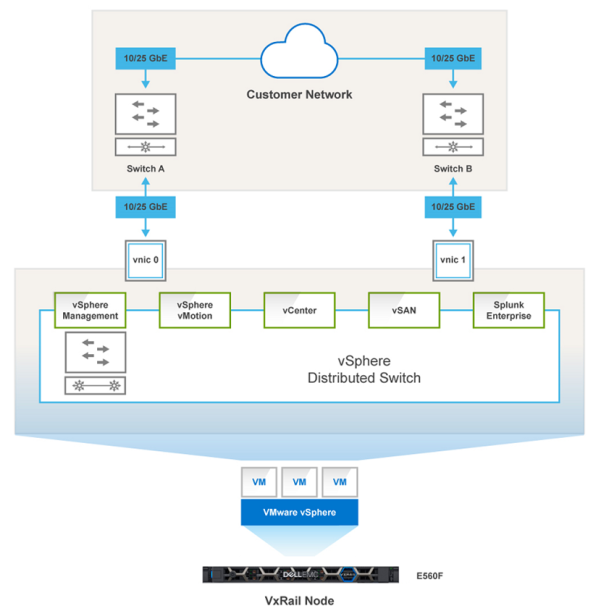
Figure 5. VxRail network design
Storage design
This section describes the vSAN storage design for the five types of Splunk Enterprise deployment on a VxRail cluster described earlier.
In this solution, we used a default vSAN storage policy and a custom policy:
- The default vSAN policy is used for the home files and the operating system Virtual Machine Disk (VMDK) files of all virtual machines.
- A newly created policy for the disk drive keeps Splunk data on the Splunk indexer virtual machines. The number of disk stripes per object is set to 10 which can drive higher levels of I/O parallelism if, and only if, the capacity devices are a significant source of contention.
- A vSAN storage policy with failures to tolerate (FTT) of 1 and failure tolerance method of RAID 1 (mirroring) creates a full copy of the data, which requires twice the capacity of the workload.
The following table shows the vSAN storage policies that are defined for the virtual machines:
Table 7. vSAN storage policy configuration
|
Policy name |
Rulesets |
Comments |
|
vSAN Default Storage Policy |
|
This policy is the vSAN default policy. It is used for the VM home files and operating system VMDK files of virtual machines created in this solution. |
|
User created Splunk-Data-Policy |
|
This policy is used for Splunk indexer data storage. |
Table 8. vSAN storage design for Splunk
|
Deployment type |
Instance role |
Quantity |
Operating system storage |
Indexer storage |
|
Single Instance 50 GB/day with 90-day retention |
Single instance combined search head and indexer |
1 |
300 GB |
3 TB |
|
Multi-instance 500 GB/day with 90-day retention |
Search Head |
1 |
300 GB |
0 |
|
Indexer |
2 |
300 GB |
13.9 TB |
|
|
Admin Server |
1 |
150 GB |
0 |
|
|
Multi-instance 1000 GB/day with 90-day retention |
Search Head |
1 |
300 GB |
0 |
|
Indexer |
5 |
300 GB |
10.8 TB |
|
|
Admin Server |
1 |
150 GB |
0 |
|
|
Multi-instance 1000 GB/day with > 90-day retention |
Search Head |
1 |
300 GB |
0 |
|
Indexer |
5 |
300 GB |
2.1 TB |
|
|
Admin Server |
1 |
150 GB |
0 |
|
|
Multi-instance 1000 GB/day with > 90-day retention and Indexer High Availability |
Search Head |
1 |
300 GB |
0 |
|
Indexer |
5 |
300 GB |
2.1 TB |
|
|
Admin Server |
1 |
150 GB |
0 |
In the solution shown in Figure 2, a four-node Isilon H500 cluster is used for the Splunk deployment to provide configurable retention for cold buckets. The following tables show the detailed Isilon node configuration and Isilon storage design for Splunk:
Table 9. Isilon node configuration
|
CPU |
CPU cores |
RAM |
SSD capacity |
HDD capacity |
Network |
|
Two Intel Xeon Processor E5-2630 v4 |
10 cores |
128 GB |
1.6 TB or 3.2 TB (1 or 2 drives) |
120 – 960 TB |
2 x 10 GbE 2 x 25 GbE 2 x 40 GbE |
Table 10. Isilon storage design for Splunk
|
Deployment Type |
Instance Role |
Quantity |
Indexer Cold Bucket Storage |
|
Multi-instance 1000 GB/day with > 90-day Retention |
Indexer |
5 |
10.8 TB |
|
Multi-instance 1000 GB/day with > 90-day Retention and Indexer High Availability |
Indexer |
5 |
10.8 TB |
For the Isilon configuration, we followed these best practices:
- Enabled SmartPools settings across all four Isilon nodes and used an SSD as L3 cache for metadata read acceleration
- Enabled SmartConnect to provide automatic client connection load balancing and failover capabilities
- Enabled SmartCache for write performance
- Optimized for concurrent access for data access pattern
- Used 10 Gb/s external network for data connection (25 Gb/s is applicable)
- Increased network MTU to 9000 (Jumbo Frames)
Splunk and Dell Technologies recommend that NFS storage, including PowerScale storage, is only used for cold and frozen data, never for hot/warm. For details about system requirements, see the Splunk Enterprise Installation Manual.
The Splunk storage sizing tool at http://splunk-sizing.appspot.com/ can provide an estimated storage requirement for beginning your design planning. However, Splunk states that this tool is not 100 percent accurate. A Dell technologist can assist you with the complete solution design.
Virtualization design
VxRail delivers virtualization, compute, and storage in a scalable, easy-to-manage, HCI. It deeply integrates VMware vSphere virtualization software that delivers an industry-leading virtualization platform to provide application virtualization with a highly available, resilient, efficient on-demand infrastructure.
For details about the configuration of the virtual machines that are used in this solution, see Table 3 through Table 7.
Virtualization configuration
This solution implements the following Dell EMC and VMware best practices to provide optimal performance for all Splunk Enterprise virtual machines running on VxRail:
- Creates a vSphere HA cluster to provide a virtualized, high-availability Splunk Enterprise environment that is easy to use and is cost-effective
- Uses a VMware Paravirtual SCSI controller to increase throughput with significant CPU utilization reduction
- Uses a VMware VMXNET3 network adapter to optimize network performance
- Installs VMware Tools in the guest operating system to improve VM performance
- Sets VM advance parameters numa.vcpu.preferHT to true for enabling hyperthreading with NUMA in ESXi
For more information, see Performance Best Practices for VMware vSphere 7.
Conclusion
Summary
Dell Technologies provides a proven platform for implementing a validated Splunk architecture. VxRail follows the same core pillars as a Splunk Validated Architecture with Availability, Performance, Scalability, Security, and Manageability. See Splunk Validated Architectures, which addresses validation in more detail.
Splunk is an enterprise intelligence platform that is designed to bring data insights to every part of your organization. Splunk Enterprise on Dell EMC VxRail provides experienced-based guidance for Splunk deployments. This guidance enables you to optimize performance, accelerate time to deployment, and reduce risk for IT operations and the businesses that they support.
There are numerous use cases to which this reference architecture applies, including:
- IT business operations
- Security and compliance
- Application delivery
- Business analytics
- IoT and industrial data
This guide details five different configurations, all of which are based on a common architecture with similar server, networking, and storage components. Each has two different options for onboard cold data storage retention.
Speed and quality of information are the two most important elements of a data analytics solution. This enterprise intelligence platform provides both. The Reference Architecture for Splunk Enterprise on Dell EMC Infrastructure provides a feature-rich, extensible, high-performance solution that scales to most needs now and in the future.
Dell Technologies has a dedicated Splunk team ready to help from sizing to implementation.
References
Dell Technologies documentation
The following documentation on Dell Technologies.com or Dell Online Support provides additional and relevant information. Access to these documents depends on your login credentials. If you do not have access to a document, contact your Dell Technologies representative.
Splunk Enterprise documentation
The following documentation on the Splunk documentation website provides additional and relevant information:
- Splunk Validated Architectures
- Splunk Enterprise Install Manual
- Splunk Enterprise Capacity Planning
- Splunk Supported Add-ons
- Splunk Enterprise Admin Manual
- Transparent huge memory pages and Splunk performance
- Managing Indexers and Clusters of Indexers
- Distributed Search
- Forwarding Data
- Additional Splunk documentation
VMware documentation
The following VMware documentation provides additional and relevant information: