Replication using Container Storage Module with Dell PowerFlex
Executive Summary
Executive summary
PowerFlex is a software-defined infrastructure platform, offering unparalleled flexibility, scalability, and performance predictability. PowerFlex offers native asynchronous replication, enriching its overall enterprise storage services. Customers can gain robust disaster recovery capabilities and can leverage replication for various use cases, including resource-intensive analytics workloads.
Replication is used to recover from a physical or logical disaster, migrate or test data at a remote site, or to offload backup operations. Replication can be faster and simpler with PowerFlex.
The cloud native architecture of PowerFlex enables modern applications to take advantage of containerization and orchestration. Kubernetes can manage complex environments with capabilities like autoscaling, scheduling, load balancing, resource monitoring, and managing containerized applications.
Dell Container Storage Modules (CSM) seamlessly integrate with Kubernetes, extending enterprise-grade storage features to cloud-native stateful applications. CSM simplifies the management and grants developers streamlined access to storage services that include provisioning, replication, observability, and application mobility.
CSM replication in Dell PowerFlex empowers robust replication and disaster recovery functionalities within Kubernetes based clusters. This solution highlights the capabilities of the CSM replication module. This solution also describes how CSM facilitates data replication between two datacenter sites that are each configured with two-layer PowerFlex deployment with Red Hat OpenShift clusters as compute, enabling uniform movement of vital applications during planned or unplanned transitions.
Introduction
Audience
The audience for this paper includes system engineers, field consultants, IT administrators, technical architects, and anyone else interested in configuring and deploying Red Hat OpenShift and PowerFlex CSI with Dell PowerFlex as the underlying software defined infrastructure.
Readers are expected to have an understanding and working knowledge of containers, Kubernetes, Red Hat OpenShift, Red Hat Enterprise Linux CoreOS (RHCOS) and PowerFlex software-defined infrastructure.
Terminology
The following table provides definitions for some of the terms that are used in this document.
Table 1. Terminology
|
Term |
Definition |
|
CSI |
Container Storage Interface |
|
DNS |
Domain Name System |
|
CSM |
Container Storage Module |
|
CRD |
Custom Resource Definition |
|
ITOM |
IT Operational Management |
|
LCM |
Life Cycle Management |
|
MDM |
Meta Data Manager for PowerFlex |
|
PV |
Persistent volume |
|
PVC |
Persistent Volume Claim |
|
RHCOS |
Red Hat Enterprise Linux CoreOS |
|
RCG |
Replication Consistency Group |
|
SDC |
Storage Data Client for PowerFlex |
|
SDS |
Storage Data Server for PowerFlex |
|
SLA |
Service Level Agreement |
|
LACP |
Link Aggregation Control Protocol |
|
SDR |
Storage Data Replicator for PowerFlex |
|
RPO |
Recovery Point Objective |
|
RG |
Replication Group |
|
VLAN |
Virtual Local Area Network |
We Value your feedback.
Dell Technologies and the authors of this document welcome your feedback on the solution and the solution documentation. Contact the Dell Technologies Solutions team by email.
Author: Shilpa Agrawal
Content editor: Ripa Bhagawati
Note: For links to additional documentation for this solution, see Dell Technologies Solutions Info Hub for PowerFlex.
Product overview
PowerFlex family
PowerFlex software-defined infrastructure enables broad consolidation across the data center, encompassing almost any type of workload and architecture. The software-defined architecture offers automation and programmability of the complete infrastructure and provides scalability, performance, and resiliency to enable effortless adherence to stringent workload SLAs.
The PowerFlex family provides a foundation that combines compute and high-performance storage resources in a managed unified fabric. PowerFlex comes in flexible deployment options (rack, appliance, or custom nodes and in the public cloud) that enable independent (two-layer), HCI (single-layer), or mixed architectures. PowerFlex is ideal for high-performance applications and databases, building an agile private/hybrid cloud, or consolidating resources in heterogeneous environments.
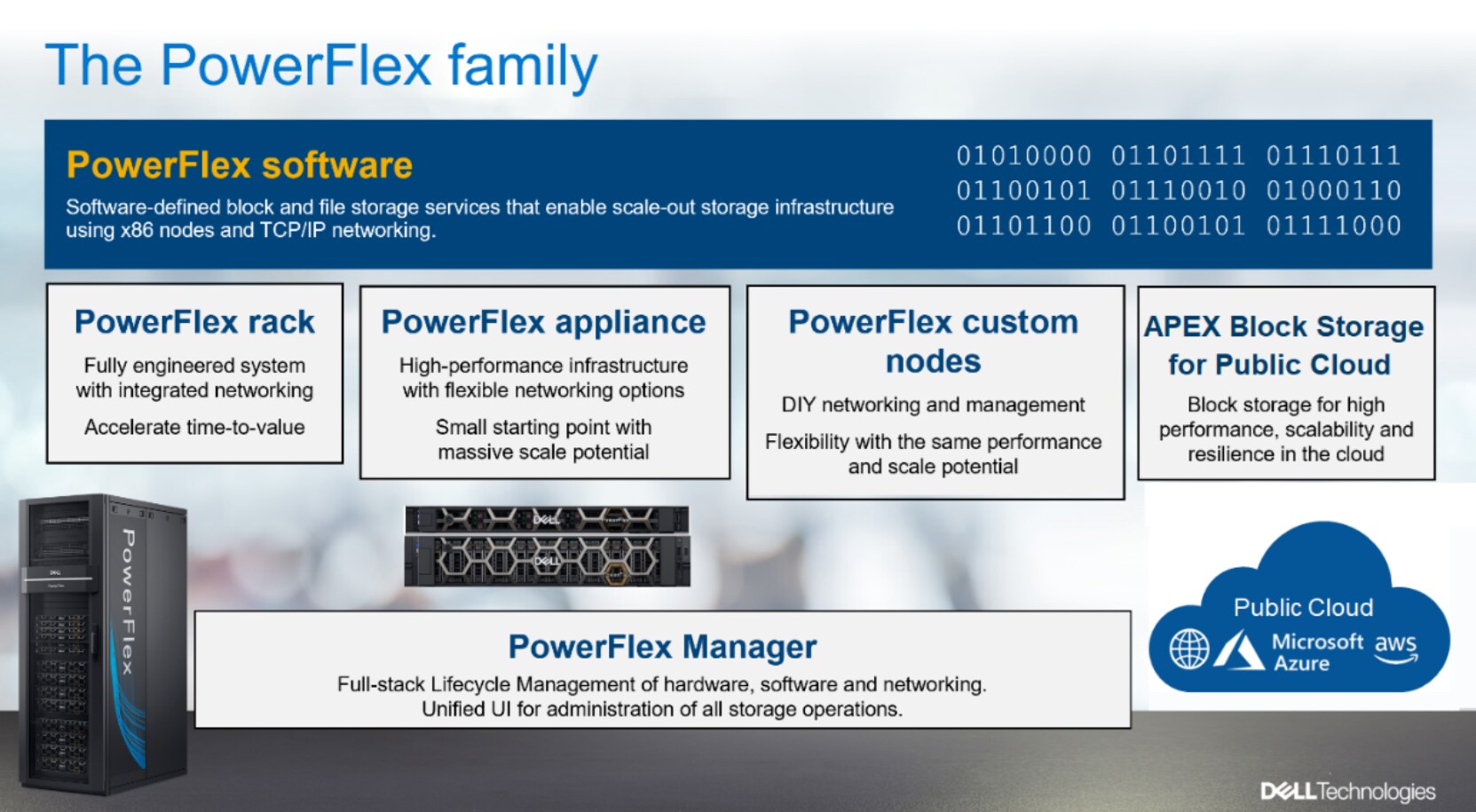
Figure 1. PowerFlex family
PowerFlex software components
Software is the key differentiation and the “secret sauce” in the PowerFlex offering. PowerFlex software components not only provide software-defined storage services, but also help simplify infrastructure management and orchestration.
PowerFlex
PowerFlex is the software foundation of PowerFlex software-defined infrastructure. It is a scale-out block and file storage service that is designed to deliver flexibility, elasticity, and simplicity with predictable high performance and resiliency at scale.
PowerFlex Manager (PFxM)
PowerFlex Manager is the software component in the PowerFlex family that enables ITOM automation and LCM capabilities for PowerFlex systems. Starting with PowerFlex 4.0, the unified PowerFlex Manager brings together three separate components used in previous releases – PowerFlex Manager, the core PowerFlex UI, and the PowerFlex gateway. The new PowerFlex UI runs in Kubernetes and embraces a modern development framework.
PowerFlex file services
PowerFlex File Controllers, also known as File Nodes, are physical nodes that enable PowerFlex software defined File Services. They host the NAS Servers, which in turn host the tenant namespaces and file systems, mapping PowerFlex volumes to the file systems presented by the NAS Servers. All major protocols are supported, such as NFS, SMB/CIFS, FTP, and NDMP. PowerFlex file service is supported from PowerFlex 4.0.
PowerFlex with NVMe over TCP (NVMe/TCP)
NVMe is a family of open specifications that defines an industry standard for both a logical interface and a communication protocol for accessing block storage across an internal PCIe fabric or through external fabrics such as TCP/IP and FC. NVMe is designed to take advantage of the internal parallelism and low latency inherent in flash-based media SSDs.
NVMe/TCP is an extension of the NVMe base specification that defines the binding of the NVMe protocol to message-based fabrics using TCP. By binding the NVMe protocol to TCP, NVMe/TCP enables the efficient end-to-end transfer of commands and data between NVMe hosts and NVMe controller devices by any standard Ethernet-based TCP/IP networks.
From PowerFlex release 4.x onwards, support for NVMe/TCP has been added for on-premises deployment with the introduction of a new Storage Data Target (SDT) component installed in the storage layer. The NVMe initiator in the operating system or hypervisor communicates with the SDT, which then communicates with the Storage Data Server (SDS). The NVMe initiator is part of the kernel of the application host operating system or hypervisor.
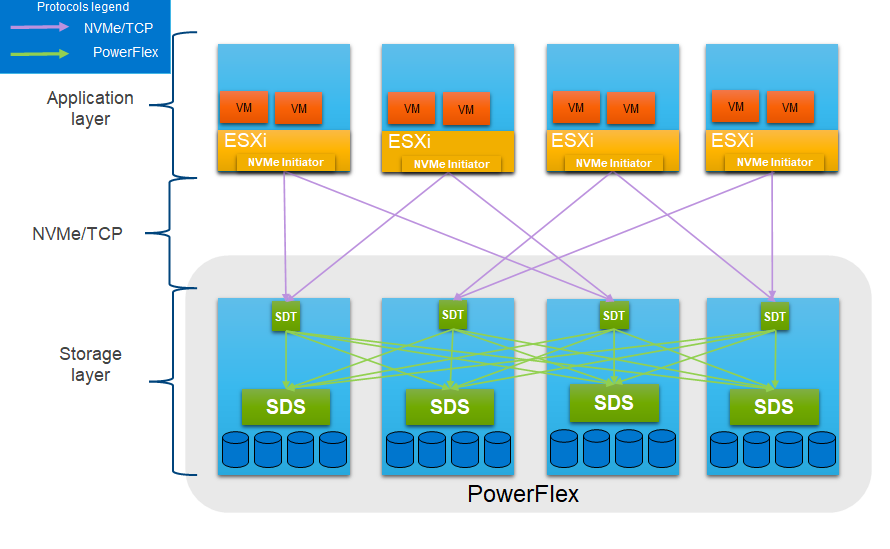
Figure 2. PowerFlex with NVMe/TCP
For more information, see PowerFlex with NVMe over TCP.
PowerFlex deployment architectures
PowerFlex software-defined storage offers flexibility of deployment architecture to help best meet the specific deployment and architectural requirements. PowerFlex can be deployed in a two-layer (Independent), single-layer (Hyperconverged/HCI), or a mixture of the two architectures (Mixed). OpenShift environments on PowerFlex use a two-layer (independent) architecture.
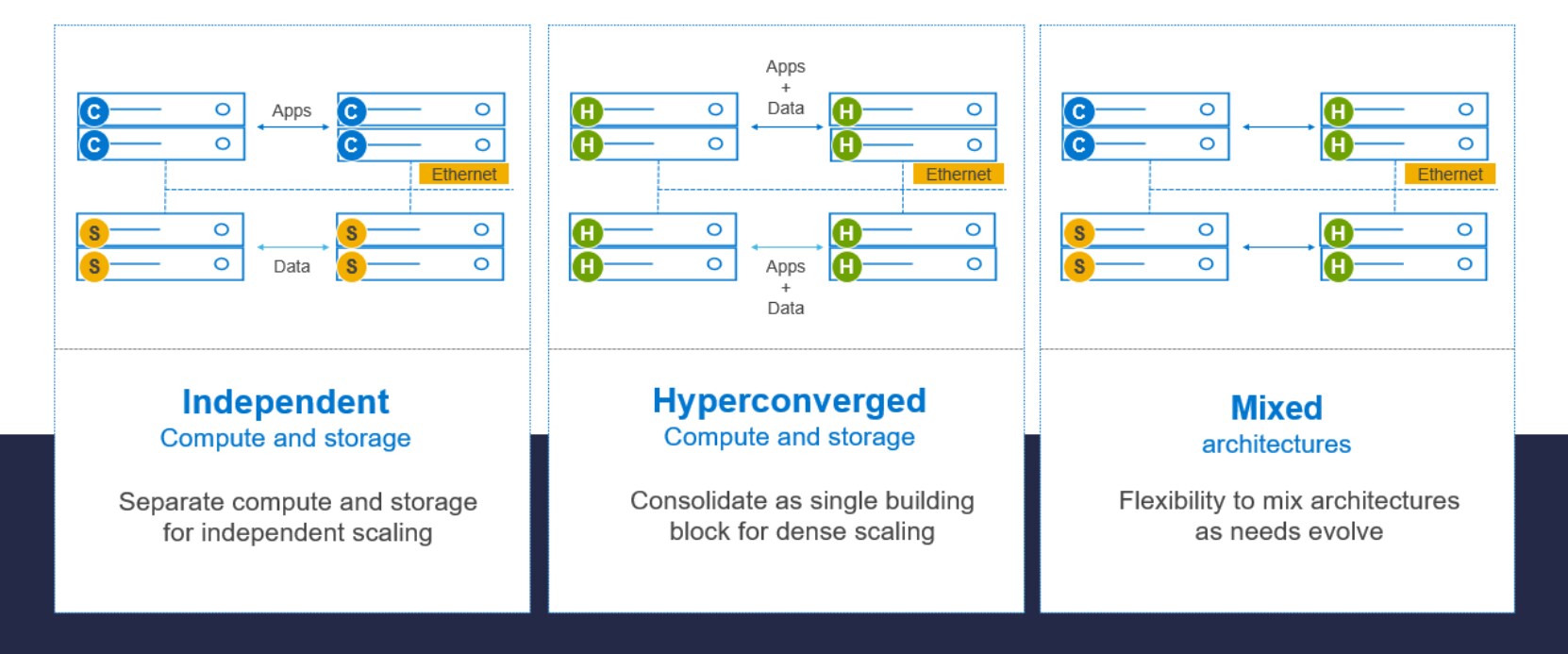
Figure 3. Deployment architectures
Independent architecture
In an independent architecture, or two-layer architecture, some nodes provide storage capacity and host datasets while other, separate, and independent nodes, host applications and workloads. Compute and storage resources can be scaled independently by adding nodes to the cluster. This separation of compute and storage resources can also help minimize software licensing costs in certain situations. And this architecture can be ideal for hosting high-performance high-value databases and application workloads.
Hyperconverged architecture
In an HCI architecture, each node in the cluster contributes storage resources and hosts applications and workloads. This architecture allows you to scale your infrastructure uniformly and with a predefined building block that adds both storage and compute resources. This architecture is appropriate for data center and workload consolidation.
Mixed architecture
A mixed architecture is a combination of both the HCI and Independent architectures. As shown in Figure 3 there are some storage only nodes, compute only nodes, and HCI nodes as a part of the same PowerFlex cluster. This is a desirable architecture when working with an existing compute infrastructure and adding high-performance software-defined infrastructure. This can also be a starting point for a two-layer deployment design as external workloads are migrated to PowerFlex.
PowerFlex consumption options
PowerFlex rack
PowerFlex rack is a software-defined storage platform that delivers flexibility, elasticity, and simplicity with predictable performance and resiliency at scale by combining compute as well as high-performance storage resources in a managed unified network. This rack-scale engineered system, with integrated networking, enables customers to achieve the scalability and management requirements of a modern data center.
PowerFlex appliance
PowerFlex appliance is a PowerEdge server which has been configured to be a node in a software-defined storage deployment. This offering allows customers the flexibility and savings to bring their own compatible networking.
PowerFlex custom nodes
PowerFlex Custom Nodes are validated server building-blocks configured for use with PowerFlex. They are available with thousands of configuration options and are available for customers who prefer to build their own environments.
Dell APEX Block Storage for Public Cloud
PowerFlex software is also available in the public cloud as Dell APEX Block Storage for Public Cloud. It offers the same on-premises benefits of high-performance, linear scalability, and high resilience as in cloud. It also adds cloud-specific benefits, such as large volume sizes, extreme performance based on NVMe drives, and predictable scalability. The Dell APEX Block Storage self-healing architecture simplifies and increases the availability of infrastructure. It is designed to remain running even when it encounters failures. With fast rebuilds, Dell APEX Block Storage recovers rapidly from failures and keeps operating, without degrading performance or compromising availability. You can also extend this availability and configure it to protect your application availability across multiple availability zones.
PowerFlex CSI/CSM
An important component outside of PowerFlex that enables a flexible consumption model for Kubernetes is the PowerFlex CSI driver, developed as a part of the Dell Kubernetes strategy. After loading the CSI driver for PowerFlex into Kubernetes, it can be used to provision persistent volumes from the underlying PowerFlex storage system.
The CSI driver connects the PowerFlex system and Kubernetes deployments. It is a storage broker which dynamically provisions volumes from PowerFlex through the PowerFlex API gateway to the Kubernetes cluster. Once the volume is available on PowerFlex, it is immediately mapped to the requesting pod. If a pod is destroyed or rescheduled, the CSI plug-in ensures that the volumes are remapped upon rescheduling of that pod.
Dell Container Storage Modules (CSM) for PowerFlex extend the standard CSI capabilities with additional key values, where each module is responsible for a different benefit. These modules help achieve the following:
- Provide enterprise storage capabilities to Kubernetes for cloud-native stateful applications.
- Reduce management complexity, so that developers can independently use enterprise storage with ease and automate daily operations.
- Extends storage functionality and capabilities beyond using the CSI driver alone.
These modules currently include observability, snapshots, authorization, application mobility, replication, and resiliency. For more information about CSM, see: Dell CSM
PowerFlex supports multiple operating systems, different deployment options on-premises and public cloud deployment models (available in AWS and Azure). PowerFlex is validated with leading Kubernetes distributions as shown in Figure 4.
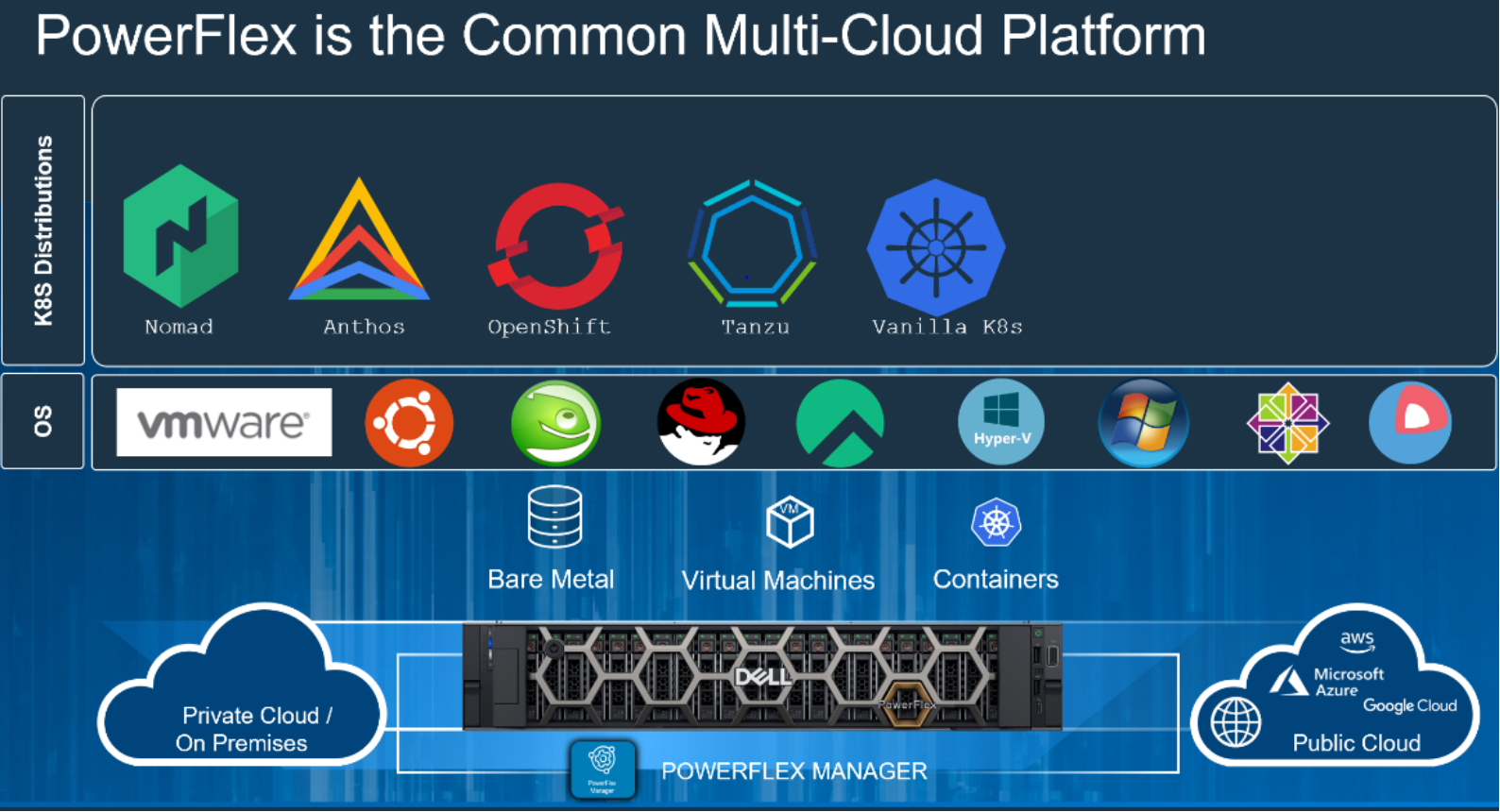
Figure 4. PowerFlex for different Kubernetes distributions
Red Hat OpenShift
Red Hat OpenShift Container Platform provides developers and IT organizations with a hybrid cloud application platform for deploying both new and existing applications on secure, scalable resources with minimal configuration and management overhead. It provides enterprise-grade Kubernetes environments for building, deploying, and managing container-based applications, alongside virtualized workloads, across any on premises data center where Red Hat Enterprise Linux is supported.
For more information, see Red Hat OpenShift Container Platform 4.12 documentation.
OpenShift Assisted Installer
OpenShift Assisted Installer provides a simple way to deploy OpenShift on on-premises nodes from the Red Hat Hybrid Cloud Console. The installer is a SaaS-based managed service to install OpenShift clusters on bare metal (although it is possible to use Assisted Installer for a wide variety of platforms). Before installing a cluster, you do not require a dedicated bootstrap node, and you do not need to preinstall Red Hat CoreOS on the nodes. Cluster deployment parameters are populated within the web UI and nodes are booted with a downloaded ISO image to complete the cluster deployment.
For more information about assisted installer, see OpenShift Assisted Installer blog.
Solution overview
Overview
For representing Dell CSM replication capabilities across PowerFlex clusters, this solution considers two PowerFlex clusters configured as Site-A and Site-B. The PowerFlex CSI driver is installed on the OpenShift clusters with the CSM replication module enabled as sidecar for replication to function.
Logical architecture
The following diagram shows the logical architecture of the PowerFlex replication clusters using two-layer deployment architecture. In this example, on each site there are four nodes that are dedicated for storage. PowerFlex storage (SDS) and replication (SDR) components are installed on these four nodes and three more nodes are dedicated for compute (SDC) on which Red Hat OpenShift cluster is configured. This model decouples compute from storage, allowing either of them to scale independently, as needed.
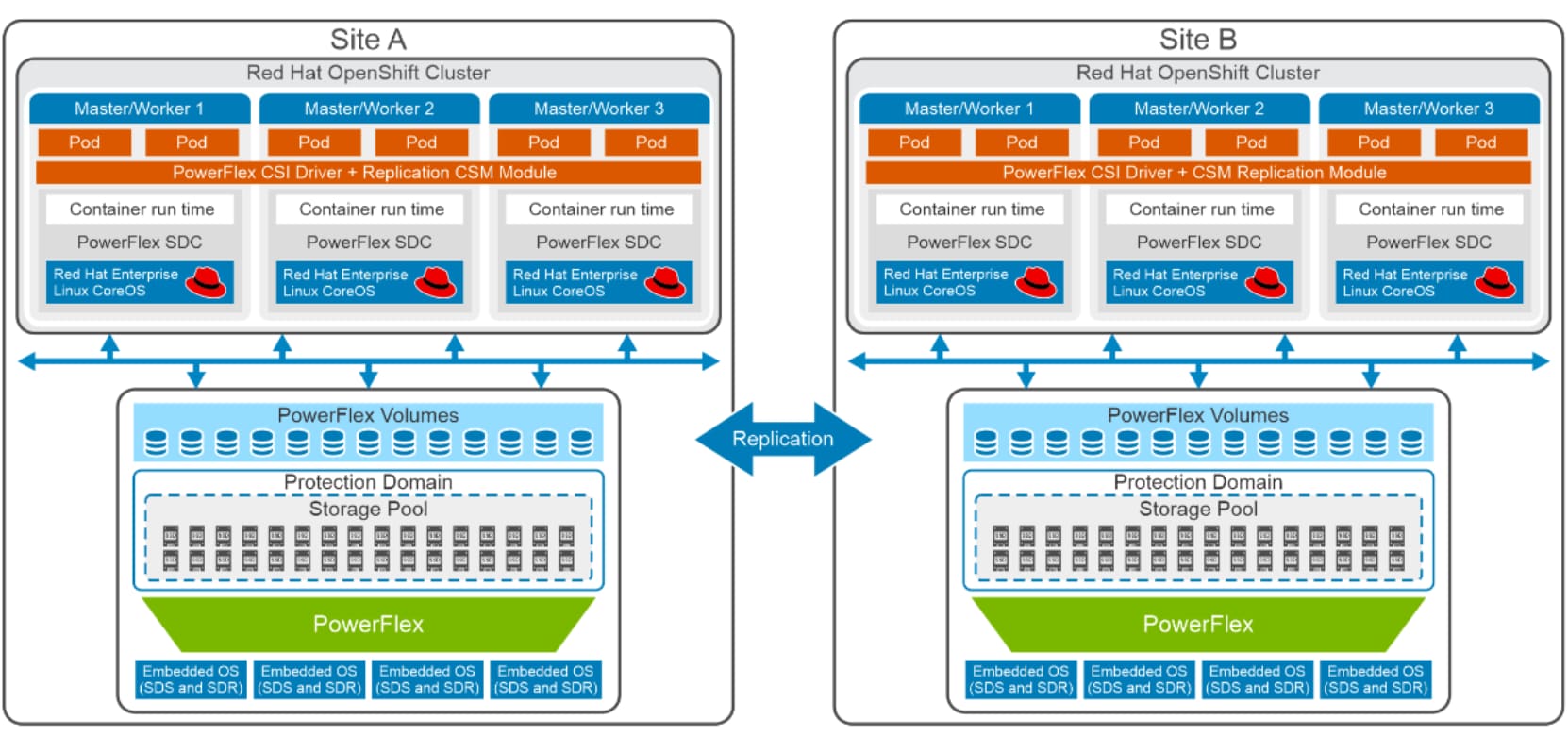
Figure 5. Logical design for PowerFlex replication clusters
Red Hat OpenShift Assisted Installer is used to configure the three bare metal compute-only nodes, creating an OpenShift cluster in each site. These nodes are configured as OpenShift control-plane and worker nodes (also known as a compact cluster).
On the storage side, PowerFlex Manager is used to deploy a PowerFlex Storage Only (SO) cluster on four bare metal servers using templates that help to install the Software defined storage (SDS) and SDS Storage Data Replicator (SDR) components. SDR deployment can be done leveraging the PowerFlex manager UI. Container Storage Modules (CSM) replication sidecar container is installed in each OpenShift cluster, along with the CSI driver to facilitate dynamic provisioning of Persistent volumes and enabling replication for Kubernetes based applications on compute nodes.
For more information about PowerFlex replication technology, see PowerFlex Replication.
Network architecture
The following diagram shows the network architecture that is configured on both the sites.
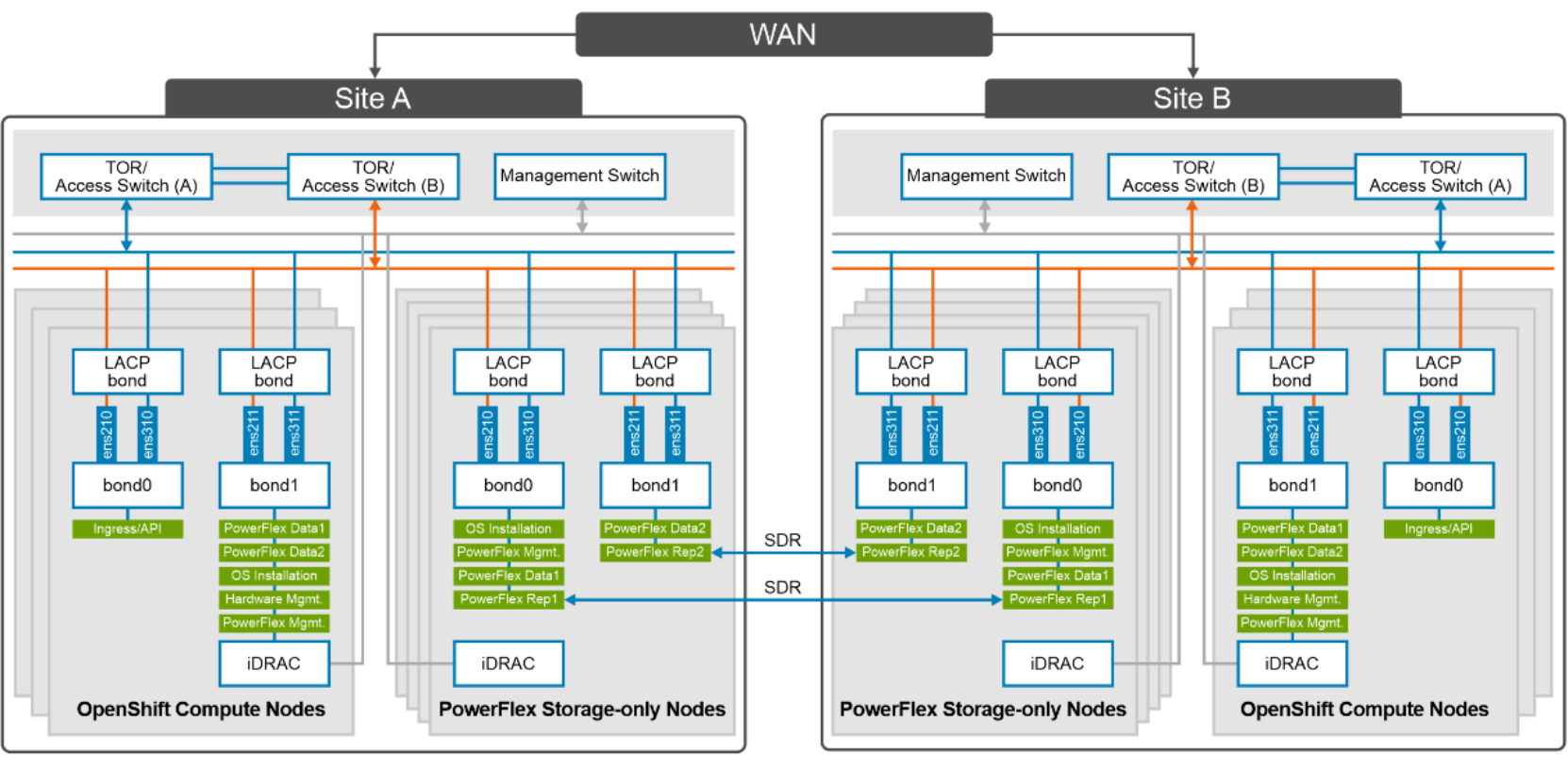
Figure 6. Network design of compute and storage nodes
At the physical layer, two supported Top of Rack (TOR) switches are used for redundancy and load-balancing purpose at each site. A peer link is configured on both the TOR switches.
The network ports of different network interfaces on each PowerFlex node are configured to carry PowerFlex management, PowerFlex data traffic and PowerFlex replication traffic. An LACP bond is configured at the host level with two network interfaces to form a single-bonded (logical) interface for increased bandwidth and redundancy.
The bond0 and bond1 are the LACP bonded interfaces and are configured with multiple VLAN tagged interfaces for all the PowerFlex networks. The traffic is logically separated by creating VLANs which separate different traffic on the bond interfaces as shown in the preceding figure. PowerFlex data1 and data2 are used for data traffic whereas PowerFlex Rep1 and PowerFlex Rep2 are dedicated for replication traffic. The following table shows the different networks that are configured for this solution. See PowerFlex node VLAN setup for more information:
The following table describes the VLAN IDs required for different network types:
Table 2. Network details
|
Network type |
VLAN ID |
|
Ingress/API |
105* |
|
Operating System Installation |
104 |
|
Hardware Management |
101 |
|
PowerFlex Management |
150 |
|
PowerFlex Data 1 |
152 |
|
PowerFlex Data 2 |
153 |
|
PowerFlex Rep1 |
154 |
|
PowerFlex Rep2 |
155 |
*: 105* is the network required for OpenShift Ingress/API and Internet connectivity is required on this network.
For more information about OpenShift networking, see Configuring and managing cluster networking.
Note: The above network diagram represents the design of one site. Based on physical locations of Site-A and Site-B, it is recommended to enable (TOR-link) connectivity between the two sites for replication.
CSM replication architecture
CSM replication aims to bring the replication and disaster recovery capabilities of Dell PowerFlex storage to Kubernetes clusters. It helps you replicate groups of volumes using the native replication capabilities available on PowerFlex and provides a way to restart applications in case of both planned and unplanned migration. Figure 7 shows the logical components that are involved in the functioning of CSM replication module.
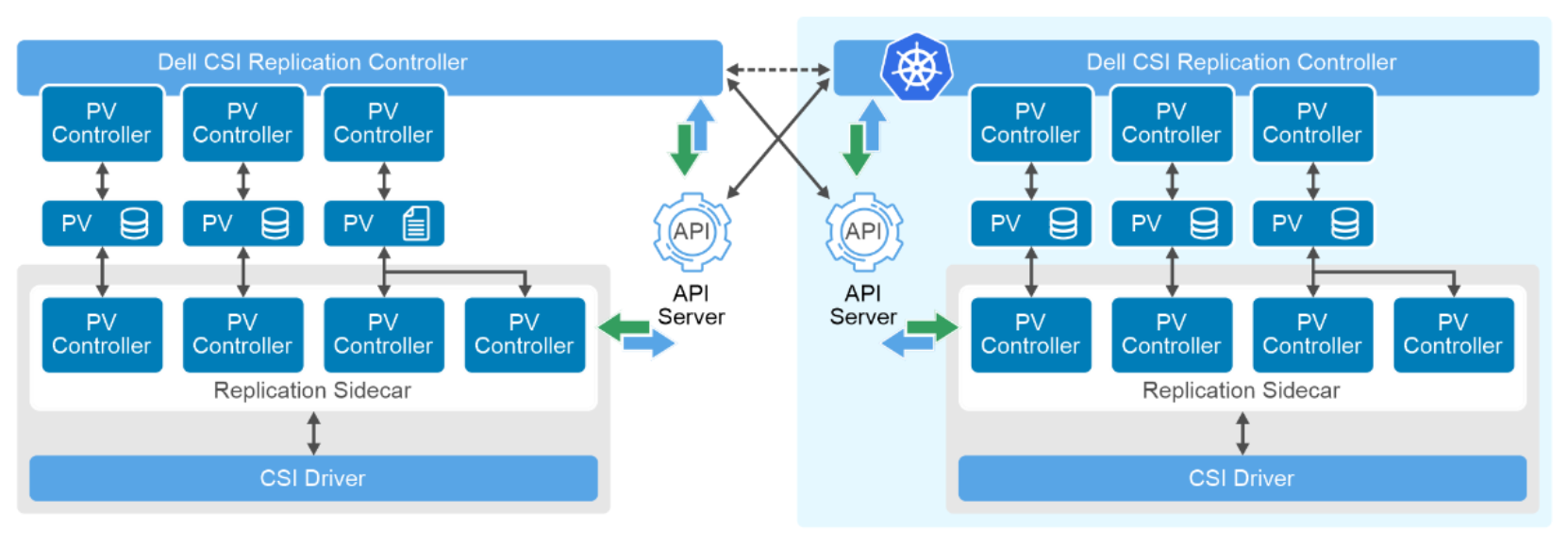
Figure 7. Logical components for Dell CSM replication
CSM for replication consists of four important components:
a) Dell CSI Replication Group (RG), a Kubernetes custom resource.
b) CSM replication sidecar container, which is part of each CSI driver controller pod.
c) CSM replication controller.
d) Repctl client tool to manage related objects.
Dell Replication Group CRD enables volume grouping and supported operations for CSM.
CSM replication sidecar is deployed in each CSI driver controller pod. It has its Controller Manager which manages the PV, PVC, and RG controllers for managing PV creation, binding and other functions within the cluster. The RG controller manages Dell CSI Replication Group instances and its change requests.
CSM Replication Controller is deployed independently of CSI drivers and is responsible for the communication between clusters. It consists of one Controller Manager which manages its own PV, PVC, and RG controllers. The PV controller is responsible for creating PV objects (representing the replicated volumes) in the remote Kubernetes cluster. The RG controller is responsible for creating RG objects in the remote Kubernetes cluster.
For more information about each of these involved components, see CSM architecture.
Configuring storage replication for OpenShift containerized workloads
Prerequisites
Before enabling replication on PowerFlex storage clusters, ensure that the PowerFlex clusters at Site-A and Site-B are configured and ready as per the above logical diagram, protection domain, storage pools are created, and the SDR component installed on both the PowerFlex systems. Journaling capacity is set on source and destination PowerFlex systems. The OpenShift cluster that has PowerFlex SDC installed is operational and running smoothly.
Prepare the PowerFlex clusters for replication
PowerFlex system root CA certificates must be exchanged between replicating clusters. This step is performed using the PowerFlex command line interface. On each system, a certificate is created and sent to the other PowerFlex cluster to form a trusted pair.
Steps:
- Log in to the the primary MDM node and verify that the SDR shows as connected. Note the system ID shown in the following command:
# scli --login --username admin --password 'password' --management_system_ip 192.168.150.150
Successfully generated login certificate at /root/.scli/cli_cert.p12
Logged in. User role is SuperUser. System ID is bac98e8e2311710f
# scli --query_all_sdr
Query-all-SDR returned 4 SDR nodes.
Protection Domain ID: 22e67e4a00000000
SDR ID: 183d892c00000000 Name: Sdr-storagenode4 State: Connected, Joined IP address: 192.168.151.34,192.168.152.34,192.168.153.34,192.168.154.34 Port: 11088 Version: 4.0.2000
SDR ID: 183d892d00000001 Name: Sdr-storagenode3 State: Connected, Joined IP address: 192.168.151.33,192.168.152.33,192.168.153.33,192.168.154.33 Port: 11088 Version: 4.0.2000
SDR ID: 183d892e00000002 Name: Sdr-storagenode1 State: Connected, Joined IP address: 192.168.151.39,192.168.152.39,192.168.153.31,192.168.154.31 Port: 11088 Version: 4.0.2000
SDR ID: 183d892f00000003 Name: Sdr-storagenode2 State: Connected, Joined IP address: 192.168.151.38,192.168.152.38,192.168.153.32,192.168.154.32 Port: 11088 Version: 4.0.2000
- Extract the root certificate and make as a trusted one on the remote cluster/Site-B by running the following command:
# scli --extract_root_ca --certificate_file /tmp/primary
Similarly, login to Site-B and extract its certificate and copy to local cluster Site-A:
# scli --login --username admin --password 'password' --management_system_ip 192.168.150.135
# scli --extract_root_ca --certificate_file /tmp/secondary
- Add the copied certificate as trusted certificate by running the following command.
## On Site-A primary MDM:
# scli --add_trusted_ca --certificate_file /tmp/secondary --comment Site-A
## On Site-B primary MDM:
# scli --add_trusted_ca --certificate_file /tmp//primary --comment Site-B
- Add replication peer system on Site-A by running the following command:
# scli --add_replication_peer_system --peer_system_ip 192.168.150.161,192.168.150.162 --peer_system_id 14e463a1e709330f --peer_system_name Rep_secondary
Similarly add replication peer system on Site-B:
# scli --add_replication_peer_system --peer_system_ip 192.168.151.140,192.168.152.140 --peer_system_id bac98e8e2311710f --peer_system_name Rep_primary
- Run the following query to verify that the peer replication systems are connected:
# scli --query_all_replication_peer_system
Query-all-Replication Peer System returned 1 Replication Peer System nodes.
Replication Peer System ID: 14e463a1e709330f Replication Peer System internal ID: 21b3923f00000000 Name: Rep_secondary State: Joined, SUCCESS IP: 192.168.150.161,192.168.150.162 Port: 7611 Version: 4.0.2000
SDR-SDR connectivity status: All connected
The systems are peered in both directions, and ready to start pairing replicated volumes. Log in to PowerFlex GUI > Protection > Peer systems tab to verify.
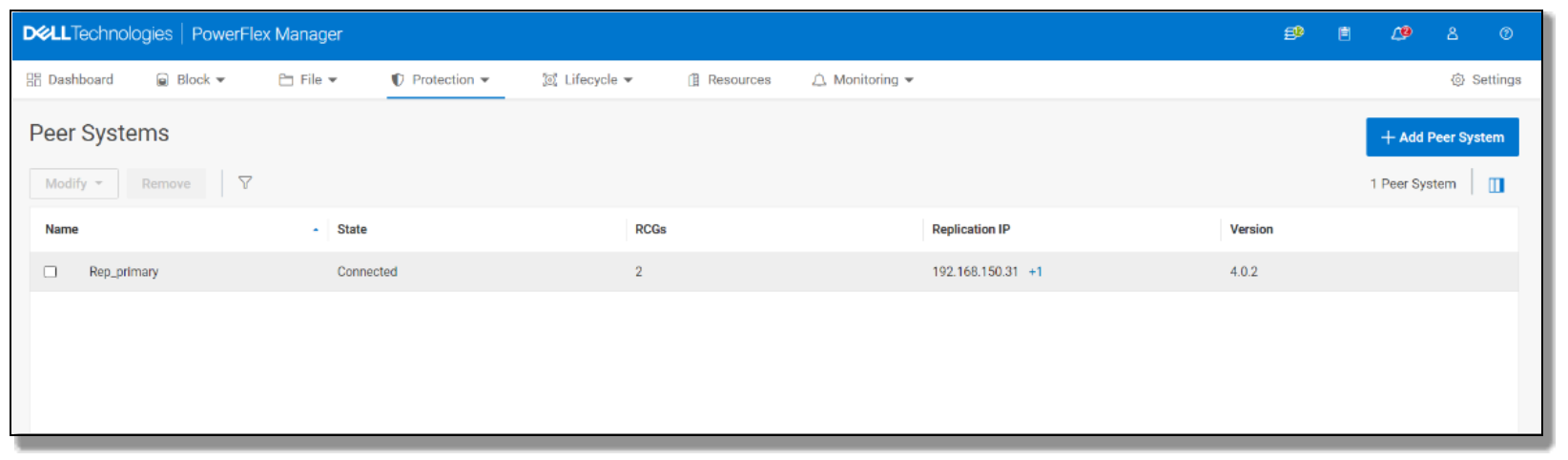
Figure 8. PowerFlex GUI of Peer systems
RCGs are created during dynamic provisioning of PV using replication storage class. When an application is deployed with request for PV creation with a replication storage class, it dynamically creates one, or it can be manually created by specifying the correct inputs in PV.yaml file. A replicated persistent volume is automatically created on the target with its own RCG. These two volumes show up as pairs in RCG of both the source and target sites.
Repctl tool
Repctl is the CSM command line tool to manage CSM replication. repctl commands can be run from any of the OpenShift clusters for configuration on both the clusters, while enabling replication.
Steps to install the repctl tool and configure the cluster for replication:
- Run the following command to download the installation source files from GitHub and install the repctl tool:
# git clone -b v1.5.0 https://github.com/dell/csm-replication.git
# cd csm-replication/repctl
# make build
- Prepare the admin OpenShift clusters by adding the kubeconfig configs of both the clusters to repctl by running the following command:
# ./repctl cluster add -f "/root/.kube/config-p1","/root/.kube/config-s1" -n "primaryocp","secondaryocp" [2023-11-16 04:17:21] INFO Adding clusters
[2023-11-16 04:17:21] INFO primaryocp
[2023-11-16 04:17:21] INFO Successfully created primaryocp in /root/.repctl/clusters folder. 12178 bytes copied
[2023-11-16 04:17:21] INFO secondaryocp
[2023-11-16 04:17:21] INFO Successfully created secondaryocp in /root/.repctl/clusters folder. 12196 bytes copied
- Install the Replication controller and CRDs by running the following command:
# ./repctl create -f ../deploy/replicationcrds.all.yaml
# ./repctl create -f ../deploy/controller.yaml
Note: When CSM Replication is deployed in an environment where the DNS is not configured, or two clusters at different physical location with their own DNS servers, you may need to update the dell-replication-controller-manager to map the API endpoint FQDN to an IP address by adding the `hostAliases` field and FQDN:IP mappings on both the clusters participating in replication.
hostAliases:
- hostnames:
- api.primaryocp.dellpowerflex.com
ip: 192.168.105.120
- hostnames:
- api.secondaryocp.dellpowerflex.com
ip: 192.168.105.114
Sample command to patch the deployment controller.
# kubectl patch deployment -n dell-replication-controller dell-replication-controller-manager -p '{"spec":{"template":{"spec":{"hostAliases":[{"hostnames":["<remote-FQDN>"],"ip":"<remote-IP>"}]}}}}'
- Inject the service account configs into the clusters by running the following command:
# ./repctl cluster inject --use-sa
- Modify the csm-replication/repctl/examples/powerfelx_example_values.yaml config file with the OpenShift cluster information to create a replication storage class.
# ./repctl create sc --from-config examples/powerflex_example_values.yaml
For the sample powerflex_example_values.yaml file, see Appendix-B.
Note: ClusterID in the file should match the names that were given to clusters in step 2.
- You can view clusters that are managed by repctl by running the followingcluster get command:
# ./repctl get clusters
+---------------+
| Cluster |
+---------------+
ClusterId Version URL
primaryocp v1.25 https://api.primaryocp.dellpowerflex.com:6443
secondaryocp v1.25 https://api.secondaryocp.dellpowerflex.com:6443
Install the CSI driver with replication side car
CSI driver needs to be installed on both clusters participating in the replication.
Steps:
- Run the following command to download the installation source files from GitHub and create vxflexos namespace.
# git clone -b v2.7.1 https://github.com/dell/csi-powerflex.git
# kubectl create namespace vxflexos
- Use a text editor like vi to prepare the configuration for a secret file, samples/secret.yaml. Enter the PowerFlex system details like username and password (admin-level credentials in the MDM cluster), systemID, endpoint IP address, and MDM IP addresses. In the replication setup, ensure that the PowerFlex system details for both the clusters are added.
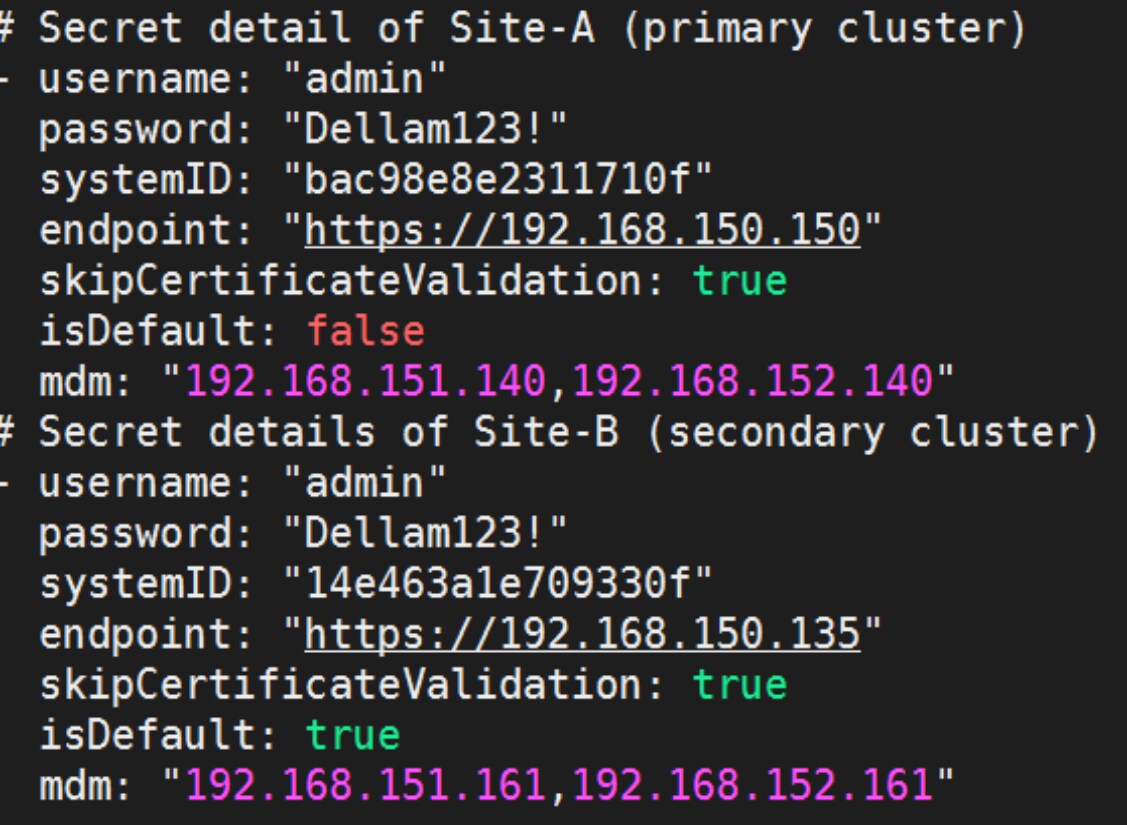
Figure 9. Secret file for replicating clusters.
Note: Kubernetes secrets with details of both PowerFlex system details needs to be created on both sides, where the default value is true for the cluster where the secret was created.
- Run the following commands to create a secret using the configured secret.yaml file.
# kubectl create secret generic vxflexos-config -n vxflexos --from-file=config=samples/secret.yaml
- Run the following command to copy and edit the default values.yaml file. To enable replication module and change the value to true.
# cd csi-powerflex/helm && cp csi-vxflexos/values.yaml myvalues.yaml
replication:
# enabled: Enable/Disable replication feature
# Allowed values:
# true: enable replication feature(install dell-csi-replicator sidecar)
# false: disable replication feature(do not install dell-csi-replicator sidecar)
# Default value: false
enabled: true
- Run the following commands to install the driver using csi-install.sh and validate the installation of CSI drivers, ensuring that the replication module is enabled.
# cd dell-csi-helm-installer && ./csi-install.sh --namespace vxflexos --values ../helm/myvalues.yaml
# kubectl get pods -n vxflexos
NAME READY STATUS RESTARTS AGE
vxflexos-controller-787b684b-hqgln 6/6 Running 0 50d
vxflexos-controller-787b684b-wqhf6 6/6 Running 0 50d
vxflexos-node-jhmvx 2/2 Running 0 50d
vxflexos-node-lhfzm 2/2 Running 0 50d
vxflexos-node-px9df 2/2 Running 0 50d
# kubectl get pods -n dell-replication-controller
NAME READY STATUS RESTARTS AGE
dell-replication-controller-manager-7bb5cdbbc-wlfcb 1/1 Running 0 43d
For more information about CSM replication installation, see the CSM-replication Installation page.
Deploying PostgreSQL
For demonstration purposes, the PostgreSQL database is installed on an OpenShift cluster. The pgbench tool, which is specially designed for PostgreSQL databases, is used for running workloads. The tool runs predefined patterns of database transactions and queries. The pgbench tool creates a workload that mimics the behavior of intensive real-world applications.
- Run the following commands to install the PostgreSQL database application.
# helm repo add bitnami https://charts.bitnami.com/bitnami
# helm install my-release oci://registry-1.docker.io/bitnamicharts/postgresql --set global.storageClass=vxflexos-replication --set global.postgresql.auth.postgresPassword=password --set primary.persistentVolumeClaimRetentionPolicy.enabled=true --set primary.persistence.size=500Gi
A stateful-set application for the PostgreSQL database is installed.
- A connection to the database can be made using a client pod or by the psql command line tool using the following command:
# kubectl run my-release-postgresql-client --rm --tty -i --restart='Never' --namespace default --image docker.io/bitnami/postgresql:16.0.0-debian-11-r3 --env="PGPASSWORD=$POSTGRES_PASSWORD" --command -- psql --host my-release-postgresql -U postgres -d postgres -p 5432
- To connect to the database from outside the cluster, run the following commands:
# kubectl port-forward --namespace default svc/my-release-postgresql 5432:5432 & PGPASSWORD="$POSTGRES_PASSWORD" psql --host 127.0.0.1 -U postgres -d postgres -p 5432
# psql -h localhost -U postgres -d postgres -p 5432
- Verify that the PostgreSQL pod is running. It creates a persistent volume (PV) of 500GB for the PostgreSQL database as specified in the command and creates a replication consistency group. Verify the same using the repctl commands. Remote cluster_id and other details can be verified using the following command:
# kubectl get rg -o yaml
# kubectl get pods
NAME READY STATUS RESTARTS AGE
my-release-postgresql-0 1/1 Running 0 7d18h
# ./repctl get pv
[2023-11-16 05:32:39] INFO listing persistent volumes
[2023-11-16 05:32:39] INFO []
[2023-11-16 05:32:39] INFO Cluster: primaryocp
+---------------------------------+
| PersistentVolume |
+---------------------------------+
Name RG SC PVC PVCNamespace rPVC rPVCNamespace
k8s-9c6fc11ef6 rg-cd6e544f-cf88-4486-899c-9c3b763b0113 vxflexos-replication data-my-release-postgresql-0 default N/A
[2023-11-16 05:32:39] INFO
[2023-11-16 05:32:39] INFO Cluster: secondaryocp
+---------------------------------+
| PersistentVolume |
+---------------------------------+
Name RG SC PVC PVCNamespace rPVC rPVCNamespace
k8s-9c6fc11ef6 rg-cd6e544f-cf88-4486-899c-9c3b763b0113 vxflexos-replication data-my-release-postgresql-0 default data-my-release-postgresql-0 default
[2023-11-16 05:32:39] INFO
# ./repctl get rg
[2023-11-16 05:32:42] INFO listing replication groups
[2023-11-16 05:32:42] INFO Cluster: primaryocp
+-----+
| RG |
+-----+
Name State rClusterID Driver RemoteRG IsSource LinkState
rg-cd6e544f-cf88-4486-899c-9c3b763b0113 Ready secondaryocp csi-vxflexos.dellemc.com rg-cd6e544f-cf88-4486-899c-9c3b763b0113 true FAILEDOVER
[2023-11-16 05:32:42] INFO
[2023-11-16 05:32:42] INFO Cluster: secondaryocp
+-----+
| RG |
+-----+
Name State rClusterID Driver RemoteRG IsSource LinkState
rg-cd6e544f-cf88-4486-899c-9c3b763b0113 Ready primaryocp csi-vxflexos.dellemc.com rg-cd6e544f-cf88-4486-899c-9c3b763b0113 false FAILEDOVER
[2023-11-16 05:32:42] INFO
Replication operations on an OpenShift Cluster with PostgreSQL
The CSI PowerFlex driver supports the following list of replication actions:
- Failover_Remote
- Unplanned_Failover_Local
- Suspend
- Resume
- Sync
Some of the maintenance actions like suspend, resume, and sync can be run at any site and are used to change the replication link state:
- The suspend action temporarily suspends replication between the source and target, you can write data to the source, but it will not be replicated.
- The resume action reenables the replication allowing clusters to replicate the data back.
- The sync action synchronizes all changes from source to target, it is more like sync now, ensuring the initial synchronization, ongoing data consistency checks, and updates between the source and target systems to be consistent and up to date.
#./repctl --rg rg-name exec -a suspend
#./repctl get rg
Use the repctl command with the option get rg to check the link state of rg. Similarly, you can use resume or sync command options. You can use the sync option after resuming, as it begins the synchronization of data immediately instead of waiting for the recovery point objective time.
Failover to remote site
This section describes the failover test that was performed to validate the replication while the PostgreSQL database workload was active on the source PowerFlex cluster. The pgbench tool was used for database workload. An additional database test table was also created and updated manually at certain times in the test and inspected later, at the replication target, to demonstrate what records were protected. This helps to check the values in the database before and after replication on the replication target, Site-B.
The following actions are run on the primary cluster, Site-A, before the failover:
- Create a database named mydb and run Pgbench.
# createdb -h localhost -U postgres mydb
# sudo pgbench -h localhost -U postgres -d mydb -p 5432 -i -s 9000
creating tables...
100000 of 900000000 tuples (0%) done (elapsed 0.02 s, remaining 173.15 s)
200000 of 900000000 tuples (0%) done (elapsed 0.04 s, remaining 180.86 s)
……………………………………..
899900000 of 900000000 tuples (99%) done (elapsed 670.19 s, remaining 0.07 s)
900000000 of 900000000 tuples (100%) done (elapsed 670.21 s, remaining 0.00 s)
vacuum...
set primary keys... done.
- Log in to the database and verify that the data is written in tables.
mydb=# SELECT * FROM pgbench_accounts LIMIT 10;
aid | bid | abalance | filler
-----------+------+----------+--------------------------------------------------------------------------------------
102094481 | 1021 | 0 |
102094482 | 1021 | 0 |
102094483 | 1021 | 0 |
102094484 | 1021 | 0 |
102094485 | 1021 | 0 |
102094486 | 1021 | 0 |
102094487 | 1021 | 0 |
- Create a database named mydb3, and then manually create a table named employees and enter the required values:
mydb3=# SELECT * FROM employees;
employee_id | first_name | last_name | hire_date
-------------+------------+-----------+------------
1 | John | Doe | 2023-09-28
2 | John | Doe | 2023-09-28
3 | John | Doe | 2023-09-28
4 | John | Doe | 2023-09-28
……………………..
………………..
149 | John | Doe | 2023-09-28
150 | John | Doe | 2023-09-28
151 | John | Doe | 2023-09-28
- To trigger the failover, use the repctl command line to initiate a planned failover to the remote/secondary cluster- siteB and run the following command:
#./repctl --rg rg-bd285081-0c9c-41d2-8254-dfffae27a803 failover --target secondaryocp
INFO RG (rg-bd285081-0c9c-41d2-8254-dfffae27a803), successfully updated with action: failover
#[root@infraocp repctl]# ./repctl get rg
[2023-10-04 07:23:14] INFO listing replication groups
[2023-10-04 07:23:15] INFO Cluster: primaryocp
+-----+
| RG |
+-----+
Name State rClusterID Driver RemoteRG IsSource LinkState
rg-bd285081-0c9c-41d2-8254-dfffae27a803 Ready secondaryocp csi-vxflexos.dellemc.com rg-bd285081-0c9c-41d2-8254-dfffae27a803 true FAILEDOVER
[2023-10-04 07:23:15] INFO
[2023-10-04 07:23:15] INFO Cluster: secondaryocp
+-----+
| RG |
+-----+
Name State rClusterID Driver RemoteRG IsSource LinkState
rg-bd285081-0c9c-41d2-8254-dfffae27a803 Ready primaryocp csi-vxflexos.dellemc.com rg-bd285081-0c9c-41d2-8254-dfffae27a803 false FAILEDOVER
The following steps are performed by the CSM replication to accomplish a failover.
- In case of a planned failover, the CSM performs one final synchronization of data from the source to target before transition.
- Once the failover is triggered, CSM enables writes on the target PowerFlex cluster and disables writes on the source PowerFlex cluster.
The link state in the repctl command confirms that the failover is successful, and we can now bring up the PostgreSQL application on the target side. The persistent volume on the secondary cluster which has the replicated data, is shown as available. We can then initiate an install of PostgreSQL that binds to the available PV.
- Run the following commands to verify the replication on the secondary cluster:
# kubectl get pv
NAME CAPACITY ACCESS MODES RECLAIM POLICY STATUS CLAIM STORAGECLASS REASON AGE
k8s-29d85baf31 504Gi RWO Delete Available vxflexos-replication 15m
# helm install my-release oci://registry-1.docker.io/bitnamicharts/postgresql --set global.storageClass=vxflexos-replication --set global.postgresql.auth.postgresPassword=password --set primary.persistentVolumeClaimRetentionPolicy.enabled=true
The PostgreSQL pod on site-B comes up successfully. Then log in to the database to verify that the data that was written on the primary cluster, site-A, was replicated to the secondary cluster, site-B, successfully. Mydb and mydb3 are the databases that were created on the primary cluster and now exist in site-B. Verify that the contents are replicated, and the secondary cluster PV is write enabled.
mydb=# SELECT * FROM pgbench_accounts LIMIT 5;
aid | bid | abalance | filler
-----------+------+----------+--------------------------------------------------------------------------------------
102094481 | 1021 | 0 |
102094482 | 1021 | 0 |
102094483 | 1021 | 0 |
102094484 | 1021 | 0 |
102094485 | 1021 | 0 |
(5 rows)
mydb3=# SELECT * FROM employees;
employee_id | first_name | last_name | hire_date
-------------+------------+-----------+------------
1 | John | Doe | 2023-09-28
2 | John | Doe | 2023-09-28
3 | John | Doe | 2023-09-28
4 | John | Doe | 2023-09-28
……………………..
………………..
149 | John | Doe | 2023-09-28
150 | John | Doe | 2023-09-28
- Rerun the Pgbench for the write operations on the secondary target cluster. This concludes the failover to the secondary cluster at site-B and shows that it is successful. At this point the access mode of the source cluster at site-A, is set to read-only mode.
Reprotect local Site
Reprotect local is used to set the original target as the new source. A reprotect operation is, in essence, removing the original source-target relationship and establishing a new one in the reverse direction. This is done only after failing over to the target cluster is complete, and the original source array is up and ready to be made a new replication destination or target.
Run the following command to reprotect the local site:
#[root@infraocp repctl]# ./repctl --rg rg-bd285081-0c9c-41d2-8254-dfffae27a803 reprotect --at secondaryocp
[2023-10-04 07:49:09] INFO RG (rg-bd285081-0c9c-41d2-8254-dfffae27a803), successfully updated with action: reprotect
[root@infraocp repctl]# ./repctl get rg
[2023-10-04 07:49:15] INFO listing replication groups
[2023-10-04 07:49:15] INFO Cluster: primaryocp
+-----+
| RG |
+-----+
Name State rClusterID Driver RemoteRG IsSource LinkState
rg-bd285081-0c9c-41d2-8254-dfffae27a803 Ready secondaryocp csi-vxflexos.dellemc.com rg-bd285081-0c9c-41d2-8254-dfffae27a803 false FAILEDOVER
[2023-10-04 07:49:15] INFO
[2023-10-04 07:49:15] INFO Cluster: secondaryocp
+-----+
| RG |
+-----+
Name State rClusterID Driver RemoteRG IsSource LinkState
rg-bd285081-0c9c-41d2-8254-dfffae27a803 Ready primaryocp csi-vxflexos.dellemc.com rg-bd285081-0c9c-41d2-8254-dfffae27a803 true FAILEDOVER
This makes the secondary cluster a new source and the original source as a new target cluster to allow replication in the reverse direction. This action will enable replication or create a copy of the data on another cluster participating in replication. If reprotect local is not enabled, data is not replicated in the reverse direction, hence any writes on the target cluster are not protected. This helps to keep the volume pairs in sync, but now in the reverse direction.
Unplanned failover of local site
This action is used in cases when there is sudden outage or failure on the source cluster. The user can trigger an unplanned failover to the target cluster as the source cluster is down.
#./repctl --rg rg-bd285081-0c9c-41d2-8254-dfffae27a803 failover –unplanned --target secondaryocp
For more information about software and hardware configuration that is used during this demonstration, see Appendix-A.
Conclusion
Conclusion
This white paper provides guidelines for deploying Dell CSI with the CSM replication module on PowerFlex clusters. The paper shows efficient data replication between two data center sites using a two-layer PowerFlex deployment on OpenShift Container Platform as the compute platform. The focus is on ensuring seamless transitions for critical applications during planned or unplanned events. The Dell CSM replication module plays a crucial role in providing a uniform and reliable mechanism for data replication. Overall, this resource empowers IT professionals to enhance data management and ensure continuous availability in diverse data center scenarios.
References
Dell Technologies documentation
The following Dell Technologies documentation provides additional information. Access to these documents depends on your login credentials. If you do not have access to a document, contact your Dell Technologies representative.
Dell CSI/CSM documentation
The following Microsoft documentation provides additional information:
Red Hat OpenShift documentation
The following Red Hat OpenShift documentation provides additional information:
PostgreSQL documentation
The following PostgreSQL documentation provides additional information:
Appendix A
Test Configuration
The following tables show the hardware and software configuration of storage and compute nodes that are used at Site-A and Site-B for Dell PowerFlex two-layer mode of deployment:
Table 3. Storage node configuration details
|
Hardware |
Configuration |
|
Server model |
PowerFlex R740 |
|
CPU |
2 x Intel 6152 Xeon 44 Cores 2.10 GHz |
|
Memory (GiB) |
192 GB RAM with 12 x 16 GB NVDIMM |
|
NIC |
4 ports 25 GB Mellanox Connect-X 5 |
|
Storage |
6 x 3.46 TB SAS SSDs |
|
Software |
Configuration |
|
Operating system |
Embedded OS |
|
Dell PowerFlex software release |
4.0 |
Table 4. Compute node configuration details
|
Hardware |
Configuration |
|
Server model |
PowerFlex R740 |
|
CPU |
2 x Intel 6152 Xeon 44 Cores |
|
Memory (GiB) |
192 GB |
|
NIC |
4 ports 25 GB Mellanox Connect-X 5 |
|
Storage |
BOSS S1 Controller 2 x 240 GB SATA SSD |
|
Software |
Configuration |
|
Operating system |
Red Hat Enterprise Linux CoreOS |
|
Dell PowerFlex software release |
4.0 |
|
PostgreSQL |
15.0 |
|
CSI/CSM version |
CSI 2.7/CSM v1.5.1 |
Appendix B YAML definition files
Replication storage class YAML
Sample YAML file used to create a replication storage class.
sourceClusterID: "primaryocp"
targetClusterID: "secondaryocp"
name: "vxflexos-replication"
driver: "vxflexos"
reclaimPolicy: "Delete"
replicationPrefix: "replication.storage.dell.com"
remoteRetentionPolicy:
RG: "Delete"
PV: "Retain"
parameters:
storagePool: # populate with storage pool to use of arrays
source: "SP-SW_SSD-1"
target: "spnew"
protectionDomain: # populate with protection domain to use of arrays
source: "PD-1"
target: "PDnew-1"
arrayID: # populate with unique ids of storage arrays
source: "bac98e8e2311710f"
target: "14e463a1e709330f"
rpo: "60"
volumeGroupPrefix: "csi"
consistencyGroupName: "" # optional name to be given to the rcg
After the storage class is created verify that the the remoteClusterID on both the sites are correctly set.
#kubectl get sc vxflexos-replication -o yaml
Sample RCG YAML
Once the RCG is created, to verify the replication configuration on the created RCG use the following command to check remoteSystemID and its own system name configurations:
[root@infraocp repctl]# kubectl get rg -o yaml
apiVersion: v1
items:
- apiVersion: replication.storage.dell.com/v1
kind: DellCSIReplicationGroup
metadata:
annotations:
replication.storage.dell.com/contextPrefix: powerflex
replication.storage.dell.com/remoteClusterID: secondaryocp
replication.storage.dell.com/remoteRGRetentionPolicy: delete
replication.storage.dell.com/remoteReplicationGroupName: rg-bd285081-0c9c-41d2-8254-dfffae27a803
replication.storage.dell.com/rg_sync_complete: "yes"
creationTimestamp: "2023-10-04T05:27:14Z"
finalizers:
- replication.storage.dell.com/replicationProtection
- replication.storage.dell.com/replicationSyncProtection
generation: 1
labels:
replication.storage.dell.com/driverName: csi-vxflexos.dellemc.com
replication.storage.dell.com/remoteClusterID: secondaryocp
replication.storage.dell.com/remoteSystemID: 14e463a1e709330f
replication.storage.dell.com/systemName: bac98e8e2311710f
name: rg-bd285081-0c9c-41d2-8254-dfffae27a803
resourceVersion: "23889849"
uid: 0e679de2-7e79-4b2a-9920-7a366b18a8d9
spec:
action: ""
driverName: csi-vxflexos.dellemc.com
protectionGroupAttributes:
powerflex/remoteSystemID: 14e463a1e709330f
powerflex/systemName: bac98e8e2311710f
protectionGroupId: 000afd3a00000000
remoteClusterId: secondaryocp
remoteProtectionGroupAttributes:
powerflex/remoteSystemID: bac98e8e2311710f
powerflex/systemName: 14e463a1e709330f
remoteProtectionGroupId: 2748f02a00000000
status:
conditions:
- condition: Replication Link State:IsSource changed from (false) to (true)
time: "2023-10-04T05:27:39Z"
lastAction: {}
replicationLinkState:
isSource: true
lastSuccessfulUpdate: "2023-10-04T05:28:40Z"
state: SYNCHRONIZED
state: Ready
kind: List
metadata:
resourceVersion: ""