Saving Time with Zero Touch Deployment
In today’s era of connectivity, people’s online presences and the data attached are constantly expanding. While new customers are always good for business, they can be demanding on a company's IT infrastructure and the departments in charge of them. Before the release of Zero Touch Deployment (ZTD), infrastructure deployment meant dull work for the IT staff required to manually set up and configure the new equipment. However, with modern-day automation capabilities, companies no longer need to worry about spending unnecessary time and resources on these mundane tasks.
With ZTD, the process of expanding and connecting a company’s network hardware is quicker and easier than ever. IT only needs to set up the necessary configurations in a server for their switches once, and then watch as the data is automatically copied over to each additional switch that is added to the network. This process frees up valuable time for IT personnel, allowing them to direct their energy to more valuable and engaging projects.
ZTD works to provide automated switch deployment onto a network using a set of preconfigurations, allowing users a plug-and-play network environment where new devices can adjust to network settings immediately. The following figure shows a high-level overview:
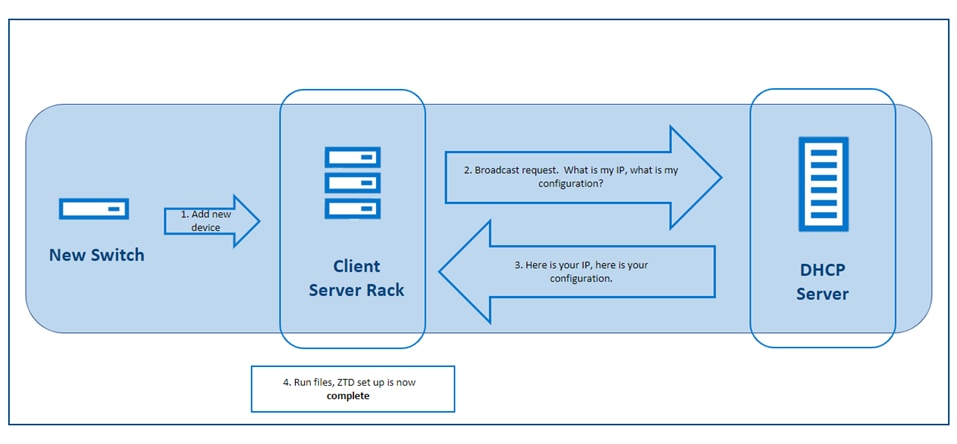
Figure 1. ZTD Automation process
By connecting the new switch to your network, it automatically downloads the configuration that it needs from the DHCP server. In addition to running the file directly from the DHCP server, you can download the file from another on-premises server or the web by using HTTP, SFTP, TFTP, or FTP. If you do not already have a preset file, there is no need to worry. The server will download and run a file with default settings, which you can modify later when you figure out your configuration.
Using ZTD instead of a manual configuration provides many benefits such as:
- Resource efficiency
- Lower costs
- Faster installation
- Improved error resolutions and quality control
- Quicker and simpler updates and changes
The first three benefits are expected with most automation projects and were described briefly in the preceding introduction. However, with ZTD, you can see the additional benefits of a central configuration file. Because all switches connect from a single source instead of independent files, it is much easier to troubleshoot where the errors occur and quickly resolve these errors for the whole network. With the convenience of a central file, you can also enjoy the ease of providing full system updates through a single source.
For more detailed information and for help setting up ZTD, see the Dell SmartFabric OS10 zero-touch deployment topic in the Dell SmartFabric OS10 User Guide at https://www.dell.com/support/manuals/en-in/networking-mx7116n/smartfabric-os-user-guide-10-5-0/dell-emc-smartfabric-os10-zero-touch-deployment?guid=guid-95ca07a2-2bcb-4ea2-84ef-ef9d11a4fa0e&lang=en-us.