
SQL Server 2022 on Dell PowerFlex Using VMware Virtualization

Sep 27, 2026
SQL Server 2022 on Dell PowerFlex Using VMware Virtualization This white paper describes the deployment, logical architecture, and configuration best practices for implementing SQL Server 2022 with Dell PowerFlex storage using VMware by Broadcom.

Executive Summary

Executive Summary

This white paper provides information for implementing SQL Server database on Dell PowerFlex storage using VMware.

The document provides design considerations for the VMware solution components, such as guidelines for configuring the storage and networking to host virtual machines efficiently by leveraging the robust capabilities of the PowerFlex infrastructure.

The paper also addresses performance best practices for optimizing Online Transaction Processing (OLTP) workload efficiency with SQL Server 2022, and describes the solution architecture that integrates PowerFlex software, VMware software, and SQL Server database.

Revision history

Table 1. Revision history

Publication date 

Part number

Description

March 2025

H04455

Initial release

Audience

This white paper is intended for Windows administrators, database administrators, field consultants, Development and Operations engineers, site reliability engineers, system engineers, and partners who are interested in deploying VMware virtualization using PowerFlex software-defined storage to host a SQL Server database. 

Readers should have a basic understanding of PowerFlex, Windows Server, VMware, and SQL Server database technologies.

Terminology

The following table provides definitions of key terms that are used in this document:

Table 2. Terminology 

Term

Definition

CO

Compute Only

CSV

Cluster Shared Volume

FG

Fine Granularity

HCI

Hyperconverged Infrastructure

IOPS

Input/Output Operations per Second

MG

Medium Granularity

OLTP

Online Transaction Processing

OLAP

Online Analytical Processing

SDC

Storage Data Client

SDS

Storage Data Server 

SLA

Service Level Agreement

SLES

SUSE Linux Enterprise Server Linux operating system

SO 

Storage Only

TPM

Transactions per minute 

VM

Virtual Machine

TOR

Top of rack

LCM

Life cycle management

ITOM

IT operational and management

TPROC-C

Transaction Processing Benchmark derived from the TPC "C"

VMDK

Virtual Machine Disks

VMware

VMware by Broadcom

We value your feedback

Dell Technologies and the authors of this document welcome your feedback on the solution and the solution documentation. Contact the Dell Technologies Solutions team by email.

Author: Anup Bharti

Note: For links to additional documentation that is relevant to this solution, see Dell Technologies Solutions Info Hub for PowerFlex .

Product Overview

PowerFlex family

PowerFlex software-defined infrastructure enables broad consolidation across the data center, encompassing almost any type of workload and architecture. The software-defined architecture offers automation and programmability of the complete infrastructure and provides scalability, performance, and resiliency to enable effortless adherence to strict workload SLAs. 

The PowerFlex family provides a foundation that combines compute and high-performance storage resources in a managed unified fabric. PowerFlex comes in flexible deployment options (rack, appliance, or custom nodes and in the public cloud) that enable independent (two-layer), HCI (single-layer), or mixed architectures. PowerFlex is ideal for high-performance applications and databases, building an agile private/hybrid cloud, or consolidating resources in heterogeneous environments.
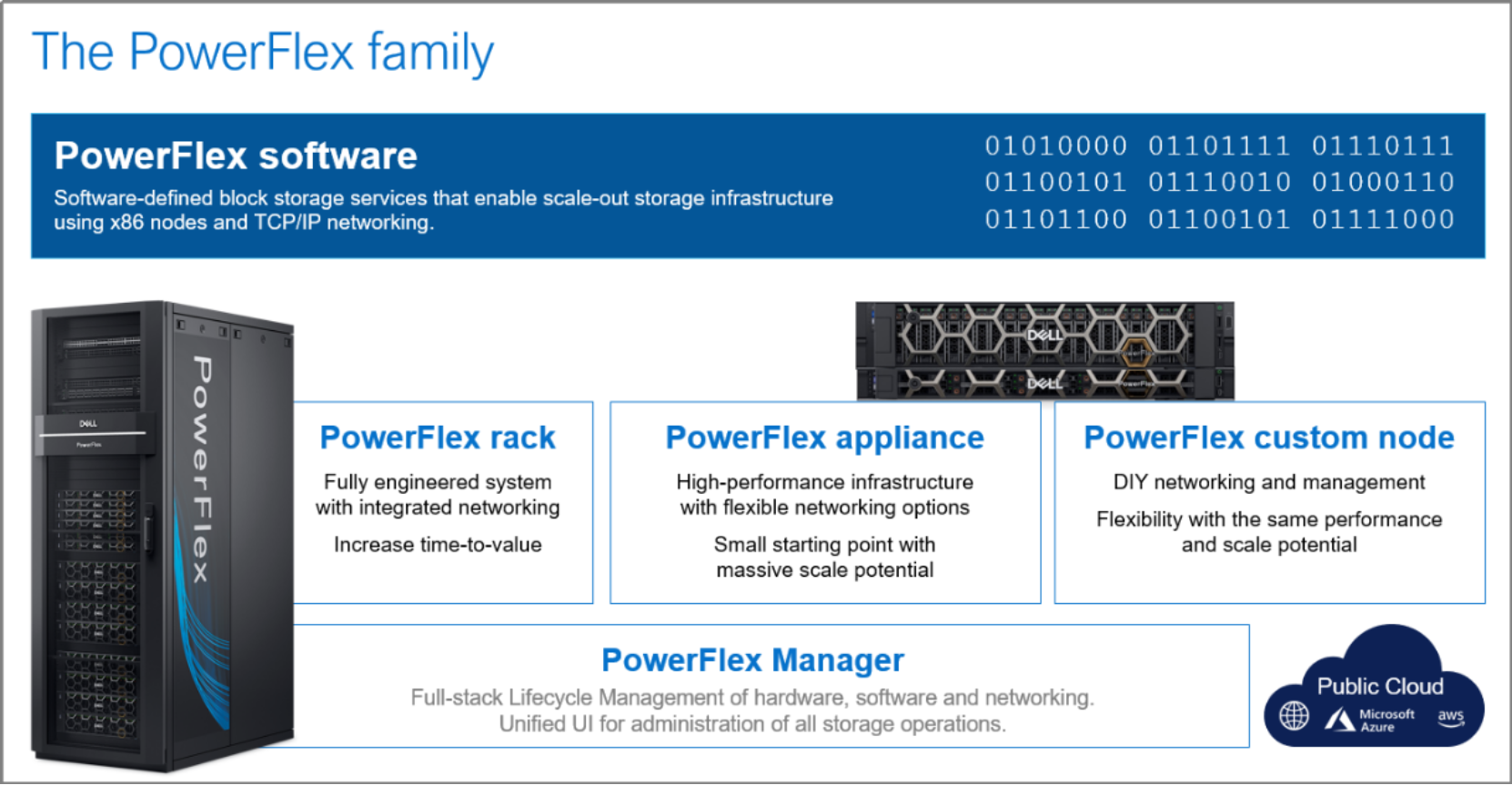
An image showing information about the PowerFlex family of products: PowerFlex Software, PowerFlex Rack, Powerflex Appliance, PowerFlex Custom Node, and PowerFlex Manager.

Figure 1.       PowerFlex Family

PowerFlex software components

Software is the key differentiation in the PowerFlex offering. PowerFlex software components not only provide software-defined storage services but also help simplify infrastructure management and orchestration. This software enables comprehensive IT Operational Management (ITOM) and Life Cycle Management (LCM) capabilities that span compute as well as storage infrastructure, from BIOS and Firmware to nodes, software, and networking. 

PowerFlex

PowerFlex is the software foundation of PowerFlex software-defined infrastructure. It is a scale-out block storage service that is designed to deliver flexibility, elasticity, and simplicity with predictable high performance and resiliency at scale. 

For more details, see PowerFlex specifications

PowerFlex Manager

PowerFlex Manager is the software component in the PowerFlex family that enables ITOM automation and LCM capabilities for PowerFlex systems. Starting with PowerFlex 4.0, the unified PowerFlex Manager brings together three separate components used in previous releases – PowerFlex Manager, the core PowerFlex UI, and the PowerFlex gateway. The new PowerFlex UI runs in Kubernetes and embraces a modern development framework.  

PowerFlex with NVMe over TCP (NVMe/TCP)

NVMe is a family of open specifications that defines an industry standard for both a logical interface and a communication protocol for accessing block storage across an internal PCIe fabric or through external fabrics such as TCP/IP and FC. NVMe is designed to take advantage of the internal parallelism and low latency inherent in flash-based media SSDs. 

NVMe/TCP is an extension of the NVMe base specification that defines the binding of the NVMe protocol to message-based fabrics using TCP. By binding the NVMe protocol to TCP, NVMe/TCP enables the efficient end-to-end transfer of commands and data between NVMe hosts and NVMe controller devices by any standard Ethernet-based TCP/IP networks. 

From PowerFlex release 4.x onwards, support for NVMe/TCP has been added for on-premises deployment with the introduction of a new Storage Data Target (SDT) component installed in the storage layer. The NVMe initiator in the operating system or hypervisor communicates with the SDT, which then communicates with the Storage Data Server (SDS). The NVMe initiator is part of the kernel of the application host operating system or hypervisor.
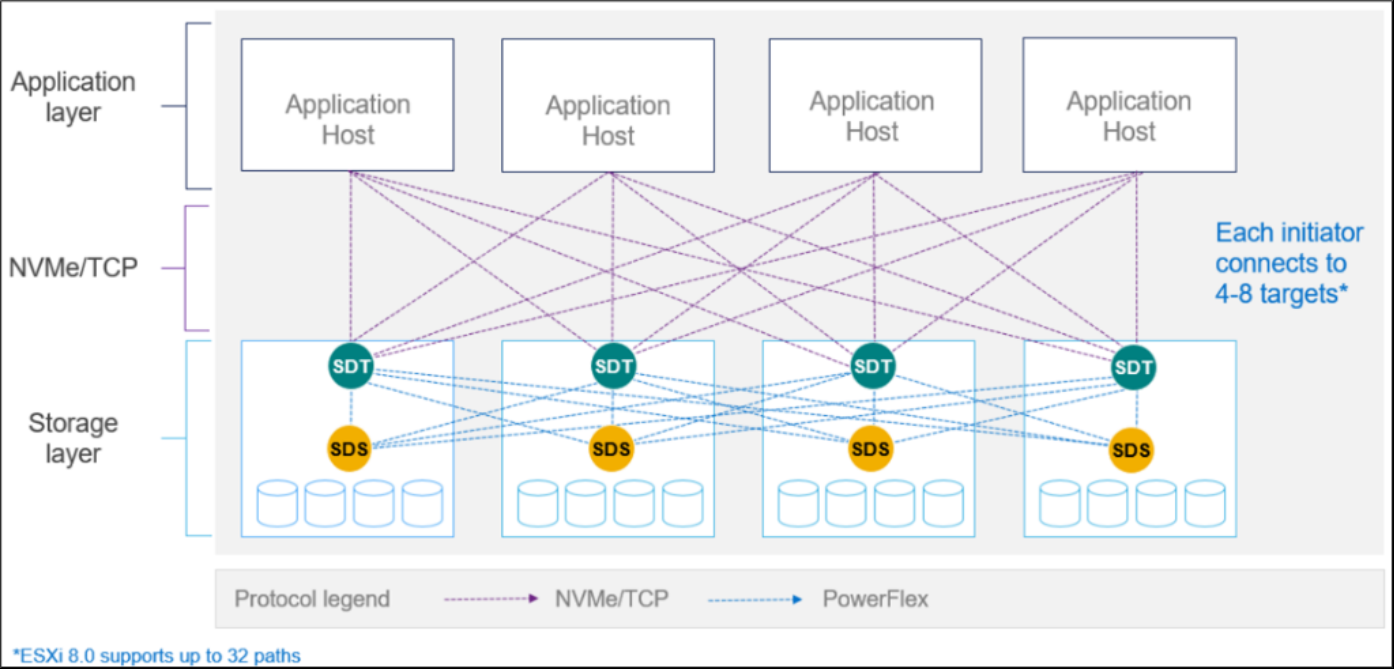
This diagram shows the connectivity between application hosts and storage layers over NVMe/TCP.

Figure 2.       PowerFlex with NVMe/TCP 

For more information, see PowerFlex with NVMe over TCP. 

PowerFlex deployment architectures

PowerFlex software-defined storage offers flexibility of deployment architecture to help best meet the specific deployment and architectural requirements. PowerFlex can be deployed in a two-layer (Independent), single-layer (Hyperconverged/HCI), or a mixture of the two architectures (Mixed). OpenShift environments on PowerFlex use a two-layer (Independent) architecture.

This diagram shows the different deployment architecture of PowerFlex

Figure 3.       PowerFlex deployment architectures 

Independent architecture

In an independent architecture, or two-layer architecture, some nodes provide storage capacity and host datasets while other, separate, and independent nodes, host applications and workloads. Compute and storage resources can be scaled independently by adding nodes to the cluster. This separation of compute and storage resources can also help minimize software licensing costs in certain situations. And this architecture can be ideal for hosting high-performance high-value databases and application workloads.

Hyperconverged architecture

In an HCI architecture, each node in the cluster contributes storage resources and hosts applications and workloads. This architecture allows you to scale your infrastructure uniformly and with a predefined building block that adds both storage and compute resources. This architecture is appropriate for data center and workload consolidation. 

Mixed architecture

A mixed architecture is a combination of the HCI and Independent architectures. As shown in Figure 3, this architecture includes some storage-only nodes, compute-only nodes, and HCI nodes as a part of the same PowerFlex cluster. This is a desirable architecture when working with an existing compute infrastructure and adding high-performance software-defined infrastructure. This architecture can also be a starting point for a two-layer deployment design as external workloads are migrated to PowerFlex. 

PowerFlex consumption options

PowerFlex rack

PowerFlex rack is a software-defined storage platform that delivers flexibility, elasticity, and simplicity with predictable performance and resiliency at scale by combining compute as well as high-performance storage resources in a managed unified network. This rack-scale engineered system, with integrated networking, enables customers to achieve the scalability and management requirements of a modern data center. 

PowerFlex appliance

PowerFlex appliance is a PowerEdge server which has been configured to be a node in a software-defined storage deployment. This offering allows customers the flexibility and savings to bring their own compatible networking. 

PowerFlex custom nodes

PowerFlex Custom Nodes are validated server building-blocks configured for use with PowerFlex. They are available with thousands of configuration options and are available for customers who prefer to build their own environments. 

Dell APEX Block Storage for Public Cloud 

PowerFlex software is also available in the public cloud as Dell APEX Block Storage for Public Cloud. It offers the same on-premises benefits of high-performance, linear scalability, and high resilience as in cloud. It also adds cloud-specific benefits, such as large volume sizes, extreme performance based on NVMe drives, and predictable scalability. The Dell APEX Block Storage self-healing architecture simplifies and increases the availability of infrastructure. It is designed to remain running even when it encounters failures. With fast rebuilds, Dell APEX Block Storage recovers rapidly from failures and keeps operating, without degrading performance or compromising availability. You can also extend this availability and configure it to protect your application availability across multiple availability zones.

PowerFlex CSI/CSM

An important component outside of PowerFlex that enables a flexible consumption model for Kubernetes is the PowerFlex CSI driver, developed as a part of the Dell Kubernetes strategy. After loading the CSI driver for PowerFlex into Kubernetes, it can be used to provision persistent volumes from the underlying PowerFlex storage resource. If the Kubernetes deployment is running low on PowerFlex storage resources, you can add PowerFlex storage nodes to increase the system capacity and performance. 

The CSI driver connects the PowerFlex system and Kubernetes deployments. It is a storage broker, which dynamically provisions volumes from PowerFlex through the PowerFlex API gateway to the Kubernetes cluster. Once the volume is available on PowerFlex, it is immediately mapped to the requesting pod. If a pod is destroyed or rescheduled, the CSI plug-in ensures that the volumes are remapped upon rescheduling of that pod.

  • Customers running Kubernetes clusters on PowerFlex use the Dell Container Storage Modules (CSM), which extend the CSI driver capabilities. These modules: 
  • Provide enterprise storage capabilities to Kubernetes for cloud-native stateful applications.   
  • Reduce management complexity, so that developers can independently use enterprise storage with ease and automate daily operations.   
  • Extends storage functionality and capabilities beyond using the CSI driver alone.

These modules include snapshot, observability, authorization, application mobility, and resiliency.

PowerFlex supports multiple operating systems, different deployment options on-premises and public cloud deployment models (available in AWS and Azure). PowerFlex is validated with leading Kubernetes distributions as shown in the following figure:
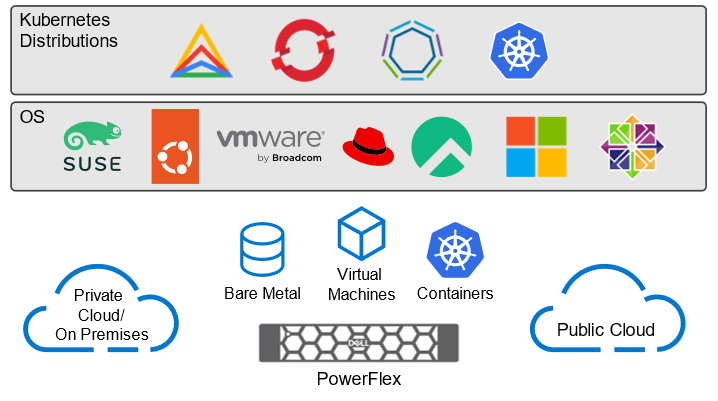
Figure 4. PowerFlex for different Kubernetes distributions 

Solution Overview

Solution Overview

In this solution, a SQL Server 2022 database is deployed on PowerFlex storage using VMware. SQL Server 2022 VMs are hosted on VMware, and the database volumes are provisioned and managed by PowerFlex.

System architecture

The following diagram depicts the logical architecture of the solution. The diagram shows a SQL Server 2022 database hosted on PowerFlex storage in a two-layer configuration with four storage nodes and four compute nodes.
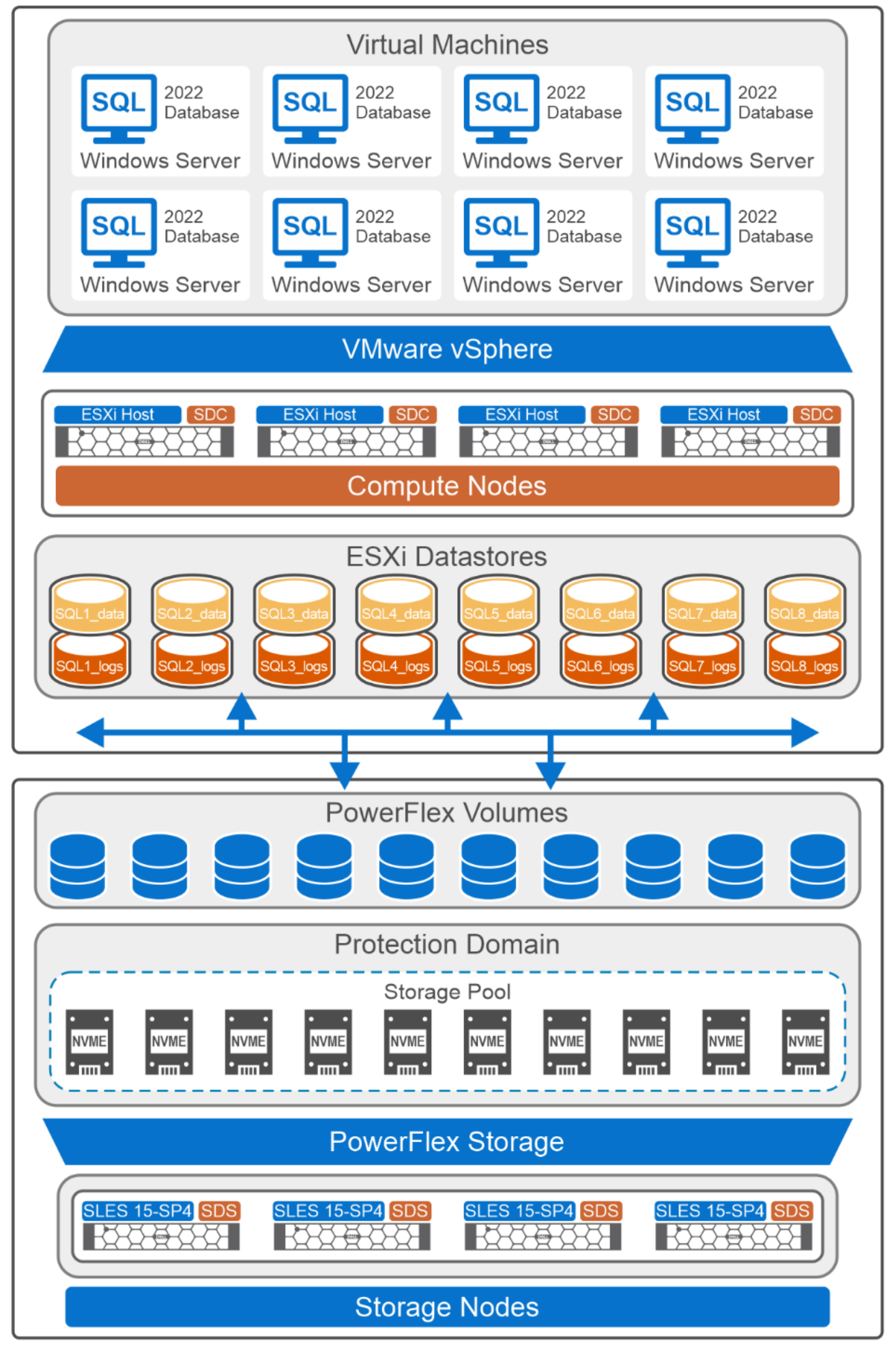
Logical architecture diagram of PowerFlex storage, Hyper-V and SQL Server database.

Figure 5.       Logical architecture of SQL Server 2022 VMs with PowerFlex storage 

Storage and compute nodes

Each storage node is equipped with ten NVMe drives, where each individual drive has a capacity of 1.7 TB. The drives from all four storage nodes (total of 40 drives) are aggregated into a single resilient storage pool. This storage pool is used for creating storage volumes for SQL Server database.

Compute nodes are deployed using PowerFlex Manager. Compute nodes are ESXi hosts and are installed with the SDC component of the PowerFlex. SDC acts as a block device driver on the ESXi hosts and maps the volume created on the storage nodes to the compute nodes.

VMware vCenter

VMware vCenter manages the ESXi hosts. The hosts are configured in a vSphere cluster environment to provide high availability. As shown in Figure 5, eight SQL VMs are created on four hosts. The SQL VMs are configured according to the VMware Virtual Machine vCPU and vNUMA Rightsizing Guidelines. SQL Server is a NUMA-aware database engine, which means it is designed to operate efficiently in Non-Uniform Memory Access (NUMA) environments. By automatically dividing its resources into soft-NUMA nodes, the server can optimize its performance. Three Distributed Virtual (DV) switches are configured to manage both the management and data networks: two are dedicated to the data network, and one is dedicated to the management network.

Each VM has a dedicated datastore to store the data and transaction log files of the SQL Server database. Temp data files are shared with the transaction log datastore. A separate datastore has been created to store the Windows operating system files of all the SQL Server VMs. The datastores are formatted with VMFS 6.

SQL Server 2022

SQL Server 2022 is deployed on Windows Server 2022 VMs, with SQL binary files stored on the operating system partition. Four VMDKs have been created and mapped to the VM to store the data files, and a single designated VMDK is allocated for storing the transaction log files.

The SQL VMs are standalone VMs, operating independently and not as a part of any cluster environment. For more information about the SQL Server VM configuration, see Appendix A3.

The HammerDB tool is used to populate the SQL server database to support the OLTP workload. For more information, see SQL Server database layout.

Network Architecture

Network Architecture

The following diagram shows the network architecture of a PowerFlex deployment that includes storage and compute nodes:
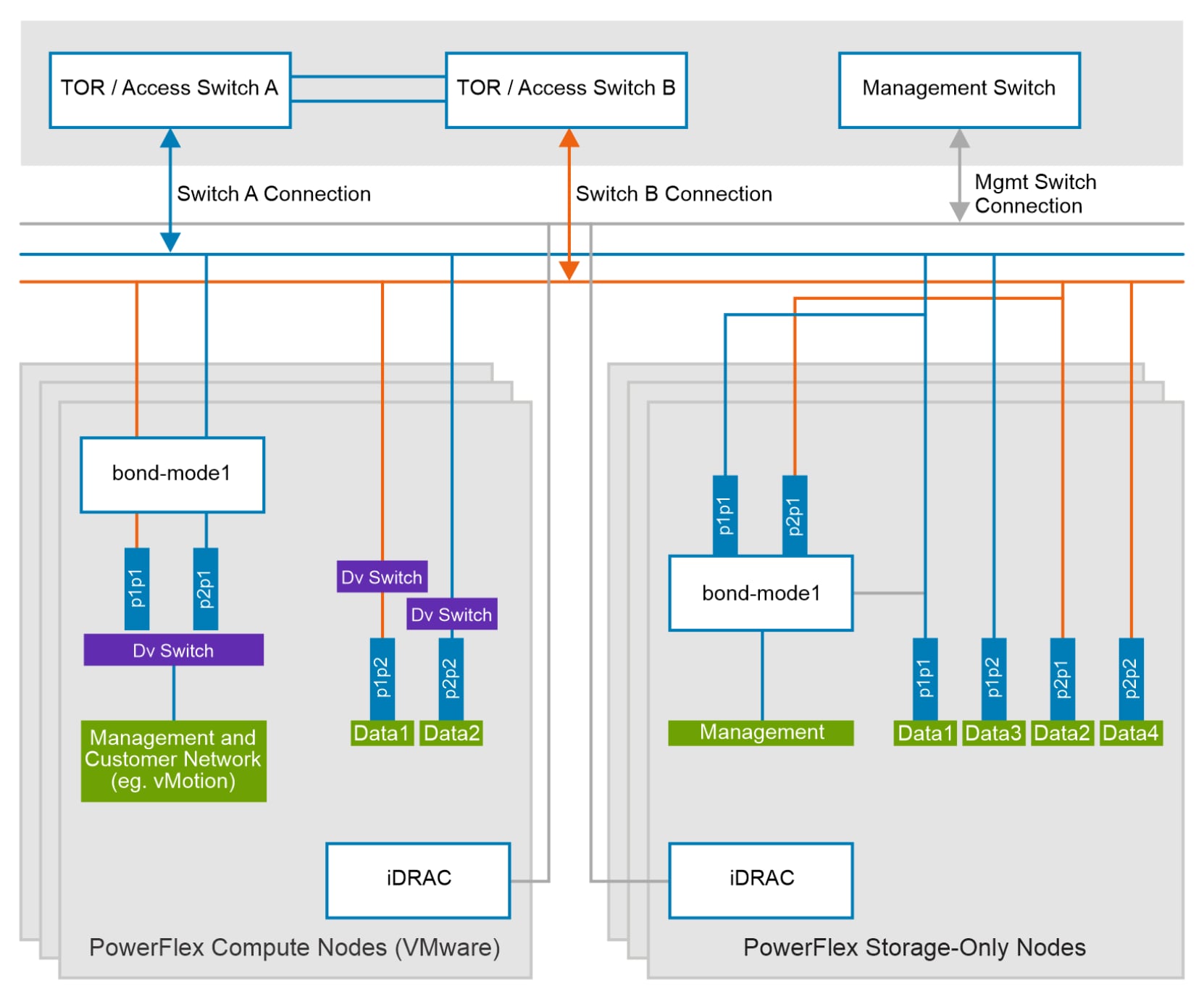
The image illustrates the network configuration of storage-only and compute-only nodes

Figure 6.       Network architecture

Each PowerFlex storage-only (SO) node is connected to the TOR switches. All nodes are equipped with dual-port NICs. These network ports are trunked with the TOR switches. The NICs handle management, data1, data2, data3, and data4 network traffic for PowerFlex. The management network operates in active-backup (mode1) bonding with the data1 and data2 networks, while the data3 and data4 networks are dedicated SDS network and are not bonded. This network configuration provides redundancy and fault tolerance, with two dedicated networks for PowerFlex data transfer.

Dedicated VLANs are used to separate management and data network traffic. The following table shows the different VLANs that are used for PowerFlex SO nodes along with their purposes:

Table 3. Network VLAN details of PowerFlex SO nodes

Network type 

VLAN 

Configurations 

Management 

150 

Mode1 bond  (interface1 port1 and interface2 port1) 

PowerFlex Data 1 

151 

Interface1 port1 

PowerFlex Data 2 

152 

Interface1 port2 

PowerFlex Data 3 

153 

Interface2 port1 

PowerFlex Data 4 

154 

Interface2 port2 

Similarly, two PowerFlex compute nodes are equipped with two dual-port NICs and are connected to the TOR switches. Two network ports, interface 1 port 1 and interface 2 port 1, are configured in an active backup (mode1) and carry only management and customer network traffic. The PowerFlex data1 network is configured on interface 1 port 2, while the data2 network is configured on interface 2 port 2. Data networks are not bonded, and they carry dedicated SDS-SDC traffic. 

The following table shows the network VLAN details of compute nodes:

Table 4.     Network VLAN details of PowerFlex compute nodes

Network type 

VLAN 

Configurations 

Management and customer network


  • 105
  • 146

Mode 1 bond  (interface1 port1 and interface2 port1) 

  • VLAN 105 for VMs 
  • VLAN 146 for VM migration

PowerFlex Data 1 

151 

Interface1 port2 

PowerFlex Data 2 

152 

Interface2 port2 

For more information about the configuration of PowerFlex storage and compute nodes, see Appendix A1 and Appendix A3.

Storage Layout

Storage Layout

This section describes the two important storage components that this solution uses along with different storage considerations for Windows when deploying SQL Server database: the PowerFlex storage layout and the SQL Server database layout.

PowerFlex storage layout

A single protection domain and storage pool are created for this solution from the PowerFlex storage. Two volumes are provisioned from PowerFlex storage for each SQL Server VM: one for storing the data files and another for storing the transaction log files. Having multiple volumes on PowerFlex storage allows concurrent I/O operations to be processed, increasing overall throughput and reducing I/O bottlenecks. Distributing the I/O load across several volumes maximizes the utilization of SDS, improving performance especially for I/O-intensive OLTP workloads. This solution uses a medium granularity (MG) storage pool.

Windows storage considerations

When using external storage such as PowerFlex for SQL Server databases, you can configure each volume in Windows Disk Management either as a drive letter, mount point, or as a Cluster Shared Volume (CSV) in the Failover Cluster wizard. Each option has its own advantages and potential limitations :

  • Drive letters are the simplest way to identify the storage volumes in Windows operating systems. Because they provide an easy way for users and applications to access storage volumes, drive letters are universally recognized and compatible with most Windows applications and services. The finite number of available letters (26) limits the overall scalability of various storage volumes that are mounted on a single host.
  • Mount points allow the format and assignment of a volume to a folder on an existing NTFS volume, rather than assigning it a drive letter. Mount points are sub-directories of the root mount point (root directory). Volumes are mounted like a directory structure, making it easier to organize data logically. Mount points enable more flexibility and scalability by mounting each volume to its sub-folder under the root mount-point. Although most modern applications support mount points, legacy applications may have compatibility issues.
  • Cluster Shared Volumes (CSVs) are a feature of failover clustering that allows shared storage to be accessed concurrently on all the nodes in a cluster. CSVs enhance the availability and reliability of storage in clustered environments. If one node fails, other nodes can still access the shared volume. When a disk is configured as a CSV, it is available to all the cluster nodes, making failover of the clustered roles faster. One limitation is that all CSV disks appear under a single root directory on the system drive at C:\ClusterStorage\, which results in a single point of failure if the system drive is corrupted.

File systems

Along with the preceding Windows storage volume options, it is essential to understand the different file system options that are available, primarily the New Technology File System (NTFS) and the Resilient File System (ReFS). Each file system has its own unique features, advantages, and recommended use cases, including considerations for allocation unit size:

  • NTFS is the default file system for Windows operating systems and has been the fundamental form of Windows storage management for a long time. NTFS provides robust performance, security, and reliability features and uses a journaling feature to maintain data integrity in the event of a system crash. NTFS supports cluster sizes ranging from 512 bytes to 64 KB. A small cluster size (such as 4 KB) is more efficient for storing numerous small files, minimizing wasted space, while large cluster sizes (such as 64 KB) are better for large file storage, potentially improving read/write performance.
  • ReFS is a newer file system that was introduced to address the limitations of NTFS, offering enhanced resiliency and scalability. ReFS is designed for modern data storage needs and is particularly well suited for large-scale and HA environments. ReFS provides automatic integrity checking by continuously validating checksums generated for file data and metadata. ReFS supports only two cluster sizes: 4 KB and 64 KB. A small cluster size is efficient for handling numerous small files, while a large cluster size is beneficial for large file storage with fewer fragmentation issues.

When selecting storage options and file systems for SQL Server database, it is important to evaluate storage using benchmarking tools. Consider various combinations from the preceding storage options, file systems, and cluster sizes for each layer. Assess the storage by determining the optimal values for IOPS and latency to meet the requirements of your specific workload.

This solution follows Microsoft’s standard recommendations: an NTFS file system with a 64KB cluster size for the database volume, and an NTFS file system with a 4KB cluster size for the operating system volume. For more information, see the Microsoft document Database files and filegroups - SQL Server.

Note: PowerFlex only supports RDMs with SDC for Windows Server Failover Cluster shared disks, irrespective of its usage as drive letters, mount points, or CSVs. Clustered VMDKs are not supported.

SQL Server database layout

To ensure optimal database performance, it is important to design the database layout with precision. The database team must work closely with the development and product teams to determine the capacity requirements for various databases, taking account of different table sizes, IOPS, and latency. 

For general-purpose applications, a single disk may be sufficient, while for mission-critical applications, it is crucial to distribute files across multiple disks. Although there is no strict limit on the number of disks, consider factors such as file system, cluster size, and file distribution to achieve optimal performance. To maximize performance and resilience, ensure that data, log, and temp files are spread across multiple disks.

The following figure depicts the SQL Server database layout: 
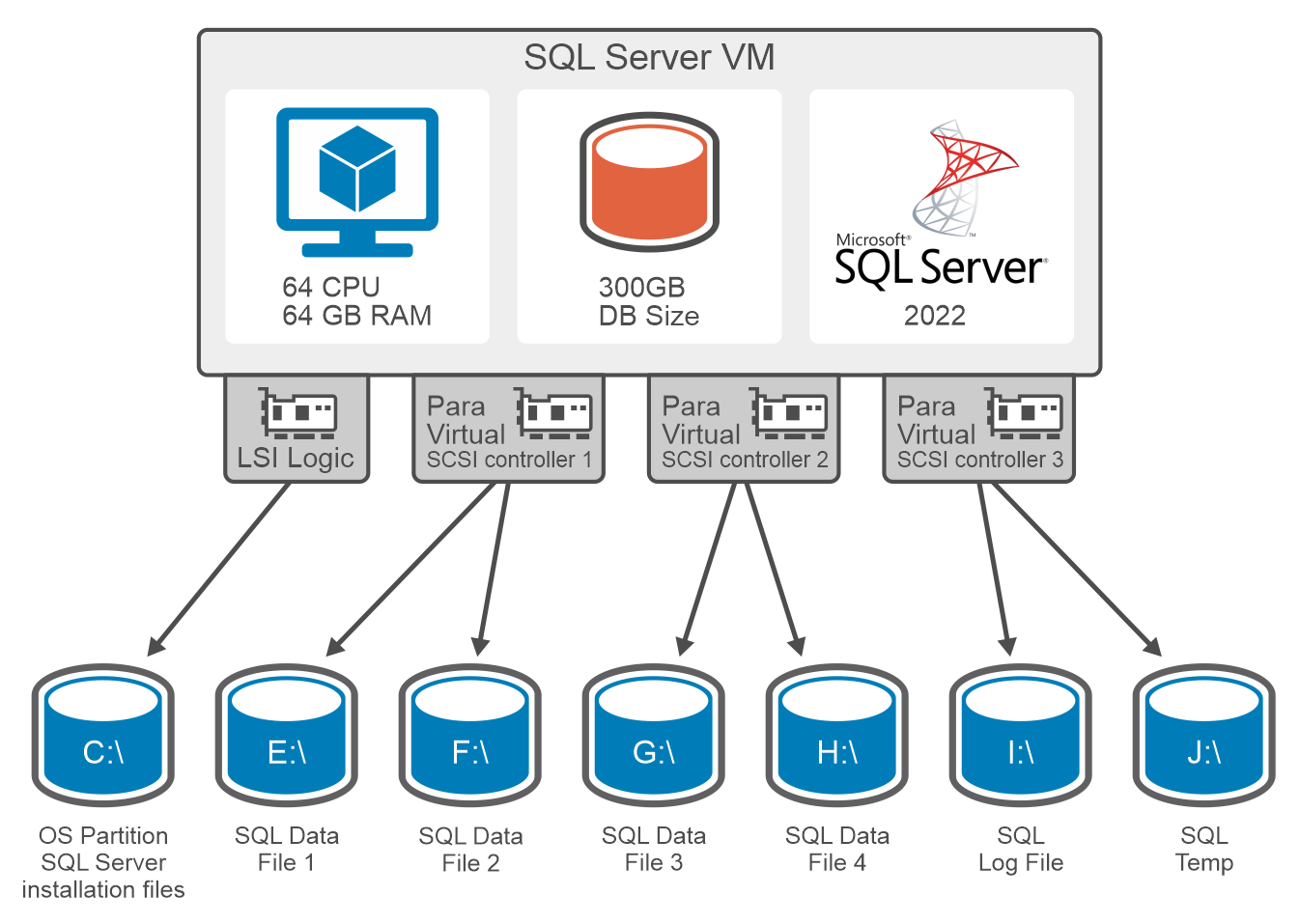
the image illustrates the Storage layout designed for SQL server database on Windows VM

Figure 7. SQL Server database layout

As shown in the preceding figure, data files are distributed across multiple disks, while a dedicated disk is provided for transaction log files. This separation prevents the mixing of random and sequential disk access patterns for the data and log files, resulting in efficient I/O distribution across multiple volumes and enhancing overall database performance.

To further optimize performance, size your data and log files adequately for the expected growth of the database. Doing this reduces the frequency of operating system calls related to the database, consequently boosting database response times.

The operating system volume is formatted with a 4 KB cluster size, while the other disk partitions are formatted with a 64 KB cluster size. 

The following table shows the partition size and file system used for the database:

Table 5. Windows partition and file system

Drive letter

Size (GB)

File system 

Allocation size

Purpose

C

90

NTFS

4 K

Operating system partition and SQL Server installation files

E

399

NTFS

64 K

Data files

F

399

NTFS

64 K

Data files

G

399

NTFS

64 K

Data files

H

399

NTFS

64 K

Data files

I

480

NTFS

64 K

Log files

J

8

NTFS

64 K

Temp files

In line with VMware best practices, this solution uses the PVSCSI controller for all database volumes and the LSI Logic controller for the operating system volume. The PVSCSI controller, which is ideal for I/O-intensive applications on vSphere, offers a higher I/O rate and lower CPU usage compared to the LSI Logic SAS. Also, PVSCSI adapters enhance I/O bandwidth by providing greater queue depth for virtualized workloads.

vSphere has a limitation of 4 SCSI controllers per VM. Therefore, one controller is shared between the operating system and SQL binaries, while the data and log volumes are distributed across the remaining controllers.

Testing and Validation

Testing and Validation

This section describes the tests that the Dell Powerflex team conducted to validate the SQL Server 2022 performance with VMs hosted on PowerFlex storage. The team used the HammerDB benchmarking tool for the performance tests. HammerDB is used to benchmark various databases, including SQL Server. It mainly focuses on schema creation, data loading, and simulating transactional (OLTP) and Analytics (OLAP) workloads. The results of these tests provide meaningful information to validate hardware and software configurations. For more information, see the HammerDB official website.

Test methodology

To validate the performance of standalone SQL Server on VMs using PowerFlex storage, a TPROC-C workload profile is configured in the HammerDB tool. The TPROC-C workload generates a transactional workload that runs a specific set of queries against a SQL Server database. These database transactions are measured in Transactions Per Minute (TPM). The TPROC-C workload consists of 75 percent read, and 25 percent write queries.

The team used the HammerDB tool to run a series of OLTP workload tests against a SQL Server database. The procedure had multiple iterations, running for a duration of 15 minutes each, with the aim of generating OLTP transactions from different virtual users. The primary objective of the test was to evaluate the SQL Server database performance and identify the optimal TPM value when operating under a storage latency of less than 1 millisecond. The team set up the lab as described in System architecture. For more information about the SQL Server and HammerDB VM configuration, see Appendix A3.

Note: For all tests, the SQL Server was assigned 59 GB of memory from a total of 64 GB available memory, with 300 GB of the database populated.

A separate load-generation VM is deployed with Windows Server 2022 to run the HammerDB clients that connect to the database over the network and generate transactions. 

The HammerDB VM is hosted on a separate ESXi host and does not use any storage or compute resources from the PowerFlex cluster. A single HammerDB VM is used to run eight instances of HammerDB software, each connecting to individual SQL Server VM, as shown in the following figure. 

The team conducted multiple tests using different virtual users. 
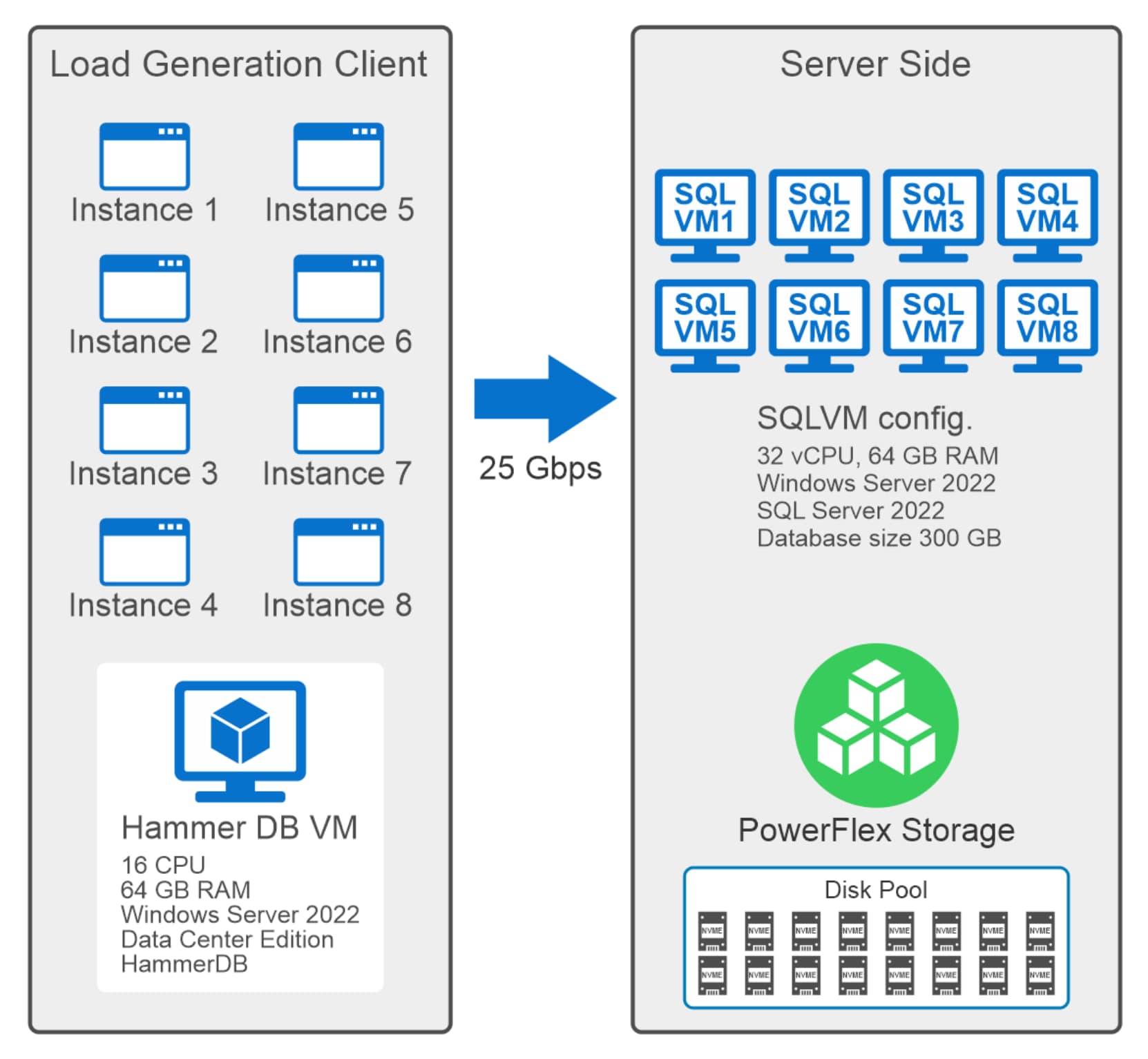
OLTP benchmark Test using HammerDB tool

Figure 8. OLTP workload generation using the HammerDB tool

Test results

The Dell PowerFlex team conducted the following tests:

  • Single VM test
  • Linear scaling test of VMs

For information about the best practices used in the tests, see Best Practices.

Single VM test

The objective of this test was to measure database performance on a single SQL Server VM hosted on an ESXi host.

The following graph shows the results of the single VM test:
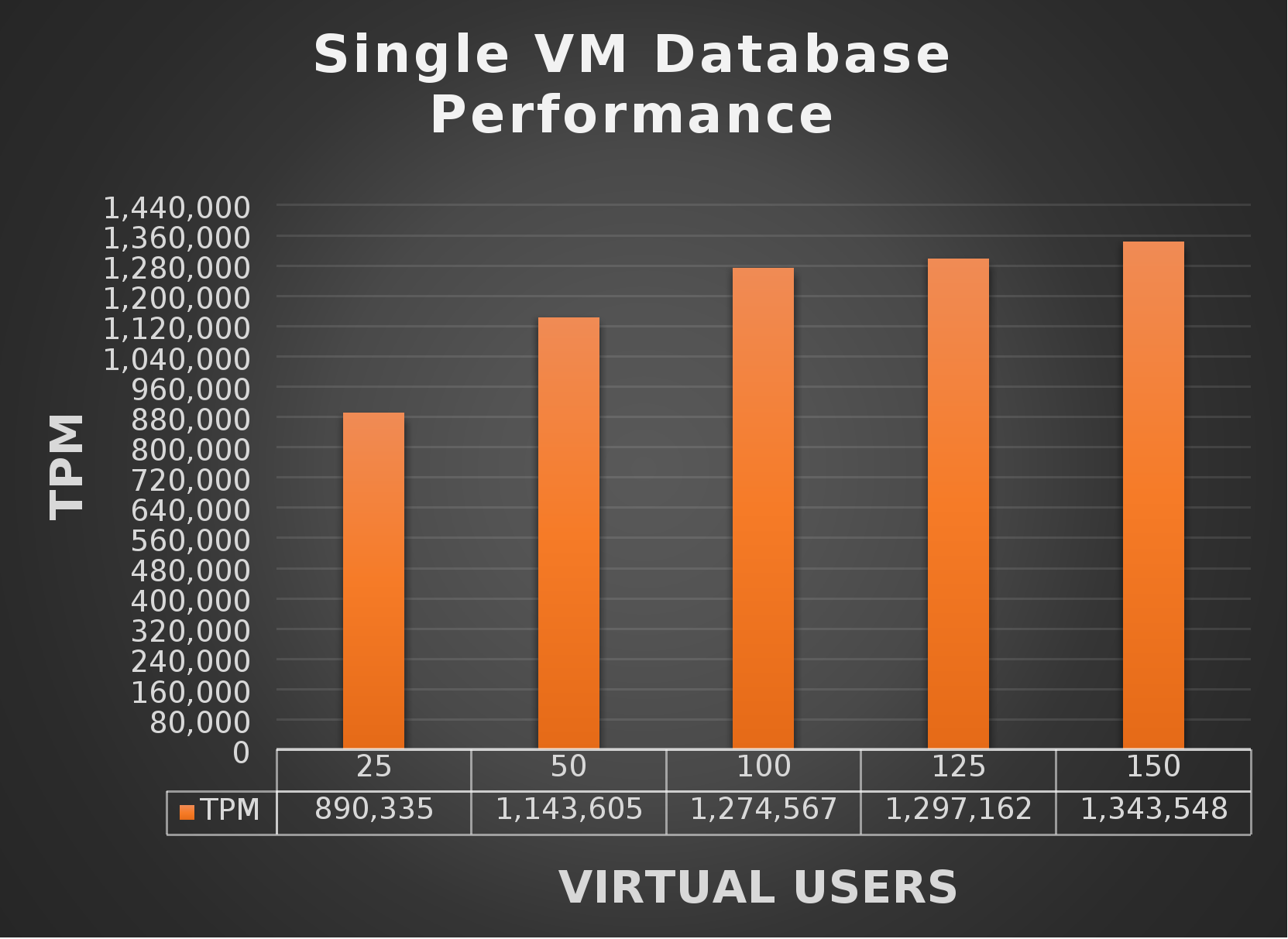
Image representing the Test results of the OLTP benchmark test measured in TPM(transaction per minute)

Figure 9.       Single VM database performance

As demonstrated by the graph, the SQL Server database achieved 1.3 million TPM with 150 virtual users. 

The following graph shows the PowerFlex storage performance for the single VM HammerDB test:
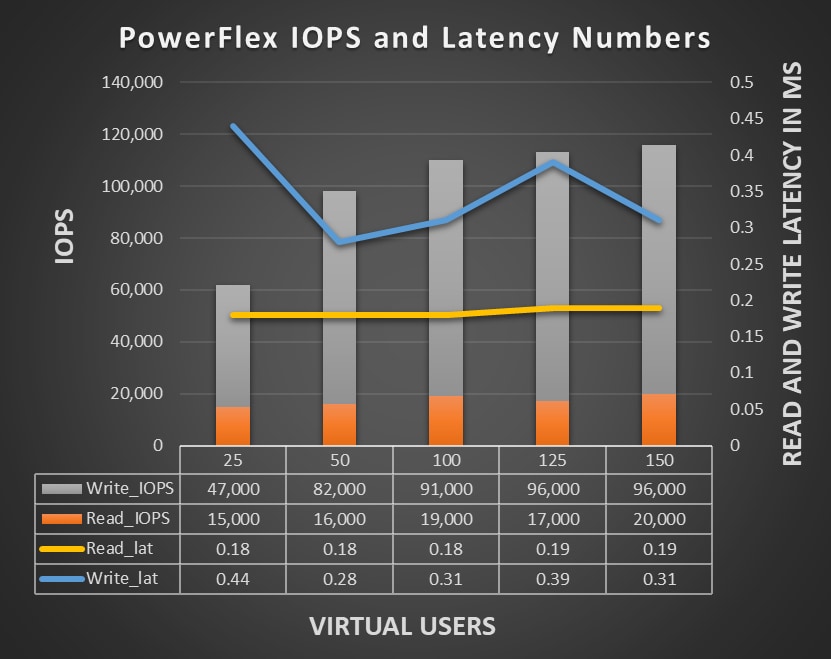
Figure 10.   PowerFlex storage performance

The PowerFlex storage generated a 96K write IOPS and 20K read IOPS for the single VM test, while maintaining a constant average read and write I/O latency of under 1 millisecond. 

CPU utilization of VMs during these tests was in the range of 39 to 75 percent.

Linear scaling

This section focuses on the scalability test of SQL Server VMs on a four-node vSphere cluster. The database layout was configured as described in SQL Server database layout.

The test began with two VMs. In each subsequent iteration, additional VMs were deployed, as described in the following table:

Table 6.     VM scaled on compute nodes


ESXi Host 1

ESXi Host 2

ESXi Host 3

ESXi Host 4

Test Iteration

VM1

VM3

VM2

VM4

VM5

VM6

VM7

VM8

Iteration 1

Active


Active


Iteration 2

Active


Active


Active


Active


Iteration 3

Active

Active

Active

Active

Active


Active


Iteration 4

Active

Active

Active

Active

Active

Active

Active

Active


As described in the preceding table, the test started with two VMs in the first iteration. In the second iteration, the team added two more VMs, making a total of four VMs active on the vSphere cluster. With each subsequent iteration, the team incrementally added two VMs, ultimately scaling the system to eight active VMs.

The following graph shows the SQL Server 2022 performance with linear scaling of two, four, six and eight VMs hosted on the PowerFlex storage:
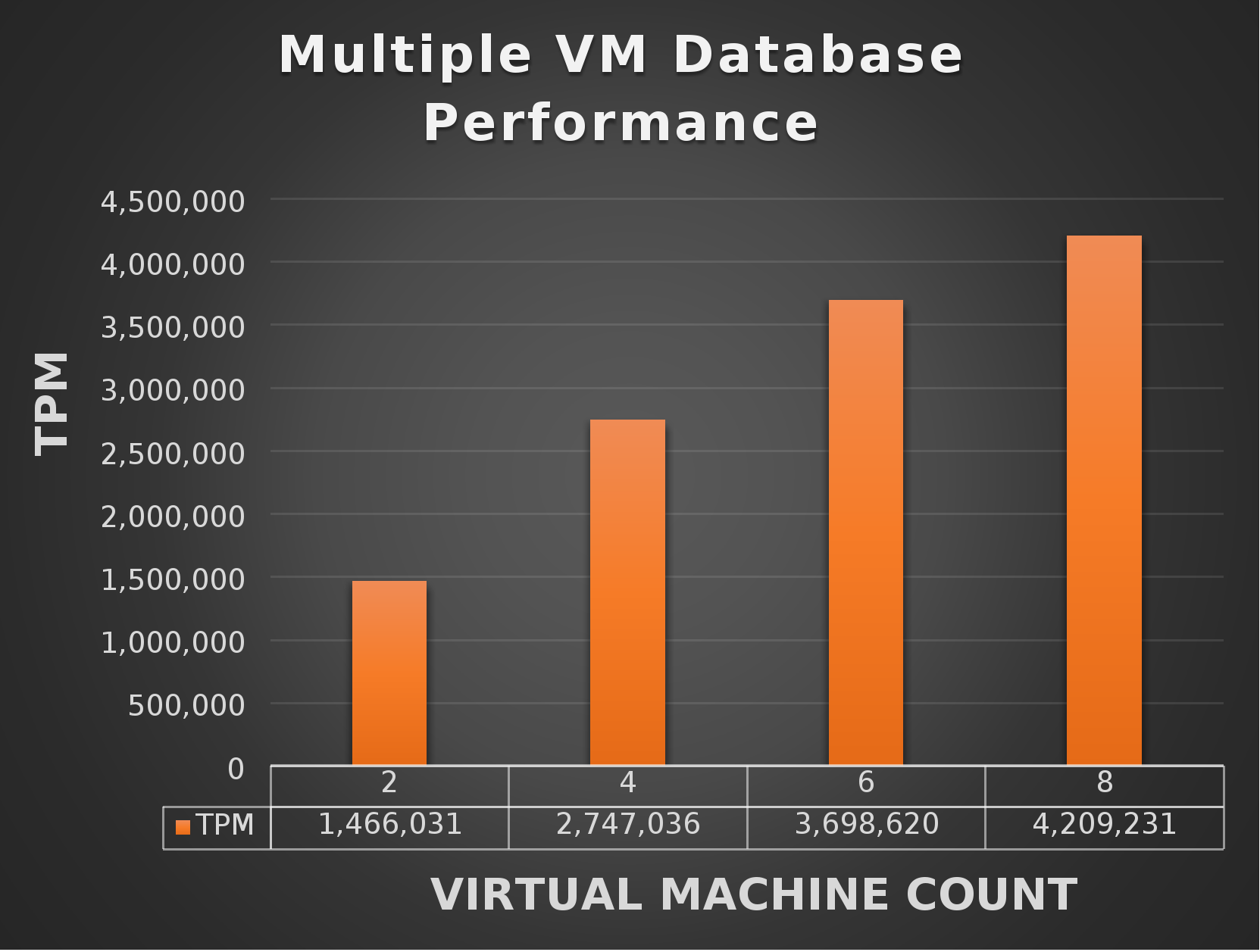
HammerDB OLTP test results measured in Transaction per minute(TPM)

Figure 11. Multiple VM database performance

The database transactions scaled from 1.4 million to 4.2 million TPM for 25 virtual users. The following graph shows the storage performance with linear scaling of two, four, six, and eight VMs.
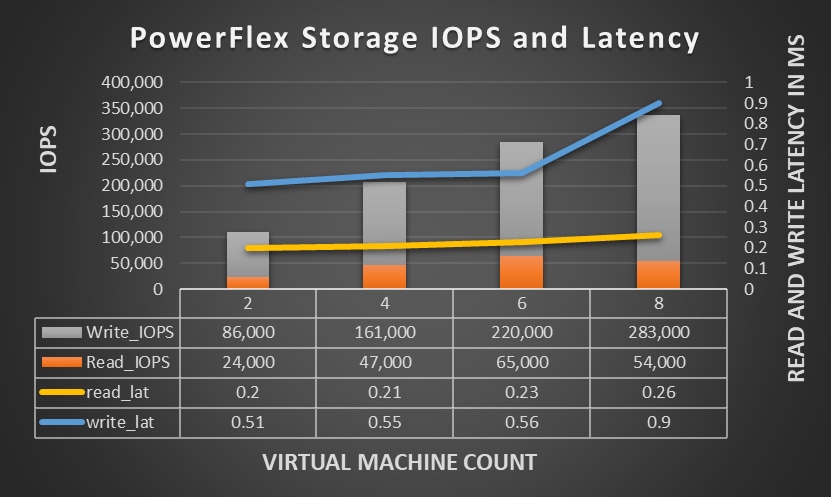
Figure 12. PowerFlex storage performance 

As shown in the preceding graph, read and write IOPS also scaled linearly with the scaling of VMs, maintaining a constant I/O latency of below 1 millisecond for the test.

CPU utilization of VMs during the tests was in the range of 21 to 26 percent. 

This test demonstrates that the performance of SQL Server 2022 on PowerFlex storage increases linearly as the VM scales on the vSphere cluster.

Best Practices

VMware virtualization

Take account of the following VMware best practices for hosting the SQL Server 2022 database on PowerFlex storage:

  • Use VMware’s paravirtual SCSI (PVSCSI) adapters for better storage performance. 
  • Assign dedicated resources (CPU and RAM) to SQL Server VMs and avoid resource overcommitment.
  • To boost ESXi host performance, enable hyper-threading in the BIOS, which helps keep the CPU pipeline engaged and ensures proper CPU cycle scheduling by the hypervisor. 
  • Use VMXNET3 network adapters for better network throughput and lower CPU overhead.
  • Enable jumbo frames (MTU 9000) to reduce CPU overhead and increase throughput for storage traffic. Consistently configure jumbo frames across the entire network path, including switches and network interfaces.
  • Use separate VLANs or physical networks for different types of traffic: management, data networks, vMotion, and backup.
  • Ensure the VM's vCPU and memory configuration aligns with the physical NUMA node architecture to enhance VM performance. Properly mapping SQL Server VMs to the appropriate NUMA nodes optimizes memory and CPU access, resulting in reduced latency and minimizing bottlenecks. 
  • Adjust the Number of Outstanding IOs parameter per device queue to a maximum of 256 on each ESXi host, enhancing IO concurrency and improving the overall data store performance.
  • Store SQL Server system and user data, transaction log data, and backup files in separate VMDKs (if not using RDMs) and possibly on separate data stores.
  • Install the SQL Server binary files in the OS VMDK. Separating SQL Server installation files from data and transaction logs also provides better flexibility for backup, management, and troubleshooting.

For more information, see Architecting Microsoft SQL Server on VMware vSphere®.

Note: PowerFlex only supports RDMs with SDC for Windows Server Failover Cluster shared disks. VMDKs are only supported for non-clustered deployments.

Windows Server & SQL Server 2022

Consider the following best practices of Windows & SQL Server 2022:

  • Ensure that the Windows Server power plan is customized for your needs. For more information, see Customized Power Plan .
  • Enable the lock pages in the memory to prevent the system from paging the data. When the lock pages in memory option are enabled, the operating system keeps the allocated memory of the specified process (such as SQL Server) in physical memory and does not allow it to be paged to disk. As a result, SQL Server can access data more quickly, improving overall performance. Make the necessary changes to enable the lock pages in the group edit policy. For more information, see Enable the Lock Pages in Memory Option.
  • For high-performance and mission-critical databases, spread the database files across multiple disks to leverage the I/O parallelism of PowerFlex storage.
  • Store database transaction logs on a separate volume to avoid mixing its unique I/O profile with the data files’ random I/O profile. Transaction logs’ I/O profiles are sequential in nature. This practice can also enable a possible usage of PowerFlex storage snapshot technology to create database backups where a volume restore does not over-write the latest transaction logs.
  • Move the tempdb files from the default location to a separate volume or to NVMe persistent storage (if available) to avoid page contention. This best practice will substantially improve the database latency performance when temp files are busy.
  • Increase the number of data files in tempdb to maximize the bandwidth and reduce contention in allocating structures. Monitor the contention level and increase the number of data files by multiple of four, to the maximum number of available logical processors.

HammerDB

HammerDB recommends the following configuration best practices for Microsoft SQL Server:

  • Set max degree of parallelism to 1.
  • Set max worker threads between 900 to 3000. The number is subject to change based on the available logical processor. Higher CPUs can accommodate higher worker threads.
  • Keep the initial data file size sufficiently large to ensure that files are not growing rapidly in the middle of a workload run.
  • To avoid a performance impact, set larger auto growth increments to reduce the frequency of growth operations and enable instant file initialization to speed up the allocation process.

For more information about HammerDB best practices, see HammerDB Best Practice for SQL Server Performance and Scalability – HammerDB Blog. 

HammerDB also provides the following recommendations for the workload tool to generate more transactional workload:

  • Use the all warehouses option in HammerDB to spread the transactions across all the warehouses. This prevents contention over just a few tables in the warehouse.
  • Select the Checkpoint when complete option to force the database to write everything to the disk at the end of the test. This helps avoid a checkpoint in the middle of a run when you conduct multiple tests in a row.
  • Use the autopilot feature with multiple virtual users to run consecutive tests when it is necessary to automate various test cases.

Conclusion

Conclusion

The deployment of SQL Server 2022 on a two-layer PowerFlex architecture using VMware provides a resilient, high-performance, and scalable storage and database solution. The best practices described in this paper assist organizations in optimizing their storage, virtualization, and database infrastructure to meet the demands of the modern workload. Integration of VMware virtualization technology with PowerFlex storage infrastructure facilitates the efficient handling of substantial workloads, as evaluated by the HammerDB testing. The sub-millisecond latency that the Dell PowerFlex team observed during these tests confirms the system's capability to support demanding workloads that require rapid response time. To learn more, contact your Dell representative.

References

Appendix: Configuration Details

A1. PowerFlex storage node configuration

The following table summarizes the hardware and software configuration of the PowerFlex storage nodes:

Table 7. PowerFlex SO node details

Hardware

Configuration details

Server model

PowerFlex R660

CPU

2 x 32 Intel(R) Xeon(R) Gold 6454S

Memory (GiB)

512 GB

NIC

2 x NVIDIA Mellanox ConnectX-6 Lx 2x 25G SFP28 OCP3.0 SFF

Storage

10 x 1.92 TB NVMe

Dell PowerFlex Manager 

4.6.0

Dell PowerFlex Core

4.5

Storage node OS 

PowerFlex Embedded OS


A2. PowerFlex compute node configuration


The following table summarizes the hardware and software configuration of the PowerFlex compute nodes:

Table 8. PowerFlex CO node details

Hardware

Configuration details

Server model

PowerFlex R660

CPU

2 x 32 Intel(R) Xeon(R) Gold 6454S

Memory (GiB)

512 GB

NIC

2 x NVIDIA Mellanox ConnectX-6 Lx 2x 25G SFP28 OCP3.0 SFF

Storage

10 x 1.92 TB NVMe

Compute Node OS 

ESXi 8

vSphere Client Version

8.0.2.00200

vCenter Details

8.0.2 (Build 23319993)

SDC version

4.5


A3.SQL Server and HammerDB VM configuration

A3.SQL Server and HammerDB VM configuration 


The following table shows the configuration of the VM used to host SQL Server database. 

Table 9. VM host configuration details

Hardware

Configuration details

vCPUs

32

Memory (GiB)

64 GB

Storage Type (GB)

  • OS Volume: 1 X 90 GB NTFS 4k     
  • Data volume: 4 x 400 GB NTFS 64k 
  • Log volume: 1 x 480 GB NTFS 64k

Windows Version

Windows Server 2022 Data center edition 

Microsoft SQL Server 

2022 CU15

 The following table summarizes the hardware and software configuration of the HammerDB VM:

Table 10. HammerDB VM configuration details

Hardware

Configuration details

vCPUs

32

Memory (GiB)

32 GB

Storage Type (GB)

OS Volume: 1 X 90 GB NTFS 4k  


Windows Version

Windows Server 2022 Data center edition 

HammerDB 

4.11

A4. SQL Server tuning parameters

The following code sample shows the SQL Server tuning parameters that are used in this solution to optimize the database performance for the OLTP workload test:

EXEC SP_CONFIGURE 'SHOW ADVANCED OPTIONS', '1'

RECONFIGURE WITH OVERRIDE

EXEC SP_CONFIGURE 'MIN SERVER MEMORY', 0

EXEC SP_CONFIGURE 'MAX SERVER MEMORY', 64000

EXEC SP_CONFIGURE 'RECOVERY INTERVAL','32767'

EXEC SP_CONFIGURE 'MAX DEGREE OF PARALLELISM','0'

EXEC SP_CONFIGURE 'LIGHTWEIGHT POOLING','1'

EXEC SP_CONFIGURE 'MAX WORKER THREADS', 3000 ---- Subject to change depending on different CPU configuration.

EXEC SP_CONFIGURE 'DEFAULT TRACE ENABLED', 0

EXEC SP_CONFIGURE 'COST THRESHOLD FOR PARALLELISM', 50

GO

RECONFIGURE WITH OVERRIDE

EXEC SP_CONFIGURE 'PRIORITY BOOST', '1'

ALTER DATABASE OLTP SET RECOVERY SIMPLE

GO

ALTER DATABASE OLTP SET TORN_PAGE_DETECTION OFF

GO

ALTER DATABASE OLTP SET PAGE_VERIFY NONE

GO