SQL Server High Availability with Dell PowerFlex and Nutanix Cloud Platform
Executive Summary
Executive Summary
Revision history
Audience
Terminology
We value your feedback
Product Overview
Product Overview
Dell PowerFlex family
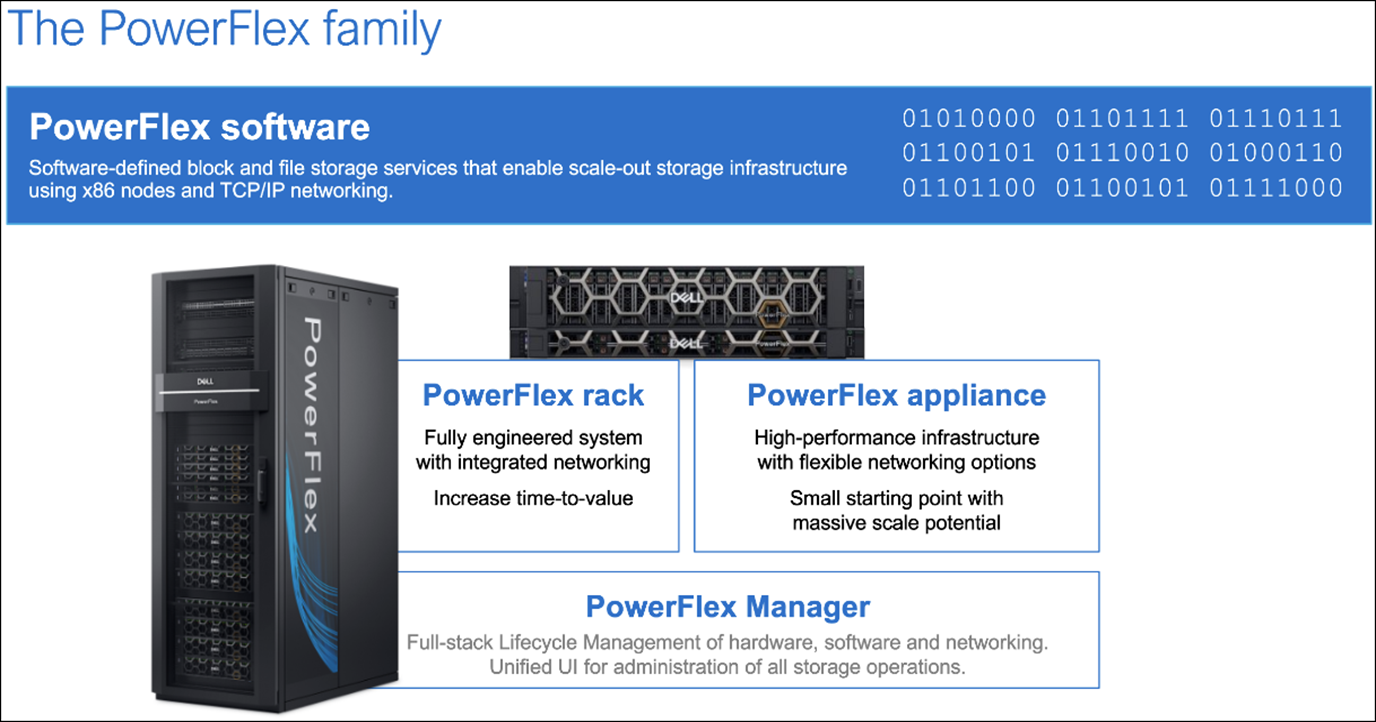
Dell PowerFlex software-defined storage enables broad consolidation across the data center, encompassing almost any type of workload and architecture. The software-defined architecture offers automation and programmability of the complete infrastructure and provides scalability, performance, and resiliency to enable effortless adherence to stringent workload SLAs.
The Dell PowerFlex family provides a foundation that combines compute and high- performance storage resources in a managed unified fabric. Dell PowerFlex comes in flexible deployment options (rack, appliance, or custom nodes and in the public cloud) that enable independent (disaggregated), HCI (single-layer), or mixed architectures. Dell PowerFlex is ideal for high-performance applications and databases, building an agile private/hybrid cloud, or consolidating resources in heterogeneous environments.
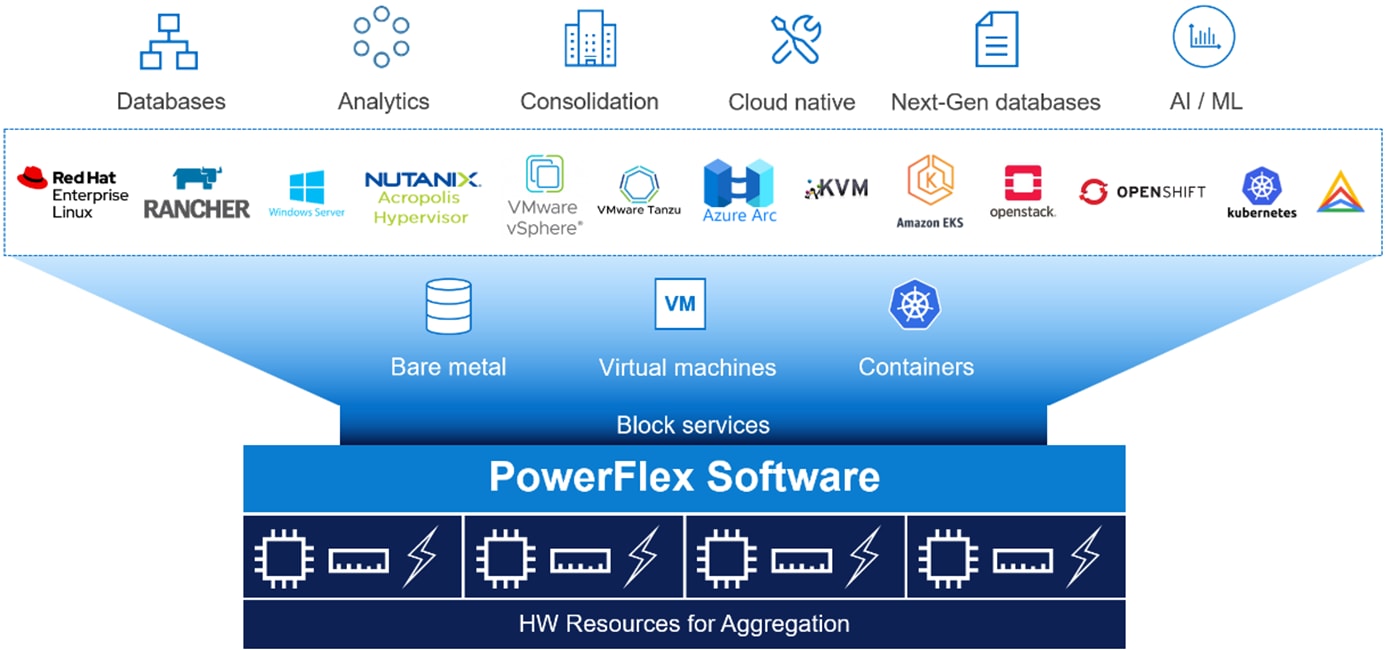
The platform supports a broad range of operating environments – bare metal operating systems, hypervisors, and container platforms – simultaneously with a unified infrastructure platform and management. By allowing users to flexibly mix these architectures in a single deployment, PowerFlex enables you to deploy, scale, and evolve all your applications to meet your business objectives.
Dell PowerFlex software components
Software is the key differentiation in the Dell PowerFlex offering. Dell PowerFlex software components not only provide software-defined storage services but also help simplify infrastructure management and orchestration. This software enables comprehensive IT Operational Management (ITOM) and Life Cycle Management (LCM) capabilities that span compute as well as storage infrastructure, from BIOS and Firmware to nodes, software, and networking.
Dell PowerFlex
PowerFlex is a software-defined scale-out block storage service that is designed to deliver flexibility, elasticity, and simplicity with predictable high performance and resiliency at scale.
For more details, see Dell PowerFlex specifications
Dell PowerFlex Manager
Dell PowerFlex Manager is the software component in the Dell PowerFlex family that enables ITOM automation and LCM capabilities for Dell PowerFlex systems. Starting with Dell PowerFlex 4.0, the unified Dell PowerFlex Manager brings together three separate components used in previous releases – Dell PowerFlex Manager, the core Dell PowerFlex UI, and the Dell PowerFlex gateway. The new Dell PowerFlex UI runs in Kubernetes and embraces a modern development framework.
Dell PowerFlex deployment architecture
Dell PowerFlex consumption options
Dell PowerFlex and Nutanix Cloud Platform
Dell PowerFlex with Nutanix Cloud Platform architecture
The Dell PowerFlex with Nutanix Cloud Platform (NCP) solution is deployed using a disaggregated architecture, as shown in the following illustration.
- Compute Layer: A Nutanix Cloud Infrastructure Compute (NCI-C) cluster with AOS and AHV running on Dell PowerFlex compute-only nodes.
- Storage Layer: A Dell PowerFlex cluster operating in a storage-only model, compatible with PowerFlex configurations. This cluster provides block storage and related services as shown in the dashed blue box in the figure below.
Figure 3. Dell PowerFlex with Nutanix Cloud Platform architecture 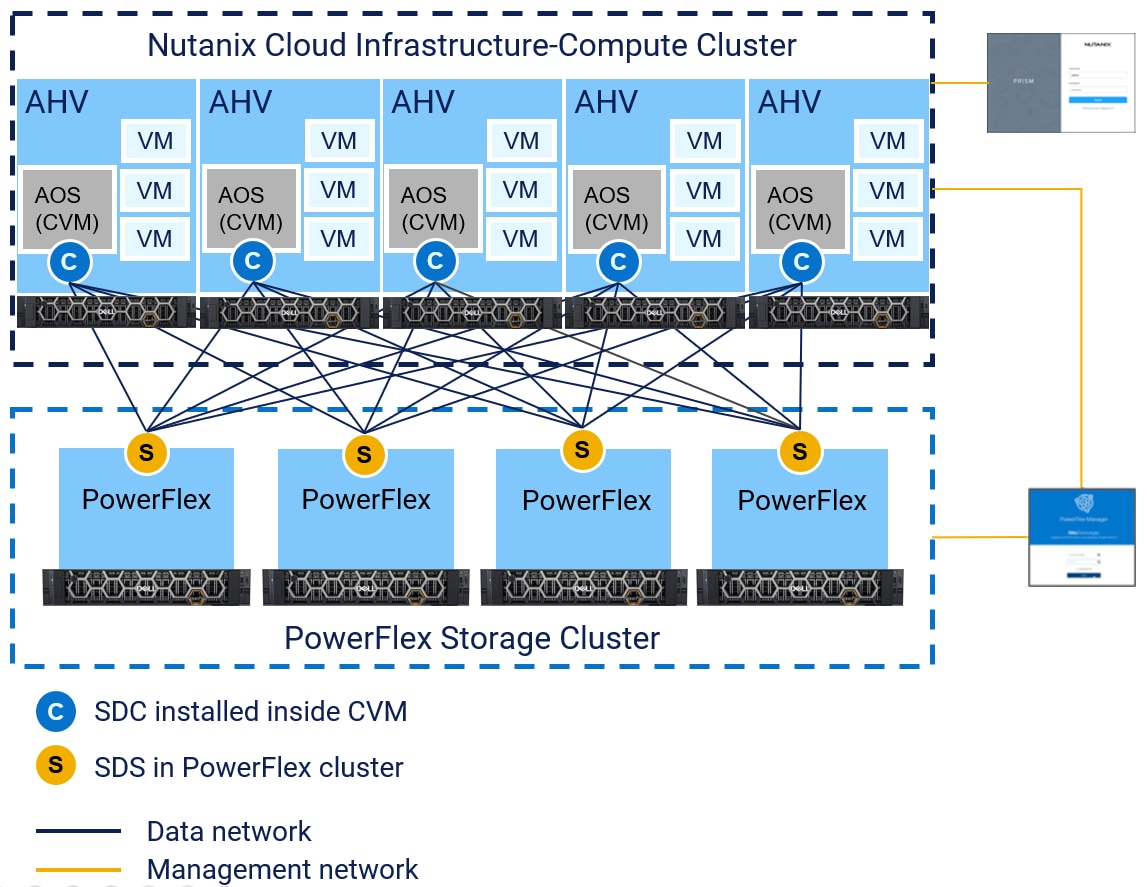
The Dell PowerFlex with Nutanix Cloud Platform architecture contains no internal storage within the Nutanix compute only nodes. In this disaggregated architecture, the compute cluster accesses storage over the Ethernet fabric from the external PowerFlex storage cluster via the SDC that is installed on every node of the NCI-C cluster.
When Dell PowerFlex with Nutanix Cloud Platform is deployed, the Nutanix software stack is hosted on the PowerFlex compute only nodes. The NCI-C cluster nodes consume storage from the PowerFlex storage cluster.
Lifecycle management
Both Dell PowerFlex and Nutanix Cloud Platform offer fully integrated and comprehensive Lifecycle Management (LCM) of qualified components for their respective architectures. These powerful features combine to provide end to end Lifecycle Management of both software and hardware across storage and compute nodes.
PowerFlex storage only nodes
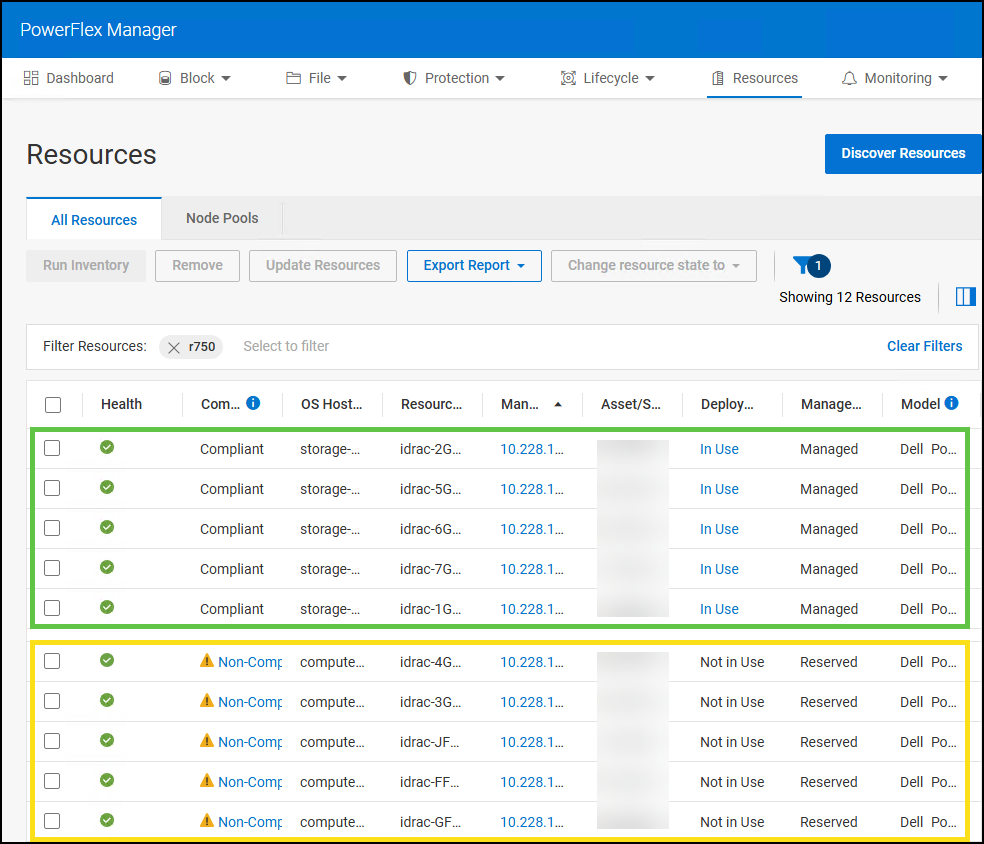
In the PowerFlex Manager UI, storage only nodes have a managed state of Managed. This indicates that PowerFlex Manager controls PowerFlex software and firmware in a turnkey fashion with no interruption to workloads. The state of the nodes can be seen in the figure below.
Nutanix compute only nodes
In PowerFlex Manager, NCI-C nodes have a managed state of Reserved. This indicates that PowerFlex Manager can upgrade the firmware on a compute node after it has been placed in maintenance mode, bringing it into compliance with a Release Certification Matrix/Intelligent Catalog (RCM/IC). Maintenance mode evacuates the workloads so they are not impacted by the LCM process. Prism Central LCM manages Nutanix software on NCI-C nodes including AOS and AHV. At the time of this writing, the PowerFlex SDC is signed by Nutanix, downloaded from https://portal.nutanix.com, and deployed to the NCI-C cluster using Prism Element. The Nutanix software and the PowerFlex SDC are qualified and upgraded together in lock step with each other.
Note: Compute only nodes should be placed in maintenance mode before software or firmware updates are applied.
Microsoft Windows Server and Failover Cluster
Microsoft SQL Server
Solution Overview
Solution Overview
Logical architecture
The following diagram depicts the logical architecture of a Microsoft SQL Server 2022 FCI hosted on Dell PowerFlex with Nutanix Cloud Platform. The diagram incorporates a three-node SQL Server FCI with shared database volumes. The solution has three primary components, as shown:
- Dell PowerFlex Storage
- Nutanix Cloud Platform
- Microsoft SQL Server Failover Cluster
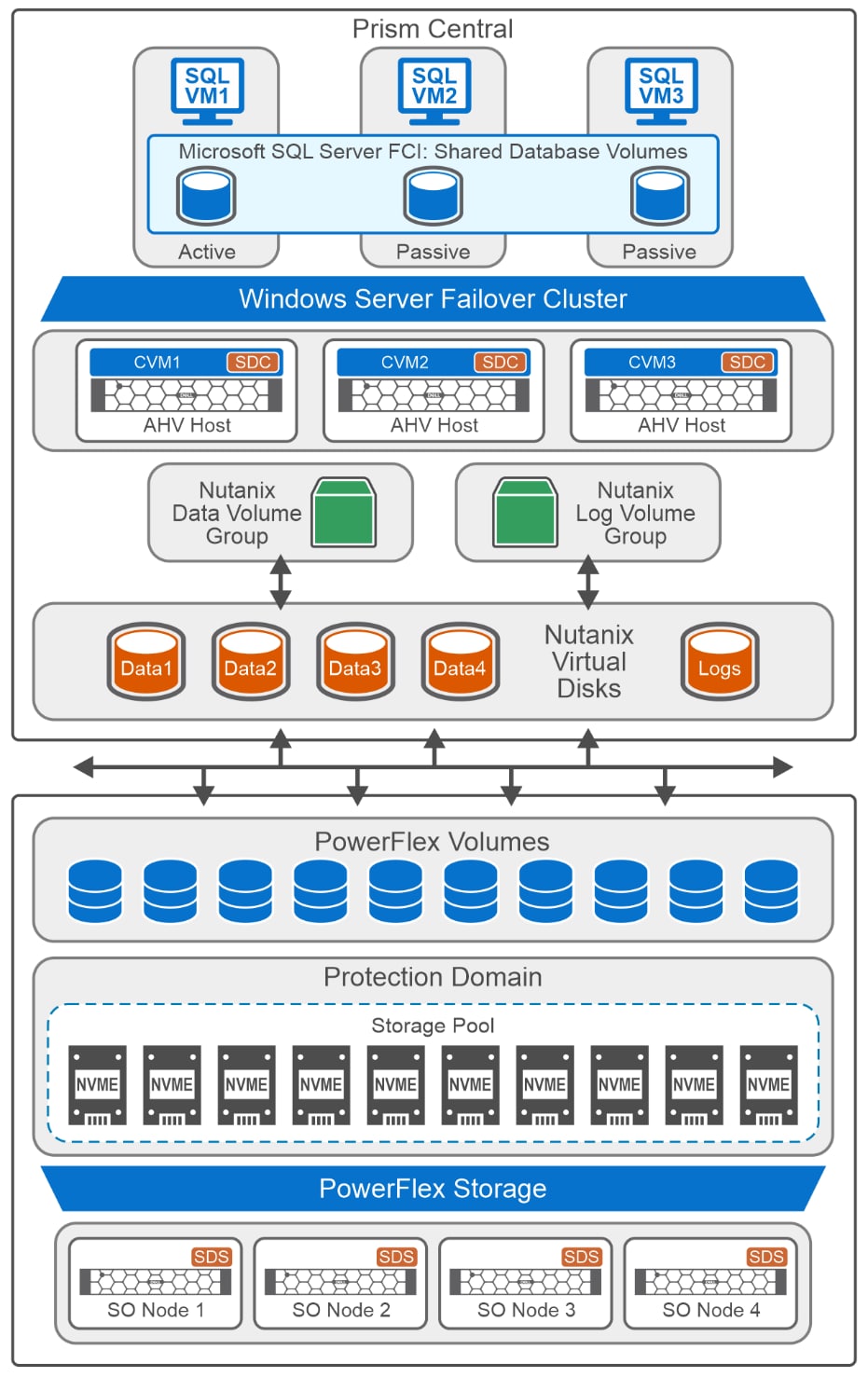
Dell PowerFlex storage is deployed in a two-layer configuration with four storage nodes. Each node contains ten 1.5 TB SAS drives, which are aggregated into a single resilient storage pool. This storage pool is used to create database volumes for SQL Server FCI. For more information, see Powerflex Storage Layout.
Three Nutanix compute nodes are deployed using Nutanix Foundation software. These nodes form the Nutanix Cloud Infrastructure compute cluster (NCI-C) on Dell PowerFlex compute-only nodes. Nutanix Cloud Platform deploys a dedicated Controller Virtual Machine (CVM) on each compute node for its own operation. These CVMs are a key component of the Nutanix platform. CVM acts as a distributed storage controller, running on each node in the cluster and managing all I/O operations for that node.
Note: This solution uses three compute-only nodes for the test environment. A production environment requires a minimum of five compute-only nodes.
With Dell PowerFlex as an external storage provider for NCP, the CVM use the Storage Data Client (SDC) driver to access the storage. Acting as a block device driver, SDC maps volumes created on the PowerFlex storage to Nutanix hosts. Volumes can be provisioned as isolated virtual disks or as part of a volume group, which simplifies management and operations. For more information, see Nutanix Storage Layout.
A three-node Windows Server Failover Cluster (WSFC) is configured on Windows Server 2025 virtual machines hosted on Nutanix Cloud Infrastructure (NCI). Using Windows Server Failover Cluster Manager (WSFCM), a Microsoft SQL Server 2022 clustered role is configured to ensure high availability for the SQL Server database. This setup enables automatic failover and resilience in case of node failure. For detailed deployment guidance, see the SQL Server Failover Cluster Deployment section.
Three Windows Server 2025 VMs form a SQL Server FCI, with shared volumes accessible by all nodes to provide continuous availability. The database is preloaded with initial data to support Online Transaction Processing (OLTP) workloads. This configuration ensures seamless operation and data integrity during failover events. For more details, see the SQL Server database layout documentation.
Network architecture
The following diagram shows the network architecture of a PowerFlex deployment, including storage and compute nodes:
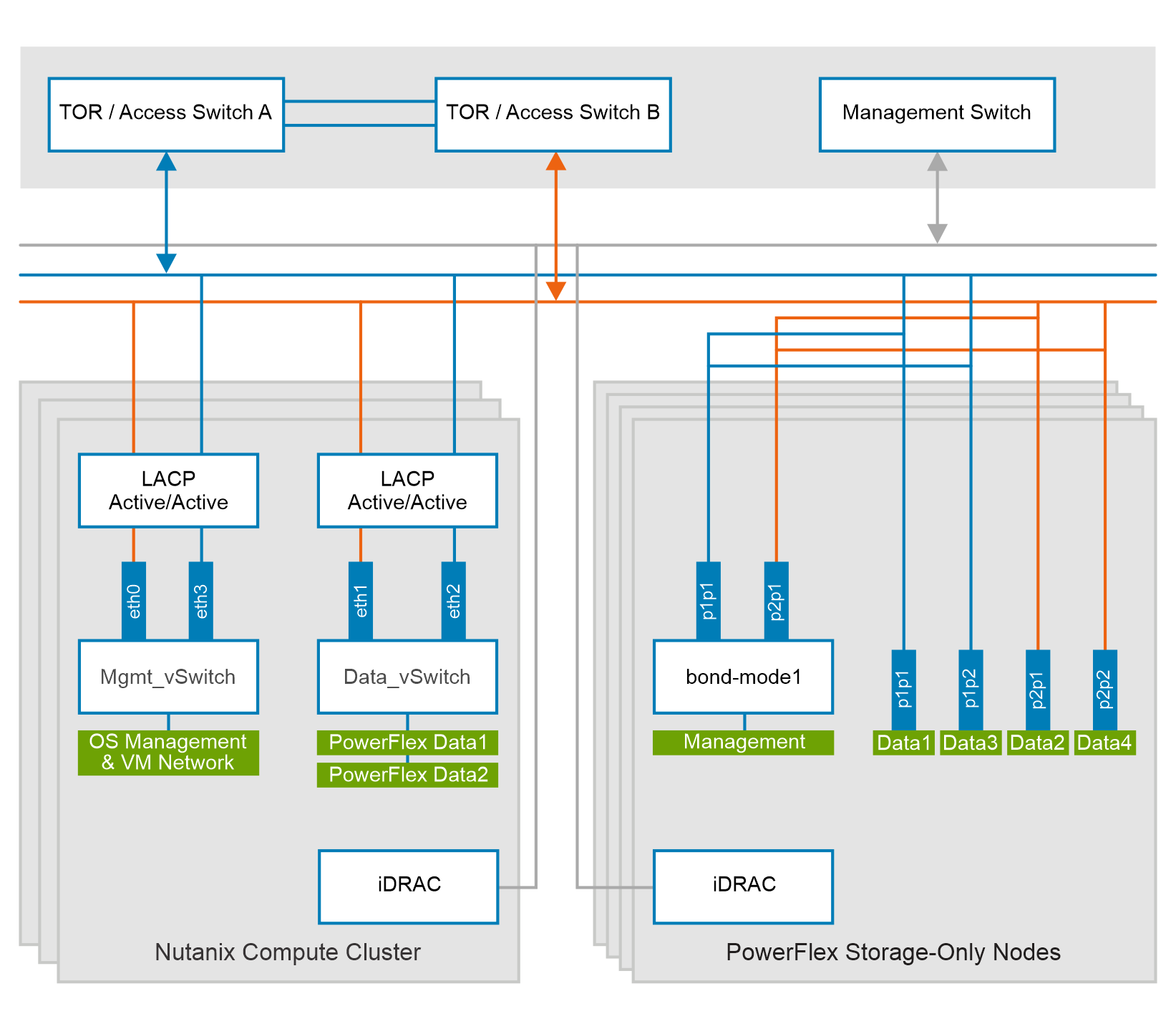
Each PowerFlex storage-only (SO) node connects to the top-of-rack (TOR) switches and is equipped with dual-port NICs. These network ports are trunked with the TOR switches and handle management, data1, data2, data3, and data4 network traffic for PowerFlex. The management network operates in active-backup (mode1) bonding with the data1 and data2 networks, while data3 and data4 serve as dedicated SDS networks and are not bonded. This network configuration provides redundancy and fault tolerance, with two dedicated networks for PowerFlex data transfer.
Dedicated VLANs separate management and data network traffic. The following table outlines the VLANs that are used for PowerFlex storage-only nodes, along with their purposes:
| Network type | VLAN | Configurations |
| Management | 150 | Mode1 bond - (interface1 port1 and interface2 port1) |
| PowerFlex Data 1 | 151 | Interface1 port1 |
| PowerFlex Data 2 | 152 | Interface2 port1 |
| PowerFlex Data 3 | 153 | Interface1 port2 |
| PowerFlex Data 4 | 154 | Interface2 port2 |
Interface1 Port1 and Interface2 Port1 are configured in trunk mode to handle management and customer network traffic. Similarly, Interface1 Port2 and Interface2 Port2 are also configured in trunk mode to manage SDC-SDS data traffic. If needed, data traffic ports can be configured in non-trunk mode.
On NCP, two virtual switches manage the networks: one for data and one for management.
A separate backplane network may also be considered for Volume Group load-balancing traffic, this approach helps isolating the management traffic from data traffic. For more details on creating a backplane network, see CVM Network Segmentation.
The following table shows the VLAN configuration for Nutanix compute nodes:
| Network type | VLAN | Configurations |
| Management and customer |
|
Mode1 bond (interface1 port1 and interface2 port1)
|
| PowerFlex data |
|
Mode1 bond (interface1 port2 and interface2 port2)
|
For more information about configuring PowerFlex storage and Nutanix compute nodes, se Appendix A1 and Appendix A3.
Storage Layout
Storage Layout
PowerFlex storage layout
Nutanix storage layout
On Nutanix Cloud Platform, database volumes are presented as virtual disks and attached to virtual machines using the Nutanix VirtIO-SCSI controller. This paravirtualized controller enables efficient communication between VMs and virtual disks and is the default and recommended option for SCSI devices in Nutanix AHV environments. It delivers better I/O throughput and lower latency than legacy IDE or standard SCSI controllers.
For Windows VMs, Nutanix provides Nutanix Guest Tools (NGT), which include VirtIO SCSI drivers for Windows operating systems.
Note: The VirtIO driver must be installed on Windows virtual machines in Nutanix AHV environments to ensure that attached virtual disks are recognized. Without this driver, Windows may fail to detect the disks, resulting in no boot device or database volume not found.
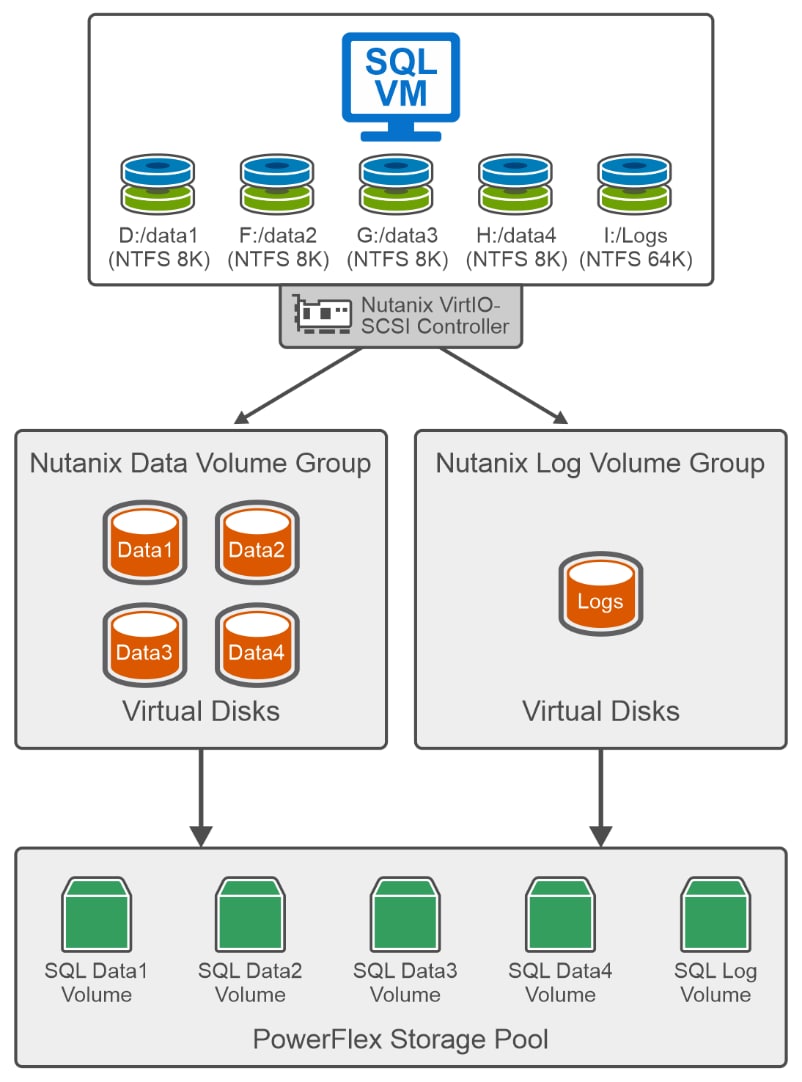
This solution is implemented using VirtIO SCSI driver version 1.2.4 on Windows Server 2025. It is important to note that version 1.2.4 has a known issue with SQL Server workloads: surprise disk removal during inflight I/O operations may cause the VM to hang. This issue has been resolved in VirtIO SCSI driver version 1.2.5, which is also qualified for Windows Server 2025. For the latest updates and compatibility information, refer to the VirtIO Release Notes.
As shown in Figure 7, four virtual disks are created for data files and one dedicated virtual disk for the SQL Server log file. These disks are grouped into two Volume Groups (VGs) on the Nutanix Cluster Infrastructure (NCI) to leverage architectural and operational benefits.
A Volume Group in Nutanix is a collection of one or more virtual disks (vDisks) that can be attached to one or more virtual machines, providing direct block-level access. This setup is ideal for cluster-based applications like Microsoft SQL Server Failover clustering that require raw block devices.
The Controller VM (CVM) provisions the virtual disks and manages all Nutanix storage operations. It communicates with Dell PowerFlex external storage via the SDC driver, enabling volume provisioning and management on the PowerFlex system.
SQL Server Failover Cluster Deployment
SQL Server Failover Cluster Deployment
Windows Server Failover Cluster
A three-node WSFC is deployed on Nutanix Cloud Platform virtual machines. Each VM is hosted on a separate AHV host, and Nutanix automatically load balances the VMs across the cluster. A dedicated network has been created for WSFC operations. All essential services—DNS, Active Directory, and NTP—are configured on a separate host.
Note: In this solution, Nutanix Cloud Platform (NCP) cluster exclusively hosts SQL Server VMs, utilizing full CPU capacity for OLTP workloads.
WSFC requires shared disks for successful failover. These disks are created on Nutanix and mapped from Dell PowerFlex storage. NCP leverages its Volume Group feature to share disks across VMs.
The SQL Server clustered role is configured to ensure high availability, fault tolerance, and seamless failover. It includes a dedicated cluster network and a configured Virtual IP (VIP) for connectivity.
The image below shows the configured SQL Server role.
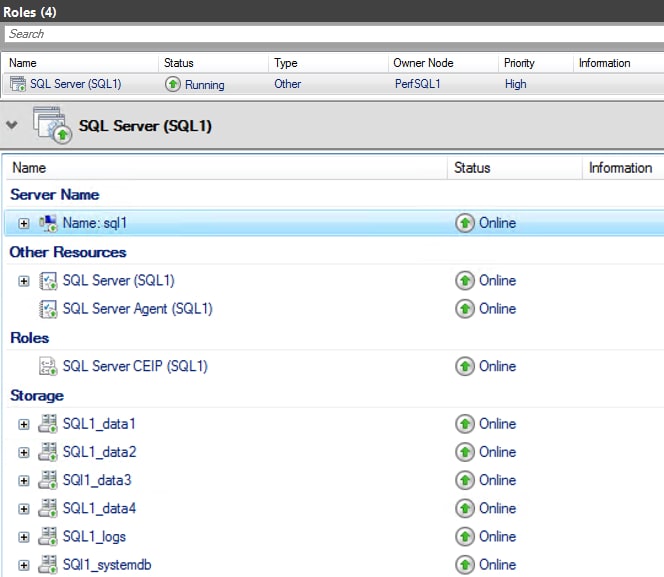
The clustered role “SQL1” is currently online and depends on associated cluster resources to maintain high availability and support coordinated failover. In case of a failure, the role automatically transitions to another node in the WSFC, along with its dependent resources. Properly configured storage resources are critical for successful failover and must be linked to the clustered role through defined dependencies. These dependencies determine the order in which resources are brought online during failover or startup.
The image below illustrates the clustered role “SQL1” and its dependency on six storage volumes, all of which must be online before the role can start.
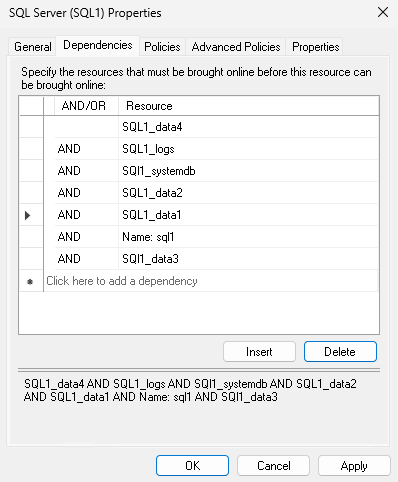
For more information on deploying WSFC, see the Implementation guide.
SQL Server database layout
To ensure optimal database performance, the database layout must be carefully designed. with precision. The database team must work closely with development and product teams to determine capacity requirements for various databases, considering different table sizes, IOPS, and latency.
For IO intensive workloads, use multiple disks to store database files. While a single disk may suffice for general-purpose applications, mission-critical workloads benefit from distributing files across multiple disks. There is no strict limit on disk count, but consider file system type, cluster size, and file distribution to optimize performance. Distribute data, log, and temp files across multiple disks to maximize performance and resilience.
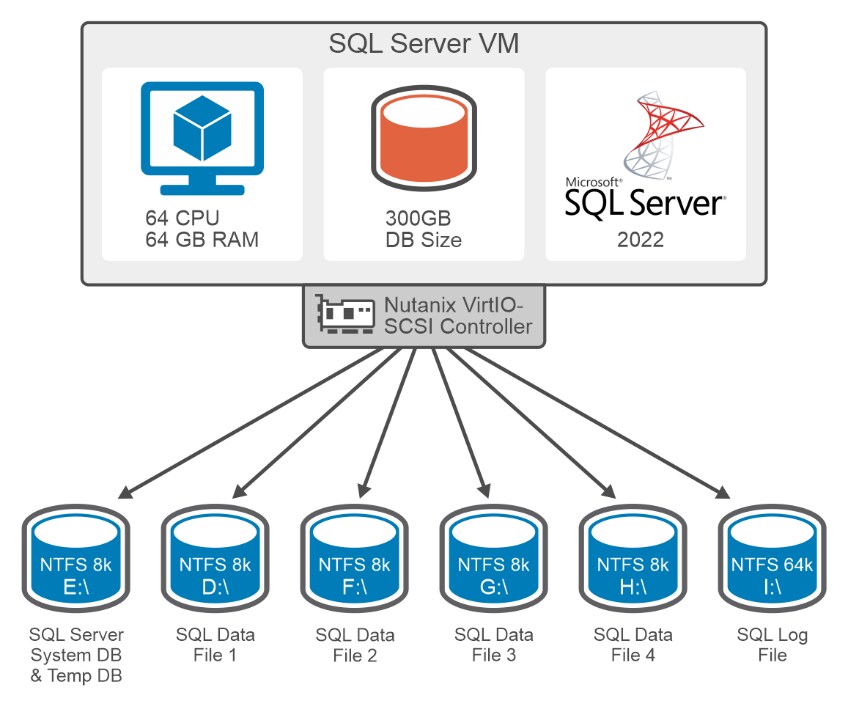
As shown in the figure above, data files are distributed across multiple disks, and a dedicated volume is provided for transaction log files. This separation prevents the mixing of random and sequential disk access patterns, improving I/O distribution and helps in improving database performance. System databases (model, master and msdb) and TempDB are stored on a separate disk to prevent TempDB contention.
To further optimize performance, size data and log files appropriately based on expected growth. This reduces the frequency of operating system calls and improves database response times.
The following Windows storage considerations should be carefully assessed when formatting the data and log volumes for the database.
Windows storage considerations
When using external storage such as PowerFlex with WSFC, you can configure each volume in Windows Disk Management as a drive letter, mount point, or CSV. Each option has its own advantages and limitations.
- Drive letters provide an easy way for users and applications to identify and access storage volumes, but are limited to 26 volumes per host.
- Mount points allow volumes to be mounted as folders on an existing NTFS volume rather than assigning it a drive letter. Mount points are sub-directories of the root mount-point (root directory), enabling more flexibility and scalability. Volumes are mounted like a directory structure, making it easier to logically organize data. While most modern applications support mount points, legacy applications may have compatibility issues.
- Cluster Shared Volumes (CSVs) allow shared storage to be accessed concurrently on all the nodes in a cluster. This feature is commonly used in Hyper-V to store VM files. CSVs enhance the availability and reliability of storage in clustered environments. If one node fails, other nodes can still access the shared volume. When a disk is configured as a CSV, that disk is available to all the cluster nodes, making failover of the clustered roles faster. One limitation is that all CSV disks appear under a single root directory on the system drive at C:\ClusterStorage\ resulting in single point of failure if the system drive is corrupted.
- File system options: Along with the Windows storage volume options, it is essential to understand the different file system options that are available, primarily the New Technology File System (NTFS) and the Resilient File System (ReFS). Each file system has its own unique features, advantages, and recommended use cases, including considerations for allocation unit size.
- NTFS is the default file system for Windows operating systems, providing robust performance, security, and reliability features. It uses a journaling feature to maintain data integrity in the event of a system crash and supports cluster sizes ranging from 512 bytes to 64 KB. A small cluster size (such as 4 KB) is more efficient for storing numerous small files, minimizing wasted space, whereas large cluster sizes (such as 64 KB) are better for large file storage, potentially improving read/write performance.
- ReFS is a newer file system introduced to address the limitations of NTFS, offering enhanced resiliency and scalability. ReFS is designed for modern data storage needs and is particularly well suited for large-scale and HA environments. It provides automatic integrity checking by continuously validating checksums generated for file data and metadata. ReFS supports only two cluster sizes: 4 KB and 64 KB. A small cluster size is efficient for handling numerous small files, whereas a large cluster size is beneficial for large file storage with fewer fragmentation issues.
When selecting storage options and file systems for both the SQL server database application, it is important to evaluate storage using benchmarking tools. Consider various combinations from the preceding storage options, file systems, and cluster sizes for each layer. Assess the storage by determining the optimal values for IOPS and latency to meet the requirements of your specific workload, be it OLTP or OLAP.
Various combinations of drive letters and mount points were evaluated, using both NTFS and ReFS file systems with different cluster sizes. Test results revealed that NTFS with an 8 KB allocation size and drive letter configuration, delivered the optimal performance for SQL Server database on Dell PowerFlex storage. While drive letters may not scale well for all environments, they were effective for this solution.
Note: This solution uses Nutanix Volume Groups instead of CSVs for shared storage in WSFC environment. This aligns with Nutanix best practices and delivers improved IOPS and throughput for SQL Server FCI deployments.
The following table summarizes the partition size and file system used for the database volumes after analyzing test results.
| Drive letter | Size (GB) | File system | Allocation size | Purpose |
| E | 100 | NTFS | 8K | SQL Server installation and TempDB files |
| D | 300 | NTFS | 8K | Data files |
| F | 300 | NTFS | 8K | Data files |
| G | 300 | NTFS | 8K | Data files |
| H | 300 | NTFS | 8K | Data files |
| I | 600 | NTFS | 64K | Log files |
Scaling SQL Server Failover Cluster Deployment
Scaling SQL Server Failover Cluster Deployment
This section outlines how the Dell PowerFlex team scaled SQL Server FCI deployments from a single cluster to multiple clusters. In a single-cluster FCI deployment, only one SQL VM remains active while the others stay idle, leading to underutilized compute and storage resources. To address this inefficiency, the team scaled the deployment to include three independent FCIs, each with its own active and passive node configuration. This approach improves resource utilization and enables more effective stress testing of the storage and database systems.
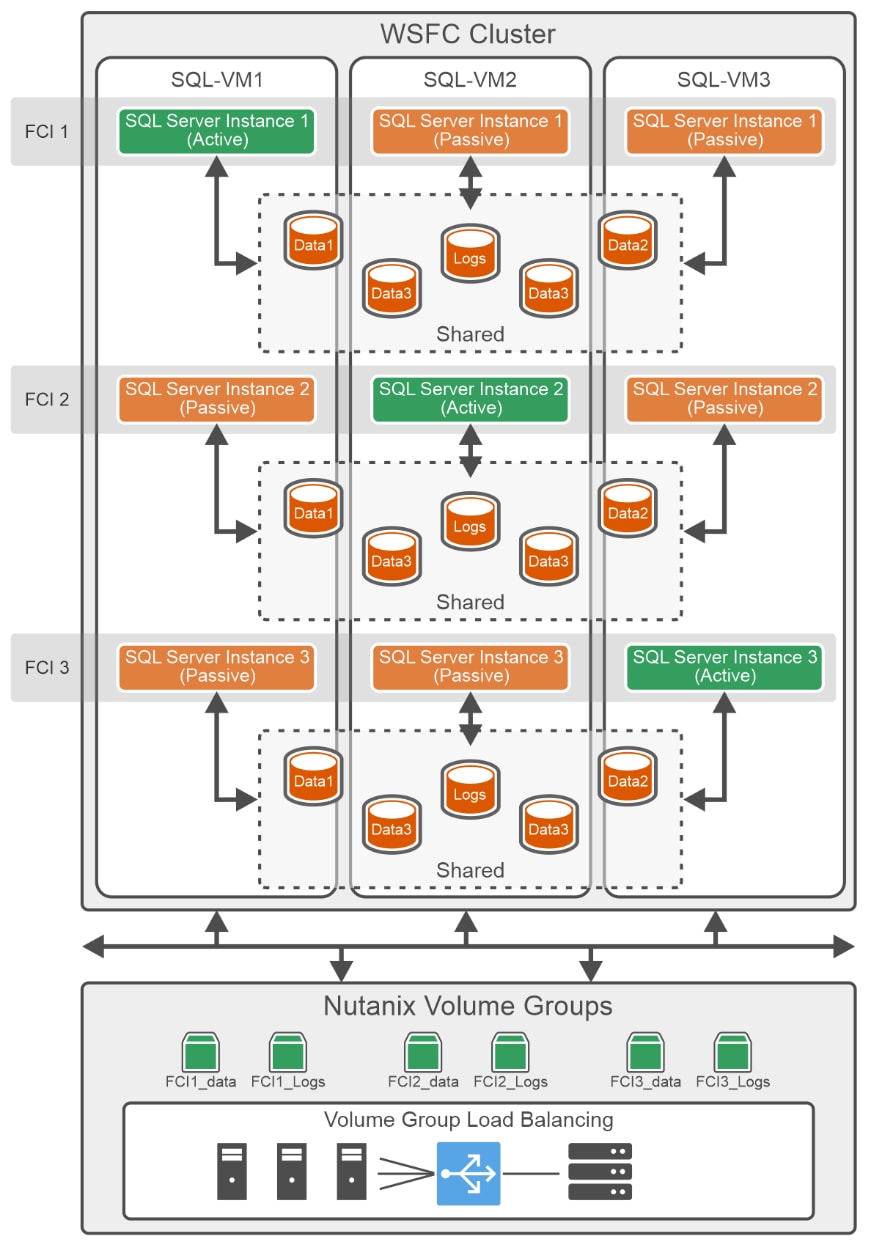
The diagram illustrates a WSFC setup with three virtual machines, SQL-VM1, SQL-VM2, and SQL-VM3. each participating in a separate FCI.
| FCI | Active node | Passive node(s) | SQL Server Instance | Volume groups |
| FCI 1 | SQL-VM1 |
SQL-VM2. SQL-VM3 |
SQL Server Instance 1 | FCI1_data, FCI1_logs |
| FCI 2 | SQL-VM2 |
SQL-VM3, SQL-VM1 |
SQL Server Instance 2 | FCI2_data, FCI2_logs |
| FCI 3 | SQL-VM3 |
SQL-VM1, SQL-VM2 |
SQL Server Instance 3 | FCI3_data, FCI3_logs |
Each FCI has its own dedicated shared storage for data and log files, along with a distinct active-passive instance configuration. For example, FCI 1 hosts its active SQL Server instance (SQL1) on SQL-VM1, with passive instance on SQL-VM2 and SQL-VM3. FCI 2 and FCI 3 follow similar configurations.
Shared storage for the cluster is managed by Nutanix Volume Groups. These groups function similarly to Cluster Shared Volumes but offer enhanced capabilities, including native integration with the Nutanix platform for simplified management and improved scalability.
A key advantage of Nutanix Volume Groups is their built-in I/O load balancing. Operations are intelligently distributed across multiple Controller Virtual Machines (CVMs) in parallel, significantly improving throughput and reducing latency. However, CVMs do not load balance I/O across volume groups by default—this feature must be enabled manually. This parallelism ensures that storage performance scales with the cluster, making it ideal for high-demand SQL Server workloads. For more information, see Scaling up VM storage performance on AHV using Volume Group Load Balancer.
By default, Volume Group load balancing occurs over the management network interfaces, but traffic can be offloaded to a separate backplane network using network segmentation for improved isolation and performance. For further details, see the Network Architecture section.
This strategy not only enhances resource utilization but also enables robust stress testing of the underlying infrastructure. It validates the performance and reliability of PowerFlex in demanding enterprise environments.
Testing and Validation
Testing and Validation
Test methodology
This section outlines how the team used the HammerDB tool to run a series of OLTP workload tests against multiple SQL Server cluster setups. The procedure involved multiple iterations, running for a duration of 10 minutes each, with the aim of generating OLTP transactions for different virtual user configurations. The primary objective of this test was to evaluate the multiple FCI setup performance and identify the optimal TPM value while operating under a storage latency of less than 1 millisecond.
Note: For this evaluation, a single VM, configured with 64 vCPUs, was deployed per compute host. In a typical customer environment, each host may have multiple VMs with lower individual vCPU counts.
For more information about the configuration of the SQL Server VM, see Appendix A3.
A dedicated load-generation VM is provisioned with Windows Server 2022 to launch the HammerDB tool that connects to the database over the network and generates transactions. This HammerDB VM is hosted on a separate host and does not use any storage or compute resources from the Nutanix Cloud Infrastructure (NCI).
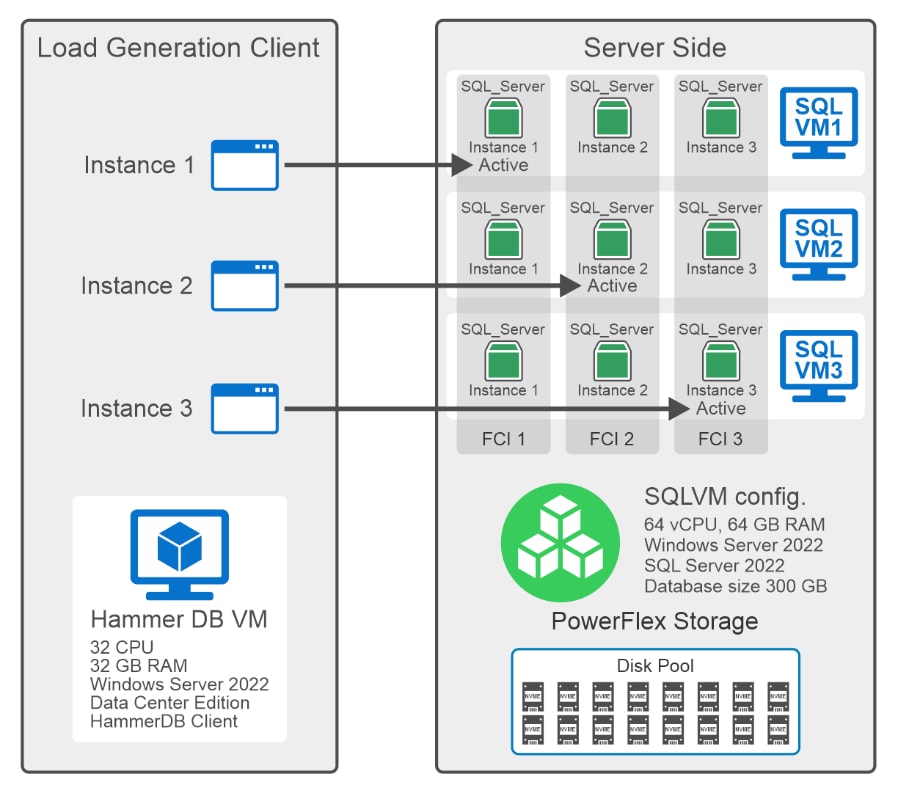
In this solution, a single HammerDB VM is used to launch three instances of HammerDB software, each connecting to an individual SQL Server FCI active node. As illustrated in the figure above, HammerDB Instance 1 connects to the active node of FCI 1, Instance 2 connects to the active node of FCI 2, and Instance 3 connects to the active node of FCI 3.
Each FCI generates OLTP workloads on its respective SQL Server database, driving IOPS on its dedicated shared storage volumes.
Note: For all tests, the SQL Server used 59 GB of memory from a total of 64 GB available memory, with 300 GB of the database populated.
HammerDB recommends using the following settings in the tool to generate a more transactional workload:
- Use the All Warehouses option in HammerDB to spread the transactions across all the warehouses. This prevents contention over just a few tables in the warehouse.
- Select the Checkpoint When Complete option to force the database to write everything to the disk at the end of the test. This is useful when running multiple tests in a row to avoid a checkpoint in the middle of a run.
- Use the Autopilot option to run multiple tests in a row when automation of multiple test cases is required.
HammerDB also suggests the following SQL Server configurations for conducting OLTP benchmarks:
- Set the max degree of parallelism to 1 to prevent excessive parallelism, which may lead to a drop in performance.
- Configure max worker threads between 900 to 3000. The number is subject to change according to the available logical processors. Higher CPU can accommodate higher worker threads.
- Keep the initial data file size sufficiently large to ensure that files are not growing rapidly in the middle of a workload run.
- Set larger auto growth increments of the data files to reduce the frequency of growth operations and enable instant file initialization to speed up the allocation process, to avoid performance impact.
For more information, see HammerDB documentation.
Test results
Single SQL Server FCI
This section showcases the HammerDB benchmark test results on a single SQL Server FCI cluster. The objective of this test was to measure database performance on one SQL Server FCI deployment.
The chart below shows the performance test results of one SQL Server FCI deployment.

As demonstrated by the test results, the single SQL Server FCI deployment achieved a peak throughput of 1.3 million TPM with 350 virtual users. Although latency remained below 1 millisecond, even at 400 users, the TPM dropped below 1.3 million. This indicates that 1.3 million TPM is the optimal number under the given configuration.
The system generated a total of 239K IOPS for 350 virtual users while constantly maintaining the average read and write I/O latency under 1 millisecond. The read-to-write IOPS ratio observed for this test was 40:60 on the PowerFlex storage.
CPU utilization of VMs during these tests was in the range of 45-75%.
Multiple SQL Server FCI
This section showcases the test results from the HammerDB benchmark of a three SQL Server FCI cluster deployment. The objective was to maximize utilization of attached storage and SQL VM resources by generating more workload using the HammerDB tool. For details on how the FCI deployment was scaled, see the Scaling SQL Server Failover Cluster Deployment section.
The chart below shows the performance test results of a three SQL Server FCI deployment (Three Active SQL VMs).
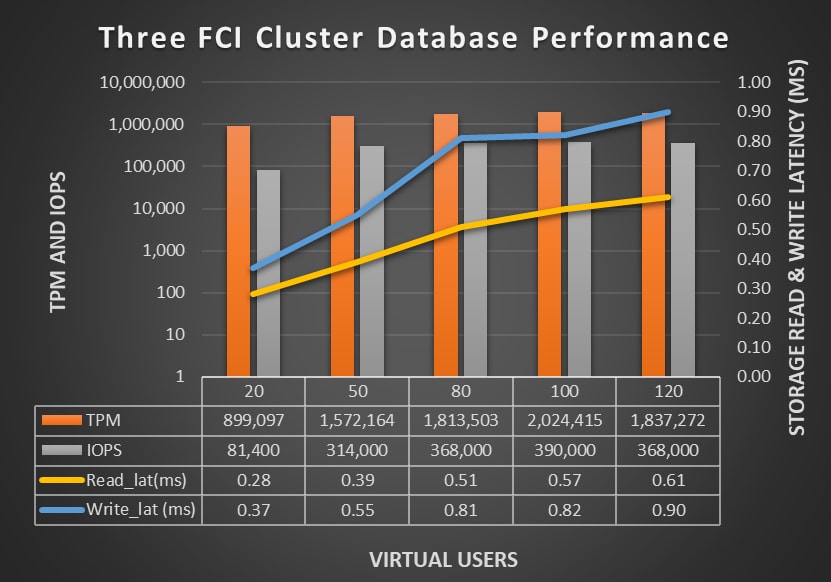
As observed from the test results, database TPM scaled from 1.3 million on a single SQL Server FCI deployment to 2 million TPM across three deployments. These tests used a total of 60 virtual users (20 per deployment), all running on the same set of three virtual machines. This approach enabled optimal utilization of available hardware resources and successfully scaled database transaction throughput.
PowerFlex storage achieved 390K IOPS when all three SQL VMs simultaneously generated OLTP workloads, while maintaining consistent average read and write I/O latency below 1 millisecond. The read-to-write IOPS ratio observed was 40:60 on the PowerFlex storage system.
The overall CPU utilization of three SQL VMs during the tests was in the range of 33-56% percent.