Using custom template for OneFS CELOG alerts
Overview
Recently, many queries have been raised about how to use a customized template for CELOG SMTP alerts. Since OneFS 6.0 (2010), CELOG used a template engine called Tempita (https://pypi.org/project/Tempita/#description) for email template formatting. Both the default template and user-configurable custom templates used this engine. In 2013, the whole Tempita project was abandoned. In OneFS 9.4 (2022), we started to use a new implementation of the template engine – Mustache. (https://mustache.github.io/ )
In this blog, I will walk you through this new implementation.
Where is my default template?
The default email template is at /etc/ifs/celog_email_template.txt. Don’t directly modify this template file. The syntax is similar to the previous version, but I will get to it soon.
# cat /etc/ifs/celog_email_template.txt
{{#company}}
Company: {{company}}
{{/company}}
{{#location}}
Location: {{location}}
{{/location}}
{{#primary_name}}
Primary Name: {{primary_name}}
{{/primary_name}}
{{#primary_phone1}}
Phone: {{primary_phone1}}
{{/primary_phone1}}
{{#primary_phone2}}
Phone2: {{primary_phone2}}
{{/primary_phone2}}
{{#primary_email}}
Email: {{primary_email}}
{{/primary_email}}
{{#secondary_name}}
Secondary Name: {{secondary_name}}
{{/secondary_name}}
{{#secondary_phone1}}
Phone: {{secondary_phone1}}
{{/secondary_phone1}}
{{#secondary_phone2}}
Phone2: {{secondary_phone2}}
{{/secondary_phone2}}
{{#secondary_email}}
Email: {{secondary_email}}
{{/secondary_email}}
Cluster Name: {{clustername}}
Cluster GUID: {{clusterguid}}
Sender OneFS Version: {{sender_onefsversion}}
Sender Serial Number: {{sender_serial}}
{{#node_event_list}}
{{^devid}}
Cluster Events
{{/devid}}
{{#devid}}
Node {{node_name}} (devid {{devid}}) Eventgroups
------------------------------------------------------------------------
OneFS Version: {{onefs_version}}
Serial Number: {{serial_number}}
{{/devid}}
------------------------------------------------------------------------
ID Started Sev Message
------------------------------------------------------------------------
{{#eventgroups}}
{{eventgroup_instance}} {{time_noticed}} {{severity}} {{message}}
{{/eventgroups}}
{{/node_event_list}}
Attachment Manifest:
Attached:
{{#attachment_list}}
{{.}}
{{/attachment_list}}
{{^attachment_list}}
(none)
{{/attachment_list}}
{{#has_unattached_list}}
Not attached due to email size limits:
{{/has_unattached_list}}
{{#unattached_list}}
{{.}}
{{/unattached_list}}
{{#kb_url_list}}
{{.}}
{{/kb_url_list}}
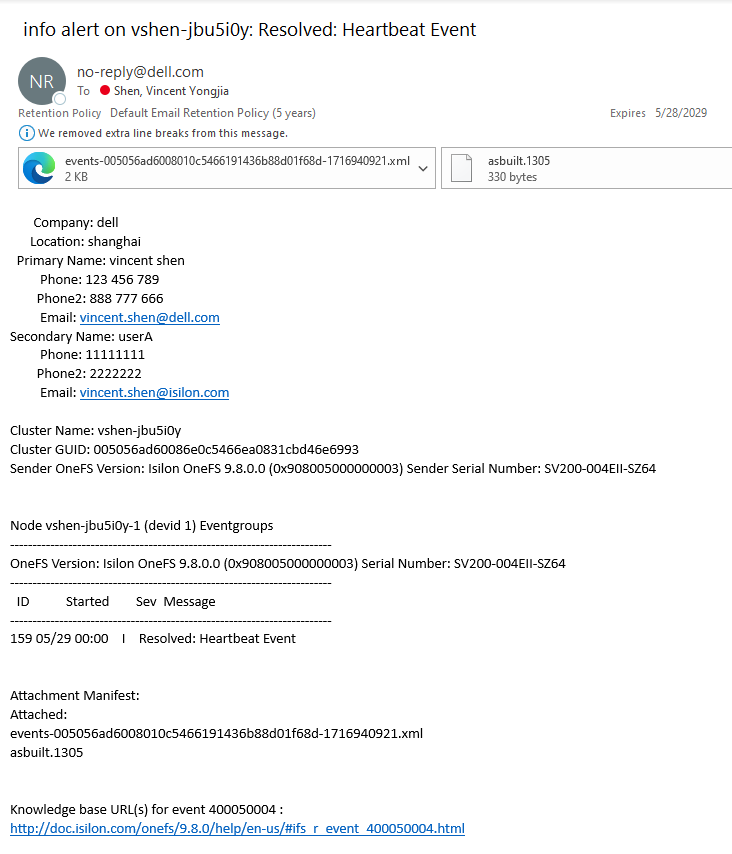
And this default template will render a CELOG email alert like:
Syntax
Basic variable substitution
Cluster Name: {{clustername}}
This did not change between Tempita and Mustache.
Conditional (if) statements
{{#company}}
Company: {{company}}
{{/company}}
Mustache allows you to conditionally display some text by wrapping it in a section, which begins with a "#" tag and ends with a "/" tag. In this case, we only produce "Company: SOME_COMPANY_NAME" if the company variable is present. In other cases, where the named variable is a boolean true/false value, we only render the section if the variable is true.
Mustache does not actually have if/else statements, but it does allow you to use "^" to get the opposite of some condition, which has a similar effect to an else statement. For example, this piece of the new template adds a "(none)" in the unlikely case that there are no files attached, which the previous default template did not do:
Attachment Manifest:
Attached:
{{#attachment_list}}
{{.}}
{{/attachment_list}}
{{^attachment_list}}
(none)
{{/attachment_list}}
Here, if there are no items in attachment_list, we display "(none)" in the {{^attachment_list}} section.
Looping (for)
New:
{{#eventgroups}}
{{eventgroup_instance}} {{time_noticed}} {{severity}} {{message}}
{{/eventgroups}}
Mustache's loops also begin with a "#" section, similar to its conditional statements. If the section is for a list of items, it will output the section's contents for each item in the list.
Within a loop, you are automatically within the context of the current item and can access its subitems directly. If you want to access the item itself, use {{.}}, as seen in the attachment_list example above. This example is actually from an inner loop where the outer loop was over each node that had alerts to send, which is why we access eventgroups directly instead of the old node_event['eventgroups'].Available variables
General information
Values are configured in isi cluster contact.
|
company |
|
location |
|
primary_name |
|
primary_email |
|
primary_phone1 |
|
primary_phone2 |
|
secondary_name |
|
secondary_email |
|
secondary_phone1 |
|
secondary_phone2 |
Cluster information
|
clustername |
|
clusterguid |
|
sender_onefsversion |
|
sender_serial |
Eventgroup information
Eventgroups are split up by node, in a list called node_event_list. The "node" with devid 0 actually contains cluster-wide eventgroups.
Example of a list with a single node that has a single eventgroup:
|
|
Attachment information
Eventgroups may or may not provide email attachments, depending on the attachments' size and on whether those attachments were generated in the first place.
Example attachment variables:
"has_attachment_list": true
"attachment_list": [
"events-GUID-TIME.xml",
"largevarfiles.190",
"dfvar.190",
"largelogs.190"
]
"has_unattached_list": false
"unattached_list": []
KB information
KB URLs are provided as a list of strings:
"kb_url_list": [
"Knowledge base URL(s) for event 100010001 : \nhttp://doc.isilon.com/onefs/9.4.0/help/en-us/#ifs_r_event_100010001.html\n"
]
Template checker
A template checker is also introduced in OneFS 9.4 to make sure a custom template’s syntax is correct. This checker will try to preview a template on the command line before configurating it on an actual channel without the need to generate actual events. This checker will use the cluster information defined in Cluster management à General settings à Cluster identity in OneFS WebUI, but the example event is not real.
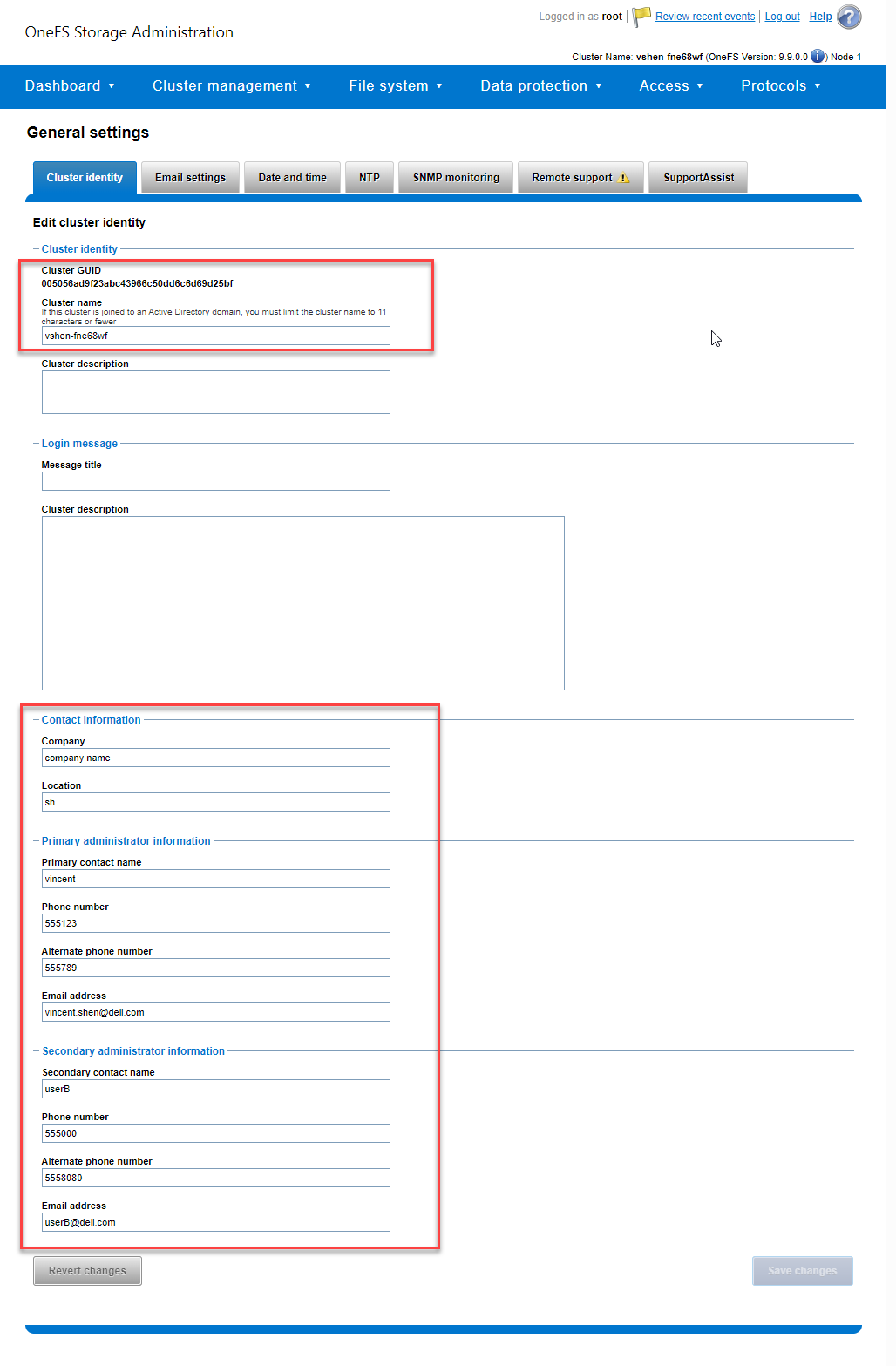
The following is an example of checking the default template at /etc/ifs/celog_email_template.txt:
# python -m isi.celog_alerting.channels check_template /etc/ifs/celog_email_template.txt
Company: company name
Location: sh
Primary Name: vincent
Phone: 555123
Phone2: 555789
Email: vincent.shen@dell.com
Secondary Name: userB
Phone: 555000
Phone2: 5558080
Email: userB@dell.com
Cluster Name: vshen-fne68wf
Cluster GUID: 005056ad9f23abc43966c50dd6c6d69d25bf
Sender OneFS Version: Isilon OneFS 9.9.0.0 (0x90900b000001095)
Sender Serial Number: SV200-004EII-TUMJ
Node vshen-fne68wf-1 (devid 1) Eventgroups
------------------------------------------------------------------------
OneFS Version: Isilon OneFS 9.9.0.0 (0x90900b000001095)
Serial Number: SV200-004EII-TUMJ
------------------------------------------------------------------------
ID Started Sev Message
------------------------------------------------------------------------
113 09/13 16:53 C The /var/crash partition is near capacity (92.5% used)
Attachment Manifest:
Attached:
events.xml
dfall.401
varcrashls.401
backtraces.401
Not attached due to email size limits:
a_very_large_file.txt
Knowledge base URL(s) for event 100010002 :
http://doc.isilon.com/onefs/9.9.0/help/en-us/#ifs_r_event_100010002.html
Author: Vincent Shen