What are VMware Carbon Black Cloud Endpoint Canary Files
Summary: This article describes the purpose and location of Canary files and how to tell if they are involved in an alert message in the VMware Carbon Black Cloud. These files appear as randomized characters with office or image extensions (.pptx, .doc, .jpg, and .xls). ...
This article applies to
This article does not apply to
This article is not tied to any specific product.
Not all product versions are identified in this article.
Instructions
Affected Products:
- VMware Carbon Black Cloud Endpoint
Affected Platforms:
- Windows
Table of Contents
- What are Canary files?
- How are Canary files used?
- Where are Canary files located?
- Why are Canary files not hidden?
- How can I determine if the Canary files have been compromised?
What are Canary files?
Canary files are sets of four files with the extensions .pptx, .doc, .jpg, and .xls that are placed in various locations on the computer drive after VMware Carbon Black Cloud Endpoint has been installed. They are an additional line of defense against ransomware attacks.
Canary files are generated once either On Access File Scan Mode is enabled, by setting either Normal or Aggressive for the mode, or when Run background scan is enabled and either Standard or Expedited is set for the run-type.
How are Canary files used?
VMware Carbon Black Cloud Endpoint monitors Canary files closely. Because they have known hashes, it is easy to detect any changes as early warning signs for possible ransomware infection.
Where are Canary files located?
Canary files are stored in various locations within the Operating System.
Each location contains eight files, with one each of:
- Randomly named
.PNGfile - Randomly named
.XLSfile - Randomly named
.DOCfile - Randomly named
.PPTXfile
The sum of the file-size in each location is 269 KB for each set of files.
Note: Before v3.6, there were only four files in each location with a total size of 144k.
Below is an example of Canary files, which VMware Carbon Black Cloud Endpoint creates:
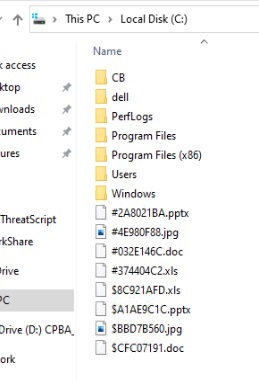
Note: Canary files are automatically created when local scanning is enabled and cannot be permanently disabled. If they are deleted, they are automatically re-created. Disabling and reenabling local scanning through On Access Files Scan Mode or Run Background Scan causes multiple copies of the canary files to be generated.
Why are Canary files not hidden?
Hiding these files reduces their effectiveness, as some ransomware strains intentionally skips hidden files. Keeping these files visible provides better ransomware detection efficacy.
How can I determine if the Canary files have been compromised?
- In a web browser, go to [REGION].conferdeploy.net.
Note: [REGION] = Region of tenant:
- Americas = https://defense-prod05.conferdeploy.net/
- Europe = https://defense-eu.conferdeploy.net/
- Asia Pacific = https://defense-prodnrt.conferdeploy.net/
- Americas = https://defense-prod05.conferdeploy.net/
- Sign In to the VMware Carbon Black Cloud.
- In the left menu pane, click Investigate and enter
event_description:attempted to modify a User Documentas the search term.

- Select the timeframe and click the search button.

- Click Process Analysis for the wanted result.

- Filter the results using the
filemodkeyword.

- Scroll through the events to find modifications to Canary files.


To contact support, reference Dell Data Security International Support Phone Numbers.
Go to TechDirect to generate a technical support request online.
For additional insights and resources, join the Dell Security Community Forum.
Affected Products
VMware Carbon BlackArticle Properties
Article Number: 000123612
Article Type: How To
Last Modified: 19 Apr 2026
Version: 15
Find answers to your questions from other Dell users
Support Services
Check if your device is covered by Support Services.