SC Storage Customer Notification: Port Numbering of 25Gb and 100Gb Chelsio iSCSI Mezzanine Adapters Reversed
Summary: This notification is for the 25Gb and 100Gb Chelsio iSCSI mezzanine adapters where the logical port numbering is reversed with Port 2 on the left and Port 1 on the right.
This article applies to
This article does not apply to
This article is not tied to any specific product.
Not all product versions are identified in this article.
Symptoms
An issue has been identified with the 25Gb and 100Gb Chelsio iSCSI 2 port Mezzanine adapter card in that the logical port numbering is reversed from expected and indicated on the controller / canister label. Normal port designations for Slot 1 and Mezzanine should start with Port 1 on the left and incrementing to the right. In the case with this Chelsio Mezzanine card, Port 2 is actually on the left and Port 1 is on the right. This issue only affects the 25Gb and 100Gb Mezzanine adapter cards (10Gb card excluded) as Chelsio cards in any PCI slot have the port ordering as expected. The picture below shows the port positioning on the canister.
Example:
The 25Gb iSCSI adapter in PCI slot 1 has correct logical port numbering from 1 to 4 L-R which also matches the label.
The 25Gb iSCSI adapter label in the Mezzanine slot also indicates on the canister that the port numbering is from 1 to 4 L-R (Similar to iSCSI card in PCI slot 1) however the logical port numbering is reversed with Port 2 is on the left and Port 1 is on the right.
Actual Rear View Picture of an SC7020 with Chelsio 25Gb cards (one 25Gb card in PCI Slot 1 and one 25Gb card in Mezzanine slot)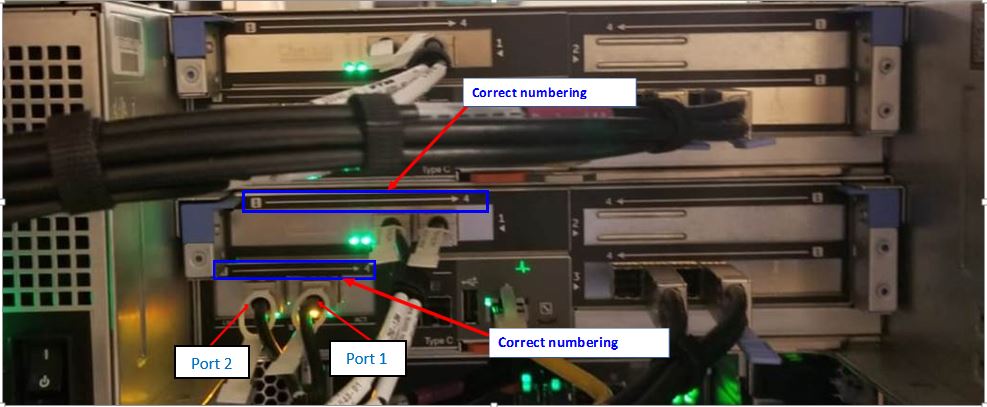
Dell Storage Manager and Storage Center Unisphere also indicates that Port 1 should be to the left and Port 2 on the right for the Mezzanine slot.
Resolution
Resolution:
This is resolved in SCOS 7.3.5, 7.3.6, and higher.
Affected Products
Dell Storage SC5020, Dell Storage SC7020Article Properties
Article Number: 000148750
Article Type: Solution
Last Modified: 23 Sep 2024
Version: 4
Find answers to your questions from other Dell users
Support Services
Check if your device is covered by Support Services.