VxRail: Determine if a PSU Replacement is Required
Summary: This article provides the methods to view power supply unit (PSU) status through VxRail Manager, vCenter, or iDRAC and through Command-Line Interface (CLI) to determine if your Dell VxRail PSU needs replacement. ...
This article applies to
This article does not apply to
This article is not tied to any specific product.
Not all product versions are identified in this article.
Instructions
Method 1: Console UI through VxRail Manager
Once a PSU is marked as failed on the VxRail Manager Web plug-in, you may see the unit as not available or in a failed state. In vCenter, you can see that the following messages show power input and redundancy as lost:
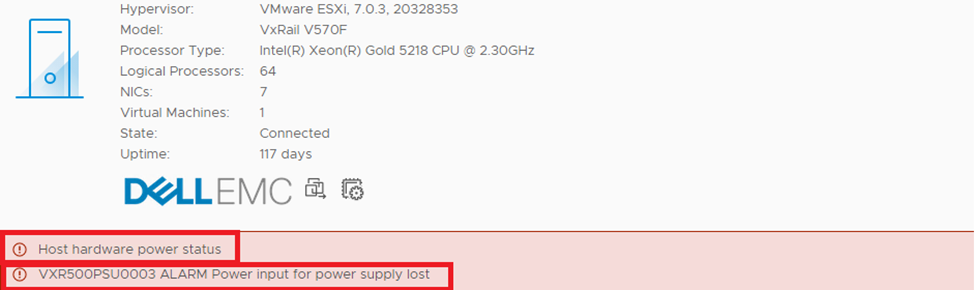
vCenter Console displaying failed power supply unit
iDRAC reflects the unit is marked as failed with power input showing as lost with the event tab showing the same:


iDRAC UI displaying failed power supply unit
Method 2: CLI
Connect using PuTTY to the affected node.
Check which PSU has failed by running the following command using PuTTY:
/opt/vxrail/tools/ipmitool sdr elist


PSU1 Status      | E0h | ok  | 10.1 | Presence detected, Failure detected
PSU2 Status      | E1h | ok  | 10.2 | Presence detected

PS1 PG FAIL      | 09h | ok  |  7.1 | State Deasserted
PS2 PG FAIL      | 0Ah | ok  |  7.1 | State Deasserted
System event log entry for failed PSU1 (Presence detected, Failure detected, State Deasserted)
You should see messages like "Failure detected" or "FAIL" state.
In the above case, the failed power supply is PSU1 (the power supply unit on top).
Run the following command on the node and then search for power supply failure:
/opt/vxrail/tools/ipmitool sel elist

Line 41:   29 | 11/24/2016 | 11:42:11 | Power Supply PSU Redundancy | Redundancy Lost | Asserted
Line 42:   2a | 11/24/2016 | 11:42:21 | Power Supply PSU2 Status | Power Supply AC lost | Deasserted
Line 42:   2a | 11/24/2016 | 11:42:21 | Power Supply PSU2 Status | Power Supply AC lost | Deasserted
Line 43:   2b | 11/24/2016 | 11:42:21 | Power Supply PSU Redundancy | Fully Redundant | Asserted
Line 60:   3c | 08/13/2017 | 12:43:08 | Power Supply PSU1 Status | Failure detected | Asserted
System event log entry for failed PSU1 (Failure detected, Asserted)
Troubleshooting:
To determine if the power supply has failed, see the steps in the following article: PowerEdge PSU: How to Troubleshoot a Server Power Supply Unit
This guide provides detailed steps to determine if there is a hardware fault with the power supply of a Dell PowerEdge Server. Typically, the failure rate of a power supply unit is low, and it is possible that there are soft issues or intermittent power supply messages that may not relate to hardware. In this case and when a hardware fault is suspected, Dell Technologies recommends contacting Dell Support, quote this article number to confirm that a hardware replacement is required.
Additional Information
Watch this video:
Affected Products
VxRail, VxRail 460 and 470 Nodes, VxRail Appliance Family, VxRail Appliance Series, VxRail G Series Nodes, VxRail D Series Nodes, VxRail D560, VxRail D560F, VxRail E Series Nodes, VxRail E460, VxRail E560, VxRail E560 VCF, VxRail E560F
, VxRail E560F VCF, VxRail E560N, VxRail E560N VCF, VxRail E660, VxRail E660F, VxRail E660N, VxRail E665, VxRail E665F, VxRail E665N, VxRail G560, VxRail G560F, VxRail G560F VCF, VxRail P Series Nodes, VxRail P470, VxRail P570, VxRail P570 VCF, VxRail P570F, VxRail P570F VCF, VxRail P580N, VxRail P580N VCF, VxRail P670F, VxRail P670N, VxRail P675F, VxRail P675N, VxRail S Series Nodes, VxRail S470, VxRail S570, VxRail S570 VCF, VxRail S670, VxRail V Series Nodes, VxRail V470, VxRail V570, VxRail V570 VCF, VxRail V570F, VxRail V570F VCF, VXRAIL V670F, VxRail VD-4510C, VxRail VD-4520C, VxRail VD Series Nodes, VxRail VE-660, VxRail VE-6615, VxRail VE-670, VxRail VP-760, VxRail VP-7625, VxRail VP-770, VxRail VS-760
...
Article Properties
Article Number: 000004068
Article Type: How To
Last Modified: 17 Apr 2026
Version: 21
Find answers to your questions from other Dell users
Support Services
Check if your device is covered by Support Services.