VxRail: Node Health-check Fails for Test scratch
Summary: The scratch partition logs are checked for recent updates.
This article applies to
This article does not apply to
This article is not tied to any specific product.
Not all product versions are identified in this article.
Symptoms
The 'scratch' health-check makes sure that logs in "vmkernel.log" can be accessed in the scratch partition:
/var/log/vmkernel.log
The results of this health-check can be one of the following:
| Test Result | Result code | Result Interpretation |
|---|---|---|
|
Pass |
0 |
The latest VMkernel log entry is 1 sec old. |
|
Warning |
1 |
This test has no warning results. |
|
Failure |
2 |
vmkernel.log not found /var/log/vmkernel.log is not a link to scratch. vmkernel.log contains no valid date-time stamps. |
|
Critical |
3 |
vmkernel.log has not been written in the last 7200 seconds (2 hours) |
Each test that passes is not listed in the summary report, for ease of reading.
An example of the health-check output is shown below:
#========================#======#=========#====================================================================#==============#
|  Hostname / Category   |Status  Dell_KB |  Warnings or Failures, unless tests Passed                         ; Product S.N. |
#========================#======#=========#====================================================================#==============#
| node02                 | Critical 43145 | scratch: /scratch/log/vmkernel.log has not been written in the last 486096 seconds|
Cause
The 'scratch' test verifies that the file '/scratch/log/vmkernel.log' can be accessed.
The timestamps on the most recent lines are checked, and an error are reported if the most recent lines are over 2 hours old.
If for any reason the vmkernel.log cannot be found in the scratch partition, the test reports a critical failure.
Resolution
Check the VMkernel log:
A failure of this test indicates that the Scratch partition was not readable by the test and this partition should be checked.
Access the command line on a node and check the scratch partition:
/scratch
If the partition can be accessed, check the contents of the following log, which should contain recent lines of events:
/scratch/log/vmkernel.log
The scratch log location may have been changed, and the logging location can be checked using the command:
esxcli system syslog config get
For example:
Local Log Output: /scratch/log
If the above is not /scratch/log, check the vmkernel.log in the alternative path.
Check the VMkernel link:
There must be a link to the scratch log (for example, /scratch/log/vmkernel.log), in /var/log:
# ls -la /var/log/vmkernel.log
lrwxrwxrwx    1 root     root            25 Sep  8 12:01 /var/log/vmkernel.log -> /scratch/log/vmkernel.log
If this is not present, create the file link to match the entry above:
ln -s /scratch/log/vmkernel.log /var/log/vmkernel.logTo fix a lack of logging to vmkernel.log:
If the vmkernel.log is not being written to (all entries are over 2 hours), the host should be rebooted.
To Reboot:
- Put node in Maintenance Mode
- Reboot the node
- Exit node from Maintenance Mode
- Run VxVerify again
If the issue is still present contact Dell Support.
Additional Information
Another possibility is that the cluster has a custom global directory value set in advanced system settings for Syslog.global.logDir (which is outside of the VxRail standards).
This can be a network share, or a syslog server misconfiguration.
For example, a customer can customize the Syslog.global.logDir in all nodes to save the logs in a Network File System (NFS), like the example below.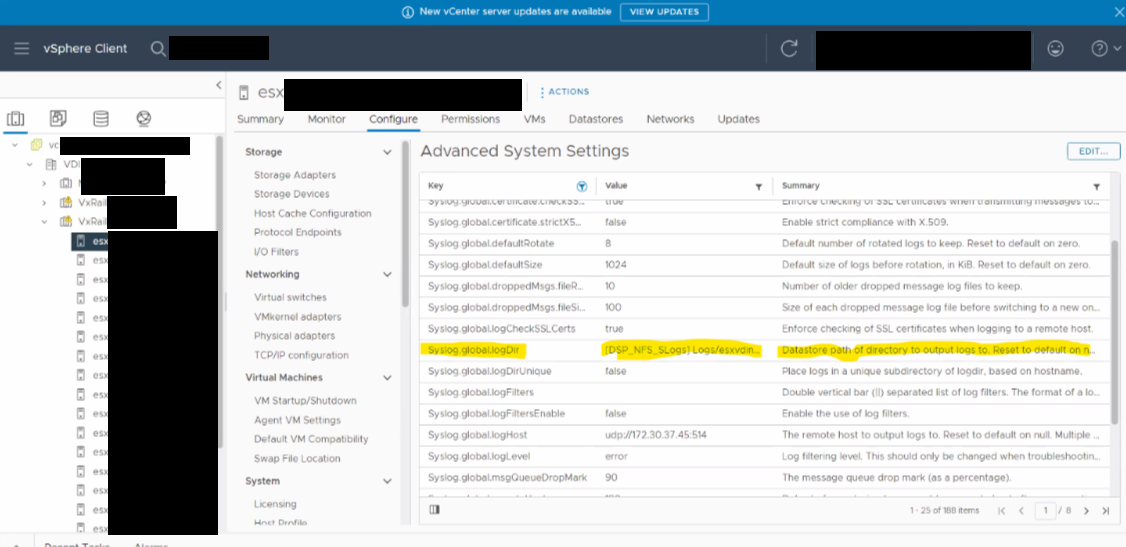
Check the variable Syslog.global.logDir, under Advanced System Settings of the node, and confirm that the value is []/scratch/log.
If the value is different from default []/scratch/log, the health-check can report that VMkernel.log is not found.
More information about the variables above can be located on the VMware article below.
https://knowledge.broadcom.com/external/article?legacyId=2003322

Affected Products
VxRail, VxRail 460 and 470 Nodes, VxRail Appliance Series, VxRail G Series Nodes, VxRail D Series Nodes, VxRail D560, VxRail D560F, VxRail E Series Nodes, VxRail E460, VxRail E560, VxRail E560F, VxRail E560N, VxRail E660, VxRail E660F, VxRail E660N
, VxRail E665, VxRail E665F, VxRail E665N, VxRail G560, VxRail G560F, VxRail P Series Nodes, VxRail P470, VxRail P570, VxRail P570F, VxRail P580N, VxRail P670F, VxRail P670N, VxRail P675F, VxRail P675N, VxRail S Series Nodes, VxRail S470, VxRail S570, VxRail S670, VxRail Software, VxRail V Series Nodes, VxRail V470, VxRail V570, VxRail V570F, VXRAIL V670F, VxRail VD-4510C, VxRail VD-4520C, VxRail VD Series Nodes, VxRail VE-660, VxRail VE-6615, VxRail VP-760, VxRail VP-7625, VxRail VS-760
...
Article Properties
Article Number: 000043145
Article Type: Solution
Last Modified: 03 Jul 2025
Version: 10
Find answers to your questions from other Dell users
Support Services
Check if your device is covered by Support Services.