PowerProtect Data Manager: VM Backup Fails With ABV0016 or ABV0006 "DPD Sync in Progress"
Summary: Virtual machine (VM) backups protected by PowerProtect Data Manager (PPDM) using the Transparent Snapshot Data Mover (TSDM) solution fail with error codes ABV0016 and ABV0006. The failure indicates the vCenter task for "Cancel SDM Snapshot" completed with an error stating "DPD Sync in progress" or "DPD Snapshot in progress." The affected VM has an orphaned vSphere Snapshot Data Mover (SDM) task that the TSDM backup workflow cannot cancel due to inconsistencies in the Data Protection Daemon (dpd) on the ESXi host. The backups were previously completing successfully before the orphaned task appeared. ...
This article applies to
This article does not apply to
This article is not tied to any specific product.
Not all product versions are identified in this article.
Symptoms
PPDM protects the vSphere environment using the TSDM solution. One or more VM backups that were previously completing successfully begin failing consistently. The PPDM UI shows error codes ABV0016 and/or ABV0006 with the following details (VM name and vCenter name vary per environment):
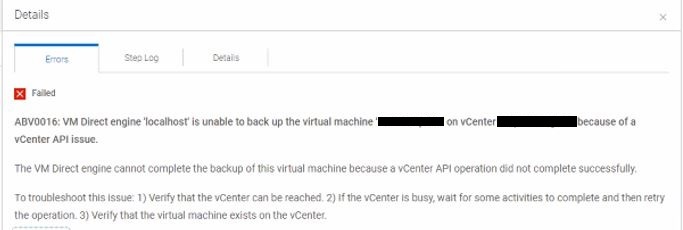
ABV0016: VM Direct engine 'localhost' is unable to back up the virtual machine 'my-vm-name' on vCenter 'my-vcernter-name' because of a vCenter API issue.

The VM Direct engine cannot complete the backup of this virtual machine because of a vCenter API operation did not complete successfully.

To troubleshoot this issue: 1) Verify that the vCenter can be reached. 2) If the vCenter is busy, wait for some activities to complete and then retry the operation. 3) Verify that the virtual machine exists on the vCenter.

Read Less

Unable to cleanup from earlier backup attempt.  Unable to cleanup session 'Backup:6755cb99-3de5-4731-8b6f-6c64bb809f0b' from virtual machine 'my-vm-name' (MORef = 'vm-241').  Unable to cancel TSDM / LWD snapshot.  The vCenter task for 'Cancel SDM Snapshot' completed with state 'error':  DPD Sync in progress.
ABV0006: VM Direct engine 'localhost' is unable to back up the virtual machine 'my-vm-name' on vCenter 'my-vcernter-name' because of a vCenter API issue.

The VM Direct engine cannot complete the backup of this virtual machine because of a vCenter API operation did not complete successfully.

To troubleshoot this issue: 1) Verify that the vCenter can be reached. 2) If the vCenter is busy, wait for some activities to complete and then retry the operation. 3) Verify that the virtual machine exists on the vCenter.

Read Less

vCenter task 'task-943698' failed:  VimFault: 'dp.vpx.fault.SnapshotInProgress.summary': DPD Snapshot in progress
The backup session may show the following status outputs:
...
YYYY-MM-DD HH:MM:SS INFO:   [acae20b6ae1ca9c8;aac63ea8d0fb1d9e]   },
YYYY-MM-DD HH:MM:SS INFO:   [acae20b6ae1ca9c8;aac63ea8d0fb1d9e]   "Status": {
YYYY-MM-DD HH:MM:SS INFO:   [acae20b6ae1ca9c8;aac63ea8d0fb1d9e]     "State": "Failure",
YYYY-MM-DD HH:MM:SS INFO:   [acae20b6ae1ca9c8;aac63ea8d0fb1d9e]     "Description": "Backup is unsuccessful:  Unable to cleanup from earlier backup attempt.  Unable to cleanup session 'Backup:6755cb99-3de5-4731-8b6f-6c64bb809f0b' from virtual machine 'vm-vm-name' (MORef = 'vm-241').  Unable to cancel TSDM / LWD snapshot.  The vCenter task for 'Cancel SDM Snapshot' completed with state 'error':  DPD Sync in progress",
YYYY-MM-DD HH:MM:SS INFO:   [acae20b6ae1ca9c8;aac63ea8d0fb1d9e]     "Progress": 0,
YYYY-MM-DD HH:MM:SS INFO:   [acae20b6ae1ca9c8;aac63ea8d0fb1d9e]     "Error": {
YYYY-MM-DD HH:MM:SS INFO:   [acae20b6ae1ca9c8;aac63ea8d0fb1d9e]       "Text": "Unable to cleanup from earlier backup attempt.  Unable to cleanup session 'Backup:6755cb99-3de5-4731-8b6f-6c64bb809f0b' from virtual machine 'vm-vm-name' (MORef = 'vm-241').  Unable to cancel TSDM / LWD snapshot.  The vCenter task for 'Cancel SDM Snapshot' completed with state 'error':  DPD Sync in progress",
YYYY-MM-DD HH:MM:SS INFO:   [acae20b6ae1ca9c8;aac63ea8d0fb1d9e]       "Code": 0,
YYYY-MM-DD HH:MM:SS INFO:   [acae20b6ae1ca9c8;aac63ea8d0fb1d9e]       "Classifications": [],
YYYY-MM-DD HH:MM:SS INFO:   [acae20b6ae1ca9c8;aac63ea8d0fb1d9e]       "Retryable": false,
YYYY-MM-DD HH:MM:SS INFO:   [acae20b6ae1ca9c8;aac63ea8d0fb1d9e]       "Remedy": null
YYYY-MM-DD HH:MM:SS INFO:   [acae20b6ae1ca9c8;aac63ea8d0fb1d9e]     },
...
...
YYYY-MM-DD HH:MM:SS INFO:   [a3f45e322add25ec;bb6e18b9d1e8178c]   },
YYYY-MM-DD HH:MM:SS INFO:   [a3f45e322add25ec;bb6e18b9d1e8178c]   "Status": {
YYYY-MM-DD HH:MM:SS INFO:   [a3f45e322add25ec;bb6e18b9d1e8178c]     "State": "Failure",
YYYY-MM-DD HH:MM:SS INFO:   [a3f45e322add25ec;bb6e18b9d1e8178c]     "Description": "Backup is unsuccessful:  vCenter task 'task-943698' failed:  VimFault: 'dp.vpx.fault.SnapshotInProgress.summary': DPD Snapshot in progress, TSDM snapshot UUID = '52031978-18dd-444a-37fd-9c070de84cc5'",
YYYY-MM-DD HH:MM:SS INFO:   [a3f45e322add25ec;bb6e18b9d1e8178c]     "Progress": 0,
YYYY-MM-DD HH:MM:SS INFO:   [a3f45e322add25ec;bb6e18b9d1e8178c]     "Error": {
YYYY-MM-DD HH:MM:SS INFO:   [a3f45e322add25ec;bb6e18b9d1e8178c]       "Text": "vCenter task 'task-943698' failed:  VimFault: 'dp.vpx.fault.SnapshotInProgress.summary': DPD Snapshot in progress, TSDM snapshot UUID = '52031978-18dd-444a-37fd-9c070de84cc5'",
YYYY-MM-DD HH:MM:SS INFO:   [a3f45e322add25ec;bb6e18b9d1e8178c]       "Code": 0,
YYYY-MM-DD HH:MM:SS INFO:   [a3f45e322add25ec;bb6e18b9d1e8178c]       "Classifications": [],
YYYY-MM-DD HH:MM:SS INFO:   [a3f45e322add25ec;bb6e18b9d1e8178c]       "Retryable": false,
YYYY-MM-DD HH:MM:SS INFO:   [a3f45e322add25ec;bb6e18b9d1e8178c]       "Remedy": null
YYYY-MM-DD HH:MM:SS INFO:   [a3f45e322add25ec;bb6e18b9d1e8178c]     },
...
Only a subset of VMs on the affected ESXi host may exhibit the issue. Other VMs may continue to back up successfully. This issue affects all PowerProtect Data Manager versions.
Cause
The affected VM has an orphaned vSphere Snapshot Data Mover (SDM) task that the TSDM backup workflow cannot cancel. When PPDM attempts to start a new backup, it first tries to clean up any residual state from previous backup sessions. The cleanup process attempts to cancel the orphaned SDM snapshot, but the dpd daemon on the ESXi host reports "DPD Sync in progress" — indicating an inconsistency in the daemon's state that prevents the cancellation.
Because the orphaned SDM task cannot be cancelled, the new backup cannot proceed and fails with ABV0016 or ABV0006. The exact reason for the orphaned task or the dpd inconsistency remains unidentified. The issue is resolved by restarting the dpd daemon on the ESXi host and resetting the SDM feature on the affected VM.
Resolution
Restart the dpd Daemon on the ESXi Host.
Important: Ensure that no virtual machine backups are actively running on the ESXi host before restarting the dpd daemon. Restarting the daemon during an active backup may cause that backup to fail.
- Identify the ESXi host where the affected VM resides.
- Open an SSH session to the ESXi host.
- Restart the
dpddaemon:/etc/init.d/dpd restart - Confirm the restart completes successfully with a
successmessage.
Disable and Re-enable SDM on the Affected VM
After restarting the dpd daemon, reset the SDM feature on the affected VM using one of the following methods. Method 1 is recommended as the easiest approach.
- Change the Protection Mechanism in the PPDM UI (Recommended):
- Open the PPDM UI and navigate to Infrastructure → Assets → Virtual Machines.
- Select the affected virtual machine.
- Select More Actions → Protection Mechanism → Migrate to VADP.
- Wait for the vSphere Web Client to show a task disabling the Lightweight Delta (LWD) filter on the VM.
- Select More Actions → Protection Mechanism → Migrate to Transparent Snapshots.
- Wait for the vSphere Web Client to show a task enabling the LWD filter on the VM.
- Remove and Re-add the VM to the Protection Policy:
- Open the PPDM UI and navigate to Infrastructure → Assets → Virtual Machines.
- Select the affected virtual machine.
- Select More Actions → Remove from Policy.
- Wait for the vSphere Web Client to show a task disabling the LWD filter on the VM.
- Select More Actions → Add to Policy and follow the wizard to add the VM back to the protection policy.
- Wait for the vSphere Web Client to show a task enabling the LWD filter on the VM.
Verify the Workaround
- Run a manual PPDM TSDM backup for the affected VM or wait for the next scheduled backup execution.
- Confirm the backup completes successfully without the ABV0016 or ABV0006 errors.
- Confirm the backup session log no longer shows "DPD Sync in progress" or "DPD Snapshot in progress."
If the backup continues to fail with "DPD Sync in progress" after restarting the dpd daemon and resetting SDM on the affected VM, contact Dell Support for further investigation and reference this KB article.
Additional Information
VMware has released enhancements to the dpd daemon to help resolve inconsistencies with the sync operation. Ensure the environment runs one of the following ESXi versions or a newer release:
- ESXi 7.0 U3o (build 22348816)
- ESXi 8.0 Ub (build 21203435)
Products
PowerProtect Data ManagerArticle Properties
Article Number: 000210949
Article Type: Solution
Last Modified: 03 Aug 2026
Version: 8
Find answers to your questions from other Dell users
Support Services
Check if your device is covered by Support Services.