Secure Connect Gateway - Discovered devices shows status as "Failed"
Shrnutí: This article explains a situation when discovering devices status shows Failed and SNMP Monitoring status shows not capable.
Tento článek se vztahuje na
Tento článek se nevztahuje na
Tento článek není vázán na žádný konkrétní produkt.
V tomto článku nejsou uvedeny všechny verze produktu.
Příznaky
From the user interface screen, the discovered devices status shows failed state instead of success and monitoring capable shows degraded.

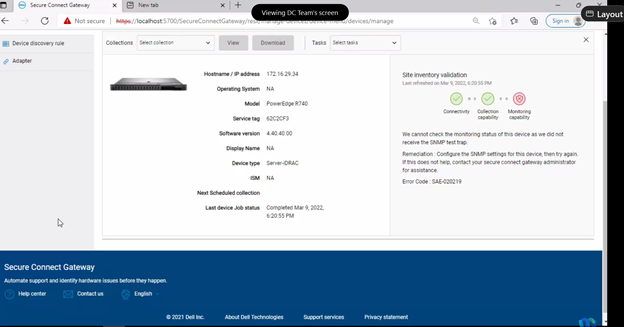
This event is registered in the log as following:
This event is registered in the log as following:
Date,045 [vert.x-eventloop-thread-1] INFO
com.dell.sae.apigateway.handlers.InventoryAPIRequestHandler- 815 - got error message
response from localization for reason:: {"displayMessage":"We cannot check the
monitoring status of this device as we did not receive the SNMP test
trap.","responseAction":"Configure the SNMP settings for this device, then try again. If
this does not help, contact your secure connect gateway administrator for
assistance.","detailedDescription":null}
Příčina
The error can be caused for the lack of administrator rights for the logged user on SCG.
Řešení
Follow this step for troubleshooting:
- Verify SNMP settings on iDRAC0.
- Perform the re-inventory validation and, after completion, check the device status.
- Verify the SCG services and check if the user logged into SCG has administrator rights.
- Check the credential's profile for SCG.
Vlastnosti článku
Číslo článku: 000200699
Typ článku: Solution
Poslední úprava: 24 Jul 2024
Verze: 2
Najděte odpovědi na své otázky od ostatních uživatelů společnosti Dell
Služby podpory
Zkontrolujte, zda se na vaše zařízení vztahují služby podpory.