API REST de NetWorker: ¿Cómo usar un servidor AUTHC remoto cuando se procesan solicitudes de API REST?
Oversigt: En entornos con varias zonas de datos de NetWorker, la autenticación de NetWorker se puede configurar a través de un solo servidor authc. En este artículo de la base de conocimientos, se detalla cómo realizar funciones de la API REST de NetWorker mediante un encabezado para indicar a la llamada a la API que utilice el NetWorker authc Server designado en lugar del NetWorker Server especificado en el URI de API. ...
Denne artikel gælder for
Denne artikel gælder ikke for
Denne artikel er ikke knyttet til et bestemt produkt.
Det er ikke alle produktversioner, der er identificeret i denne artikel.
Instruktioner
La interfaz de API REST de NetWorker se utiliza para acceder mediante programación al servicio de protección de datos de NetWorker. El servicio de autenticación de NetWorker (authc) está configurado en un NetWorker Server remoto, por lo que la solicitud de la API REST de NetWorker debe incluir la información de authc. La interfaz de la API REST v3 de NetWorker y las versiones más recientes pueden incluir el servidor authc con un encabezado personalizado. El valor de clave debe proporcionar la dirección IP del servidor authc o el nombre de dominio completamente calificado (FQDN) y el puerto authc (valor predeterminado=9090):
En el siguiente ejemplo de un cliente de API, se muestra el uso de este encabezado para indicar al identificador uniforme de recursos (URI) de la API que utilice el host especificado en el encabezado para la autorización, en lugar del host especificado en el URI.
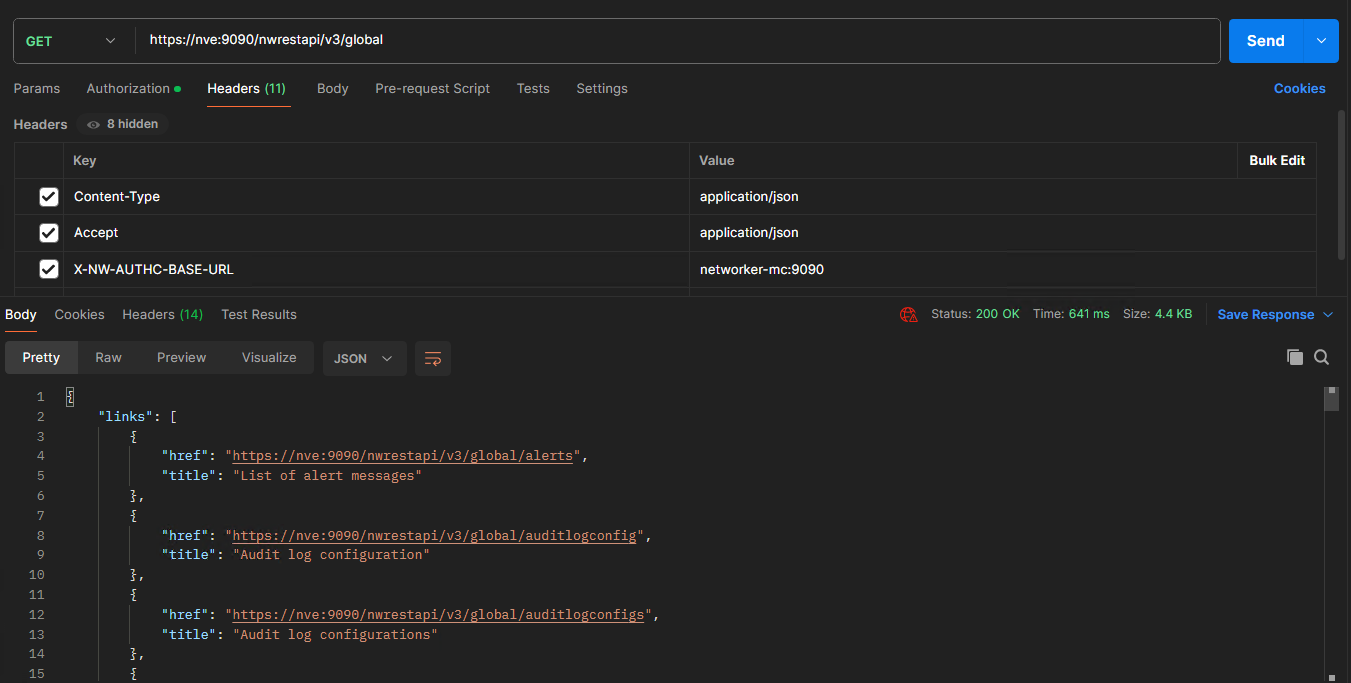
Si no tiene acceso a un cliente de API, esto también se puede confirmar con el comando linux curl .
Clave: X-NW-AUTHC-BASE-URL
Valor: AUTHC_IP/AUTHC_FQDN:9090
Valor: AUTHC_IP/AUTHC_FQDN:9090
En el siguiente ejemplo de un cliente de API, se muestra el uso de este encabezado para indicar al identificador uniforme de recursos (URI) de la API que utilice el host especificado en el encabezado para la autorización, en lugar del host especificado en el URI.
En este ejemplo, nos conectamos a la API REST en un servidor "nve" de NetWorker:
nve:~ # tail -n 1 /nsr/logs/restapi/restapi.log
2024-02-07 10:51:25.512 INFO  [https-jsse-nio-9090-exec-4] c.e.n.w.WebApiResponse -Response status Method: 'GET', URI:'v3/global', Status '200'
Sin embargo, la autorización para esta solicitud se procesó en "networker-mc":
root@networker-mc:~# tail -n 1 /nsr/authc/logs/localhost_access_log.2024-02-07.txt
192.168.25.12 - - [07/Feb/2024:10:51:25 -0500] "POST /auth-server/api/v1/sec/authenticate HTTP/1.1" 201 12209
Si no tiene acceso a un cliente de API, esto también se puede confirmar con el comando linux curl .
Nomenclatura:
Ejemplo:
curl -v -k --header "X-NW-AUTHC-BASE-URL:REMOTE_AUTHC_SERVER_ADDRESS:9090" --user Administrator https://NETWORKER_SERVER_ADDRESS:9090/nwrestapi/v3/global/...
Ejemplo:
nve:~ # curl -v -k --header "X-NW-AUTHC-BASE-URL:networker-mc:9090" --user Administrator https://nve:9090/nwrestapi/v3/global/
Enter host password for user 'Administrator':
*   Trying 192.168.25.12...
* TCP_NODELAY set
* Connected to nve (192.168.25.12) port 9090 (#0)
* ALPN, offering h2
* ALPN, offering http/1.1
* Cipher selection: ALL:!EXPORT:!EXPORT40:!EXPORT56:!aNULL:!LOW:!RC4:@STRENGTH
* TLSv1.2 (OUT), TLS handshake, Client hello (1):
* TLSv1.2 (IN), TLS handshake, Server hello (2):
* TLSv1.2 (IN), TLS handshake, Certificate (11):
* TLSv1.2 (IN), TLS handshake, Server key exchange (12):
* TLSv1.2 (IN), TLS handshake, Server finished (14):
* TLSv1.2 (OUT), TLS handshake, Client key exchange (16):
* TLSv1.2 (OUT), TLS change cipher, Client hello (1):
* TLSv1.2 (OUT), TLS handshake, Finished (20):
* TLSv1.2 (IN), TLS change cipher, Client hello (1):
* TLSv1.2 (IN), TLS handshake, Finished (20):
* SSL connection using TLSv1.2 / ECDHE-RSA-AES256-GCM-SHA384
* ALPN, server did not agree to a protocol
* Server certificate:
*  subject: C=US; ST=TX; L=Round Rock; O=DELL; OU=NetWorker; CN=nve.amer.local
*  start date: Oct  8 13:55:46 2019 GMT
*  expire date: Oct  1 13:55:46 2044 GMT
*  issuer: C=US; ST=TX; L=Round Rock; O=DELL; OU=NetWorker; CN=nve.amer.local
*  SSL certificate verify result: self signed certificate (18), continuing anyway.
* Server auth using Basic with user 'Administrator'
> GET /nwrestapi/v3/global/ HTTP/1.1
> Host: nve:9090
> Authorization: Basic QWRtaW5pc3RyYXRvcjpBZG1pblBhc3NAMDE=
> User-Agent: curl/7.60.0
> Accept: */*
> X-NW-AUTHC-BASE-URL:networker-mc:9090
>
< HTTP/1.1 200
< Content-Security-Policy: frame-ancestors 'none';script-src' 'self';object-src 'self'
< Strict-Transport-Security: max-age=31536000
< X-XSS-Protection: 1; mode=block
< X-Frame-Options: DENY
< X-Content-Type-Options: nosniff
< Date: Wed, 07 Feb 2024 15:41:33 GMT
< Cache-Control: no-cache,no-store,must-revalidate
< Pragma: no-cache
< Expires: 0
< Content-Type: application/json
< Transfer-Encoding: chunked
< Server: NSR SERVICES for Authentication
<
{"links":[{"href":"https://nve:9090/nwrestapi/v3/global/alerts","title":"List of alert messages"},{"href":"https://nve:9090/nwrestapi/v3/global/auditlogconfig","title":"Audit log configuration"},{"href":"https://nve:9090/nwrestapi/v3/global/auditlogconfigs","title":"Audit log configurations"},{"href":"https://nve:9090/nwrestapi/v3/global/backups","title":"List of backups"},{"href":"https://nve:9090/nwrestapi/v3/global/clients","title":"List of clients"},{"href":"https://nve:9090/nwrestapi/v3/global/cloudboostappliances","title":"List of cloudboost appliances"},{"href":"https://nve:9090/nwrestapi/v3/global/datadomainsystems","title":"List of data domain systems"},{"href":"https://nve:9090/nwrestapi/v3/global/dddevicereplication","title":"DD device replication"},{"href":"https://nve:9090/nwrestapi/v3/global/devices","title":"List of storage devices"},{"href":"https://nve:9090/nwrestapi/v3/global/directives","title":"List of backup directives"},{"href":"https://nve:9090/nwrestapi/v3/global/inspect","title":"Inspect remote/local server"},{"href":"https://nve:9090/nwrestapi/v3/global/jobgroups","title":"List of job groups"},{"href":"https://nve:9090/nwrestapi/v3/global/jobindications","title":"List of job indications"},{"href":"https://nve:9090/nwrestapi/v3/global/jobs","title":"List of jobs"},{"href":"https://nve:9090/nwrestapi/v3/global/jukeboxes","title":"List of jukeboxes"},{"href":"https://nve:9090/nwrestapi/v3/global/labels","title":"List of volume label templates"},{"href":"https://nve:9090/nwrestapi/v3/global/licenseconfig","title":"Server license configuration"},{"href":"https://nve:9090/nwrestapi/v3/global/licenses","title":"List of license templates"},{"href":"https://nve:9090/nwrestapi/v3/global/lockbox","title":"Lockbox resource"},{"href":"https://nve:9090/nwrestapi/v3/global/mediaconfig","title":"Server media configuration"},{"href":"https://nve:9090/nwrestapi/v3/global/mobilestorageunits","title":"Mobile storage units."},{"href":"https://nve:9090/nwrestapi/v3/global/nasdevices","title":"List of NAS devices"},{"href":"https://nve:9090/nwrestapi/v3/global/notifications","title":"List of notification settings"},{"href":"https://nve:9090/nwrestapi/v3/global/nsrcloneconfig","title":"NSR Clone Configuration"},{"href":"https://nve:9090/nwrestapi/v3/global/pools","title":"List of pools"},{"href":"https://nve:9090/nwrestapi/v3/global/probes","title":"List of probes"},{"href":"https://nve:9090/nwrestapi/v3/global/protectiongroups","title":"List of protection groups"},{"href":"https://nve:9090/nwrestapi/v3/global/protectionpolicies","title":"List of protection policies"},{"href":"https://nve:9090/nwrestapi/v3/global/recoverapps","title":"List of recovery applications"},{"href":"https://nve:9090/nwrestapi/v3/global/recovers","title":"List of recover resources"},{"href":"https://nve:9090/nwrestapi/v3/global/rules","title":"List of rules"},{"href":"https://nve:9090/nwrestapi/v3/global/schedules","title":"List of schedules"},{"href":"https://nve:9090/nwrestapi/v3/global/securityconfig","title":"Server security configurati* Connection #0 to host nve left intact
on"},{"href":"https://nve:9090/nwrestapi/v3/global/serverconfig","title":"Server configuration"},{"href":"https://nve:9090/nwrestapi/v3/global/servermessages","title":"List of server messages"},{"href":"https://nve:9090/nwrestapi/v3/global/serverstatistics","title":"Server statistics"},{"href":"https://nve:9090/nwrestapi/v3/global/sessions","title":"List of save/recover sessions"},{"href":"https://nve:9090/nwrestapi/v3/global/storagenodes","title":"List of storage nodes"},{"href":"https://nve:9090/nwrestapi/v3/global/tenants","title":"Restricted data zone protection"},{"href":"https://nve:9090/nwrestapi/v3/global/timepolicies","title":"List of Time Policies"},{"href":"https://nve:9090/nwrestapi/v3/global/usergroups","title":"List of user groups"},{"href":"https://nve:9090/nwrestapi/v3/global/vmware","title":"View of VMware objects"},{"href":"https://nve:9090/nwrestapi/v3/global/volumes","title":"List of volumes"}]}
Registros:
Servidor de autenticación:
Linux: /nsr/authc/logs Windows
: C:\Program Files\EMC NetWorker\nsr\authc-server\tomcat\logs
REST API (NetWorker Server):
Linux: /nsr/logs/restapi/restapi.log
Windows: C:\Program Files\EMC NetWorker\nsr\logs\restapi\restapi.log
Flere oplysninger
NetWorker: Cómo habilitar la DEPURACIÓN AUTHC para fines
de solución de problemasNetworker: Cómo habilitar la depuración de la API REST
Guía de triage de la API REST de NetWorker
de solución de problemasNetworker: Cómo habilitar la depuración de la API REST
Guía de triage de la API REST de NetWorker
Berørte produkter
NetWorkerProdukter
NetWorkerArtikelegenskaber
Artikelnummer: 000011247
Artikeltype: How To
Senest ændret: 04 mar. 2025
Version: 5
Find svar på dine spørgsmål fra andre Dell-brugere
Supportservices
Kontrollér, om din enhed er dækket af supportservices.