Deployment KB: How to validate vSan encryption for Cloudlink.
Oversigt: This article explains how to validate vSan encryption for Cloudlink.
Denne artikel gælder for
Denne artikel gælder ikke for
Denne artikel er ikke knyttet til et bestemt produkt.
Det er ikke alle produktversioner, der er identificeret i denne artikel.
Instruktioner
How to monitor vSAN encryption using vCenter:
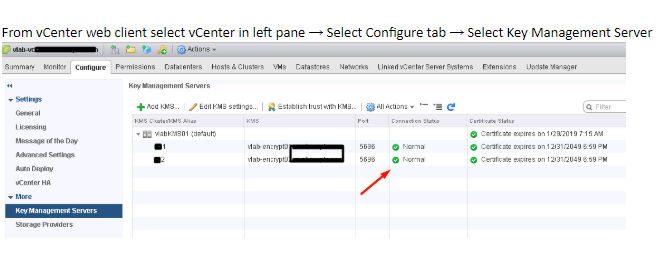
- Check vCenter and KMS server s connection status.
If connection statue is not Normal, make sure vCenter is connected to KMS and there are no trust related issues.
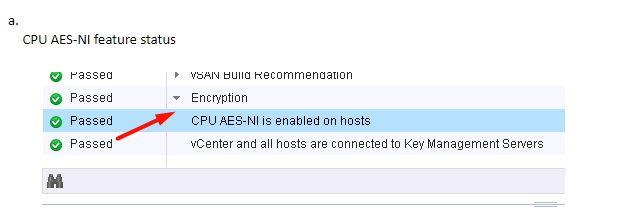
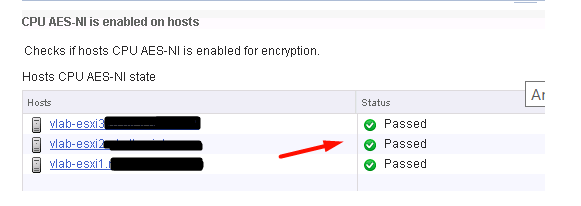
- Select ESXi Cluster where you have enabled vSAN Encryption. vSAN Health plugin see the KMS connectivity status and Disk Encryption status. If you have enabled Encryption then Encryption links are displayed in vSAN Health plugin.
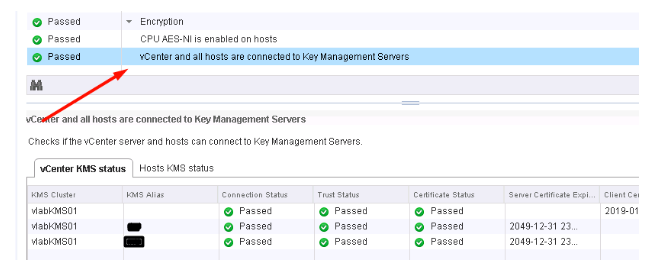
b. Check KMS and vCenter status
c. Check KMS and ESXi Host Connection Status
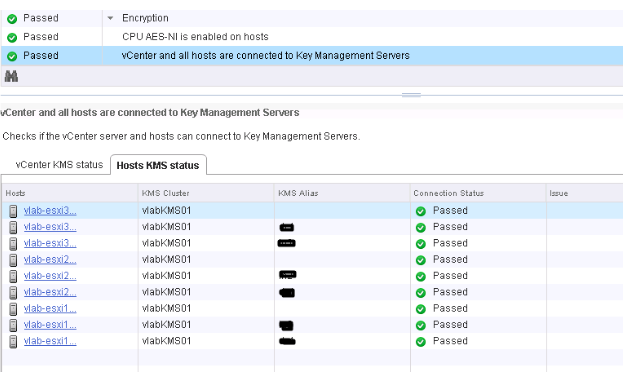
Flere oplysninger
It is recommended to watch the VMworld session below if you are looking to Implement VM Encryption or vSAN Encryption:
VMworld 2017 - SER1392BU - Honey, Where Are My Keys? Understanding and Avoiding Common Issues with Virtual Machine Encryption
https://www.youtube.com/watch?v=I5gR_dVqfz0&feature=youtu.be
VMworld 2017 - SER1392BU - Honey, Where Are My Keys? Understanding and Avoiding Common Issues with Virtual Machine Encryption
https://www.youtube.com/watch?v=I5gR_dVqfz0&feature=youtu.be
Berørte produkter
CloudLinkProdukter
CloudLinkArtikelegenskaber
Artikelnummer: 000022200
Artikeltype: How To
Senest ændret: 17 apr. 2026
Version: 4
Find svar på dine spørgsmål fra andre Dell-brugere
Supportservices
Kontrollér, om din enhed er dækket af supportservices.