CloudIQ: Cloud IQ nie wysyła danych do firmy Dell Technologies
Oversigt: CloudIQ: Cloud IQ nie wysyła danych do firmy Dell Technologies.
Denne artikel gælder for
Denne artikel gælder ikke for
Denne artikel er ikke knyttet til et bestemt produkt.
Det er ikke alle produktversioner, der er identificeret i denne artikel.
Instruktioner
Ten artykuł bazy wiedzy zawiera pewne kontrole, które należy wykonać od agenta pomocy technicznej na urządzeniach Cloud IQ SR, aby upewnić się, że jest on prawidłowo skonfigurowany i prawidłowo wysyła dane do firmy Dell Technologies:
-
Upewnij się, że cloud iq jest włączony zarówno w interfejsie CLI, jak i w interfejsie użytkownika
. Użyj polecenia, aby sprawdzić, czy zarządzanie chmurą jest włączone10:58:34 service@(none) spb:~> uemcli /sys/support/config show -detail Storage system address: 127.0.0.1 Storage system port: 443 HTTPS connection 1: Support proxy server enabled = no Support proxy server address = Support proxy server port = 0 Support proxy user name = Support proxy protocol = Unknown Automatic support contracts update enabled = no Cloud management enabled = yes From GUI: Please make sure that the check box of send data to CloudIQ is checked as below :
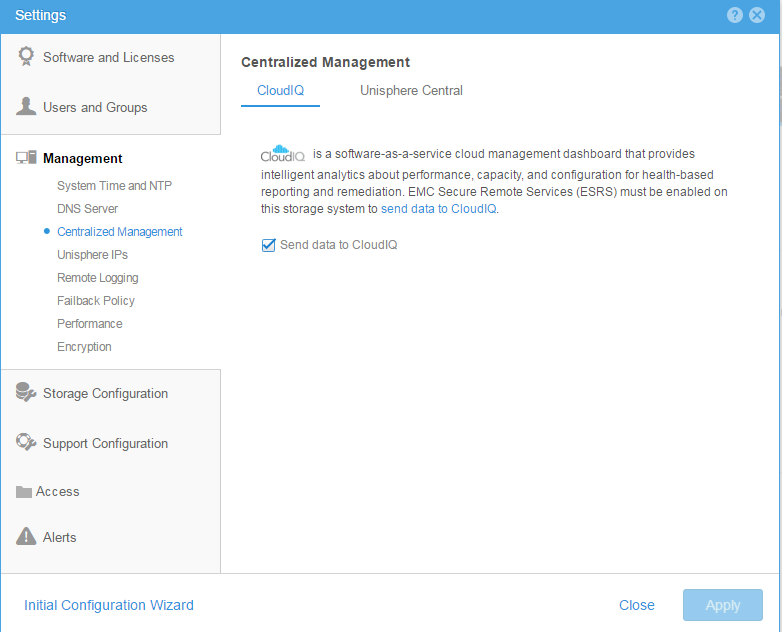
-
Upewnij się, że ESRS jest poprawnie skonfigurowany i czy wyświetlany jest zielony stan połączenia.
-
Upewnienie się, że wszystkie macierze Dell Technologies znajdują się w bazie instalacyjnej IB klienta
-
Upewnij się, że konto Cloud IQ klienta jest takie samo jak konto pomocy technicznej po stronie Dell Technologies.
Berørte produkter
Dell EMC Unity FamilyProdukter
CloudIQ, PowerMax, PowerMax 2000, PowerMax 8000, PowerMaxOS 5978, Unisphere for VMAX, Unisphere for PowerMax, Dell Unity 300, Dell EMC Unity 300F, Dell EMC Unity 350F, Dell EMC Unity 400, Dell EMC Unity 450F, Dell EMC Unity 500, Dell EMC Unity 500F
, Dell EMC Unity 600, Dell EMC Unity 600F, Dell EMC Unity 650F, Dell EMC Unity Family |Dell EMC Unity All Flash, Dell EMC Unity Family, Dell EMC Unity Hybrid, Dell EMC UnityVSA Professional Edition/Unity Cloud Edition, VMAX, VMAX 100K, VMAX 200K, VMAX 250F, VMAX 400K, VMAX 450F, VMAX 50K, VMAX 850F, VMAX 950F, VMAX All Flash, VMAX3 Series
...
Artikelegenskaber
Artikelnummer: 000022684
Artikeltype: How To
Senest ændret: 17 apr. 2026
Version: 7
Find svar på dine spørgsmål fra andre Dell-brugere
Supportservices
Kontrollér, om din enhed er dækket af supportservices.