CloudIQ:Cloud IQ 未將資料傳送至 Dell Technologies
Oversigt: CloudIQ:Cloud IQ 不會將資料傳送至 Dell Technologies。
Denne artikel gælder for
Denne artikel gælder ikke for
Denne artikel er ikke knyttet til et bestemt produkt.
Det er ikke alle produktversioner, der er identificeret i denne artikel.
Instruktioner
本知識文章包含一些必須由雲端 IQ SR 上的支援專員執行的檢查,以確保其已正確設定,並將資料正確傳送至 Dell Technologies:
-
請確定 CLI 和 UI
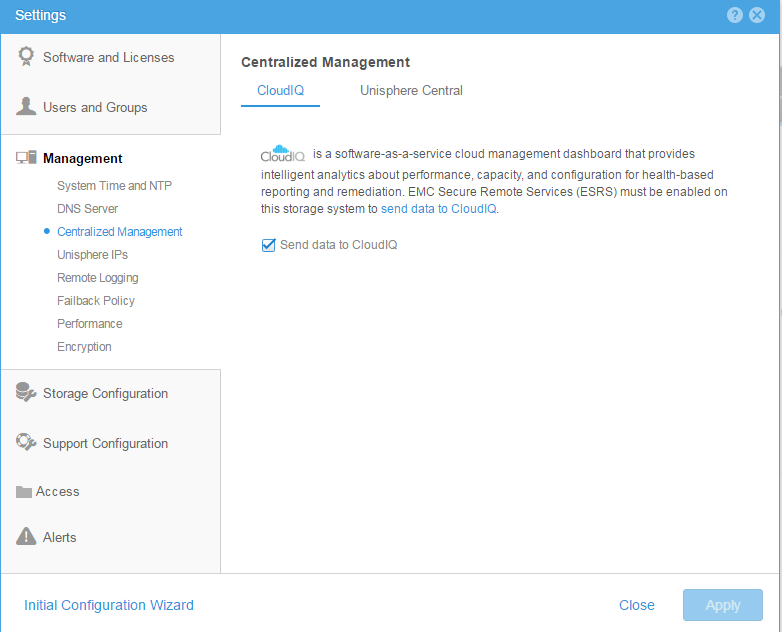
都已啟用 Cloud IQ 從 CLI:使用命令檢查是否啟用雲端管理10:58:34 service@(none) spb:~> uemcli /sys/support/config show -detail Storage system address: 127.0.0.1 Storage system port: 443 HTTPS connection 1: Support proxy server enabled = no Support proxy server address = Support proxy server port = 0 Support proxy user name = Support proxy protocol = Unknown Automatic support contracts update enabled = no Cloud management enabled = yes From GUI: Please make sure that the check box of send data to CloudIQ is checked as below :
-
請確定 ESRS 已正確設定,並顯示綠色的連線狀態
-
確保 Dell Technologies 陣列全部在客戶安裝基礎 IB 中。
-
請確定 客戶 cloud IQ 帳戶與 Dell Technologies 端的支援登入資料相同 。
Berørte produkter
Dell EMC Unity FamilyProdukter
CloudIQ, PowerMax, PowerMax 2000, PowerMax 8000, PowerMaxOS 5978, Unisphere for VMAX, Unisphere for PowerMax, Dell Unity 300, Dell EMC Unity 300F, Dell EMC Unity 350F, Dell EMC Unity 400, Dell EMC Unity 450F, Dell EMC Unity 500, Dell EMC Unity 500F
, Dell EMC Unity 600, Dell EMC Unity 600F, Dell EMC Unity 650F, Dell EMC Unity Family |Dell EMC Unity All Flash, Dell EMC Unity Family, Dell EMC Unity Hybrid, Dell EMC UnityVSA Professional Edition/Unity Cloud Edition, VMAX, VMAX 100K, VMAX 200K, VMAX 250F, VMAX 400K, VMAX 450F, VMAX 50K, VMAX 850F, VMAX 950F, VMAX All Flash, VMAX3 Series
...
Artikelegenskaber
Artikelnummer: 000022684
Artikeltype: How To
Senest ændret: 17 apr. 2026
Version: 7
Find svar på dine spørgsmål fra andre Dell-brugere
Supportservices
Kontrollér, om din enhed er dækket af supportservices.