PowerEdge: SupportAssist Enterprise Q&A
Oversigt: This document answers questions about SupportAssist Enterprise.
Denne artikel gælder for
Denne artikel gælder ikke for
Denne artikel er ikke knyttet til et bestemt produkt.
Det er ikke alle produktversioner, der er identificeret i denne artikel.
Instruktioner
Table of Content
-
When should I use SupportAssist for Servers to gather system state information and logs?
-
Why should a customer keep SupportAssist installed after gathering system state information?
When should I use Dell SupportAssist for Servers to gather system state information and logs?
Each customer is unique and may have different troubleshooting needs, security protocols, and change management policies. Dell SupportAssist for Servers is a fast and effective tool to gather system state information (AKA collections) for many customers.
Understanding the answers to the three questions below can help you quickly identify if the customer is a good candidate to use Dell SupportAssist for Servers. If the customer meets these three profile questions, it is recommended to propose Dell SupportAssist for Servers first to gather system state information.
| Question | Should I use Dell SupportAssist to collect? |
| Does the customer have at least one server with an Internet connection? | Yes |
| Is that server 9-13G server with a Microsoft, Red Hat Enterprise Linux, CentOS, or SUSE OS? | Yes |
| Is the customer willing to send systems state information and logs back to Dell for troubleshooting? | Yes |
For full details regarding supported models and OS versions, see the documentation on www.dell.com/supportassist.
Supplemental Information: What if the customer has questions about installing and using Dell SupportAssist?
Customers may have questioned why they should use Dell SupportAssist to gather this information rather than using other tools, here are some things to consider:
- Dell SupportAssist only requires a one-time installation to get system state information and logs for multiple devices and multiple requests.
- The end to end process to download, install, register, gather, and send to Dell is fast
- The interface is to use
Registration of Dell SupportAssist
- Why is Dell asking for customer’s contact information?
- In addition to gathering Point of Need system state information and logs, Dell SupportAssist can perform active monitoring and notify the customer in case any hardware failure is detected.
- Customers can choose to be contacted either by email or phone.
- Pro Support plus customers receive periodic reporting on Dell SupportAssist monitoring.
License Agreements
What is Dell SupportAssist asking me to agree with these license agreements?
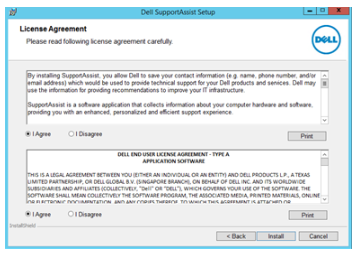
Agreement 1:
- Dell saves customer contact information to provide technical support
- Dell will also collect system state information and log files that contain the following information:
- User information: Computer name, domain, IP address, and Dell service tag
- Hardware configuration: Installed devices, processors, memory, network devices, and usage.
- Software configuration: Operating system, installed applications, and application usage
Agreement 2:
- Dell governs the use of the software including any associated media and publications
Security concerns (Information sent back to Dell)
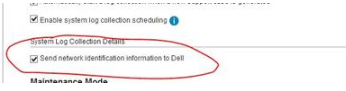
For security purposes - the customer can mask the network information in the logs sent back to Dell. The option is in the settings tab -> preferences within the Dell SupportAssist UI.
What are the different options to install Dell SupportAssist?
- If the customer is uncomfortable or cannot install Dell SupportAssist on the impacted or unhealthy device, Dell can install Dell SupportAssist on another device and run the collection by iDRAC.
- The automatic transfer of collections is 128-bit SSL encrypted and secure.
Why should a customer keep Dell SupportAssist installed after gathering system state information?
Customers have no obligation to keep Dell SupportAssist installed after a troubleshooting event. If they keep Dell SupportAssist running, it can help in the following ways.
- Dell SupportAssist can provide 24/7 Proactive and predictive monitoring. Dell SupportAssist can quickly notify Dell if a customer’s Dell ProSupport or Dell ProSupport Plus device experiences a critical failure.
- Dell ProSupport Plus customers can automatically receive a monthly email with recommended firmware and driver update reporting for Dell SupportAssist monitored devices.
- Customers can gather system state information at any time and review locally for any devices in the Dell SupportAssist list of monitored devices.
Berørte produkter
OEMR R230, OEMR R240, OEMR R250, OEMR XE R250, OEMR R260, OEMR XE R260, OEMR R330, OEMR R340, OEMR R350, OEMR XE R350, OEMR R360, OEMR XE R360, OEMR R430, OEMR R440, OEMR R450, OEMR R530, OEMR R540, OEMR R550, OEMR R630, OEMR R640, OEMR XL R640
, OEMR R6415, OEMR R650, OEMR R650xs, OEMR R6515, OEMR R6525, OEMR R660, OEMR XL R660, OEMR R660xs, OEMR R6615, OEMR R6625, OEMR R730, OEMR R730xd, OEMR R740, OEMR XL R740, OEMR R740xd, OEMR XL R740xd, OEMR R740xd2, OEMR R7415, OEMR R7425, OEMR R750, OEMR R750xa, OEMR R750xs, OEMR R7515, OEMR R7525, OEMR R760, OEMR R760xa, OEMR R760XD2, OEMR XL R760, OEMR R760xs, OEMR R7615, OEMR R7625, OEMR R830, OEMR R840, OEMR R860, OEMR R930, OEMR R940, OEMR R940xa, OEMR R960, OEMR T330, OEMR T340, OEMR T350, OEMR T360, OEMR T430, OEMR T440, OEMR T550, OEMR T560, OEMR T630, OEMR T640, OEMR XL T640, OEMR XL R230, OEMR XL R330, OEMR XL R340, OEMR XL R630, OEMR XL R660xs, OEMR XL R6615, OEMR XL R6625, OEMR XL R730, OEMR XL R730XD, OEMR XL R760xs, OEMR XL R7615, OEMR XL R7625, OEMR XR11, OEMR XR12, PowerEdge C4130, Poweredge C4140, PowerEdge c6300, PowerEdge c6320, PowerEdge c6320p, PowerEdge C6400, PowerEdge C6420, PowerEdge C6520, PowerEdge C6525, PowerEdge C6600, PowerEdge C6615, PowerEdge C6620, Poweredge FC430, Poweredge FC630, PowerEdge FC640, Poweredge FC830, PowerEdge FD332, PowerEdge FM120x4 (for PE FX2/FX2s), PowerEdge HS5610, PowerEdge HS5620, PowerEdge M630, PowerEdge M630 (for PE VRTX), PowerEdge M640, PowerEdge M640 (for PE VRTX), PowerEdge M830, PowerEdge M830 (for PE VRTX), PowerEdge MX5016s, PowerEdge MX7000, PowerEdge MX740C, PowerEdge MX750c, PowerEdge MX760c, PowerEdge MX840C, PowerEdge R230, PowerEdge R240, PowerEdge R250, PowerEdge R260, PowerEdge R330, PowerEdge R340, PowerEdge R350, PowerEdge R360, PowerEdge R430, PowerEdge R440, PowerEdge R450, PowerEdge R530, PowerEdge R530xd, PowerEdge R540, PowerEdge R550, PowerEdge R630, PowerEdge R640, PowerEdge R6415, PowerEdge R650, PowerEdge R650xs, PowerEdge R6515, PowerEdge R6525, PowerEdge R660, PowerEdge R660xs, PowerEdge R6615, PowerEdge R6625, PowerEdge R670, PowerEdge R730, PowerEdge R730xd, PowerEdge R740, PowerEdge R740XD, PowerEdge R740XD2, PowerEdge R7415, PowerEdge R7425, PowerEdge R750, PowerEdge R750XA, PowerEdge R750xs, PowerEdge R7515, PowerEdge R7525, PowerEdge R760, PowerEdge R760XA, PowerEdge R760xd2, PowerEdge R760xs, PowerEdge R7615, PowerEdge R7625, PowerEdge R770, PowerEdge R830, PowerEdge R840, PowerEdge R860, PowerEdge R930, PowerEdge R940, PowerEdge R940xa, PowerEdge R960, PowerEdge T130, PowerEdge T140, PowerEdge T150, PowerEdge T160, PowerEdge T30, PowerEdge T330, PowerEdge T340, PowerEdge T350, PowerEdge T360, PowerEdge T40, PowerEdge T430, PowerEdge T440, PowerEdge T550, PowerEdge T560, PowerEdge T630, PowerEdge T640
...
Artikelegenskaber
Artikelnummer: 000060848
Artikeltype: How To
Senest ændret: 01 jun. 2026
Version: 7
Find svar på dine spørgsmål fra andre Dell-brugere
Supportservices
Kontrollér, om din enhed er dækket af supportservices.