Dell Data Securityアンインストーラーをダウンロードする方法
Oversigt: 次の手順に従って、Dell Data Securityアンインストーラーをダウンロードする方法について説明します。
Denne artikel gælder for
Denne artikel gælder ikke for
Denne artikel er ikke knyttet til et bestemt produkt.
Det er ikke alle produktversioner, der er identificeret i denne artikel.
Instruktioner
注:
- 「対象製品」に記載されている製品は、アクティブな状態ではない場合があります。製品のサポートに関する最新情報については、「Dell Data Securityに関する製品ライフサイクル(サポート終了/ライフサイクル終了)」を参照してください。代替記事に関する質問がある場合は、担当のセールス チームに連絡するか、またはendpointsecurity@dell.comにお問い合わせください。
- 現在の製品に関する追加情報については、Endpoint Securityを参照してください。
Dell Data Securityアンインストーラーは、リストされているWindows Dell Data Security(旧Dell Data Protection)の影響を受けた製品について、合理的な削除方法を提供します。この記事では、これらの製品のDell Data Securityアンインストーラーを入手する手順について説明します。
対象製品:
- Dell Encryption Enterprise
- Dell Data Protection | Enterprise Edition
- Dell Encryption Personal
- Dell Data Protection | Personal Edition
- Dell Encryption External Media
- Dell Data Protection | External Media Edition
- Dell Data Guardian
- Dell Encryption Enterprise Self-Encrypting Drive Manager
- Dell BitLocker Manager
- デルのフル ディスク暗号化
- Dell Data Protection | Secure Lifecycle
- Dell Data Protection | Cloud Edition
- Dell Endpoint Security Suite Enterprise
- Dell Endpoint Security Suite Pro
- Dell Threat Defense
- Dell Data Protection | Server Encryption
- Dell Data Protection | Security Tools
影響を受けるバージョン:
- v8.0.X以降
対象オペレーティング システム:
- Windows
- Webブラウザーで、https://www.dell.com/support/homeにアクセスします。
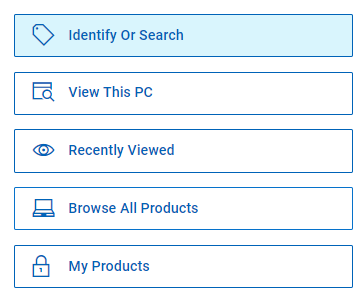
- [すべての製品を参照]をクリックします。
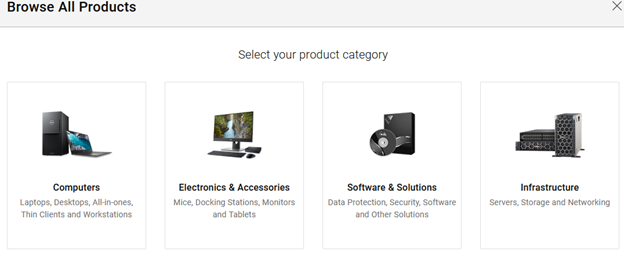
- [ソフトウェアおよびソリューション]をクリックします。
- [Security](セキュリティ)をクリックします。

- [Dell Data Security]をクリックします。

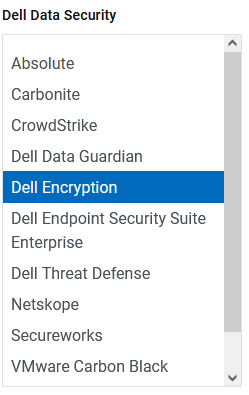
- [Dell Encryption]をクリックします。
- [Select This Product]をクリックします。
![[Select This Product]](https://supportkb.dell.com/img/ka0Do0000005wFaIAI/ka0Do0000005wFaIAI_ja_6.jpeg)
- ドライバーおよびダウンロードをクリックします。

- [オペレーティング システム]ドロップダウンから、[Windows 7 [X-bit]]、[Windows 8 [X-bit]]、[Windows 8.1 [X-bit]]、[Windows 10 [X-bit]]、[Windows 11]のいずれかを選択します。

- [Dell Data Securityアンインストーラー]の右側にある[ダウンロード]をクリックします。
 リリース日は、上記のスクリーンショットと異なる場合があります。
Berørte produkter
Dell Data Guardian, Dell Encryption, Dell Threat Defense, Dell Endpoint Security Suite Pro, Dell Endpoint Security Suite EnterpriseArtikelegenskaber
Artikelnummer: 000130754
Artikeltype: How To
Senest ændret: 05 aug. 2026
Version: 15
Find svar på dine spørgsmål fra andre Dell-brugere
Supportservices
Kontrollér, om din enhed er dækket af supportservices.