What is the Alienware OSD Application
Oversigt: The Alienware On-Screen Display (OSD) application enables custom messages to be displayed on the laptop through the Windows Notifications.
Denne artikel gælder for
Denne artikel gælder ikke for
Denne artikel er ikke knyttet til et bestemt produkt.
Det er ikke alle produktversioner, der er identificeret i denne artikel.
Instruktioner
What is the Alienware OSD application?
The Alienware On-Screen Display (OSD) application enables custom messages to be displayed through the Windows notifications. (They appear at the lower right-hand corner of the screen.)
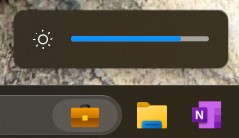
Affected Platforms:
- Alienware Area-51m
- Alienware Area-51m R2
- Alienware m15 R2
- Alienware m15 R3
- Alienware m15 R4
- Alienware m15 Ryzen Edition R5
- Alienware m17 R2
- Alienware m17 R3
- Alienware m17 R4
- Alienware m17 R5 AMD
- Alienware x14
- Alienware x15 R1
- Alienware x15 R2
- Alienware x17 R1
- Alienware x17 R2
Note: Alienware laptops released since 2023 do not require a separate Alienware OSD application.
What happens after uninstalling the Alienware OSD application?
No further laptop-specific notifications are received if the Alienware OSD application is not installed. The notifications aid in better understanding the operation of the laptop.
Note: Important: The Alienware OSD application does not affect the performance or functionality of the laptop.
Is the Alienware OSD application available to download?
Yes, the Alienware OSD application is available for download at the: Dell Drivers & Downloads page
Berørte produkter
Alienware Area-51m, Alienware Area-51m R2, Alienware M15 R2, Alienware M15 R3, Alienware m15 R4, Alienware m15 Ryzen Edition R5, Alienware M17 R2, Alienware M17 R3, Alienware m17 R4, Alienware m17 R5 AMDProdukter
Alienware x14, Alienware x15 R1, Alienware x15 R2, Alienware x17 R1, Alienware x17 R2Artikelegenskaber
Artikelnummer: 000177587
Artikeltype: How To
Senest ændret: 15 jun. 2026
Version: 9
Find svar på dine spørgsmål fra andre Dell-brugere
Supportservices
Kontrollér, om din enhed er dækket af supportservices.