Windows 11 Incorrect Operating System Version Reported
Oversigt: Learn about the specific applications and computer settings on Windows 11 detects the Operating System as Windows 10.
Denne artikel gælder for
Denne artikel gælder ikke for
Denne artikel er ikke knyttet til et bestemt produkt.
Det er ikke alle produktversioner, der er identificeret i denne artikel.
Symptomer
In multiple applications and computer settings, Windows 11 identifies as Windows 10 to prevent application incompatibilities.
System settings that identify as Windows 10.
- Microsoft Edge and other Chromium-based browsers such as Google Chrome Browser, Brave, and so on show Windows 10 in the user agent string.
- Mozilla/5.0 (Windows NT 10.0; Win64; x64) AppleWebKit/537.36 (KHTML, like Gecko) Chrome/95.0.4638.69 Safari/537.36
- Websites that use the user agent string to identify the actual Windows version for digital content such as driver downloads and self-help may direct to incorrect content.
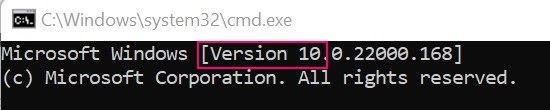
- Windows Command Prompt identifies as Version 10.
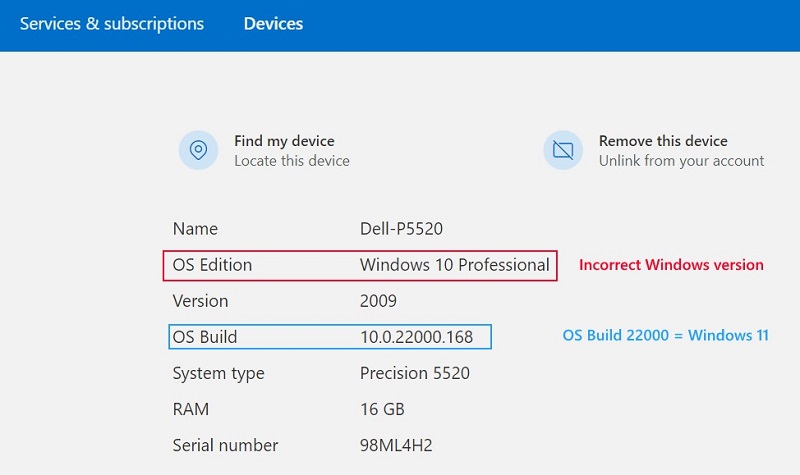
- Microsoft Account Device properties
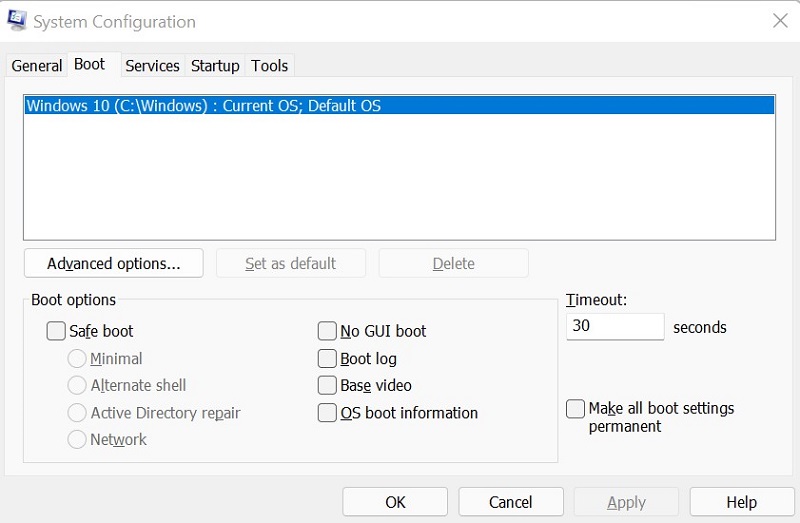
- System Configuration (MSCONFIG)
Årsag
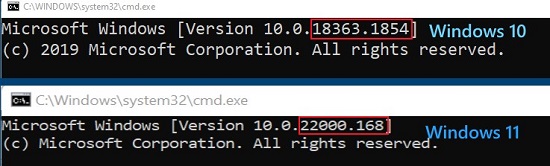
Windows uses the internal build number to differentiate between Windows 11 (Build 22000 and higher) and Windows 10 (Build below 22000).
Løsning
To correctly identify Windows version on your computer, use Winver. For instructions, see Microsoft knowledge-base article: Which version of Windows operating system am I running
Berørte produkter
Alienware, Inspiron, OptiPlex, Vostro, XPS, G Series, G Series, Alienware, Inspiron, Latitude, Vostro, XPS, Fixed Workstations, Mobile WorkstationsArtikelegenskaber
Artikelnummer: 000193571
Artikeltype: Solution
Senest ændret: 12 maj 2026
Version: 8
Find svar på dine spørgsmål fra andre Dell-brugere
Supportservices
Kontrollér, om din enhed er dækket af supportservices.