AppSync: How to determine the version in use
Oversigt: How to determine the version of AppSync in use.
Denne artikel gælder for
Denne artikel gælder ikke for
Denne artikel er ikke knyttet til et bestemt produkt.
Det er ikke alle produktversioner, der er identificeret i denne artikel.
Instruktioner
To determine the current version of AppSync software in use, follow one of the methods listed below:
AppSync UI:
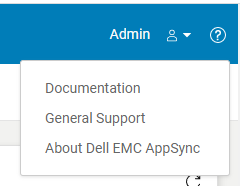
Fig.2
AppSync Logs:
Note: The version of AppSync displayed in "Control Panel\Programs\Programs and Features" is not sufficient as it does not confirm whether AppSync hotfixes have been installed.
AppSync UI:
- Open the AppSync UI and login.
- Click on "?" in the top right of the window. (Fig.1)
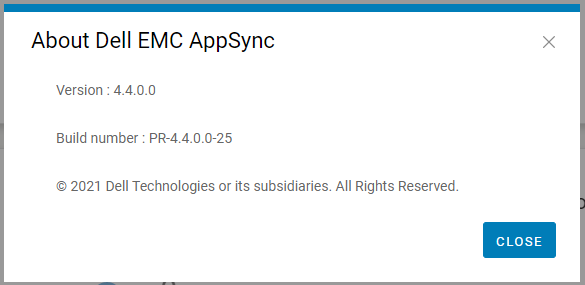
- Click on "About Dell EMC Appsync". (Fig.2)
- Quote this version and build number displayed to Dell AppSync technical support.
Fig.2
AppSync Logs:
- On the AppSync server, navigate to the logs directory in the install location (typically C:\EMC\AppSync\jboss\logs).
- Open server.log using a text editor.
- The first two line indicates the version of AppSync in use and whether any hotfixes are installed.
e.g. Sample server.log snippet (version = 4.3.0.0 & hotfix 3315_R1 is installed)
The current version of AppSync Server is 4.3.0.0_3315_R1
4. Quote this version and hotfix status displayed to Dell AppSync technical support.
The current version of AppSync Server is 4.3.0.0_3315_R1
Note: The version of AppSync displayed in "Control Panel\Programs\Programs and Features" is not sufficient as it does not confirm whether AppSync hotfixes have been installed.
Berørte produkter
AppSync, AppSyncArtikelegenskaber
Artikelnummer: 000199464
Artikeltype: How To
Senest ændret: 14 maj 2026
Version: 7
Find svar på dine spørgsmål fra andre Dell-brugere
Supportservices
Kontrollér, om din enhed er dækket af supportservices.