CloudLink: CloudLink SSL Web certificate is Expiring
Oversigt: The CloudLink SSL Web certificate is expiring.
Denne artikel gælder for
Denne artikel gælder ikke for
Denne artikel er ikke knyttet til et bestemt produkt.
Det er ikke alle produktversioner, der er identificeret i denne artikel.
Symptomer
The CloudLink SSL Web certificate is expiring.
By default, CloudLink Center uses a self-signed certificate. When connecting to CloudLink Center, the web browser may display several security warnings. These warnings are displayed because self-signed certificates do not have the same level of trust as certificates issued and signed by a trusted certification authority (CA).
Årsag
The SSL certificate date was set to expire.
To stop these warnings from being displayed, obtain and upload to CloudLink Center a certificate that has been signed for CloudLink by a trusted CA.
You can upload an externally generated certificate and private key, or generate a certificate signing request for a private key generated by CloudLink Center.
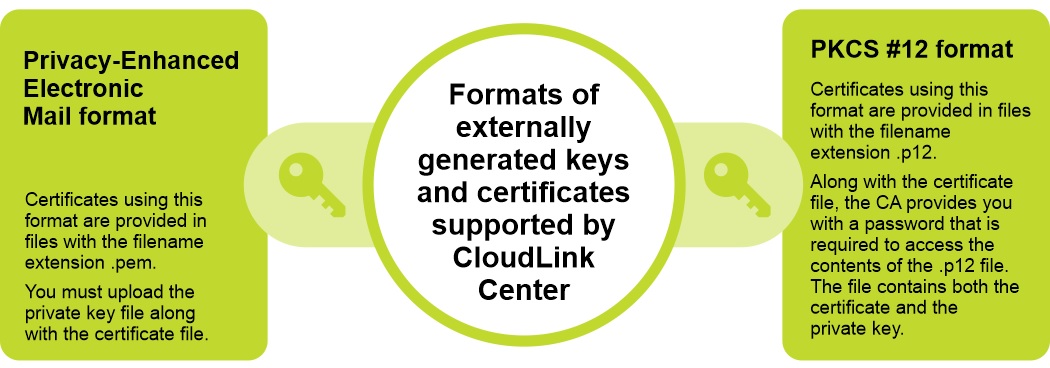
CloudLink supports two formats for externally generated keys and certificates:
Privacy-Enhanced Electronic Mail format and PKCS #12 format.
Løsning
To resolve this issue, upload a new SSL certificate to the CloudLink appliance.
Steps:
Note: When uploading a new certificate and an optional private key, the web server restarts and the connection is terminated. After uploading a certificate signed for CloudLink Center, verify the subject, fingerprint, and end date to ensure that it is the certificate that is wanted.
Steps:
- Log in to CloudLink Center.
- Click Server > SSL > Upload. The Upload Web SSL Certificate is displayed.
- In the Upload Web SSL Certificate dialog box, enter the following information:
- From the Certificate Format list, select the required certificate format.
- In the Certificate box, click to select the certificate.
- In the Key box, click to select the key.
- Click Upload.
Berørte produkter
CloudLinkArtikelegenskaber
Artikelnummer: 000199912
Artikeltype: Solution
Senest ændret: 14 maj 2026
Version: 8
Find svar på dine spørgsmål fra andre Dell-brugere
Supportservices
Kontrollér, om din enhed er dækket af supportservices.