Microsoft SQL Server Summary.txt Log
Oversigt: The Microsoft SQL Server Summary .txt-file log is created when SQL Server installations, uninstallations, feature changes, and product updates are applied. This article explains what to expect in this file. ...
Denne artikel gælder for
Denne artikel gælder ikke for
Denne artikel er ikke knyttet til et bestemt produkt.
Det er ikke alle produktversioner, der er identificeret i denne artikel.
Symptomer
A Microsoft SQL Server installation or uninstallation is failing to complete successfully.
Årsag
Microsoft SQL Server installations or uninstallations can fail for many different reasons, the SQL Server
Summary.txt log may provide information as to why the installation\uninstallation events have failed.
Løsning
- The default file location for the
Summary.txtlog in a SQL Server 2019 installation is the "C:\Program Files\Microsoft SQL Server\150\Setup Bootstrap\Log" folder. The installation folder may be in another drive location, the "Log" folder is located in that installation location.
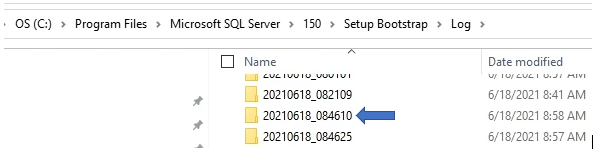
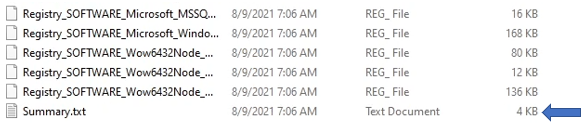
- The "Log" folder contains past installation information as seen above in individual folders. Each folder is stamped with a date and installation number. The Summary.txt log is found in the root of the "Log" folder usually at the bottom of the folder and file list.
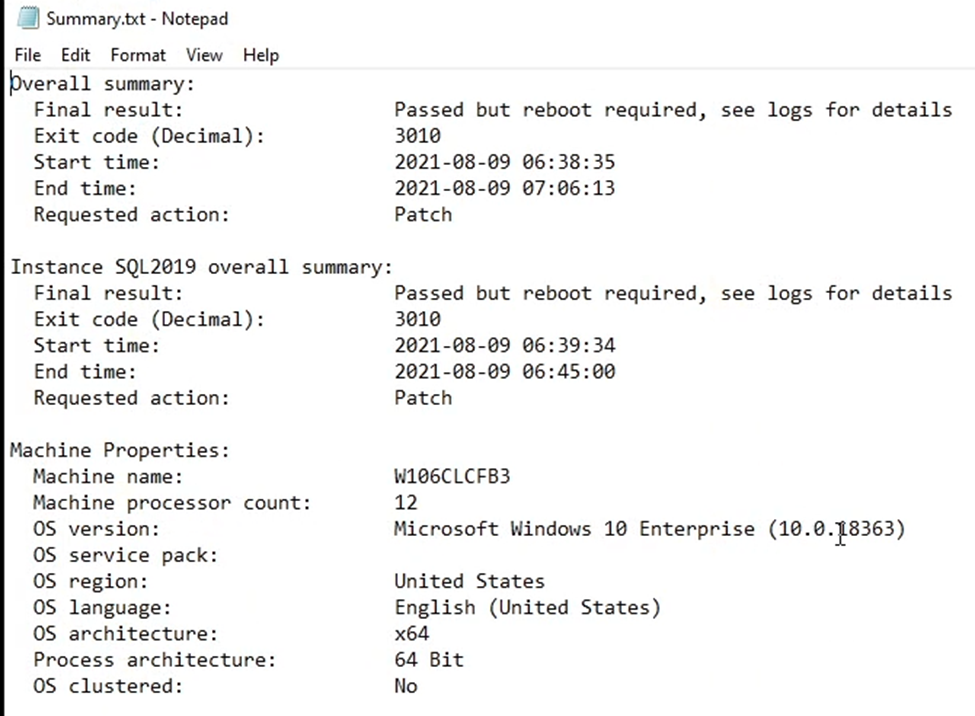
- SQL Server installation information in the
Summary.txtlog includes multiple pieces of information that can either confirm a successful installation or show information related to a failed installation.
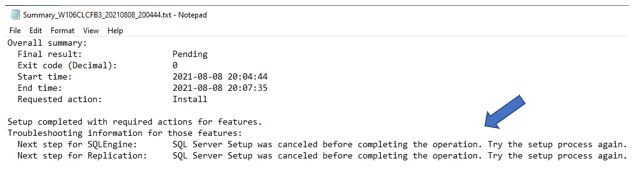
- Below is an example showing information about an intentionally forced failure involving the "SQLEngine and Replication" features. This is only an example, an unforced failure shows information about the failure that can be used for further investigation of the event.
Berørte produkter
Dell Quickstart Data Warehouse Appliance, Microsoft Windows Server 2016, Microsoft Windows Server 2019, Microsoft Windows Server 2022, Microsoft Windows 2012 Server, Microsoft Windows 2012 Server R2, Prosupport for Microsoft SoftwareArtikelegenskaber
Artikelnummer: 000200565
Artikeltype: Solution
Senest ændret: 14 maj 2026
Version: 7
Find svar på dine spørgsmål fra andre Dell-brugere
Supportservices
Kontrollér, om din enhed er dækket af supportservices.