什么是 Dell Pair?
Oversigt: 以下文章提供有关 Dell Pair 软件的信息。此软件使您能够更轻松地将戴尔蓝牙设备连接到您的戴尔计算机。
Denne artikel gælder for
Denne artikel gælder ikke for
Denne artikel er ikke knyttet til et bestemt produkt.
Det er ikke alle produktversioner, der er identificeret i denne artikel.
Instruktioner
注意: 本文不再维护或更新。
注意: 戴尔支持针对 Dell Pair 的服务将于 2026 年 3 月 26 日结束。
目录:
简介
Dell Pair 是一款在某些戴尔平台上提供的软件实用程序,支持与戴尔蓝牙设备配对。(例如:无线鼠标、键盘或耳机等蓝牙设备。)启用 Dell Pair 后,实用程序用户界面 (UI) 会自动提示与戴尔计算机蓝牙检测范围内的任何戴尔蓝牙设备配对。
软件要求
Dell Pair 应用程序有以下要求:
- Windows 11
- Windows 10(版本 10.0.19041 及更高版本。)
- 蓝牙版本 5.0 或更高版本
- 已启用蓝牙
安装 Dell Pair
Dell Pair 应用程序不再可供下载。Windows 10 版本 1803 和更高版本以及 Windows 11 包括具有类似功能的 Swift Pair:

Dell Pair 应用程序的所有支持文档均可在戴尔支持网站上找到:
Dell Pair 功能
Dell Pair 通知会自动显示。当支持 Dell Pair 检测的蓝牙设备处于开启状态并且在戴尔计算机的检测范围内时,将显示通知。
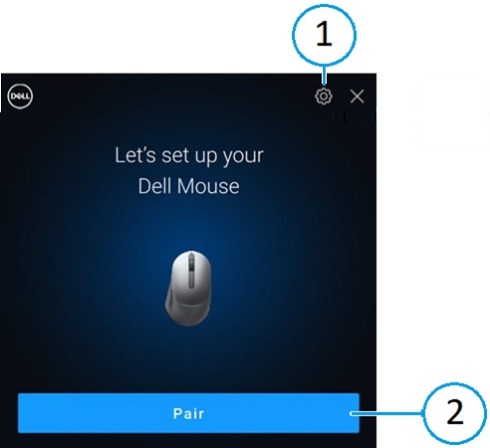
| 1 | Dell Pair 设置 | 2 | 使用蓝牙开始配对 |
当 UI 出现时,单击 Pair(配对)以将戴尔蓝牙设备与戴尔计算机配对。
从开始菜单打开 Dell Pair 应用程序的用户界面:
- 开始菜单
-
戴尔
-
Dell Pair
-
-
从 Dell Pair 用户界面中,更改 Dell Pair 设置。通过将开关滑动到 ON 或 OFF 位置来启用或禁用 Dell Pair 应用程序。
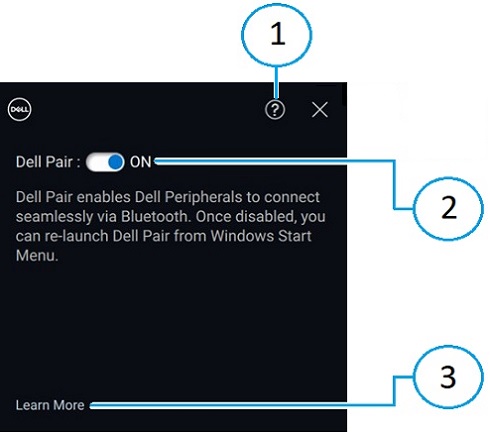
| 1 | 软件版本信息 | 2 | 启用或禁用 Dell Pair |
| 3 | 了解更多 |
提醒:禁用应用程序后,从 Windows 开始菜单重新启动 Dell Pair。
支持的平台和外围设备
以下计算机上预安装了 Dell Pair 软件:
| Inspiron 灵越 | Vostro 成就 | XPS | Latitude | Precision |
|---|---|---|---|---|
| 13 5320 | 3440 | 13 9315 | 3330 | 3480 |
| 13 5330 | 5320 | 13 9315 二合一 | 3340 | 3490 |
| 14 5420 | 5620 | 13 Plus 9320 | 3440 | 3570 |
| 14 5425 | 5625 | 13 9340 | 3450 | 3571 |
| 14 5430 | 5630 | 14 9350 | 3540 | 3580 |
| 14 5435 | 5635 | 14 9440 | 3550 | 3581 |
| 16 5620 | 5640 | 15 9520 | 5320 | 3590 |
| 14 5440 | 7620 | 15 9530 | 5330 | 3591 |
| 14 5445 | 16 9640 | 5340 | 5470 | |
| 16 5625 | 17 9720 | 5350 | 5480 | |
| 16 5630 | 17 9730 | 5430 | 5490 | |
| 16 5635 | 5431 | 5570 | ||
| 14 5640 | 5440 | 5690 | ||
| 14 5645 | 5450 | 5770 | ||
| 14 Plus 7420 | 5455 | 7670 | ||
| 14 7430 二合一 | 5530 | 7680 | ||
| 14 Plus 7430 | 5531 | 7770 | ||
| 14 7435 二合一 | 5540 | 7780 | ||
| 14 Plus 7440 | 5550 | |||
| 14 7440 二合一 | 7320 | |||
| 14 7445 二合一 | 7330 | |||
| 16 Plus 7620 | 7350 | |||
| 16 Plus 7630 | 7350 可拆卸式 | |||
| 16 Plus 7640 | 7420 | |||
| 16 7630 二合一 | 7430 | |||
| 16 7635 二合一 | 7450 | |||
| 16 7640 二合一 | 7455 | |||
| 7530 | ||||
| 7650 | ||||
| 9330 | ||||
| 9430 | ||||
| 9440 二合一 | ||||
| 9450 二合一 |
| Dell Pro | Dell Plus | Dell Pro Premium | Dell Pro Plus | 戴尔 Pro Rugged |
|---|---|---|---|---|
| PC14255 | DB16250 | PA13250 | PB13250 | RA13250 |
| PC16255 | DB16255 | PA14250 | PB13255 | RB14250 |
| PB14250 | ||||
| PB14255 | ||||
| PB16250 | ||||
| PB16255 |
提醒:您收到的计算机是否没有安装 Dell Pair?如果是这样,请在以下支持站点页面上查看服务手册中的安装要求和最新支持的型号:
| 支持的外围设备 | ||
|---|---|---|
| Dell Pro 紧凑型静音鼠标 (MS355):或者,戴尔静音鼠标 | 戴尔 Pro Plus 无线主动降噪 (ANC) 耳机 (WL5024):或者,戴尔 Pro 无线 ANC 耳机 | Dell Pro Plus 无线扬声器 SL525 |
| Dell Pro 紧凑型静音键盘和鼠标 (KM555):或者,戴尔静音键盘和鼠标 | Dell Pro Premium 无线主动降噪耳机 WL7024:或者,Dell Premier 无线主动降噪耳机 | |
| Dell 蓝牙旅行鼠标 (MS700) | Dell Pro 无线耳机 WL3024:或者,戴尔无线耳机 | |
Dell Pro Premium 协作键盘和鼠标 KM900:
|
戴尔 Pro Plus 耳塞式耳机 EB525 | |
| Dell Pro Premium 鼠标 MS900 | ||
故障处理
| 问题 | 可能的解决方案 |
|---|---|
| 首次打开戴尔蓝牙设备时,Dell Pair 通知未打开。 |
|
| Dell Pair 报告配对错误。 |
|
Flere oplysninger
了解如何使用与计算机配合使用的蓝牙设备以及如何对其相关问题进行故障处理。查找有关故障处理步骤、入门指南和相关支持视频的信息以获得帮助。
如需查看 Dell Pair 用户指南,请浏览至 Dell Pair 手册页面。轻触或单击用户指南右侧的 View PDF,它位于 Manuals and Documents 部分。
Berørte produkter
Dell 16 Plus DB16250, Dell 16 Plus DB16255, Dell Pro 5 Earbuds EB525, Dell Pro Premium Collaboration Keyboard KB900, Dell Pro 5 Silent Compact Keyboard and Mouse KM555, Dell Pro Premium Collaboration Keyboard and Mouse KM900
, Dell Pro Premium Mouse MS900, Dell Pair, Dell Pro 13 Premium PA13250, Dell Pro 14 Premium PA14250, Dell Pro 13 Plus PB13250, Dell Pro 13 Plus PB13255, Dell Pro 14 Plus PB14250, Dell Pro 14 Plus PB14255, Dell Pro 16 Plus PB16250, Dell Pro 16 Plus PB16255, Dell Pro 14 PC14255, Dell Pro 16 PC16255, Dell Pro Rugged 13 RA13250, Dell Pro Rugged 14 RB14250, Dell Pro 5 Wireless Speakerphone SL525, Dell Pro 3 Wired Speakerphone SP325, Dell Pro Wireless Headset WL3024, Dell Pro Plus Wireless ANC Headset WL5024, Dell Pro Premium Wireless ANC Headset WL7024, Inspiron 13 5320, Inspiron 13 5330, Inspiron 14 5420, Inspiron 14 5425, Inspiron 14 5430, Inspiron 14 5435, Inspiron 14 5440, Inspiron 14 5445, Inspiron 14 Plus 7420, Inspiron 14 7430 2-in-1, Inspiron 14 Plus 7430, Inspiron 14 7440 2-in-1, Inspiron 14 Plus 7440, Inspiron 14 7445 2-in-1, Inspiron 16 5620, Inspiron 16 5625, Inspiron 16 5630, Inspiron 16 5635, Inspiron 16 5640, Inspiron 16 5645, Inspiron 16 Plus 7620, Inspiron 16 7630 2-in-1, Inspiron 16 Plus 7630, Inspiron 16 7635 2-in-1, Inspiron 16 7640 2-in-1, Inspiron 16 Plus 7640, Latitude 3330, Latitude 3340, Latitude 5320, Latitude 5330, Latitude 5340, Latitude 5350, Latitude 7320, Latitude 7330, Latitude 7340, Latitude 7350, Latitude 7350 Detachable, Latitude 9330, Latitude 3440, Latitude 3450, Latitude 5431, Latitude 5440, Latitude 5450, Latitude 5455, Latitude 7420, Latitude 7430, Latitude 7450, Latitude 7455, Latitude 9430, Latitude 9440 2-in-1, Latitude 9450 2-in-1, Latitude 3540, Latitude 5530, Latitude 5531, Latitude 5540, Latitude 5550, Latitude 7530, Latitude 7650, Latitude 5430, Precision 3480, Precision 3490, Precision 5470, Precision 5480, Precision 5490, Precision 3570, Precision 3571, Precision 3580, Precision 3581, Precision 3590, Mobile Precision 3591, Mobile Precision 5690, Precision 7680, Precision 5770, Precision 7770, Precision 7780, Vostro 5320, Vostro 14 3440, Vostro 5620, Vostro 5625, Vostro 16 5630, Vostro 16 5635, Vostro 16 5640, Vostro 7620, XPS 13 9315 2-in-1, XPS 13 9315, XPS 13 9340, XPS 13 9350, XPS 15 9520, XPS 15 9530, XPS 16 9640, XPS 17 9720, XPS 17 9730
...
Produkter
Dell PairArtikelegenskaber
Artikelnummer: 000201693
Artikeltype: How To
Senest ændret: 06 jul. 2026
Version: 25
Find svar på dine spørgsmål fra andre Dell-brugere
Supportservices
Kontrollér, om din enhed er dækket af supportservices.