PowerEdge: iDRAC - Virtual Keyboard and Virtual Media Troubleshooting
Oversigt: Integrated Dell Remote access Console (iDRAC) Virtual Keyboard/Virtual Media Troubleshooting
Denne artikel gælder for
Denne artikel gælder ikke for
Denne artikel er ikke knyttet til et bestemt produkt.
Det er ikke alle produktversioner, der er identificeret i denne artikel.
Symptomer
iDRAC Virtual Keyboard/Mouse and Virtual Media are not responding.
Årsag
This issue can be caused by a device plugged into the USB Ports or an incorrect setting in the Virtual Console Settings.
Løsning
- Click Configuration -> Virtual Console -> to view the Virtual Console settings, under Keyboard/Mouse Attach State ensure that it is not set to detached and instead set to Attached or Auto.
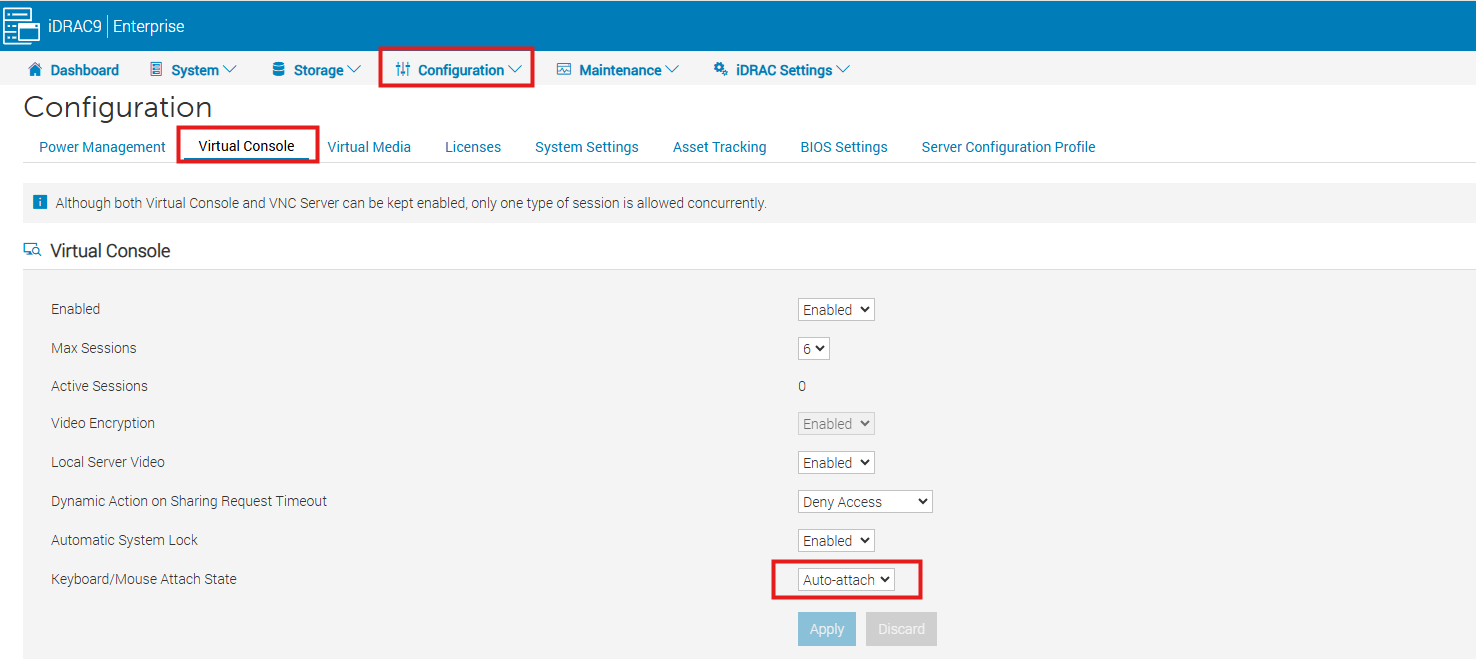
- Disconnect ALL USB devices.
- Examples: External USB hard drive's, USB Keyboard, USB Mouse, KVM Dongle.
- Examples: External USB hard drive's, USB Keyboard, USB Mouse, KVM Dongle.
Berørte produkter
iDRAC7, iDRAC8, iDRAC9Artikelegenskaber
Artikelnummer: 000202404
Artikeltype: Solution
Senest ændret: 14 sep. 2026
Version: 4
Find svar på dine spørgsmål fra andre Dell-brugere
Supportservices
Kontrollér, om din enhed er dækket af supportservices.