Dell ESA 7.0 PAK Manager PAK file DellEMCEnterpriseStorageAnalytics-7.0.0-build-2260_signed.pak is not in zip format.
Oversigt: PAK Manager PAK file DellEMCEnterpriseStorageAnalytics-7.0.0-build-2260_signed.pak is not in zip format.
Denne artikel gælder for
Denne artikel gælder ikke for
Denne artikel er ikke knyttet til et bestemt produkt.
Det er ikke alle produktversioner, der er identificeret i denne artikel.
Symptomer
In VMware vRealize Operations (vROps), when trying to upload this PAK file DellEMCEnterpriseStorageAnalytics-7.0.0-build-2260_signed.pak, keep seeing a message appear:
PAK Manager: PAK file DellEMCEnterpriseStorageAnalytics-7.0.0-build-2260_signed.pak is not in zip format.OR
PAK Manager: PAK file reservedTemp_2696460655826554461.pak is not in zip format

Årsag
The downloaded pak file was corrupted.
Løsning
Before using the downloaded file, it is always good practice to run a checksum to confirm the integrity of the file.
1. Download the ESA 7.0 file (DellEMCEnterpriseStorageAnalytics-7.0.0-build-2260_signed.pak) and get its checksum value.
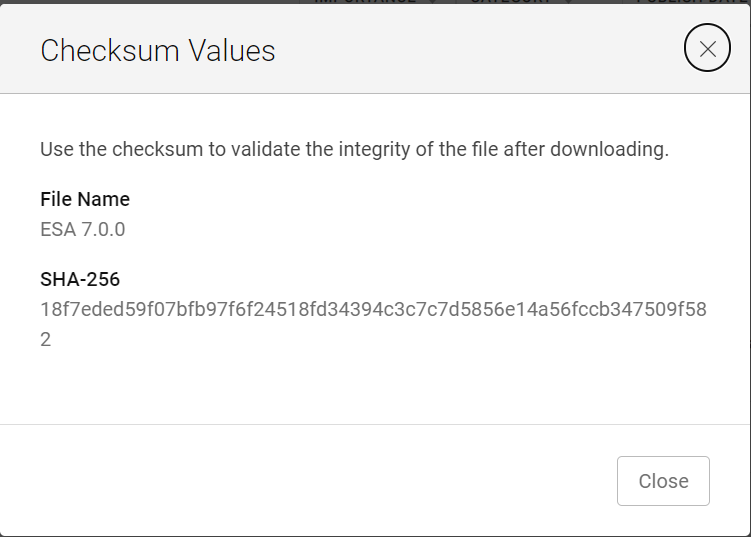
2. Invoke PowerShell
3. Run the checksum to verify that the alphanumeric checksum value of the downloaded file matches the one stated on its website.

4. Select a solution to install

5. Click "UPLOAD" and see that the validated file upload successfully.

1. Download the ESA 7.0 file (DellEMCEnterpriseStorageAnalytics-7.0.0-build-2260_signed.pak) and get its checksum value.
2. Invoke PowerShell
Input:
Press winkey+ R.
Type cmd.
The command prompt is opened.
Type PowerShell and press enter.
3. Run the checksum to verify that the alphanumeric checksum value of the downloaded file matches the one stated on its website.
4. Select a solution to install
5. Click "UPLOAD" and see that the validated file upload successfully.
Artikelegenskaber
Artikelnummer: 000204311
Artikeltype: Solution
Senest ændret: 12 mar. 2024
Version: 2
Find svar på dine spørgsmål fra andre Dell-brugere
Supportservices
Kontrollér, om din enhed er dækket af supportservices.