Po instalaci se nezobrazí výzva k párování Dell Pair
Oversigt: Tento článek obsahuje informace a řešení problému, při kterém se po instalaci nezobrazí výzva k párování softwaru Dell Pair.
Denne artikel gælder for
Denne artikel gælder ikke for
Denne artikel er ikke knyttet til et bestemt produkt.
Det er ikke alle produktversioner, der er identificeret i denne artikel.
Symptomer
Poznámka: Podpora Dell pro software Dell Pair končí 26. března 2026.
Dotčené platformy:
- Latitude 7320
- Latitude 7420
- Latitude 7520
- Latitude 7330
- Latitude 7430
- Latitude 7530
- Latitude 9330
- Latitude 9430
- Precision 5470
- Precision 5570
- Precision 5770
- Precision 7670
- Precision 7770
- XPS 9315
- XPS 9320
- XPS 9520
- XPS 17 9720
- Dell Pro 13 Premium
Dotčené produkty
- Dell Pair
Dotčené operační systémy:
- Windows 11
- Windows 10, sestavení v10.0.19041 a novější
Uživatelé se mohou setkat, že se výzva k párování Dell nezobrazí, když se po instalaci softwaru Dell Pair bez restartování počítače přiblíží k notebooku Dell pomocí zařízení Bluetooth.
Pozadí aplikace Dell Pair
Software Dell Pair podporuje následující funkce:
- Zjištění zařízení Dell (například myši a klávesnice), pokud jsou v dosahu detekce pro spárování pomocí Bluetooth.
- Automatické párování zařízení prostřednictvím technologie Bluetooth.
Årsag
Když je nainstalován software Dell Pair, instaluje se ovladač filtru, který vyžaduje resetování řadiče Bluetooth. Tento krok je nutný, aby technologie Bluetooth mohla po restartování načíst ovladač filtru Dell Pair, aby mohla fungovat funkce párování Dell. Pokud ovladač Bluetooth neprovádí správné resetování Bluetooth, funkce párování Dell nebude fungovat, dokud Bluetooth nevypnete a znovu nezapnete.
Løsning
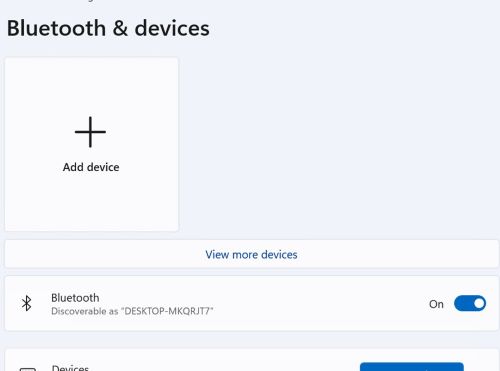
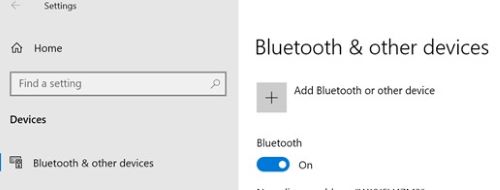
Pokud uživatel po instalaci aplikace Dell Pair přiblíží zařízení k počítači za účelem párování a nezobrazí se výzva k párování, přepněte (Vypnout a poté zapnout) nastavení Bluetooth v nastavení systému Windows pomocí:
- Windows 11: Nastavení> systému Windows Bluetooth a zařízení
- Windows 10: Nastavení> systému Windows Bluetooth a další zařízení
Berørte produkter
Dell Pair, Dell Pro 13 Premium PA13250, Latitude 7320, Latitude 7330, Latitude 9330, Latitude 7420, Latitude 7430, Latitude 9430, Latitude 7520, Latitude 7530, Precision 5470, Precision 5570, Precision 7670, Precision 5770, Precision 7770
, XPS 13 9315, XPS 13 Plus 9320, XPS 15 9520, XPS 17 9720
...
Artikelegenskaber
Artikelnummer: 000209916
Artikeltype: Solution
Senest ændret: 16 maj 2026
Version: 9
Find svar på dine spørgsmål fra andre Dell-brugere
Supportservices
Kontrollér, om din enhed er dækket af supportservices.