Newly deployed SRM cannot discover previously discovered XtrmIO
Oversigt: Newly deployed SRM cannot discover previously discovered XtrmIO
Denne artikel gælder for
Denne artikel gælder ikke for
Denne artikel er ikke knyttet til et bestemt produkt.
Det er ikke alle produktversioner, der er identificeret i denne artikel.
Symptomer
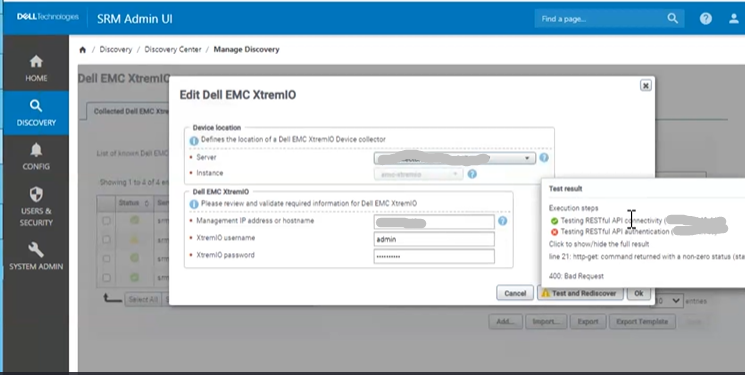
Issue shown below:
Årsag
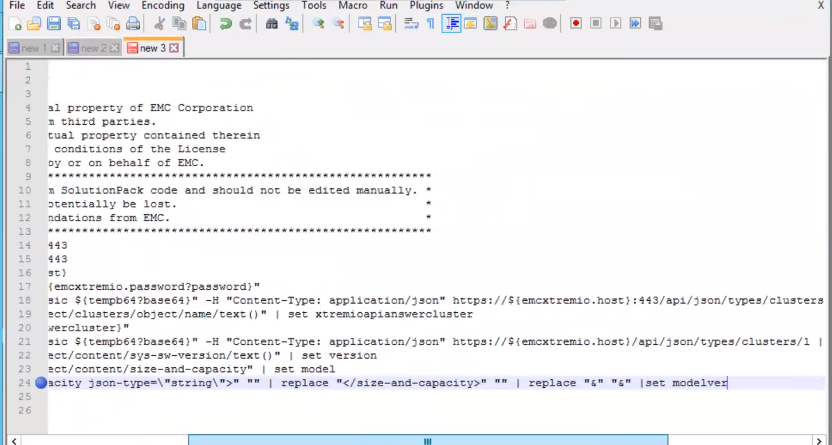
The discovery script was trying to replace substring "& ;" with "&" even though it was not present in model property.
Løsning
Workaround:
Replace substring "&" with "&". This way, it will replace the substring only if it contains "& ;"
Procedure:
1. Log into the SRM collector VM running the SolutionPack for Dell EMC XtremiO in question
2. Go to this directory /opt/APG/Tools/Script-Engine/Default/data/emc-xtremio-collect-emc-
xtremio
3. Backup a copy of emc-xtremio-collect.sc1
cp emc-xtremio-collect.sc1 emc-xtremio-collect.sc1-backup
4. Edit this file emc-xtremio-collect.sc1 as followed:
Replace line:24
print ${model} | replace "<size-and-capacity json-type=\"string\">" "" | replace "</size-and-capacity>" "" | replace "&" "&" |set modelver
with this new line:
print ${model} | try replace "<size-and-capacity json-type=\"string\">" "" | try replace "</size-and-capacity>" "" | try replace "&" "&" |set modelver
Contents of a correctly modified script emc-xtremio-collect.sc1 looks like this:
# Copyright (c) 2023, EMC Corporation.
# All Rights Reserved.
#
# This software contains the intellectual property of EMC Corporation
# or is licensed to EMC Corporation from third parties.
# Use of this software and the intellectual property contained therein
# is expressly limited to the terms and conditions of the License
# Agreement under which it is provided by or on behalf of EMC.
#**********************************************************************************************
# This file has been auto-generated from SolutionPack code and should not be edited manually. *
# Any manual changes in this file can potentially be lost. *
# Edit this file only on formal recommendations from EMC. *
#**********************************************************************************************
step testrestfulapi ${emcxtremio.host} 443
ssl-connect -t 30 ${emcxtremio.host} 443
step testrestfulapiauth ${emcxtremio.host}
set tempb64 "${emcxtremio.username}:${emcxtremio.password?password}"
http-get -k -t 30 -H "Authorization: Basic ${tempb64?base64}" -H "Content-Type: application/json" https://${emcxtremio.host}:443/api/json/types/clusters | json2xml | set xtremioapianswer
print ${xtremioapianswer} | xpath "/object/clusters/object/name/text()" | set xtremioapianswercluster
print ${xtremioapianswer} | xpath "(/object/clusters/object/href/text())[1]" | set xtremioclusterapi
println "Found cluster: ${xtremioapianswercluster}"
http-get -k -t 30 -H "Authorization: Basic ${tempb64?base64}" -H "Content-Type: application/json" ${xtremioclusterapi}| json2xml | set xtremioapianswer
print ${xtremioapianswer} | xpath "/object/content/sys-sw-version/text()" | set version
print ${xtremioapianswer} | xpath "/object/content/size-and-capacity" | set model
print ${model} | try replace "<size-and-capacity json-type=\"string\">" "" | try replace "</size-and-capacity>" "" | try replace "&" "&" |set modelver
println "Firmware Version: ${version}"
println "Model: ${modelver}"
5. Try the XtremIO discovery again and it should be successful this time
Artikelegenskaber
Artikelnummer: 000217570
Artikeltype: Solution
Senest ændret: 19 maj 2026
Version: 3
Find svar på dine spørgsmål fra andre Dell-brugere
Supportservices
Kontrollér, om din enhed er dækket af supportservices.