OpenShift Virtualization: Failed to clone VM if the VM has disks with "hotpluggable" option enabled
Oversigt: Due to OpenShift Virtualization limitation, VM cannot be cloned if it has disks with "hotpluggable" option enabled.
Denne artikel gælder for
Denne artikel gælder ikke for
Denne artikel er ikke knyttet til et bestemt produkt.
Det er ikke alle produktversioner, der er identificeret i denne artikel.
Symptomer
If a VM has disks with "hotpluggable" option enabled, clone the VM will fail.
The newly cloned VM will stay at "WaitingForVolumeBinding" state.
The newly cloned VM will stay at "WaitingForVolumeBinding" state.
The VM "hotpluggable" option will be enabled in the following scenarios:
- The user adds a new disk (from an existing PVC) with interface type "SCSI" to an existing and running VM.
- The user creates a VM via YAML and sets "hotpluggable: true" explicitly.
Årsag
It is an OpenShift Virtualization limitation.
Løsning
Disable "hotpluggable" option before VM clone operation.
Two options to disable it:
- Edit the YAML of VM and set "hotpluggable: false" for the disks explicitly.
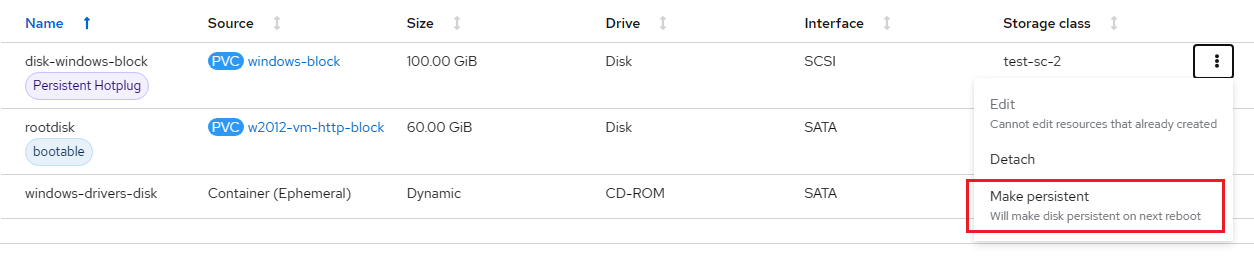
- On OpenShift Virtualization UI, select the "Hotplug" disk and click the "Make persistent" button.
For example:
Berørte produkter
APEX Cloud Platform for Red Hat OpenShiftArtikelegenskaber
Artikelnummer: 000217670
Artikeltype: Solution
Senest ændret: 20 feb. 2026
Version: 3
Find svar på dine spørgsmål fra andre Dell-brugere
Supportservices
Kontrollér, om din enhed er dækket af supportservices.