PowerProtect Data Manager: VM-gendannelse holder op med at reagere og mislykkes med et problem med Data Domain-certifikat
Oversigt: Gendannelse af PowerProtect Data Manager VM holder op med at svare og mislykkes derefter med fejlen "Handlingen mislykkedes på grund af et problem med certifikatet. Kontroller, at certifikatet blev accepteret." ...
Denne artikel gælder for
Denne artikel gælder ikke for
Denne artikel er ikke knyttet til et bestemt produkt.
Det er ikke alle produktversioner, der er identificeret i denne artikel.
Symptomer
Fejlmeddelelse:
YYYY-MM-DDTHH:MM:SS.956Z INFO [request-dispatch-service-1] [][][][][] [c.e.b.d.c.r.c.DdRestClient.dataDomainLogin(236)] -  hostname=mynas-dd####.abc.local url=https://mynas-dd####.abc.local:3009/rest/v1.0/auth
YYYY-MM-DDTHH:MM:SS.222Z ERROR [request-dispatch-service-1] [][][][][] [c.e.b.d.c.r.c.DdRestClient.executeDataDomainAuthRequest(281)] -  issue with certificate when execute request
YYYY-MM-DDTHH:MM:SS.222Z ERROR [request-dispatch-service-1] [][][][][] [c.e.b.d.c.r.c.DdRestClient.executeDataDomainAuthRequest(285)] -  Exception when trying to login, PowerProtect DD System = mynas-dd####.abc.local, error = The operation was unsuccessful because of an issue with certificate.  Verify that the certificate was accepted.
Årsag
Udløbet Data Domain-certifikat medfører, at gendannelsen af PowerProtect Data Manager VM mislykkes.
Løsning
Forny det udløbne Data Domain-certifikat ved hjælp af PPCP-kommandolinjeværktøjet:
- Opsætning af PPCP-scripttilladelse
Run
admin@my-ppdm:~> sudo chmod 755 /home/admin/bin/ppcp
admin@my-ppdm:~> cd /home/admin/bin/ppcp
- Angiv de certifikater, der skal valideres
port: 3009ogstate showing expired
Run
admin@my-ppdm:~> ./ppcp certs list
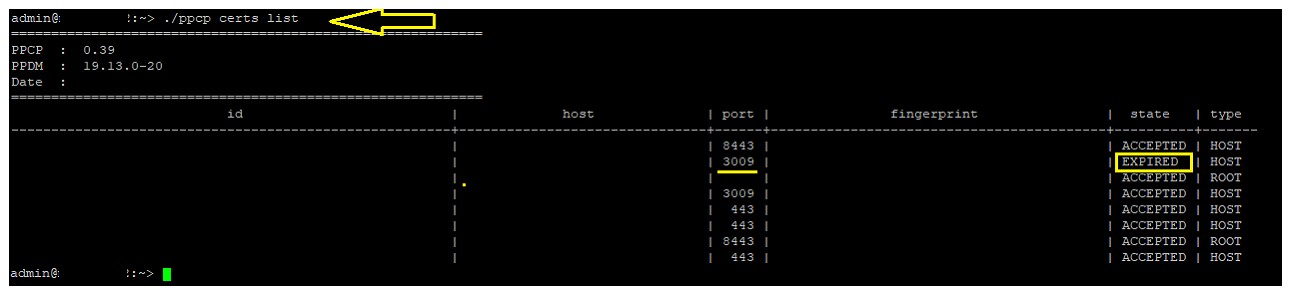
- Kør kommandoen til certifikatopdatering for at opdatere Data Domain-certifikatet. Dette fornyer certifikatet og fjerner udløbet.
Run below command using the actual <certid>

admin@my-ppdm:~> ./ppcp certs update --host mynas-dd####.abc.local --port 3009
- Genstart VMDM-tjenesten
Run
admin@my-ppdm:~> vmdm restart
admin@my-ppdm:~> vmdm status
- Genstart VPOD-tjenesten
Run
admin@my-ppdm:~> systemctl restart vpod
admin@my-ppdm:~> systemctl status vpod
- Genstart vproxyd-tjenesten
Run
admin@my-ppdm:~> systemctl restart vproxyd
admin@my-ppdm:~> systemctl status vproxyd
- Test PPDM VM Restore igen.
Produkter
PowerProtect SoftwareArtikelegenskaber
Artikelnummer: 000218428
Artikeltype: Solution
Senest ændret: 21 aug. 2026
Version: 4
Find svar på dine spørgsmål fra andre Dell-brugere
Supportservices
Kontrollér, om din enhed er dækket af supportservices.