How to launch Microsoft Copilot in Windows
Oversigt: This is how to launch Microsoft Copilot in Windows, using the keyboard, short-cut keys, or button within Windows and Microsoft Edge.
Denne artikel gælder for
Denne artikel gælder ikke for
Denne artikel er ikke knyttet til et bestemt produkt.
Det er ikke alle produktversioner, der er identificeret i denne artikel.
Instruktioner
Affected Operating Systems:
- Windows 11
- Windows 10
- Microsoft Copilot in Windows is not available in the People's Republic of China (PRC)
- Recall is an NPU Driven feature only available on Microsoft Copilot+ PCs
- Where available, Microsoft Copilot in Windows and Recall can also be disabled by users, which result in different behaviors of the Microsoft Copilot key
- The hierarchy applies to all computers with Windows 11
- Enablement of the Microsoft Copilot key on Non-Copilot+ PCs with Windows 10 using Windows Update - To be Announced (TBA)
Microsoft Copilot in Windows can be launched in multiple ways.
| To Launch Microsoft Copilot | Keyboard Shortcut, Icon, or Key |
|---|---|
| Windows Key + C |  |
| Windows taskbar |  |
| Microsoft Edge |  |
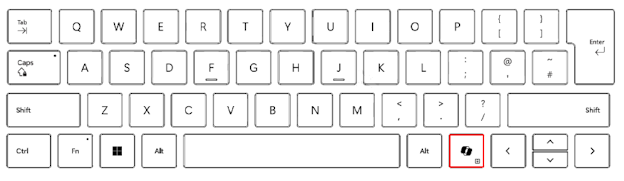
| The Microsoft Copilot Key |  |
Note: Beginning in spring 2024, new Windows 11 devices ship with a new keyboard layout and a dedicated key to launch Microsoft Copilot in Windows. The key replaces the menu key next to the right Alt key. The key position can vary on some regional layouts.
Known Behavior
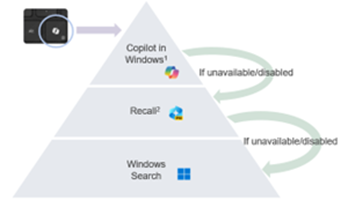
On Microsoft Copilot+ PCs pressing the Microsoft Copilot key will:
- Launch Microsoft Copilot in Windows.
- If Microsoft Copilot is not available or disabled, the key launches Recall.
- If Recall is not available or disabled, the key launches Windows Search
Press and hold the Microsoft Copilot key launches a voice dictation:
This allows the user to ask questions or iterate voice commands to Microsoft Copilot in Windows. This feature will be enabled at some point in the future.
Flere oplysninger
Related Article:

Artikelegenskaber
Artikelnummer: 000221081
Artikeltype: How To
Senest ændret: 21 jul. 2025
Version: 8
Find svar på dine spørgsmål fra andre Dell-brugere
Supportservices
Kontrollér, om din enhed er dækket af supportservices.