PowerFlex: How to Reset iDRAC 13G and 14G
Summary: PowerFlex: How to soft reset iDRAC 13G &14G
Αυτό το άρθρο ισχύει για
Αυτό το άρθρο δεν ισχύει για
Αυτό το άρθρο δεν συνδέεται με κάποιο συγκεκριμένο προϊόν.
Δεν προσδιορίζονται όλες οι εκδόσεις προϊόντων σε αυτό το άρθρο.
Instructions
Reset using iDRAC UI (13G)
The Graphical User Interface (UI) of the iDRAC provides an option to perform a soft reset:
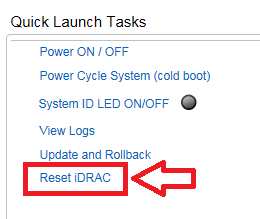
- Connect to the iDRAC
- Log in to the interface by entering the username and password
- In the lower right corner of the overview screen, the Quick Launch Tasks are shown
- Click Reset iDRAC.
- Confirm the action
- The iDRAC will not be reachable for a few minutes, while the system performance is not affected
Reset using iDRAC UI (14G)
The Graphical User Interface (UI) of the iDRAC provides an option to perform a soft reset:
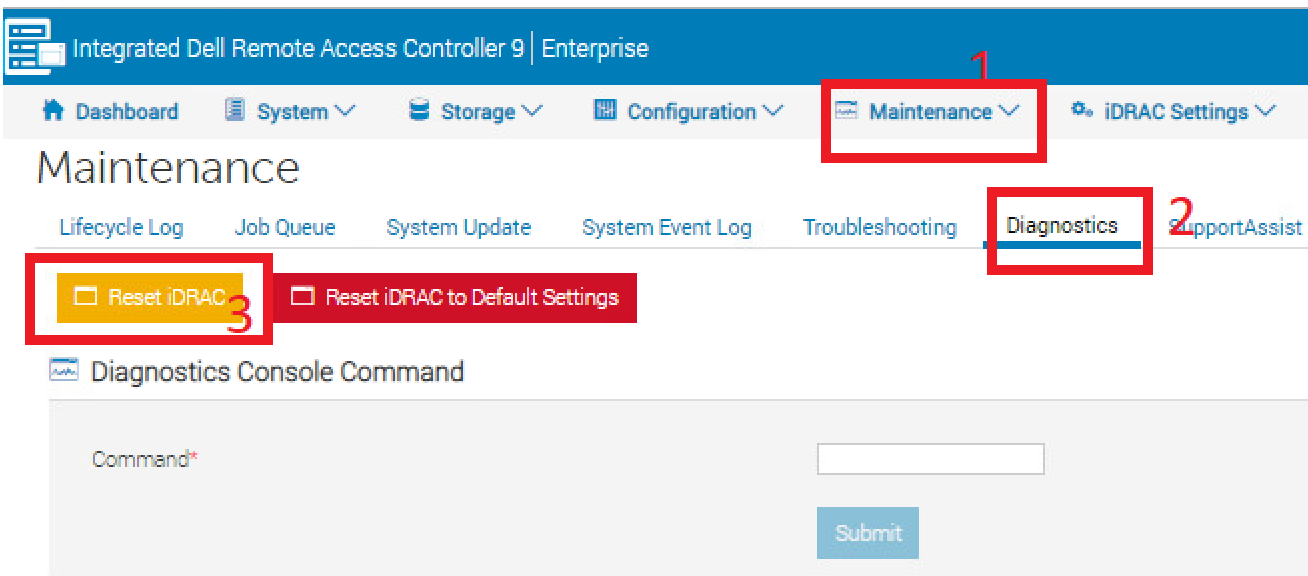
- Connect to the iDRAC
- Log in to the interface by entering the username and password
- Click "Maintenance" tab on top
- Click "Diagnostics" sub-tab
- Click Reset iDRAC.
- Confirm the action
- The iDRAC will not be reachable for a few minutes, while the system performance is not affected
Επηρεαζόμενα προϊόντα
PowerFlex rack, VxFlex Ready Nodes, PowerFlex appliance Intelligent Catalog Software, PowerFlex Software, PowerFlex appliance R640, PowerFlex appliance R740XD, PowerFlex appliance R840Ιδιότητες άρθρου
Article Number: 000019789
Article Type: How To
Τελευταία τροποποίηση: 09 Ιαν 2026
Version: 5
Βρείτε απαντήσεις στις ερωτήσεις σας από άλλους χρήστες της Dell
Υπηρεσίες υποστήριξης
Ελέγξτε αν η συσκευή σας καλύπτεται από τις Υπηρεσίες υποστήριξης.