Dell Notebook or Desktop Video Shows a Square Artifact
Summary: This article gives you information about fixing your Dell laptop or desktop that shows a square artifact in the middle of your screen.
Αυτό το άρθρο ισχύει για
Αυτό το άρθρο δεν ισχύει για
Αυτό το άρθρο δεν συνδέεται με κάποιο συγκεκριμένο προϊόν.
Δεν προσδιορίζονται όλες οι εκδόσεις προϊόντων σε αυτό το άρθρο.
Symptoms
A square artifact appears in the middle of your laptop LCD or monitor.
Cause
The cause of the video artifact has been traced to the presence of the Segurazo anti-virus.
Resolution
Video Has a Square Artifact
Dell laptops and desktops using Windows 10 may show a square artifact in the middle of the screen.
Solution
To correct this video issue, uninstall the Segurazo anti-virus app.
Note: Segurazo anti-virus may not be listed in Windows with that name, since it has been changed to S anti-virus. S anti-virus can be uninstalled to resolve this issue.
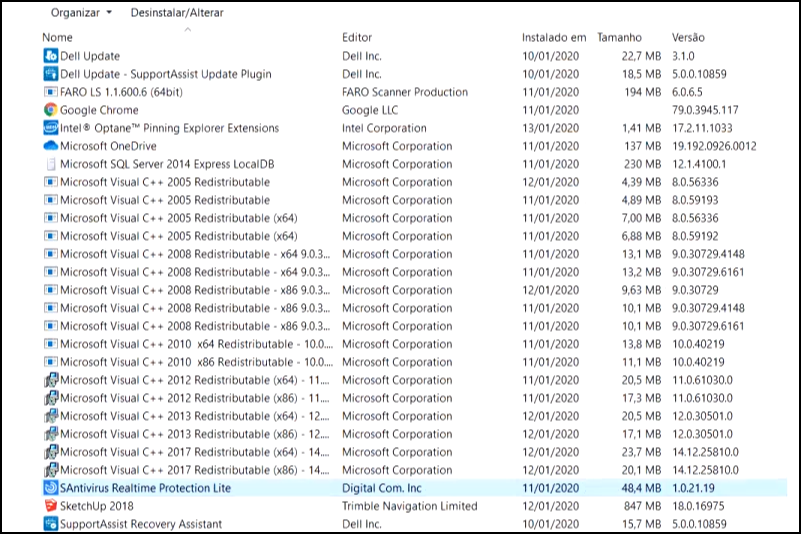
If your computer does not have Segurazo anti-virus installed, but has video issues. Use the following articles to troubleshoot the issue:
Επηρεαζόμενα προϊόντα
Inspiron, OptiPlex, Vostro, XPS, Inspiron, Latitude, Vostro, XPS, Fixed Workstations, Mobile WorkstationsΙδιότητες άρθρου
Article Number: 000127567
Article Type: Solution
Τελευταία τροποποίηση: 22 Ιουλ 2025
Version: 7
Βρείτε απαντήσεις στις ερωτήσεις σας από άλλους χρήστες της Dell
Υπηρεσίες υποστήριξης
Ελέγξτε αν η συσκευή σας καλύπτεται από τις Υπηρεσίες υποστήριξης.