OptiPlex 7060: Visual guide to your Computer
Summary: The following article provides a visual guide to your OptiPlex 7060 Computer and lists the external ports and features of your computer.
Αυτό το άρθρο ισχύει για
Αυτό το άρθρο δεν ισχύει για
Αυτό το άρθρο δεν συνδέεται με κάποιο συγκεκριμένο προϊόν.
Δεν προσδιορίζονται όλες οι εκδόσεις προϊόντων σε αυτό το άρθρο.
Symptoms
Note: For a more detailed description about each location, please go to the system manuals at www.dell.com/manuals
Table of Contents:
Cause
Mini Tower (MT) Front View
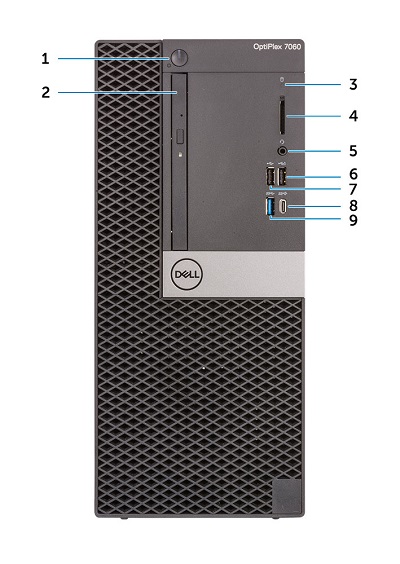
(Figure.1 MT Front View)
| 1 | Power Button and Power LED | 2 | Optical Drive (Optional) |
| 3 | Hard Drive Activity LED | 4 | Memory Card Reader (Optional) |
| 5 | Headset/Universal Audio Jack Connector | 6 | USB 2.0 Connector w/PowerShare (Supports battery charge capability) |
| 7 | USB 2.0 Connector | 8 | USB 3.1 Gen2 Type-C Connector w/PowerShare |
| 9 | USB 3.1 Gen1 Connector |
Mini Tower (MT) Rear View

(Figure.2 MT Rear View)
| 1 | Line-Out Connector | 2 | PS/2 Keyboard Connector |
| 3 | Serial Connector | 4 | PS/2 Mouse Connector |
| 5 | DisplayPort Connector x2 | 6 | Option Slot (HDMI 2.0b/DisplayPort/VGA/USB Type-C Alt-mode) |
| 7 | USB 3.1 Gen1 Connector x4 | 8 | Service Tag Location |
| 9 | USB 2.0 Connector x2 (Supports SmartPower On) | 10 | Network Connector (NIC) |
| 11 | Expansion Card Slots x4 | 12 | Power Connector |
| 13 | External Antenna Connectors x2 (Optional) | 14 | Power Supply (PSU) Diagnostic LED |
| 15 | Release Latch | 16 | Kensington Security Cable Slot |
| 17 | Padlock Ring |
Small Form Factor (SFF) Front View
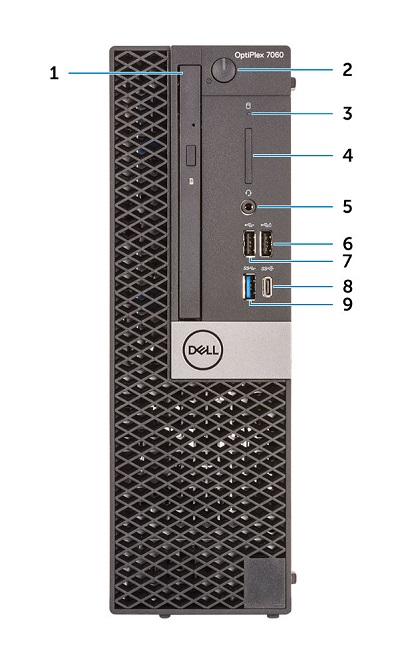
(Figure.3 SFF Front View)
| 1 | Optical Drive (Optional) | 2 | Power Button and Power LED |
| 3 | Hard-drive Activity LED | 4 | Memory Card Reader (Optional) |
| 5 | Headset/Universal Audio Jack Connector | 6 | USB 2.0 Connector w/PowerShare (Supports battery charge capability) |
| 7 | USB 2.0 Connector | 8 | USB 3.1 Gen2 Type-C Connector w/PowerShare |
| 9 | USB 3.1 Gen1 Connector |
Small Form Factor (SFF) Rear View

(Figure.4 SFF Rear View)
| 1 | Line-Out Connector | 2 | PS/2 Keyboard Connector |
| 3 | Serial Connector | 4 | PS/2 Mouse Connector |
| 5 | Option Slot (DisplayPort/HDMI 2.0b/VGA/USB Type-C Alt Mode) | 6 | DisplayPort Connector x2 |
| 7 | Service Tag Location | 8 | USB 3.1 Gen1 Connector x4 |
| 9 | USB 2.0 Connector x2 (Supports SmartPower On) | 10 | Network Connector (NIC) |
| 11 | Expansion Card Slots x2 | 12 | Power Connector |
| 13 | Power Supply (PSU) Diagnostic LED | 14 | Release Latch |
| 15 | Antenna SMA Connectors (Optional) | 16 | Kensington Security Cable Slot |
| 17 | Padlock Ring |
Micro Form Factor (MFF) Front View

(Figure.5 MFF Front View)
| 1 | Power Button and Power LED | 2 | Hard Drive Activity LED |
| 3 | Headset/Universal Audio Jack Connector | 4 | Line-Out Connector |
| 5 | USB 3.1 Gen2 Type-C Connector w/PowerShare | 6 | USB 3.1 Gen1 Connector w/PowerShare |
Micro Form Factor (MFF) Rear View
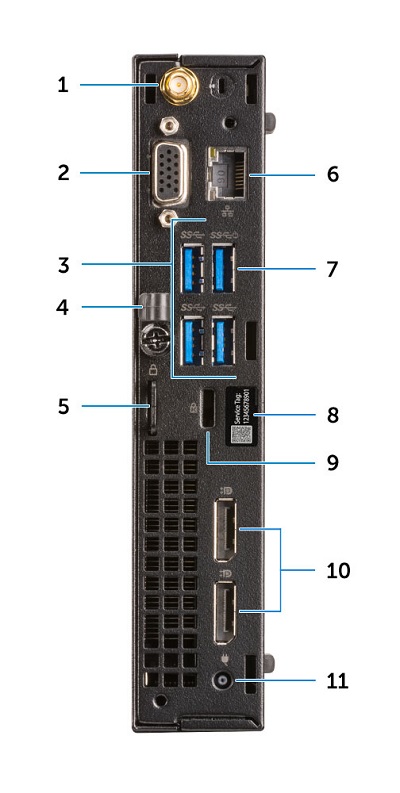
(Figure.6 MFF Rear View)
| 1 | External Antenna Connectors (Optional) | 2 | Option Slot (DisplayPort/HDMI 2.0b/VGA/USB Type-C alt mode) |
| 3 | USB 3.1 Gen1 Connector x3 | 4 | Cable Holder |
| 5 | Padlock Ring | 6 | Network Connector (NIC) |
| 7 | USB 3.1 Gen1 Connector (Supports SmarPower On) | 8 | Service Tag Location |
| 9 | Kensington Security Cable Slot | 10 | DisplayPort Connector x2 |
| 11 | Power Connector |
Resolution
N/A
Additional Information
Επηρεαζόμενα προϊόντα
OptiPlex 7060 Tower, OptiPlex 7060 Micro, OptiPlex 7060 Small Form FactorΙδιότητες άρθρου
Article Number: 000131523
Article Type: Solution
Τελευταία τροποποίηση: 02 Ιουν 2025
Version: 7
Βρείτε απαντήσεις στις ερωτήσεις σας από άλλους χρήστες της Dell
Υπηρεσίες υποστήριξης
Ελέγξτε αν η συσκευή σας καλύπτεται από τις Υπηρεσίες υποστήριξης.