Modalità Dell Data Security Shield
Summary: Questo articolo descrive le modalità di protezione di Dell Data Security (in precedenza Dell Data Protection).
Symptoms
Prodotti interessati:
- Credant Mobile Guardian
- Dell Encryption Enterprise
- Dell Data Protection | Enterprise Edition
- Dell Encryption External Media
- Dell Data Protection | External Media Edition
- Dell Encryption Personal
- Dell Data Protection | Personal Edition
- Dell Data Protection | Security Tools
- Dell Encryption Enterprise for Server
- Dell Data Protection | Server Edition
Piattaforme interessate:
- Windows
Il software Dell Data Security (in precedenza Dell Data Protection) basato su policy utilizza un identificatore della modalità di protezione per la classificazione dei prodotti.
Cause
- La modalità di protezione viene determinata al momento dell'installazione del prodotto e non può essere modificata manualmente.
- La modalità scudo viene utilizzata solo per risolvere i problemi relativi al tipo o allo stato del prodotto.
Resolution
Le modalità di protezione per i prodotti Dell Data Security sono:
| ID | modalità alternativa DisplayPort | Prodotto |
|---|---|---|
| 0 | Sconosciuto/Non inizializzato | Non inizializzato/senza provisioning1 |
| 1 | Enterprise Mode | Dell Encryption Enterprise \ Dell Data Protection Enterprise Edition Shield |
| 2 | Modalità standalone | Credant Mobile Guardian |
| 3 | Modalità solo EME Enterprise | Dell Encryption External Media \ Dell Data Protection | Edizione multimediale esterna |
| 4 | Modalità gestita localmente | Dell Encryption Personal \ Dell Data Protection | Edizione personale |
| 5 | Modalità Essentials | Protezione dei dati Dell | Strumenti di sicurezza2 |
| 6 | Modalità di crittografia del server | Dell Encryption Enterprise per server \ Dell Data Protection | Crittografia server |
| 7 | Modalità SaaS | Dell Encryption Enterprise Shield |
1Tutti i prodotti Dell Data Protection rimangono senza provisioning fino all'attivazione.
2La modalità Essential si verifica solo nelle installazioni di Dell Data Protection | Strumenti di sicurezza.
Per individuare la modalità Shield:
- Quando si modifica il Registro di sistema, il computer potrebbe smettere di rispondere al riavvio successivo.
- Contattare i numeri di telefono internazionali del supporto di Dell Data Security per assistenza in caso di dubbi sull'esecuzione di questa procedura.
- Cliccare con il pulsante destro del mouse sul menu Start di Windows e selezionare Esegui.
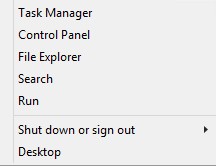
Figura 1. Esegui (solo in inglese)
- Nell'interfaccia utente Esegui, digitare regedit, quindi premere OK.

Figura 2. (solo in inglese) Digitare regedit
- Passare a HKEY_LOCAL_MACHINE\SOFTWARE\Credant\CMGShield.

Figura 3. (solo in inglese) CMGShield
- Individuare la chiave DWORD SM.

Figura 4. (solo in inglese) SM
Per contattare il supporto, consultare l'articolo Numeri di telefono internazionali del supporto di Dell Data Security.
Accedere a TechDirect per generare una richiesta di supporto tecnico online.
Per ulteriori approfondimenti e risorse accedere al forum della community Dell Security.