How to subscribe to DTA and DSA Notifications
Summary: This article describes the procedure for users to get notification of documents published of any product that has notification abilities.
Αυτό το άρθρο ισχύει για
Αυτό το άρθρο δεν ισχύει για
Αυτό το άρθρο δεν συνδέεται με κάποιο συγκεκριμένο προϊόν.
Δεν προσδιορίζονται όλες οι εκδόσεις προϊόντων σε αυτό το άρθρο.
Instructions
Use the following procedure to subscribe for Product Updates using the option below:
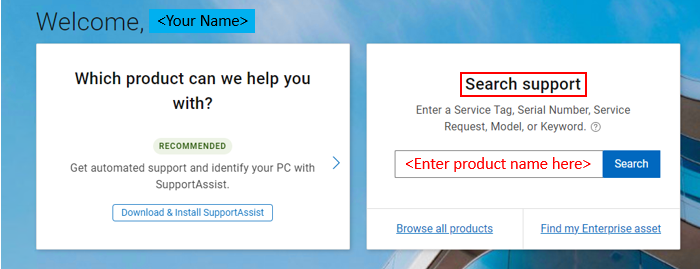
- Go to https://www.dell.com/support/home/
- Sign-In using the account details (the Sign-in name will be visible on the right-hand side of the screen).
- In the Search support window on the right, enter the Dell product that you want to receive notifications for.
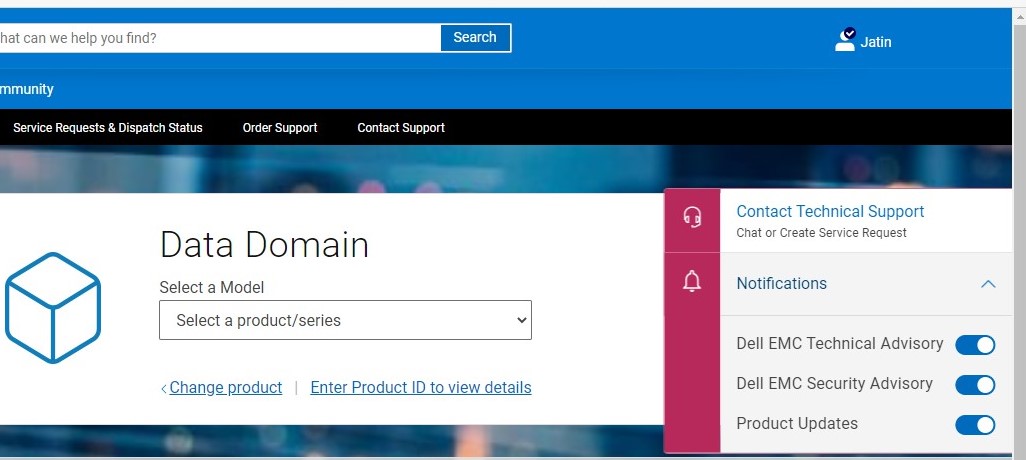
- Click Notifications on the right-hand side of the screen and switch on the options for Product Updates. It is highly recommended to enable Dell Technical Advisory and Dell Security Advisory also. See the screenshot for reference. If the pop-out window is not displayed click the tags on the right with the head set and bell icon to see Notifications.
Example of Data Domain as the entered product
Επηρεαζόμενα προϊόντα
VxRack, VxRail, AppSync, Avamar, PowerProtect Data Protection Appliance, Atmos, CloudArray, Disk Library, ECS, Isilon, metro node, PowerMax, ScaleIO, Symmetrix, VMAX, VPLEX, XtremIO, NetWorkerΙδιότητες άρθρου
Article Number: 000183044
Article Type: How To
Τελευταία τροποποίηση: 09 Μαΐ 2025
Version: 6
Βρείτε απαντήσεις στις ερωτήσεις σας από άλλους χρήστες της Dell
Υπηρεσίες υποστήριξης
Ελέγξτε αν η συσκευή σας καλύπτεται από τις Υπηρεσίες υποστήριξης.