vProtect: "Boot device not found" is seen when powering on vProtect on Nutanix
Summary: vProtect: "Boot device not found" is seen when powering on vProtect on Nutanix.
Αυτό το άρθρο ισχύει για
Αυτό το άρθρο δεν ισχύει για
Αυτό το άρθρο δεν συνδέεται με κάποιο συγκεκριμένο προϊόν.
Δεν προσδιορίζονται όλες οι εκδόσεις προϊόντων σε αυτό το άρθρο.
Symptoms
The following error is seen when powering on vProtect on Nutanix.
Boot device not found, please install an operating system

Boot device not found, please install an operating system
Cause
The OVA file was directly uploaded without being unpacked.
Resolution
1.The OVA file should be unpacked first. Do this using the command below.tar -xvf <OVAname>
2. This produces the files shown below.
The file that starts with f5 should be uploaded, not the OVA file.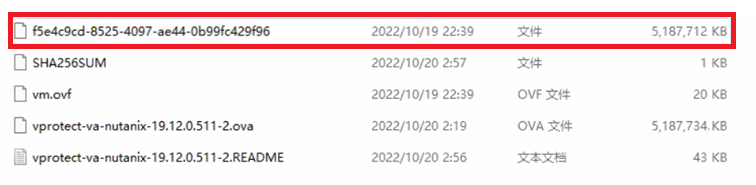
3. Select Image Type as DISK, not OVA.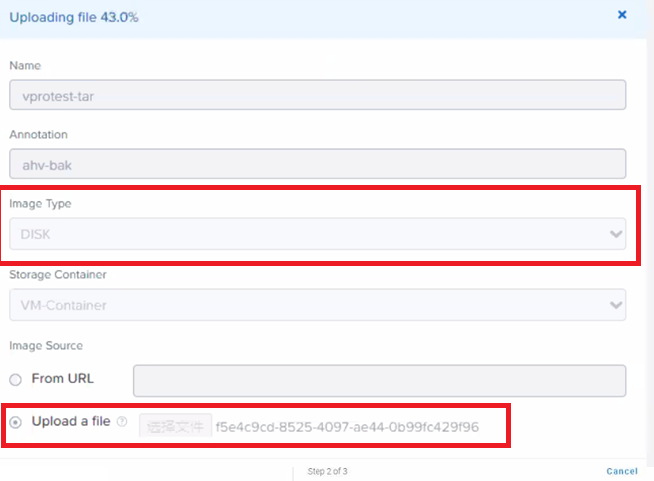
Additional Information
Επηρεαζόμενα προϊόντα
vProtectΙδιότητες άρθρου
Article Number: 000210745
Article Type: Solution
Τελευταία τροποποίηση: 19 Σεπ 2025
Version: 3
Βρείτε απαντήσεις στις ερωτήσεις σας από άλλους χρήστες της Dell
Υπηρεσίες υποστήριξης
Ελέγξτε αν η συσκευή σας καλύπτεται από τις Υπηρεσίες υποστήριξης.