NetWorker: How to Enable debugging in SQL plug-in user interface
Summary: This article describes how to enable debugging within the NetWorker Module for Microsoft (NMM) SQL Plugin. This is used for debugging the user interface issues and not for debugging the module backup/restore issues. ...
Αυτό το άρθρο ισχύει για
Αυτό το άρθρο δεν ισχύει για
Αυτό το άρθρο δεν συνδέεται με κάποιο συγκεκριμένο προϊόν.
Δεν προσδιορίζονται όλες οι εκδόσεις προϊόντων σε αυτό το άρθρο.
Instructions
This article describes how to enable debugging within the NetWorker Module for Microsoft (NMM) SQL Plugin.
This is used for debugging the user interface issues and not for debugging the module backup/restore issues.
Steps Required
- Open the plugin user interface from the toolbar in SQL Server Management Studio or click the Start menu, select EMC NetWorker, NetWorker Plugin for SQL Server Module.
- Once the plugin is open, use the keystroke combination of pressing control and double-click the bottom of the SQL Plugin interface. This opens a window like notepad.
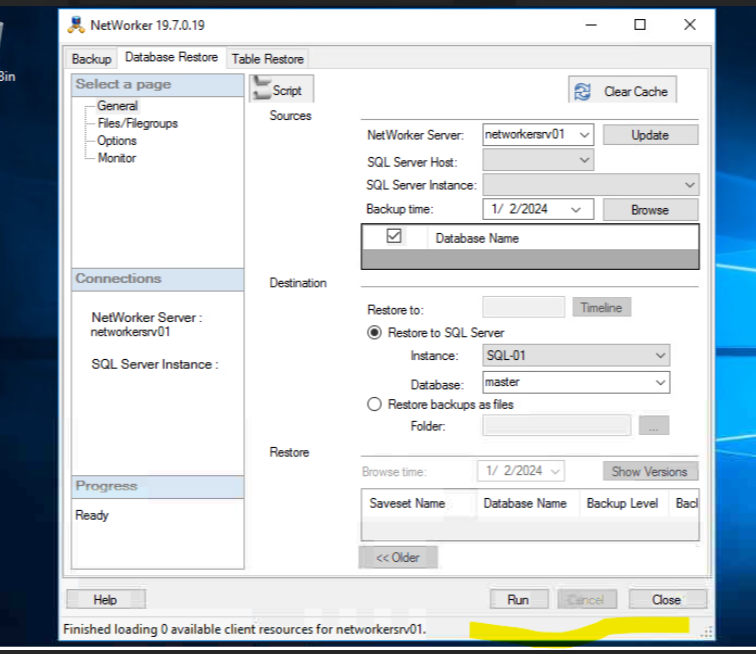
- In the new wIndow, check the Enabled checkbox at the bottom of the window. Double-click again on the bottom to go back to the normal user interface.
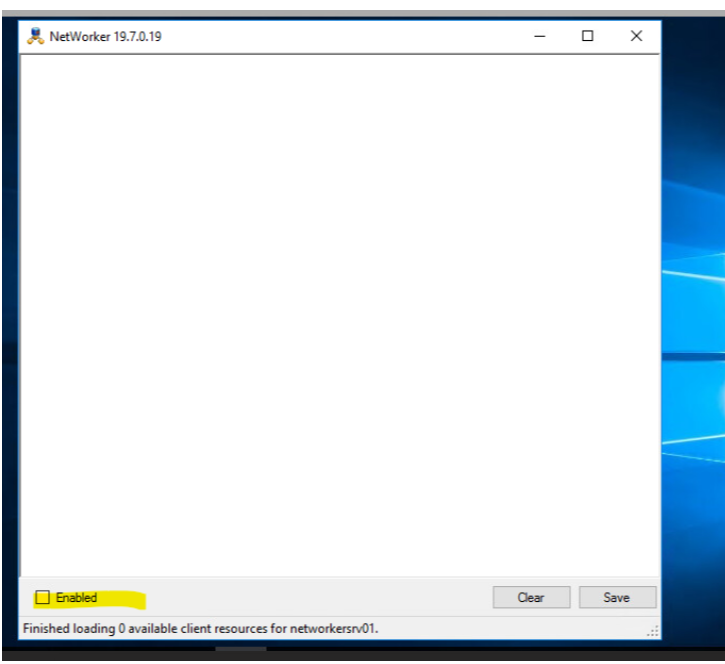
- Reproduce the user interface display issues, and collect the debugging messages displayed in the user interface.
Επηρεαζόμενα προϊόντα
NetWorker, NetWorker Module for MicrosoftΠροϊόντα
NetWorker Family, NetWorker ModuleΙδιότητες άρθρου
Article Number: 000223805
Article Type: How To
Τελευταία τροποποίηση: 06 Απρ 2026
Version: 3
Βρείτε απαντήσεις στις ερωτήσεις σας από άλλους χρήστες της Dell
Υπηρεσίες υποστήριξης
Ελέγξτε αν η συσκευή σας καλύπτεται από τις Υπηρεσίες υποστήριξης.