Intune Fails to Deploy Dell Optimizer Version 4.2.2 When Downloaded from the Microsoft Store
Summary: Information about Intune not deploying Dell Optimizer version 4.2.2 if it is downloaded from the Microsoft Store.
Αυτό το άρθρο ισχύει για
Αυτό το άρθρο δεν ισχύει για
Αυτό το άρθρο δεν συνδέεται με κάποιο συγκεκριμένο προϊόν.
Δεν προσδιορίζονται όλες οι εκδόσεις προϊόντων σε αυτό το άρθρο.
Symptoms
App Does Not Have a Valid Latest Package Version Error
Intune shows an error message, "The selected app does not have a valid latest package version" (Figure 1).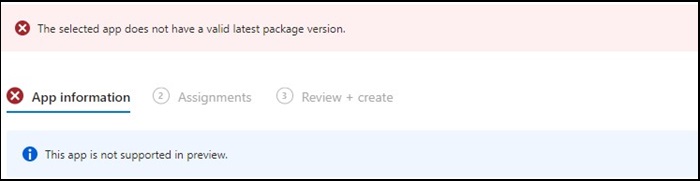
Figure 1
Note: Available exclusively on select Dell Latitude, Precision, OptiPlex, and Rugged PCs.
Cause
Dell Optimizer did not pass the Intune verification that requires apps to install on all hardware (Dell and non-Dell).
Resolution
Manually Deploy Dell Optimizer
As a workaround, IT Admin can try the following to manually deploy Dell Optimizer through Intune.
- Download the Dell Optimizer installer from Dell.com
- Follow the below instructions:
- Install the software using this command:
Install command: Dell-Optimizer-Application_xxxxx_WIN_x.x.x.x_A00.EXE /passthrough /silent /InstallDotNet=true /FACTORY=TRUE

Note: To uninstall, use the following command:
Uninstall command: Dell-Optimizer-Application_xxxxx_WIN_x.x.x.x_A00.EXE /passthrough /silent /remove
Επηρεαζόμενα προϊόντα
Alienware, Inspiron, OptiPlex, Vostro, XPS, G Series, G Series, Alienware, Inspiron, Latitude, Vostro, XPS, Fixed Workstations, Mobile WorkstationsΙδιότητες άρθρου
Article Number: 000224821
Article Type: Solution
Τελευταία τροποποίηση: 17 Ιουλ 2025
Version: 7
Βρείτε απαντήσεις στις ερωτήσεις σας από άλλους χρήστες της Dell
Υπηρεσίες υποστήριξης
Ελέγξτε αν η συσκευή σας καλύπτεται από τις Υπηρεσίες υποστήριξης.