PowerProtect Data Manager VM Direct Protection Engine, NAS protection Engine: Status: MaintenancePending
Summary: A proxy stuck in Maintenance Pending can be due to the proxy being considered in-use due to reservation leak. Therefore any precheck does not pass. The result of this message is that the customer cannot perform actions such as Enable, Disable, Redeploy, or Delete the VM Direct Protection Engine or NAS protection Engine. ...
Αυτό το άρθρο ισχύει για
Αυτό το άρθρο δεν ισχύει για
Αυτό το άρθρο δεν συνδέεται με κάποιο συγκεκριμένο προϊόν.
Δεν προσδιορίζονται όλες οι εκδόσεις προϊόντων σε αυτό το άρθρο.
Instructions
Message received:
When the customer runs a precheck, this is the error received:
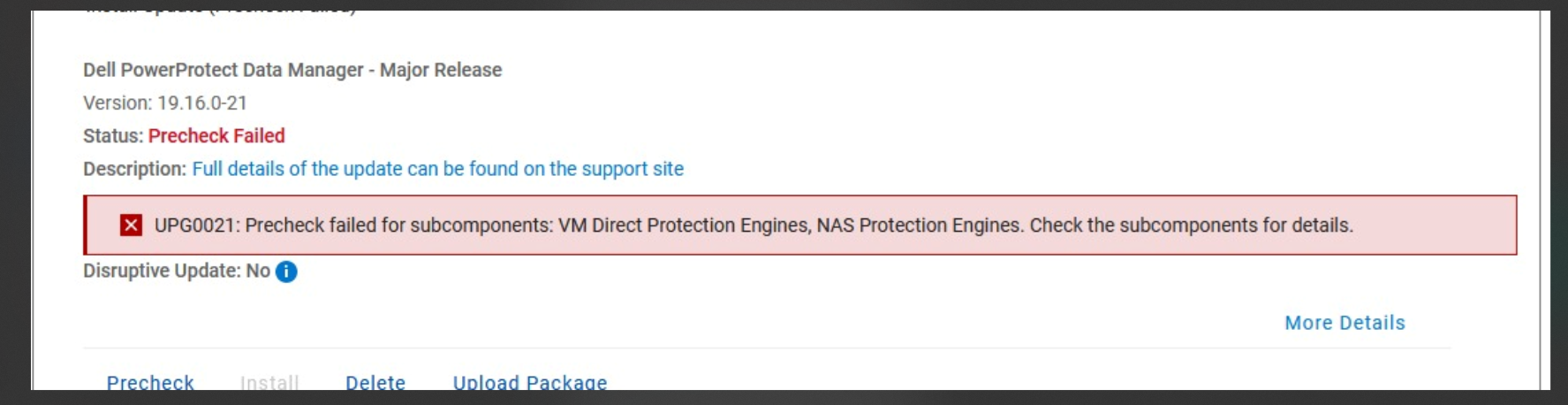 Logs:
Logs:
Steps:
VM Direct Protection Engine. NAS protection Engine. Status: MaintenancePending.A proxy stuck in Maintenance Pending can be due to the proxy being considered in-use due to reservation leak. Therefore any precheck will not pass.The result of this message is that the customer cannot perform actions such as Enable, Disable, Redeploy, or Delete the VM Direct Protection Engine or NAS protection Engine.
When the customer runs a precheck, this is the error received:
vmdm.log:

2024-06-28T14:57:10.086Z ERROR [] [https-jsse-nio-0.0.0.0-8447-exec-243] [][][][TRACE_ID:94d95e343f6488a5][] [c.e.d.v.c.VProxyManager.error(1099)] - Update session failed: code=409, text=ProxySessions resource 'f78d9ae3-93f6-4f0b-b4bb-39516f791c60' is not in a state that can be updated., response={"Text":"ProxySessions resource 'f78d9ae3-93f6-4f0b-b4bb-39516f791c60' is not in a state that can be updated.","Code":-409}
This is an attempt to <Delete>. You may get a different error, depending on the action [Enable, Disable, Redeploy, or Delete]
/var/log/brs/vmd

2024-06-28T15:12:26.837Z INFO [] [https-jsse-nio-0.0.0.0-8447-exec-227] [][][][TRACE_ID:8b8050290653cce4][] [c.e.b.v.f.RestLogFilter.doFilter(51)] - Enter RESTful Msg - DELETE https://localhost:8443/api/v2/protection-engines/36768649-4539-48c0-9012-3db7e9acc58d/proxies/f78d9ae3-93f6-4f0b-b4bb-39516f791c60 com.emc.brs.vmdm.error.MethodForbidden: Unable to delete the VM Direct engine 'proxy_name' because the engine is not disabled.
Steps:
- Login in PowerProtect Data Manager as root
- Get Source environment file:
source /opt/emc/vmdirect/unit/vmdirect.env - Get the credentials for the Proxy:
a) Get all vProxy credentials/opt/emc/vmdirect/bin/vproxymgmt get -secretb) Get credentials for a particular vProxy/opt/emc/vmdirect/bin/vproxymgmt get - - Check the status of the VM Direct Protection Engine or NAS protection Engine.
VProxy ID: <proxy_id>
Type: External
Hostname: name_of_proxy
Disabled: false
Status: MaintenancePending
Solution:
Run:
#systemctl stop visd && rm /opt/emc/vmdirect/runtime/state/visd/ProxySessions.gob && systemctl start visd
Refresh the PowerProtect Data Manager UI.
Επηρεαζόμενα προϊόντα
Data Protection, Data Protection Suite, PowerProtect Data Protection Appliance, PowerProtect Data Manager ApplianceΙδιότητες άρθρου
Article Number: 000226512
Article Type: How To
Τελευταία τροποποίηση: 16 Οκτ 2024
Version: 1
Βρείτε απαντήσεις στις ερωτήσεις σας από άλλους χρήστες της Dell
Υπηρεσίες υποστήριξης
Ελέγξτε αν η συσκευή σας καλύπτεται από τις Υπηρεσίες υποστήριξης.